Do Usb Sound Cards Work With Speakers Heres The Answer
Do USB sound cards work with speakers? The short answer is yes. A USB sound card acts as an external audio adapter that sends high-quality audio to your speakers through a USB port. Whether you use a desktop or laptop, these compact devices solve audio problems and boost sound quality without needing internal hardware upgrades.
Have you ever plugged your speakers into your computer and wondered why the sound quality was so weak? Or maybe your laptop has a broken audio jack and you need a quick fix. The answer might be simpler than you think. Do USB sound cards work with speakers? Absolutely. These small devices have become a go-to solution for anyone who wants better audio without opening up their computer.
A USB sound card is an external audio adapter that connects to your computer through a USB port. It takes the place of your computers built-in audio chip and gives you a cleaner, stronger audio signal. Whether you are listening to music, watching movies, or gaming, a USB audio device can make a real difference. In this guide, we will walk through everything you need to know about using a USB sound card with speakers.
Key Takeaways
- USB sound cards work with most speakers: They connect easily through USB ports and deliver reliable audio output to desktop and computer speakers.
- Plug and play setup is standard: Most USB audio devices work instantly without needing complex sound card driver installations or extra software.
- They improve audio quality significantly: External sound cards reduce interference and deliver cleaner stereo sound compared to built-in audio chips.
- USB adapter compatibility matters: You may need a USB C to USB adapter if your device uses newer USB ports.
- Choosing the right one depends on your needs: Basic adapters suit casual listening, while advanced USB audio interfaces serve audiophiles and content creators.
📑 Table of Contents
- What Is a USB Sound Card?
- How Do USB Sound Cards Work With Speakers?
- Types of USB Sound Cards Available
- Benefits of Using a USB Sound Card With Speakers
- Common Issues and How to Fix Them
- How to Choose the Right USB Sound Card for Your Speakers
- Quick Tips for Best Performance
- Expert Insights on USB Sound Card Performance
- Final Thoughts
What Is a USB Sound Card?
A USB sound card is a small external device that processes audio signals for your computer. Think of it as a tiny audio engine that plugs right into a USB port. Instead of relying on your computers internal sound hardware, the USB sound card handles all the audio processing on its own.
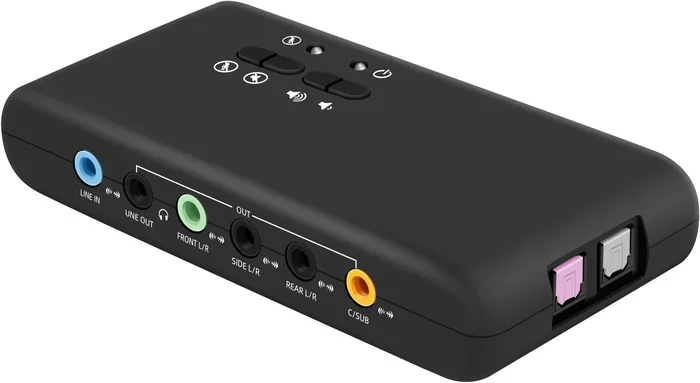
These devices come in all shapes and sizes. Some are tiny thumb-sized adapters that barely take up space. Others are larger units with extra features like volume knobs, headphone jacks, and multiple audio inputs. No matter the size, they all do the same core job: they turn digital data into analog audio that your speakers can play.
The beauty of a USB audio adapter is that it works with almost any computer. You do not need a fancy desktop or a high-end laptop. Even older machines with limited audio capabilities can benefit from one. As long as you have a free USB port, you are good to go.
How Do USB Sound Cards Work With Speakers?
Understanding how a USB sound card connects to your speakers helps you troubleshoot issues and get the best performance. The process is straightforward, but there are a few details worth knowing.
The Connection Process
Here is how the connection works step by step:
- You plug the USB sound card into an available USB port on your computer.
- The computer recognizes the device and installs the necessary drivers automatically.
- The sound card becomes the primary audio output device for your system.
- You connect your speakers to the sound card using a standard audio cable, usually a 3.5mm audio jack or RCA cable.
- Audio flows from your computer through the USB sound card and out to your speakers.
That is it. The USB sound card acts as a bridge between your computer and your speakers. It takes the digital audio signal from your computer, converts it to analog, and sends it to your speakers with improved clarity and strength.
Plug and Play Setup
One of the best things about modern USB audio devices is that most of them support plug and play. This means you do not need to hunt down special software or spend hours configuring settings. You plug the device in, and your computer does the rest.
Windows and macOS both include built-in drivers for most common USB sound cards. If your computer does not recognize the device right away, you can usually download the latest sound card driver from the manufacturers website. The process is quick and painless.
For those who also connect other USB devices, you might run into port compatibility questions. If you are dealing with different USB types, check out Can I Convert USB To USB C for helpful guidance on adapter solutions.
Types of USB Sound Cards Available
Not all USB sound cards are the same. They range from simple budget adapters to professional-grade audio interfaces. Knowing the differences helps you pick the right one for your needs.
Basic USB Audio Adapters
Basic USB audio adapters are small, affordable, and perfect for everyday use. They usually have one 3.5mm headphone jack and maybe a microphone input. These adapters are ideal for:
- Listening to music through external speakers
- Fixing a broken laptop audio jack
- Getting better audio quality than your computers built-in sound chip
- Using headphones with clearer, louder sound
These adapters cost anywhere from $5 to $25. They do not have fancy features, but they get the job done. If you just want your speakers to sound better without spending a lot, a basic USB sound card is a great choice.
Advanced USB Audio Interfaces
On the other end of the spectrum, you have professional USB audio interfaces. These are more expensive but offer much better performance. They include features like:
- Multiple audio inputs and outputs
- XLR microphone connections
- Built-in preamps for studio-quality recording
- Low audio latency for real-time monitoring
- High-resolution audio support up to 24-bit/192kHz
These devices are designed for musicians, podcasters, and audio engineers. They deliver studio-grade audio quality that basic adapters simply cannot match. If you are serious about sound, investing in a higher-end external sound card is worth it.
Benefits of Using a USB Sound Card With Speakers
Why should you consider adding a USB sound card to your setup? There are several real-world benefits that make these devices worthwhile.
Improved Audio Quality
Your computers built-in audio hardware is often basic and cheap. It picks up electrical interference from other components, which causes buzzing or static in your speakers. A dedicated USB audio device has its own sound processing chip, which reduces this interference and delivers cleaner, richer sound.
Compatibility With Any Speaker
Whether you use powered computer speakers, passive speakers with a separate amplifier, or even high-end studio monitors, a USB sound card works with all of them. As long as your speakers have a standard audio input, you can connect them to the sound card. This makes USB sound card compatibility one of its strongest advantages.
No Internal Installation Required
Unlike internal sound cards that require opening your computer case and installing hardware, a USB sound card is completely external. You plug it in and start using it. This makes it perfect for laptops and compact desktops where opening the case is not practical.
Portability
Many USB sound cards are small enough to fit on a keychain. You can carry one in your laptop bag and use it with any computer you work on. This is especially useful if you travel frequently or work from multiple locations.
Solving Audio Problems
If your computers audio jack is damaged or not working, a USB sound card bypasses the problem entirely. You simply use the USB port for audio output instead. This is a quick and affordable fix that saves you from expensive repairs.
Common Issues and How to Fix Them
While USB sound cards are reliable, you may run into a few common problems. Here is what to watch for and how to solve them.
No Sound After Plugging In
If you plug in your USB audio device and hear nothing, the first thing to check is your audio output settings. Make sure the USB sound card is set as the default playback device. On Windows, right-click the speaker icon in your taskbar, select Open Sound Settings, and choose the USB device under Output.
Distorted or Crackling Audio
Distorted sound usually means the audio signal is too high or there is interference. Try lowering the volume on both your computer and the sound card. If the problem persists, try a different USB port. Some USB ports share power with other devices, which can cause audio issues.
Driver Problems
Occasionally, your computer may not recognize the USB sound card because of driver issues. Visit the manufacturers website and download the latest driver for your specific model. Restart your computer after installing the driver, and the device should work properly.
USB Port Compatibility
If your computer only has USB C ports and your sound card uses a standard USB A connector, you will need an adapter. You can find solutions for USB type conversions in our guide on Can I Go From USB C To USB A. Similarly, if you are connecting other devices through USB, understanding your port options helps a lot.
How to Choose the Right USB Sound Card for Your Speakers
With so many options on the market, picking the right USB sound card can feel overwhelming. Here are the key factors to consider before you buy.
Check Your Speakers Input
Look at the back of your speakers. Do they have a 3.5mm aux input? RCA inputs? Both? Make sure the USB sound card you choose has matching outputs. Most basic adapters have a 3.5mm jack, which works with the vast majority of computer speakers.
Consider Your Use Case
Think about what you will use the sound card for. If you just want better music and movie audio, a basic adapter is fine. If you record voiceovers or music, you need an interface with microphone inputs and low latency. Matching the device to your needs saves you money and frustration.
Check Operating System Compatibility
Before buying, confirm that the USB sound card works with your operating system. Most adapters support Windows and macOS, but some may not have drivers for Linux or older versions of Windows. Check the product listing or contact the manufacturer if you are unsure.
Read Reviews
Customer reviews tell you a lot about real-world performance. Look for reviews that specifically mention using the sound card with speakers. Pay attention to comments about audio quality, ease of setup, and long-term reliability.
Budget
You do not need to spend a fortune to get good results. Basic USB audio adapters in the $10 to $20 range deliver excellent sound for casual listening. Professional interfaces can cost $100 or more, but they are only necessary for specific use cases like music production or podcasting.
When shopping for audio accessories, you might also wonder about other USB device connections. For example, if you are looking to connect your phone to speakers or other devices via USB, check out Can I Connect My Iphone To A Usb for relevant tips on USB connectivity across devices.
Quick Tips for Best Performance
Follow these simple tips to get the most out of your USB sound card and speaker setup:
- Always use a direct USB port on your computer instead of a USB hub. Hubs can reduce power and cause audio dropouts.
- Keep your sound card driver updated to the latest version for the best performance and bug fixes.
- Use a short, high-quality audio cable between the sound card and your speakers to minimize signal loss.
- If you experience audio lag, lower the buffer size in your audio settings. This reduces latency but requires more processing power.
- Keep your USB sound card away from other electronic devices that might cause interference, like routers or microwaves.
- Clean your USB ports regularly. Dust and debris can cause connection issues that affect audio quality.
Expert Insights on USB Sound Card Performance
Audio engineers and tech reviewers consistently agree that USB sound cards offer a noticeable upgrade over built-in audio. The key reason is isolation. Built-in audio shares circuitry with other components on your computers motherboard, which introduces electrical noise. A USB sound card has its own dedicated processing, which keeps the audio signal clean.
For everyday users, the difference may be subtle but meaningful. For audiophiles and professionals, the improvement is dramatic. The audio quality gains from a dedicated USB audio device are hard to ignore once you hear them.
If you are curious about how USB audio compares to other connection methods, understanding the broader ecosystem of audio devices helps. For instance, many people also explore Bluetooth audio options for their setups. Learning about Bluetooth headphone compatibility can give you a broader perspective on modern audio connectivity options.
The bottom line is that USB sound cards are a reliable, affordable, and effective way to boost your audio experience. They solve real problems and deliver tangible improvements in sound quality. Whether you are a casual listener or a serious audio enthusiast, there is a USB sound card that fits your needs and budget.
Final Thoughts
So, do USB sound cards work with speakers? Without a doubt. These compact devices solve audio problems, improve sound quality, and work with virtually any speaker setup you can think of. They are easy to set up, affordable, and incredibly convenient.
If your computers built-in audio is letting you down, a USB sound card is one of the simplest and most effective upgrades you can make. Whether you pick a basic adapter or a professional interface, you will notice the difference in clarity, volume, and overall audio performance.
Take a few minutes to evaluate your needs, pick the right device, and enjoy better sound today. Your ears will thank you.
Frequently Asked Questions
Do USB sound cards work with all types of speakers?
Yes, USB sound cards work with most speakers that have a standard audio input. This includes powered computer speakers, passive speakers with an amplifier, and studio monitors. As long as your speakers accept a 3.5mm aux or RCA input, the USB sound card will connect without issues.
Do I need to install drivers for a USB sound card?
Most modern USB audio devices use plug and play technology, meaning your operating system installs the necessary drivers automatically. However, some advanced models may require you to download a specific sound card driver from the manufacturers website for full functionality.
Can I use a USB sound card with a laptop?
Absolutely. USB sound cards work great with laptops. They are especially useful for laptops with damaged audio jacks or weak built-in audio. Simply plug the device into any available USB port and start using your external speakers right away.
Does a USB sound card improve audio quality?
Yes, a dedicated USB audio device typically improves audio quality significantly. It reduces electrical interference from other computer components and delivers a cleaner, stronger audio signal to your speakers. The difference is most noticeable with higher-quality speakers and headphones.
Can I use a USB sound card for gaming?
Yes, many gamers use USB sound cards to get better audio positioning and clearer sound effects. Some models are specifically designed for gaming with features like surround sound support and low audio latency. Check out Bluetooth headphones with PS4 for related gaming audio tips.
Are expensive USB sound cards worth the money?
It depends on your needs. Basic adapters under $20 work perfectly for casual listening and everyday use. Professional audio interfaces costing $100 or more are worth it for musicians, podcasters, and anyone who needs studio-quality audio output. For most users, a mid-range option offers the best value.
=== CONCLUSION ===
Do USB sound cards work with speakers? Yes, they do, and they do it well. A USB sound card is one of the easiest and most affordable ways to upgrade your audio setup. Whether you are fixing a broken audio jack, improving sound quality, or connecting speakers to a device without a standard audio output, these devices deliver real results.
With plug and play compatibility, wide USB sound card compatibility, and a range of options at every price point, there is no reason not to try one. Pick the right USB audio adapter for your needs, connect your speakers, and enjoy better sound today.