Can You Pair Ryobi Speakers Together for Better Sound
Yes, you can pair Ryobi speakers together to create a louder, more immersive wireless audio setup. This guide walks you through the pairing process, compatible models, and common troubleshooting tips so you can enjoy better sound at home or outdoors.
If you own a pair of Ryobi Bluetooth speakers, you have probably wondered whether you can link them together for a bigger, bolder sound. The good news is that Ryobi speakers are designed with wireless connectivity in mind, and pairing them is something most users can do in just a few minutes.
Whether you are setting up a backyard party, powering up a garage workshop, or just want richer sound in your living room, pairing Ryobi speakers together can make a noticeable difference. This guide covers everything you need to know, from which models support pairing to step-by-step instructions and common troubleshooting tips.
Let us dive in and explore how you can get the most out of your Ryobi wireless audio setup.
Key Takeaways
- Ryobi speakers support Bluetooth pairing: Most Ryobi Bluetooth speakers can connect to each other for stereo or amplified sound.
- The pairing process is simple: You just need to put both speakers in pairing mode and connect from your source device.
- Not all models are compatible: Check your specific Ryobi speaker model before attempting to pair them together.
- Range matters: Keep both speakers within 30 feet of each other and your source device for the best connection.
- Common issues are fixable: Resetting the speakers and updating firmware often solves pairing problems.
📑 Table of Contents
- Can You Pair Ryobi Speakers Together?
- How to Pair Ryobi Speakers Together
- Benefits of Pairing Ryobi Speakers Together
- Compatible Ryobi Speaker Models for Pairing
- Common Issues When Pairing Ryobi Speakers
- Tips for the Best Sound Experience with Paired Ryobi Speakers
- How Ryobi Speakers Compare to Other Bluetooth Speakers
- Expert Insights on Pairing Portable Speakers
- Final Thoughts
Can You Pair Ryobi Speakers Together?
The short answer is yes. Most Ryobi Bluetooth speakers can be paired together to deliver stereo sound or simply louder audio. Ryobi has built wireless connectivity into many of their portable speaker models, which makes wireless pairing a straightforward process for the average user.
However, there are a few important things to keep in mind. Not every Ryobi speaker model supports multi-speaker pairing. The ability to connect two or more speakers depends on the specific model, its firmware, and the Bluetooth version it uses. Before you start, it is always a good idea to check your speaker’s user manual or visit the Ryobi product page to confirm compatibility.
When pairing works correctly, you will notice a significant improvement in audio quality. The sound becomes fuller, the bass hits harder, and the overall listening experience feels much more immersive. This is especially true when you use the speakers outdoors, where a single speaker often struggles to fill a large space with sound.
How Bluetooth Speaker Pairing Works
Bluetooth speaker pairing relies on a wireless protocol that lets two or more audio devices communicate with each other. When you pair Ryobi speakers, one speaker acts as the primary unit and receives the audio signal from your phone or tablet. The second speaker then receives that signal wirelessly from the first speaker, playing the same audio in sync.
This process is sometimes called daisy chain pairing or stereo pairing, depending on the speaker brand and model. With Ryobi, the goal is usually to boost volume and coverage rather than create a true left-right stereo separation. Still, the result is a much more satisfying listening experience compared to using a single speaker.
How to Pair Ryobi Speakers Together
Pairing your Ryobi speakers is a simple process that does not require any special apps or technical expertise. Follow these steps to get both speakers connected and playing audio together.
Step 1: Charge Both Speakers Fully
Before you begin, make sure both Ryobi Bluetooth speakers are fully charged or at least have enough battery to last through the pairing process. A low battery can cause connection drops and make the pairing process fail. Plug both speakers in and wait until the charging indicator shows a full battery.
Step 2: Turn on Both Speakers
Press the power button on each speaker to turn them on. Wait for the power-up tone or LED indicator to confirm that both speakers are ready. You should see a solid or blinking light on each unit, depending on the model.
Step 3: Put Both Speakers in Pairing Mode
Most Ryobi speakers have a dedicated Bluetooth or pairing button. Press and hold this button on the first speaker until the LED light starts flashing rapidly. This indicates that the speaker is ready to be discovered. Repeat the same process on the second speaker.
Some Ryobi models may require you to hold the Bluetooth button for three to five seconds. Check your specific model’s instructions if the flashing light does not appear.
Step 4: Connect from Your Source Device
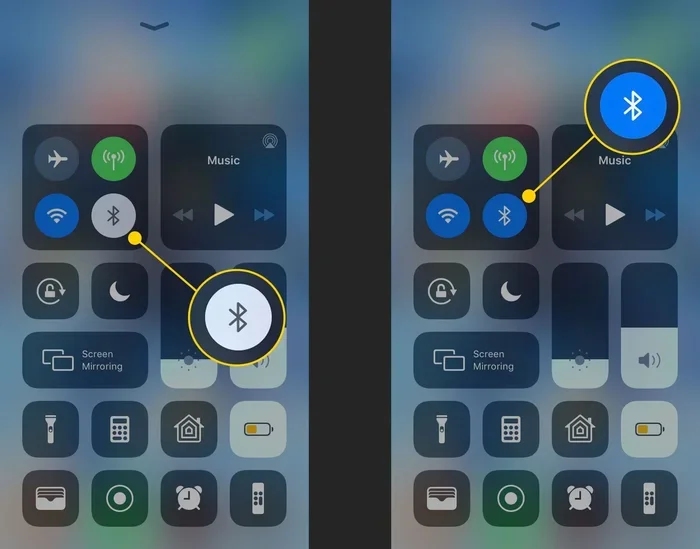
Open the Bluetooth settings on your phone, tablet, or other audio source device. Look for the first Ryobi speaker in the list of available devices and tap to connect. Once the first speaker is connected, go back to your Bluetooth settings and connect to the second speaker.
In some cases, after connecting the first speaker, the second speaker will automatically pair if it is in range and in pairing mode. This depends on the Ryobi model and its Bluetooth protocol.
Step 5: Test the Connection
Play a song or any audio from your device. Walk around the area where both speakers are placed and check if the sound is coming from both units. If one speaker is silent, try moving it closer to the first speaker and re-establishing the connection.
Quick Tips for Smooth Pairing
- Keep both speakers within 10 feet of each other during the initial pairing process.
- Turn off any other Bluetooth devices nearby that might interfere with the connection.
- Restart your source device if you are having trouble finding the speakers.
- Make sure the speakers are not connected to any other device before you start pairing.
Benefits of Pairing Ryobi Speakers Together
Pairing two Ryobi speakers offers several real-world benefits that go beyond just making things louder. Here is why you should consider setting up a multi-speaker configuration with your Ryobi devices.
Louder Volume for Larger Spaces
The most obvious benefit is increased volume. A single Ryobi Bluetooth speaker is great for a small room or a personal listening session. But if you are hosting a backyard barbecue, working in a large garage, or setting up a campsite, one speaker simply will not be enough. Pairing two speakers gives you the audio power to fill a much larger area with clear, loud sound.
Better Coverage and Sound Distribution
Even in a moderately sized room, a single speaker can create dead zones where the sound is weak or muffled. By placing two paired Ryobi speakers in different parts of the room, you ensure that wireless audio reaches every corner evenly. This is especially useful for outdoor gatherings where people spread out across a large area.
Improved Bass and Audio Depth
When two speakers work together, the bass response often improves. Each speaker handles a portion of the audio workload, which reduces strain on any single unit. The result is deeper bass, cleaner midrange frequencies, and a more balanced sound profile overall.
Portability Meets Power
One of the best things about Ryobi speakers is their portability. You can pair them at home for a movie night, take them to the beach, or bring them to a tailgate. The portable speaker design means you are not stuck in one place, and the wireless connection keeps your setup free of tangled cables.
Compatible Ryobi Speaker Models for Pairing
Not all Ryobi speakers are created equal when it comes to pairing capabilities. Here is a look at some popular Ryobi speaker models and their pairing compatibility.
| Model | Bluetooth Version | Pairing Supported | Battery Life |
|---|---|---|---|
| Ryobi PCLB125 | Bluetooth 5.0 | Yes | Up to 12 hours |
| Ryobi PCLB125B | Bluetooth 5.0 | Yes | Up to 12 hours |
| Ryobi PCLB108 | Bluetooth 4.2 | Limited | Up to 8 hours |
| Ryobi PLGTP18 | Bluetooth 5.0 | Yes | Up to 10 hours |
As you can see from the table, newer Ryobi models with Bluetooth 5.0 tend to have better pairing performance and a more stable wireless connection. If you are planning to pair your speakers, it is worth checking the Bluetooth version on your specific model before you buy.
For users who are unsure about their model, the Ryobi website has a detailed product support page where you can look up your speaker by its model number. This is the best way to confirm whether your particular unit supports multi-speaker pairing.
Common Issues When Pairing Ryobi Speakers
Even though the pairing process is fairly simple, things can sometimes go wrong. Here are the most common issues users encounter and how to fix them.
Speakers Will Not Connect to Each Other
If one or both speakers refuse to enter pairing mode, try resetting them first. Most Ryobi speakers have a reset button or a reset procedure that involves holding down the power button for 10 seconds. After resetting, try the pairing process again from Step 3.
Audio Cuts Out or Gets Interrupted
Bluetooth interference is a common culprit. If you are using your speakers near a Wi-Fi router, microwave, or other wireless devices, the Bluetooth signal can get disrupted. Moving the speakers away from these devices often resolves the issue.
Another cause can be distance. Keep both speakers within 30 feet of your source device for the most reliable connection. Walls, furniture, and other obstacles can weaken the Bluetooth signal and cause audio dropouts.
Speakers Are Out of Sync
Sometimes, the two speakers will not play audio in perfect sync, which can create an echoing or off-balance sound. This is more common with older Bluetooth versions. To minimize this issue, keep both speakers close together and make sure they are both running the latest firmware. You can update firmware through the Ryobi mobile app if your model supports it.
One Speaker Is Significantly Quieter
If one speaker sounds much quieter than the other, check the volume settings on your source device. Some Bluetooth devices allow you to adjust the volume independently for each connected speaker. Also, make sure both speakers are at the same physical distance from the source device for balanced output.
Tips for the Best Sound Experience with Paired Ryobi Speakers
Once you have successfully paired your Ryobi speakers, you can take a few extra steps to get the best possible sound quality from your setup.
Position the Speakers Correctly
Place the two speakers at roughly equal distances from your listening area. If you are using them outdoors, angle them slightly toward the center of the gathering area. This creates a more even sound distribution and prevents one speaker from dominating the audio.
Keep Firmware Updated
Ryobi occasionally releases firmware updates that improve Bluetooth connectivity and audio performance. Check the Ryobi app or website periodically to see if updates are available for your speaker model. Updated firmware can also fix known pairing bugs and improve overall stability.
Use a High-Quality Audio Source
The quality of your audio source matters just as much as the speakers themselves. Streaming high-quality audio from services like Spotify or Apple Music in a higher bitrate will sound noticeably better than low-quality compressed files. Your wireless audio setup is only as good as the source feeding it.
Experiment with Placement
Do not be afraid to move the speakers around to find the sweet spot. Even a few feet of adjustment can make a big difference in how the sound fills a room or outdoor space. Try different angles and distances, and listen carefully to what sounds best.
Consider the Environment
Indoor and outdoor environments affect sound differently. Hard surfaces like walls and floors reflect sound and can make it seem louder but also more echoey. Soft surfaces like grass, cushions, and curtains absorb sound and produce a cleaner listening experience. Keep this in mind when setting up your paired speakers.
How Ryobi Speakers Compare to Other Bluetooth Speakers
Ryobi speakers are part of a broader ecosystem of portable Bluetooth speakers on the market. Here is a quick comparison of how Ryobi stacks up against some well-known brands in terms of pairing capability and overall performance.
| Brand | Multi-Speaker Pairing | Bluetooth Version | Typical Price Range |
|---|---|---|---|
| Ryobi | Yes (select models) | 4.2 – 5.0 | $50 – $150 |
| JBL | Yes (JBL Connect+) | 4.2 – 5.0 | $100 – $400 |
| Bose | Yes (Bose Party Mode) | 5.0 | $150 – $400 |
| Sony | Yes (Party Connect) | 5.0 | $100 – $350 |
Ryobi speakers offer a great balance of affordability and functionality. While they may not have the brand recognition of JBL or Bose, they deliver solid audio quality at a price point that is hard to beat. The Ryobi Bluetooth speaker lineup is especially popular among DIY enthusiasts and homeowners who already use Ryobi power tools and appreciate the brand’s durability.
One thing to note is that Ryobi speakers are not designed for audiophile-level sound. They are portable, rugged, and practical. If you are looking for a speaker setup for casual listening, outdoor gatherings, or workshop use, pairing Ryobi speakers is a smart and cost-effective choice.
Expert Insights on Pairing Portable Speakers
According to audio experts, the key to getting the best results from any paired speaker setup is understanding the limitations of Bluetooth technology. Bluetooth has a limited bandwidth compared to wired connections, which means that some audio quality is lost during wireless transmission. However, modern Bluetooth versions, especially 5.0 and above, have made significant improvements in both range and audio fidelity.
Experts also recommend keeping the source device close to the speakers during playback. While Bluetooth can reach up to 30 feet in ideal conditions, obstacles like walls and furniture reduce the effective range. Placing your phone or tablet in a central location ensures a strong, stable connection to both paired speakers.
For those who want even better audio quality, some users explore alternatives like Wi-Fi speakers or wired connections. While Ryobi speakers do not support Wi-Fi audio streaming, they excel in the portable Bluetooth category. If you are curious about other wireless audio options, you might want to explore whether you can boost a Wi-Fi signal outside to support Wi-Fi-based speakers in outdoor settings.
Another consideration is the difference between pairing speakers for volume versus pairing them for stereo separation. Most Ryobi speakers are designed for volume boosting rather than true stereo mode. If you want a dedicated stereo experience, you may need to look at speakers from brands that explicitly support left-right channel separation in their pairing mode.
Final Thoughts
Pairing Ryobi speakers together is a simple and effective way to enhance your wireless audio experience. Whether you are looking to fill a large room with sound, power up an outdoor event, or just enjoy richer audio while working in your garage, the process is straightforward and the results are well worth the effort.
Remember to check your specific model for pairing compatibility, follow the step-by-step instructions carefully, and troubleshoot any issues using the tips outlined in this guide. With the right setup, your Ryobi speakers can deliver surprisingly impressive sound that punches well above their price point.
The beauty of the Ryobi ecosystem is that it is built for real-world use. These speakers are tough, portable, and reliable. Pairing them together simply extends that reliability into a bigger, bolder audio experience that you can take anywhere. So grab your Ryobi speakers, follow the pairing steps, and enjoy the improved sound.
Frequently Asked Questions
Can I pair any two Ryobi Bluetooth speakers together?
Most Ryobi Bluetooth speakers can be paired, but compatibility depends on the specific model and its Bluetooth version. Check your speaker’s manual or the Ryobi website to confirm that your model supports multi-speaker pairing before you attempt to connect them.
How many Ryobi speakers can I pair together at once?
Most Ryobi speaker models support pairing two speakers together. Some newer models may allow additional connections, but pairing two is the most common and reliable setup. Always check the specifications for your particular model.
Do I need the Ryobi app to pair speakers together?
No, you do not need the Ryobi app for basic Bluetooth pairing. You can pair Ryobi speakers directly through your phone or tablet’s Bluetooth settings. The app is only necessary if you want to update firmware or access advanced features.
Why is one of my paired Ryobi speakers quieter than the other?
This is usually caused by distance from the source device or interference from other wireless devices. Try moving both speakers closer to your phone or tablet and away from Wi-Fi routers or microwaves. Also check the volume balance settings on your source device.
Can I pair Ryobi speakers with non-Ryobi Bluetooth devices?
Yes, Ryobi Bluetooth speakers can connect to any Bluetooth-enabled device, including iPhones, Android phones, tablets, and laptops. The pairing process is the same regardless of the brand of your source device.
What should I do if my Ryobi speakers will not stay paired?
If the connection keeps dropping, try resetting both speakers and pairing them again. Also make sure both speakers are fully charged, as low battery can cause unstable connections. Keeping the speakers within 30 feet of your source device and away from wireless interference sources also helps maintain a stable connection.