Can You Plug Usb C Into Micro Usb And Why It Matters
Can you plug USB C into Micro USB? The short answer is no, not directly, because the two connectors have different shapes and pin configurations. However, you can use a USB C to Micro USB adapter or a hybrid cable to bridge the gap between these two popular connector types. Understanding how these connectors work, what adapters you need, and why USB Type-C is replacing Micro USB can save you time, money, and frustration. This guide covers everything you need to know about USB connector compatibility in simple, practical terms.
Have you ever grabbed a cable and tried to plug it into your device, only to realize it just does not fit? That frustrating moment happens to almost everyone at some point. The world of USB connectors can feel confusing, especially when you have both USB C and Micro USB devices sitting around your home. You might wonder, can you plug USB C into Micro USB and expect it to work? The answer is more nuanced than a simple yes or no.
In this article, we will break down everything you need to know about USB connector compatibility. We will explain why these two connector types do not fit together directly, how adapters solve the problem, and why the tech world is moving toward USB Type-C as the universal standard. Whether you are trying to charge your phone, transfer files, or connect accessories, understanding these basics will save you time and protect your devices.
Let us start with the fundamentals. A USB connector is the physical plug at the end of a cable that fits into a port on your device. Over the years, different connector types have been developed to serve various needs. The two most common ones you will encounter today are Micro USB and USB Type-C. They look very different from each other, and that difference is the whole reason you cannot plug one directly into the other.
Key Takeaways
- USB C and Micro USB are not compatible without an adapter: The physical shapes and internal pin layouts are completely different, so you cannot plug one directly into the other.
- USB C to Micro USB adapters are widely available and affordable: These small adapters let you connect USB C devices to Micro USB cables and accessories with ease.
- USB Type-C offers faster data transfer and more power delivery: Switching to USB C means better charging speeds, faster file transfers, and a reversible connector design.
- Using the wrong cable can damage your devices: Forcing incompatible connectors or using low-quality adapters can lead to port damage, slow charging, or data loss.
- Most modern devices now use USB C: Smartphones, laptops, tablets, and accessories are increasingly adopting USB Type-C as the universal standard.
- Choose certified adapters and cables for safety: Look for USB-IF certified products to ensure reliable performance and protect your devices.
📑 Table of Contents
Understanding USB Connectors: USB C vs Micro USB
Before we answer the main question, it helps to understand what makes these two connectors different. Think of them like two different keys that fit different locks. Even though both are used for charging and data transfer, their designs serve distinct purposes.
What Is Micro USB?
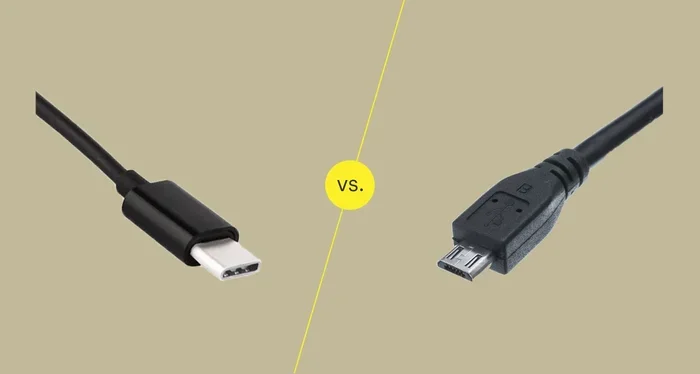
Micro USB was the standard connector for many years. You have probably seen it on older smartphones, Bluetooth speakers, fitness trackers, and portable chargers. It has a small, rectangular shape with a slightly tapered top. The connector only fits in one direction, which means you have to flip it a few times to get it right. Micro USB comes in two versions: Micro USB 2.0 and Micro USB 3.0. The 3.0 version is wider and has an extra row of pins for faster data transfer, but both share the same basic plug shape.
Micro USB served the tech world well for over a decade. It was affordable, widely available, and worked reliably for most devices. However, it had limitations. The data transfer speeds were modest, and the power delivery was limited compared to newer standards. As devices became more powerful, the need for a better connector grew.
What Is USB Type-C?
USB Type-C, often called USB C, is the newer connector standard. It is smaller than a traditional USB-A port but larger than Micro USB. The most noticeable feature is that it is reversible, meaning you can plug it in either way. No more flipping the cable three times before it fits. USB C supports much faster data transfer speeds, higher power delivery, and video output through Alternate Mode technology.
USB C uses a different pin configuration than Micro USB. It has 24 pins compared to Micro USB’s 5 pins. This extra capacity allows for features like USB Power Delivery, which can deliver up to 100 watts of power, and USB 3.1 or USB 3.2 data speeds that make file transfers incredibly fast. This is why USB C has become the go-to connector for modern smartphones, laptops, tablets, and even gaming controllers.
Key Physical Differences
Here are the main physical differences between these two connector types:
- Shape: Micro USB is rectangular with an asymmetrical top. USB C is oval-shaped and symmetrical.
- Size: USB C is slightly larger than Micro USB but smaller than standard USB-A.
- Reversibility: Micro USB only works one way. USB C works either way.
- Pin Count: Micro USB has 5 pins. USB C has 24 pins.
- Power Delivery: Micro USB maxes out around 2.5 watts. USB C can deliver up to 100 watts with Power Delivery.
- Data Speed: Micro USB 2.0 tops out at 480 Mbps. USB C can reach speeds of 10 Gbps or more with USB 3.1 or USB 3.2.
These differences are fundamental. They mean the two connectors are physically incompatible without an adapter or a special cable. This brings us to the next big question.
Can You Plug USB C Into Micro USB Directly?
The direct answer is no. You cannot plug a USB C plug into a Micro USB port, and you cannot plug a Micro USB plug into a USB C port. The shapes are different, the sizes are different, and the internal pin arrangements are completely different. Attempting to force a connector into the wrong port can damage the port, the cable, or both.
Some people wonder if they can just sand down the edges of a connector or use some kind of DIY trick. Please do not do this. Modifying connectors can destroy the cable, ruin your device port, and even create safety hazards like short circuits or overheating. Always use proper adapters and cables designed for the job.
The reason these two connectors cannot work together comes down to how they are built inside. The USB connector design determines which pins make contact when you plug in a cable. USB C and Micro USB have completely different pin layouts. Even if you could somehow physically force them together, the electrical signals would not align properly, and nothing would work.
The Role of Pin Configuration
Each USB connector type has a specific pin configuration that dictates how data and power flow through the cable. Micro USB uses a simple 5-pin design that handles basic charging and data transfer at slower speeds. USB C uses a 24-pin design that supports advanced features like high-speed data, high-wattage power delivery, and video output.
Because the pins are in different positions and serve different functions, the two connectors are fundamentally incompatible at the hardware level. This is not a software issue or a protocol problem. It is a physical design difference that makes direct connection impossible.
How Adapters and Cables Bridge the Gap
So if you cannot plug USB C directly into Micro USB, how do you connect them? The answer is adapters and hybrid cables. These accessories let you use your existing cables and devices together, even when they use different connector types.
USB C to Micro USB Adapters
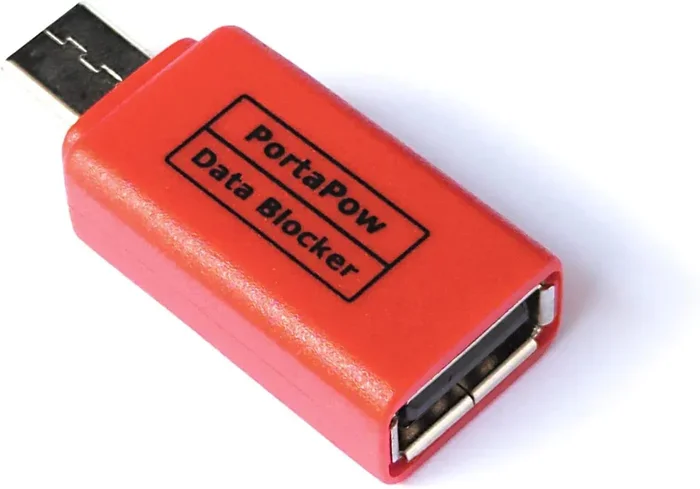
A USB C to Micro USB adapter is a small, inexpensive device that lets you connect a Micro USB cable to a USB C port. You plug the adapter into the USB C port on your device, and then plug your Micro USB cable into the adapter. It is a simple and effective solution for situations where you only have a Micro USB cable but need to charge or sync a USB C device.
These adapters are widely available online and in electronics stores. They typically cost just a few dollars. Look for adapters from reputable brands and choose ones that are USB-IF certified for reliable performance and safety.
USB C to Micro USB Cables
Some cables come with a USB C connector on one end and a Micro USB connector on the other. These hybrid cables are convenient because you do not need a separate adapter. They are great for keeping in your bag or at your desk for connecting devices with different port types.
When buying a hybrid cable, pay attention to the specifications. Make sure the cable supports the data speeds and power levels you need. A cheap cable might only support slow charging or basic USB 2.0 speeds, while a quality cable can handle fast charging and high-speed data transfer.
USB C Adapters with Multiple Ports
If you need to connect multiple Micro USB devices to a single USB C hub, consider a USB C hub with Micro USB ports. These hubs expand your connectivity options and let you charge or sync several devices at once. They are especially useful for people who have a mix of old and new devices.
Quick Tips for Using Adapters
- Always check that the adapter supports the power and data speeds you need.
- Avoid cheap, uncertified adapters from unknown brands.
- Make sure the adapter fits snugly without wobbling or loose connections.
- Do not force connectors into adapters or ports.
- Store adapters in a safe place to prevent damage and loss.
What Happens When You Use the Wrong Cable or Adapter?
Using the wrong cable or a low-quality adapter can cause several problems. Understanding these risks helps you make better choices and protect your devices.
Slow Charging
If you use a cable or adapter that does not support fast charging, your device will charge very slowly. This is especially frustrating if you are used to quick fast charging speeds. A cheap Micro USB cable used with a USB C adapter might only deliver basic charging speeds, even if your device supports rapid power delivery.
Data Transfer Issues
For slow data transfers, a low-quality adapter or cable is often the culprit. If you are trying to move large files between devices, you need a cable and adapter that support high-speed data protocols. Using a basic USB 2.0 cable with an adapter will bottleneck your transfer speeds, no matter how fast your devices are.
Potential Device Damage
In rare cases, using incompatible or low-quality accessories can damage your device. Poorly made adapters may not regulate power properly, which can lead to overheating, short circuits, or even permanent damage to the charging port. This is why it is important to invest in quality accessories from trusted brands.
Common Mistakes to Avoid
- Forcing a connector into a port that does not fit.
- Using damaged or frayed cables with adapters.
- Buying the cheapest adapter available without checking reviews or certifications.
- Assuming all adapters support the same speeds and power levels.
- Leaving adapters plugged in when not in use, which can wear out the ports over time.
Why Switching to USB-C Matters
The tech industry has been moving toward USB Type-C for several years now. Understanding why this shift matters can help you make smarter decisions about your cables, adapters, and devices.
Faster Charging and Power Delivery
One of the biggest advantages of USB C over Micro USB is power delivery. USB C with Power Delivery can charge devices much faster than Micro USB ever could. Laptops, tablets, and even some smartphones now charge fully in under two hours thanks to USB C Power Delivery. If you still use Micro USB devices, an adapter lets you take advantage of fast USB C chargers.
Universal Compatibility
USB C is becoming the universal connector standard. Most new smartphones, laptops, tablets, headphones, and accessories now use USB Type-C. This means one cable type can work across multiple devices, reducing cable clutter and making life simpler. The European Union has even mandated USB C as the standard charging port for most electronics sold in the region.
Better Data Transfer Speeds
With support for USB 3.1 and USB 3.2 protocols, USB C delivers dramatically faster data transfer speeds than Micro USB. You can transfer a full HD movie in seconds rather than minutes. For content creators, photographers, and anyone who works with large files, this speed difference is huge.
Reversible Design for Convenience
The reversible design of USB C is a small feature that makes a big difference. You never have to worry about which way to plug in the cable. It works every time, on the first try. This might seem like a minor convenience, but once you switch to USB C, going back to Micro USB feels incredibly inconvenient.
Future-Proofing Your Setup
As more devices adopt USB C, having USB C cables and adapters ensures your setup stays compatible with future technology. Investing in USB C accessories now means fewer compatibility headaches down the road. Even if you still have some Micro USB devices, using a USB C to Micro USB adapter keeps everything connected and working together.
Expert Tips for Choosing the Right Cable and Adapter
Not all cables and adapters are created equal. Here are some expert tips to help you choose the right accessories for your needs.
Look for USB-IF Certification
The USB Implementers Forum (USB-IF) certifies cables and adapters that meet strict quality and safety standards. Look for the USB-IF logo on the packaging or product listing. Certified products are tested to work reliably and safely with your devices.
Check the Power Rating
If you need fast charging, check the power rating of your cable and adapter. Look for cables that support at least 18 watts of power delivery for smartphones, and 60 watts or more for laptops. The adapter should also match or exceed these power requirements.
Consider Your Data Needs
If you regularly transfer large files, invest in a cable and adapter that support USB 3.0 or higher speeds. For basic charging and occasional file transfers, USB 2.0 speeds may be sufficient. Understanding your needs helps you avoid overpaying for features you do not need.
Read Reviews Before Buying
Before purchasing any adapter or cable, read reviews from other users. Look for feedback on charging speed, durability, and compatibility. Real-world experiences from other buyers can help you avoid low-quality products that do not live up to their claims.
Buy from Reputable Brands
Stick with well-known brands like Anker, Belkin, Cable Matters, or UGREEN. These brands have established track records for quality and reliability. While their products may cost a bit more, they are worth the investment for the peace of mind they provide.
Key Takeaways
- USB C and Micro USB are not directly compatible: You cannot plug one into the other without an adapter or hybrid cable due to different physical shapes and pin configurations.
- Adapters are the simple solution: A USB C to Micro USB adapter lets you connect Micro USB cables to USB C devices quickly and affordably.
- USB Type-C offers major advantages: Faster charging, higher data speeds, reversible design, and universal compatibility make USB C the superior choice.
- Quality matters: Always choose certified, reputable adapters and cables to protect your devices and ensure reliable performance.
- The industry is moving to USB C: Most new devices now use USB Type-C, so investing in USB C accessories future-proofs your setup.
- Never force incompatible connectors: Forcing a connector can cause permanent damage to your device ports and cables.
- Hybrid cables simplify connectivity: Cables with USB C on one end and Micro USB on the other offer a convenient all-in-one solution.
Conclusion
So, can you plug USB C into Micro USB? Not directly, but with the right adapter or hybrid cable, you can connect them easily and keep all your devices working together. The key is understanding the differences between these two connector types and choosing quality accessories that meet your needs.
The shift from Micro USB to USB Type-C is one of the most significant changes in consumer electronics in recent years. USB C offers faster charging, quicker data transfers, and a reversible design that makes life simpler. If you still have devices with Micro USB ports, grabbing a few USB C to Micro USB adapters is a smart and affordable move.
Remember to always buy certified products, check power and data ratings before purchasing, and never force connectors into ports that do not fit. Taking these simple precautions keeps your devices safe and ensures reliable performance every time you plug in a cable.
The world of USB connectors does not have to be confusing. With the right knowledge and the right accessories, you can connect any device to any port with confidence. USB C to Micro USB compatibility is easy once you know how it works, and this guide has given you everything you need to navigate it successfully.
Frequently Asked Questions
Can I charge a USB C device with a Micro USB charger using an adapter?
Yes, you can charge a USB C device with a Micro USB charger by using a USB C to Micro USB adapter. However, the charging speed will depend on the charger’s power output and the adapter’s quality. For fast charging, make sure both the charger and adapter support adequate wattage.
Will a USB C to Micro USB adapter support data transfer?
Yes, most quality adapters support data transfer, but the speed depends on the cable and adapter specifications. If you need fast data transfers, look for adapters and cables that support USB 3.0 or higher speeds. Basic adapters may only support USB 2.0 speeds.
Are USB C to Micro USB adapters expensive?
No, these adapters are very affordable. You can find reliable USB C to Micro USB adapters for just a few dollars online. Investing in a certified adapter from a reputable brand ensures safe and reliable performance without breaking the bank.
Can I use a Micro USB cable to charge a USB C laptop?
You can use a Micro USB cable with a USB C laptop if you have the right adapter, but it will likely charge very slowly. Laptops require higher power delivery than Micro USB cables and adapters typically support. For best results, use a USB C cable with a USB C charger for laptops.
Is Micro USB being completely phased out?
Micro USB is being phased out in favor of USB Type-C in most consumer electronics. Many new smartphones, tablets, and accessories now use USB C exclusively. However, Micro USB devices are still widely available, especially in budget electronics and accessories, so adapters remain very useful.
What should I do if my USB C port is not working with a Micro USB adapter?
If your USB C port is not working with a Micro USB adapter, first check that the adapter is properly seated and not damaged. Try a different adapter or cable to rule out a faulty accessory. If the problem persists, the USB C port itself may be damaged and need professional repair.