Can You Repair A Broken Hdmi Port Without Replacing It
Yes, you can often repair a broken HDMI port without replacing the entire port. Simple fixes like cleaning, re-soldering, or using a new cable can restore your connection. This guide covers every method from DIY troubleshooting to professional repair options.
You plug in your HDMI cable, and nothing happens. No signal. No picture. No sound. Your heart sinks because you think your broken HDMI port is dead forever. But before you rush out to buy a new TV, monitor, or console, stop. There is a good chance you can fix this yourself.
Can you repair a broken HDMI port without replacing it? The short answer is yes. In most cases, the problem is minor and fixable. Whether it is a loose connection, dirty contacts, or a bent pin, this guide walks you through every option. You will learn simple fixes you can do at home and when it is time to seek professional help.
HDMI ports are small but mighty. They carry both high-definition video and audio through a single cable. When they break, it disrupts your entire entertainment or work setup. The good news is that HDMI port repair does not always mean spending hundreds of dollars. Let us dive in and explore your options.
Key Takeaways
- HDMI port damage is common and often fixable without full replacement.
- Cleaning and reseating the cable solves many loose or dirty port issues.
- Soldering can repair broken pins if you have basic electronics skills.
- Bent pins and debris are the two most frequent causes of HDMI port failure.
- Professional repair costs are usually lower than buying a new device.
- Prevention tips can extend your HDMI port lifespan significantly.
- Knowing when to replace saves time and money in the long run.
📑 Table of Contents
- Understanding How HDMI Ports Work
- Can You Repair A Broken Hdmi Port Without Replacing It
- Signs Your HDMI Port Needs Repair
- Professional Repair vs. DIY Repair
- Preventing Future HDMI Port Damage
- When Replacement Is the Only Option
- Quick Tips for HDMI Port Repair Success
- Common Mistakes to Avoid
- Expert Insights on HDMI Port Longevity
- Key Takeaways
- Conclusion
Understanding How HDMI Ports Work
Before you fix anything, it helps to understand what you are dealing with. An HDMI port has tiny pins inside that carry the signal. There are different types of HDMI ports too. Standard HDMI, mini HDMI, and micro HDMI all work the same way but have different sizes.
The port connects your device to a display. Think of your TV, computer monitor, or gaming console. When the connection is solid, you get crisp video and clear sound. When something goes wrong, you get nothing or a flickering screen.
Common Types of HDMI Port Damage
Not all HDMI damage looks the same. Here are the most common problems people face:
- Loose port: The cable wobbles and does not stay seated.
- Bent pins: Internal pins are misaligned or broken.
- Dirty contacts: Dust or debris blocks the signal.
- Burned or scorched port: Electrical damage from a power surge.
- Cracked housing: The plastic around the port is broken.
Each type of damage needs a different fix. The good news is that most of these problems are solvable without replacing the entire port. Understanding the root cause is your first step toward a successful HDMI port repair.
Can You Repair A Broken Hdmi Port Without Replacing It
This is the big question, and the answer is more encouraging than you might think. Many people throw away perfectly good devices because they assume the port is fried. But in reality, repairing a broken HDMI port is often simple and inexpensive.
The method you choose depends on the type of damage. A loose port needs tightening. A dirty port needs cleaning. A broken pin needs re-soldering. Let us walk through each option so you can pick the right one for your situation.
DIY Fixes You Can Try Today
You do not need to be an electronics expert to fix most HDMI port problems. Here are the easiest methods that work surprisingly well:
Method 1: Clean the Port
Dust and lint build up inside HDMI ports over time. This debris blocks the signal and causes connection problems. Grab a can of compressed air and blow gently into the port. You can also use a toothpick wrapped in a tiny cloth to sweep out any grime. Be gentle. The pins inside are fragile.
Method 2: Reseat the Cable
Sometimes the fix is as simple as unplugging and plugging the cable back in. Do it firmly but carefully. Make sure the cable clicks into place. A loose fit is one of the most common reasons for HDMI signal loss.
Method 3: Use a Different Cable
Before assuming the port is broken, test with another cable. A damaged cable often mimics port failure. This quick check saves you hours of unnecessary troubleshooting.
Method 4: Straighten Bent Pins
If you can see a bent pin, use a small needle or tweezers to gently straighten it. Work slowly and carefully. Do not force anything. One wrong move can snap the pin completely.
When Soldering Becomes Necessary
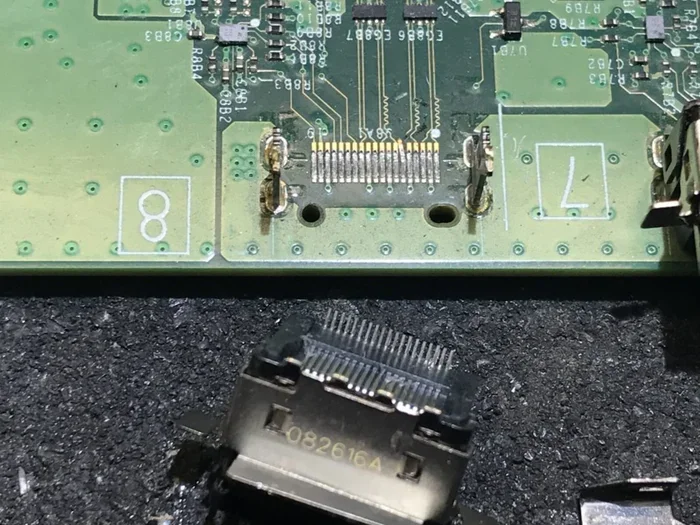
For more serious damage, soldering might be your best option. If a pin is completely broken off or the connection is loose inside the port, a careful solder job can bring it back to life. You will need a basic soldering iron, some solder wire, and a steady hand.
Here is what the process looks like:
- Open the device housing carefully.
- Locate the damaged HDMI port.
- Heat the broken joint with your soldering iron.
- Apply fresh solder to rebuild the connection.
- Let it cool completely before testing.
If you have never soldered before, watch a few tutorials first. Practice on something cheap before working on your expensive device. HDMI port soldering is a skill that anyone can learn with a little patience.
Using Adapters as a Temporary Fix
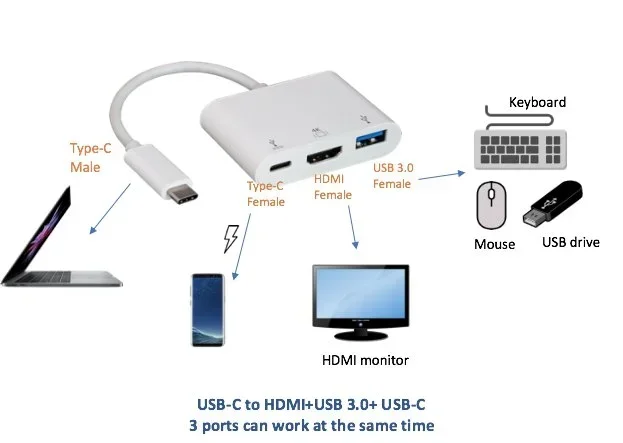
Not ready to do permanent repairs? An HDMI adapter can be a great temporary solution. A USB-C to HDMI adapter or a DisplayPort to HDMI converter lets you bypass the broken port entirely. You can keep using your device while you decide on a long-term fix.
Adapters are affordable and widely available. They are a smart choice if you are on a tight budget or waiting for parts. Just remember that adapters add another connection point, which means another potential failure point over time.
Signs Your HDMI Port Needs Repair
How do you know your HDMI port actually needs repair? Sometimes the problem is not the port at all. Here are clear signs that point to a hardware issue with the port itself:
- The cable fits loosely and falls out easily.
- You see no signal even with a brand-new cable.
- The picture flickers when you touch or move the cable.
- There is visible damage or discoloration around the port.
- Sound cuts out while the video stays working, or vice versa.
- Multiple cables fail in the same port but work elsewhere.
If you notice these signs, the problem is likely inside the port. At this point, HDMI port troubleshooting should move beyond cable swaps and into physical inspection.
Professional Repair vs. DIY Repair
Deciding between professional repair and doing it yourself depends on your comfort level and the severity of the damage. Both paths have clear advantages.
| Factor | DIY Repair | Professional Repair |
|---|---|---|
| Cost | Very low (tools you may already own) | Moderate ($30 to $150 typically) |
| Time | 30 minutes to a few hours | 1 to 5 business days |
| Skill Level Needed | Basic handyman skills | None required |
| Risk | Higher if you make mistakes | Low, done by an expert |
| Warranty | Voids device warranty | May come with repair warranty |
| Best For | Minor damage, experienced users | Severe damage, warranty-covered devices |
If your device is still under warranty, contact the manufacturer first. Opening the device yourself may void the warranty. A professional repair keeps your coverage intact. However, if the warranty has expired, DIY repair can save you a significant amount of money.
For devices that use proprietary operating systems, repair options may be more limited. Some manufacturers lock down hardware access, making it harder to perform internal fixes. Check your device manual or support page before opening anything up.
Preventing Future HDMI Port Damage
Fixing a broken HDMI port is frustrating. Preventing damage is much easier. Here are simple habits that keep your ports healthy for years:
- Plug in gently. Do not force the cable. It should slide in smoothly.
- Avoid tugging the cable. Always pull from the connector, not the wire.
- Keep ports covered. Use dust caps when ports are not in use.
- Secure cables with clips. Cable management clips prevent accidental pulls.
- Use quality cables. Cheap cables put more stress on the port during connection.
- Do not overload ports. Never force a connector that does not fit.
These small habits make a huge difference. A little care goes a long way toward avoiding HDMI connection issues down the road.
When Replacement Is the Only Option
Sometimes repair is not enough. If the HDMI port is severely burned, cracked beyond fixing, or the internal circuit board is damaged, replacement becomes necessary. Here is how to know it is time:
- The port is physically cracked or broken apart.
- Soldering does not restore the connection.
- Multiple ports on the same device have failed.
- The device has experienced a major electrical surge.
In these cases, replacing the port or the entire device makes more sense. A professional technician can often replace just the port for a reasonable cost. If the device is old and cheap, buying a new one might be the smarter financial choice.
For businesses and enterprise setups, using a value-added network for electronic commerce communication can help manage multiple display connections more efficiently. These systems reduce wear and tear on individual ports by centralizing signal routing.
Quick Tips for HDMI Port Repair Success
Here are some fast tips to keep in mind as you work through your repair:
- Always unplug the device before opening it up.
- Take photos before disassembling anything so you can remember how things go back together.
- Use an anti-static wrist strap to protect sensitive electronics.
- Work on a clean, well-lit surface.
- Test after every small fix before moving to the next step.
- Keep your original screws in a small container so they do not get lost.
Following these tips reduces the risk of making things worse. A careful approach leads to a successful HDMI hardware fix every time.
Common Mistakes to Avoid
Even with the best intentions, people make mistakes during HDMI port repair. Here are the ones to watch out for:
- Using too much force. This bends pins further or cracks the port housing.
- Skipping the cable test. A bad cable is often mistaken for a bad port.
- Using the wrong solder. Lead-free solder requires higher temperatures and can damage components.
- Ignoring software issues. Sometimes a driver update fixes what looks like a hardware problem.
- Rushing the process. Patience is your best tool. Take your time.
Avoiding these mistakes keeps your repair safe and effective. If you are unsure about any step, it is always okay to consult a professional.
Expert Insights on HDMI Port Longevity
According to electronics repair professionals, most HDMI ports last 5 to 10 years with proper care. The biggest enemies of HDMI ports are physical stress and dust. Keeping connections clean and secure dramatically extends their lifespan.
Experts also recommend checking your HDMI port maintenance routine every few months. A quick visual inspection and gentle cleaning can catch small problems before they become big ones. Think of it like brushing your teeth, but for your tech gear.
One thing professionals emphasize is that not all signal problems come from the port. Sometimes the graphics card, the display, or even the software settings are the real culprit. Always rule out software issues before assuming hardware failure.
Key Takeaways
- HDMI port repair is often possible without replacing the entire port.
- Cleaning and reseating the cable solves many common connection problems.
- Bent pins and debris are the two most frequent causes of HDMI port failure.
- Soldering can fix broken pins if you have basic electronics skills.
- Professional repair costs are usually lower than buying a new device.
- Prevention tips can extend your HDMI port lifespan significantly.
- Knowing when to replace saves time and money in the long run.
Conclusion
Can you repair a broken HDMI port without replacing it? Absolutely. In the majority of cases, the answer is yes. Whether you choose to clean the port, straighten a bent pin, re-solder a broken connection, or use an adapter as a temporary solution, you have options. You do not need to be a tech genius to handle most of these fixes.
Start with the simplest solutions first. Clean the port. Try a different cable. Reseat the connection. If those do not work, move on to more advanced methods like soldering or professional repair. The key is to stay patient and work carefully.
HDMI port repair is a skill that saves you money and keeps your devices in use longer. With the right approach and a little confidence, you can bring your broken port back to life. Give these methods a try before you spend money on a replacement. Your wallet will thank you.
Frequently Asked Questions
Can a broken HDMI port be fixed at home?
Yes, many broken HDMI ports can be fixed at home with basic tools. Cleaning, reseating the cable, or straightening bent pins are fixes most people can handle. Soldering requires a bit more skill but is still doable with online tutorials and practice.
How much does it cost to repair an HDMI port professionally?
Professional HDMI port repair typically costs between $30 and $150, depending on the device and the severity of the damage. This is much cheaper than buying a new TV, monitor, or gaming console. Always get a quote before committing to a repair.
What causes an HDMI port to stop working?
The most common causes are dust buildup, bent pins, loose connections, and physical damage from yanking the cable. Power surges can also burn out the port internally. Regular care and gentle handling prevent most of these issues.
Do HDMI adapters fix broken ports permanently?
Adapters provide a temporary workaround, not a permanent fix. They let you bypass the broken port and keep using your device. However, the underlying port damage remains. Use an adapter while you plan a proper repair or replacement.
Can software issues mimic a broken HDMI port?
Yes, software problems can cause the same symptoms as a broken HDMI port. Driver issues, incorrect display settings, or outdated firmware can all cause signal loss. Always check software solutions before assuming the port itself is damaged.
Is it worth repairing an old device with a broken HDMI port?
It depends on the device value and repair cost. If the repair costs less than half the price of a new device, it is usually worth it. For older or low-value devices, replacement might make more financial sense. Consider your budget and the device overall condition.