Can You Transmit 4k Wirelessly Here Is The Full Answer
Can you transmit 4k wirelessly? Yes, you absolutely can, and it is easier than ever before. Wireless 4K transmission lets you stream 4K resolution content from your laptop, phone, or console to a TV or projector without any cables. In this guide, we break down how it works, which devices you need, and how to avoid common wireless 4K lag issues.
Have you ever wanted to share a movie or a game on the big screen without fumbling with cables? The idea of wireless 4K transmission sounds great, but you might wonder if it really works. The short answer is yes. You can transmit 4K content wirelessly, and the technology has come a long way in just a few years.
Whether you want to connect my laptop to TV wirelessly or stream 4K content from your phone to a projector, there is a solution for you. In this article, we will walk through everything you need to know about wireless 4K streaming. We will cover how it works, which devices to use, and how to get the best experience without frustrating lag.
The world of wireless display technology has changed how we enjoy media at home. You no longer need a tangle of HDMI cables running across the room. With the right setup, you can enjoy 4K Ultra HD video from almost any device. Let us dive into the details and find out exactly what you need to get started.
Key Takeaways
- Wireless 4K transmission is possible: Modern technology makes it easy to send 4K content without cables.
- Multiple devices support wireless 4K: From wireless HDMI adapters to Wi-Fi 6 routers, options are plentiful.
- Latency can be an issue: Wireless 4K gaming may experience slight delays compared to wired connections.
- Compression matters: Some devices use compression technology to reduce bandwidth needs for smooth streaming.
- Setup is simple: Most wireless 4K adapters plug and play with minimal configuration.
- Bandwidth is key: A strong Wi-Fi connection ensures the best 4K streaming experience.
📑 Table of Contents
What Does It Mean to Transmit 4K Wirelessly?
When we talk about wireless 4K transmission, we mean sending video at 4K resolution through the air instead of using a cable. A typical 4K signal has about four times the pixels of a standard 1080p video. That means a lot of data needs to move fast. Without the right equipment, you might see buffering or a drop in quality.
How 4K Resolution Works
4K resolution means the display has roughly 4,000 pixels across the screen. The most common standard is 3840 by 2160 pixels. This gives you incredibly sharp and detailed images. When you transmit this much data, you need a strong signal and good bandwidth.
Think of it like a water hose. A 1080p video is a small garden hose. A 4K video is a fire hose. You need a big pipe to push all that data through without interruption. Wireless transmission uses radio waves instead of a physical cable, so the strength of your connection matters a lot.
Why Go Wireless for 4K?
There are several reasons people choose wireless 4K streaming over cables. First, it keeps your living space clean and clutter-free. No one likes a mess of wires behind the TV. Second, it gives you flexibility. You can move around the room and still enjoy your content on the big screen.
Third, many modern devices do not even have HDMI ports anymore. Laptops and phones are getting thinner every year. A wireless display adapter solves this problem easily. You just plug a small dongle into your TV, and you are ready to go.
How Wireless 4K Transmission Works
Understanding the basics of wireless video transmission helps you pick the right setup. There are a few different technologies that make it all possible. Each one has its own strengths and weaknesses.
Wireless HDMI Technology
Wireless HDMI is one of the most popular ways to send 4K without cables. A wireless HDMI transmitter and receiver pair replaces your HDMI cable. You plug the transmitter into your source device, like a laptop or a Blu-ray player, and the receiver plugs into your TV.
These devices use radio frequency or millimeter wave technology to send the signal. Most modern wireless HDMI kits support 4K at 60Hz, which means smooth motion and great color. Some even support HDR, which gives you richer contrast and more vivid colors.
Wi-Fi Based Streaming
Another common method is using your home Wi-Fi network. Apps like Netflix, YouTube, and Disney+ all support 4K streaming over Wi-Fi. Many smart TVs have these apps built in. But what if your TV is not smart? You can use a streaming stick like a Roku or Chromecast to add 4K streaming capability.
Wi-Fi based streaming relies on your router and internet speed. A Wi-Fi 6 router handles 4K much better than older models. If your router is outdated, you might experience stuttering or resolution drops. Make sure your wireless Wi-Fi work anywhere setup has a strong signal in the room where you watch.
Screen Mirroring and Casting
Screen mirroring lets you display your device screen on a TV wirelessly. Apple AirPlay, Google Cast, and Miracast are the main standards. These work well for 4K content from phones and tablets, but they can sometimes compress the image.
For example, if you want to AirPlay without being on the same network, some setups allow it with the right configuration. However, wired screen mirroring usually gives you the best quality. Wireless casting is convenient, but it trades a little quality for ease of use.
Best Devices for Wireless 4K Transmission
Not all wireless 4K devices are the same. Some are built for casual streaming, while others are designed for gamers and professionals. Here are the main categories of devices you can use for wireless 4K streaming.
Wireless HDMI Transmitters and Receivers
These are the gold standard for wireless 4K transmission. Brands like Nyrius, IoGear, and AV Access make reliable kits. They typically cost between $100 and $300. A good wireless 4K adapter gives you near-zero latency and full 4K resolution.
You plug the transmitter into your source device and the receiver into your display. Most kits work right out of the box. No software installation is needed. This makes them a great choice for people who want a simple plug-and-play solution.
Streaming Sticks and Boxes
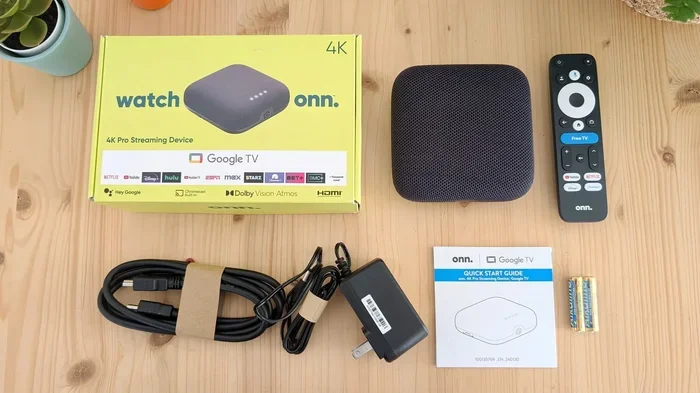
Devices like the Roku Ultra, Amazon Fire TV Stick 4K, and Apple TV 4K all support 4K streaming. These connect to your Wi-Fi network and pull content from the internet. They are affordable and easy to set up.
If you want to connect my laptop to TV wirelessly through a streaming stick, you can use screen mirroring features built into the device. These are best for content from apps and websites, not for mirroring your entire computer screen with zero delay.
Wireless Display Adapters
Wireless display adapters like the Microsoft Wireless Display Adapter or the Netgear Push2TV let you mirror your screen to any TV with an HDMI port. They work with both Windows and Android devices. These are handy for presentations and casual viewing.
For a more versatile option, consider using a Bluetooth adapter on my TV for audio, paired with a wireless video transmitter. This combination gives you both wireless video and wireless sound. It is a great way to upgrade an older TV without buying a new one.
Comparison Table: Wireless 4K Devices
- Wireless HDMI Kits: Best for full 4K with low latency, costs $100-$300, great for gaming and movies.
- Streaming Sticks/Boxes: Best for app-based 4K streaming, costs $30-$150, easy setup, needs Wi-Fi.
- Wireless Display Adapters: Best for screen mirroring, costs $40-$80, moderate quality, good for presentations.
- Built-in Smart TV Apps: No extra device needed, best quality when using native apps, limited to app content.
Wireless 4K for Gaming and Home Theater
Gamers and home theater fans have the highest standards for wireless 4K transmission. You need low latency, rich colors, and smooth frame rates. Let us look at what you need for each use case.
Wireless 4K Gaming
Can you game in 4K wirelessly? Yes, but there are trade-offs. Wireless 4K lag is the biggest concern for gamers. Even a small delay between your controller input and what appears on screen can make fast games frustrating.
For the best wireless gaming experience, use a dedicated wireless HDMI transmitter rather than Wi-Fi streaming. These devices are designed to minimize delay. Some models claim latency as low as one millisecond, which is nearly indistinguishable from a wired connection.
If you are playing slower games like puzzles or strategy games, Wi-Fi streaming works fine. But for competitive shooters or fighting games, a wired connection is still the safest bet. Consider using a wireless 4K adapter for casual gaming sessions where a few milliseconds of lag do not matter.
Home Theater Setups
For watching movies and TV shows, wireless 4K is fantastic. A wireless HDMI transmitter sends stunning picture quality to your projector or TV. You can place your media player in a different room if needed.
Many people use a 4K projector for a cinematic experience at home. Wireless transmission makes this even easier. You do not need to run a cable from the projector to your media center. Just set up a transmitter and receiver, and you are ready for movie night.
If you are using a projector in a different room, make sure your wireless Wi-Fi work anywhere setup has enough range. Walls and obstacles can weaken the signal. A mesh Wi-Fi system can help maintain a strong connection throughout your home.
Common Problems and How to Fix Them
Even with the best equipment, you might run into issues with wireless 4K transmission. Here are the most common problems and simple fixes.
Buffering and Stuttering
Buffering happens when your internet or local network cannot keep up with the data demand. For 4K streaming, you need at least 25 Mbps of stable internet speed. If your Wi-Fi signal is weak, move closer to your router or use a mesh network to extend coverage.
A quick fix is to reduce the number of devices using your network while streaming. Other devices downloading updates or streaming their own content can eat up your bandwidth. Give your 4K streaming device priority by using Quality of Service settings on your router.
Image Compression Artifacts
Some wireless devices compress the video signal to fit through the air. This can cause artifacts, which look like blocky or blurry patches in the image. Cheaper wireless 4K adapters are more likely to have this problem.
To avoid compression issues, invest in a reputable brand. Look for devices that support uncompressed or lightly compressed 4K transmission. Reading reviews before you buy can save you from a disappointing experience.
Connection Drops
If your wireless 4K connection keeps dropping, interference might be the cause. Other electronic devices, microwaves, and even neighboring Wi-Fi networks can interfere with your signal. Try changing your Wi-Fi channel or moving your router away from other electronics.
For wireless HDMI kits, make sure the transmitter and receiver have a clear line of sight. Walls and metal objects block radio signals. Placing the devices in open spaces helps maintain a stable connection.
Tips for Getting the Best Wireless 4K Experience
Want to get the most out of your wireless 4K setup? Follow these practical tips to enjoy the best picture quality and performance.
- Use a Wi-Fi 6 router: Wi-Fi 6 handles more data with less interference. It is ideal for wireless 4K streaming in busy households.
- Keep devices close: The closer your transmitter and receiver are, the stronger the signal. Try to keep them in the same room when possible.
- Update your firmware: Manufacturers release updates that improve performance and fix bugs. Check for updates regularly.
- Use a dedicated network: If possible, set up a separate Wi-Fi network just for streaming. This reduces congestion from other devices.
- Check your internet speed: Run a speed test before streaming. You want at least 25 Mbps for smooth 4K content. Use a wired ethernet connection for your source device if you can, and transmit the final signal wirelessly to the TV.
- Invest in quality equipment: A cheap wireless 4K adapter might save money upfront but cost you in quality and frustration. Choose trusted brands with good reviews.
These simple steps make a big difference. You will notice sharper images, smoother motion, and fewer connection problems. A little preparation goes a long way toward a great wireless 4K experience.
Final Thoughts on Wireless 4K Transmission
So, can you transmit 4k wirelessly? Absolutely. The technology is mature, affordable, and widely available. Whether you want to watch movies, stream shows, or even game in 4K Ultra HD, there is a wireless solution that fits your needs and budget.
From wireless HDMI transmitters to smart streaming sticks, you have many options. The key is choosing the right device for your specific use case. Casual streamers will be happy with a simple Wi-Fi setup. Gamers and home theater enthusiasts should invest in a dedicated wireless 4K adapter for the best results.
Keep in mind that wireless 4K lag and compression are real factors to consider. But with the right equipment and a strong network, these issues are manageable. The convenience of going cable-free is hard to beat. You can enjoy stunning 4K picture quality from almost anywhere in your home.
Start by assessing what you need. Do you want to connect my laptop to TV wirelessly for work and movies? A wireless display adapter will do the job. Do you want a cinematic experience with a projector? A wireless HDMI kit is the way to go. Whatever your goal, wireless 4K transmission makes it possible. Embrace the freedom of a cable-free setup and enjoy your 4K content the way it was meant to be seen.
Frequently Asked Questions
Can you transmit 4K wirelessly without losing quality?
Yes, you can transmit 4K wirelessly without noticeable quality loss if you use a good wireless HDMI transmitter or a strong Wi-Fi 6 network. Cheaper devices may compress the signal, which can reduce quality slightly. Investing in reputable brands helps preserve the full 4K resolution and color accuracy.
What is the best device for wireless 4K streaming?
The best device depends on your needs. For gaming and professional use, a wireless HDMI transmitter and receiver pair is the top choice. For casual streaming from apps, a Roku Ultra or Apple TV 4K works great. For screen mirroring, a wireless display adapter is the most affordable option.
Does wireless 4K have lag compared to wired connections?
Yes, wireless 4K lag exists but varies by device. High-end wireless HDMI kits claim latency under five milliseconds, which is barely noticeable. Wi-Fi streaming can have more delay, especially on congested networks. For competitive gaming, a wired connection is still preferable.
Can I use a wireless 4K setup for my projector?
Absolutely. Many people use a wireless HDMI transmitter to send 4K content to a projector without cables. Just make sure your projector has an HDMI input and that the transmitter and receiver are within range. A clear line of sight between the devices gives the best results.
How much bandwidth do I need for wireless 4K streaming?
For smooth 4K streaming, you need at least 25 Mbps of stable internet speed. For local wireless transmission within your home, a strong Wi-Fi signal and a modern router like a Wi-Fi 6 model make a big difference. Reducing other network activity while streaming also helps maintain quality.
Can I connect my laptop to a TV wirelessly for 4K playback?
Yes, you can connect my laptop to TV wirelessly for 4K playback using a wireless display adapter or a streaming stick. Make sure your laptop supports 4K output and your TV or display can receive it. For the best experience, use a device that supports 4K at 60Hz and has low compression.
=== CONCLUSION ===
Can you transmit 4k wirelessly? Yes, and now you know exactly how. From wireless HDMI kits to smart streaming devices, the options are vast and accessible. The key is matching the right device to your needs, whether that is casual movie watching, immersive gaming, or a full home theater setup.
Keep your network strong, choose quality equipment, and do not be afraid to experiment with different setups. The world of wireless 4K transmission is at your fingertips. Enjoy the freedom, the clarity, and the convenience of going completely cable-free with your 4K content today.