Can You Use A Projector Tv Without A Screen For Movies
Yes, you can use a projector TV without a screen for movies, but the viewing experience depends heavily on your wall color, ambient light, and projector brightness. A plain white wall works in a pinch, yet a proper projection surface dramatically improves image sharpness and color accuracy. This guide walks you through every option so you can enjoy projector movies without buying a dedicated screen.
You have a projector TV sitting in the living room, and tonight you want to watch a movie. But there is one problem: you do not have a screen. No worries. You can absolutely use a projector TV without a screen for movies, and thousands of people do it every day. The real question is not whether it works but how well it works and what you can do to make it better.
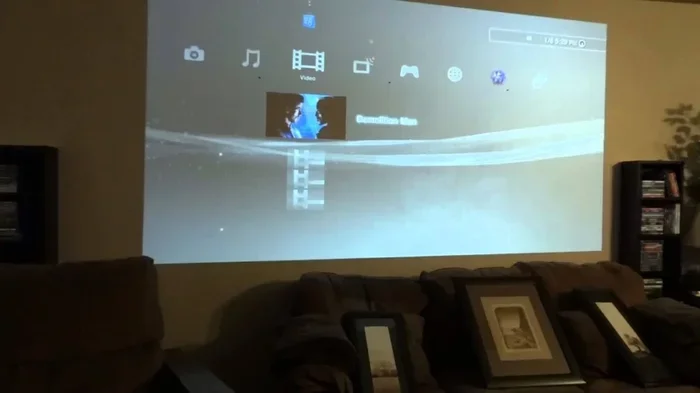
Using a projector without a screen is simpler than most people think. You can point the device at a blank wall, a hanging sheet, or even a large piece of cardboard. The image will appear, and you can start watching right away. However, the quality of that image depends on several factors that this guide will cover in full detail.
Whether you are a college student setting up a dorm room movie night or a homeowner looking for a quick home theater fix, this article has you covered. We will explore which surfaces work best, how to optimize your projector settings, and common mistakes that ruin the experience. By the end, you will know exactly how to get the best picture from your projector TV without spending a dime on a screen.
Key Takeaways
- A projector works without a screen: Any flat, light-colored surface can display an image, but results vary greatly.
- White walls are the cheapest option: They reflect light well but may lack the texture and gain of a proper screen.
- Brightness matters most: A higher-lumen projector compensates for the lack of a screen in rooms with ambient light.
- DIY screens are easy to make: Materials like blackout cloth or a white bedsheet can mimic a screen at minimal cost.
- Portable projectors excel at screenless setups: They are compact, easy to position, and perfect for impromptu movie nights.
- Avoid dark or textured walls: They absorb light and distort the projected image, making movies hard to watch.
📑 Table of Contents
- What Happens When You Project Without A Screen
- Best Surfaces For Projecting Without A Screen
- How To Optimize Your Projector For Screenless Viewing
- Portable Projectors: The Best Choice For Screen-Free Movies
- Common Mistakes When Using A Projector Without A Screen
- Screenless Projecting Vs Traditional Screen Setup
- Final Verdict
What Happens When You Project Without A Screen
When you turn on a projector and aim it at a bare wall, the light bounces off the surface and enters your eyes. That is essentially how a screen works too. The difference lies in how well that surface reflects light and maintains image quality. A dedicated screen is engineered to scatter light evenly, which keeps the picture bright and uniform from every angle.
A plain wall does not always do this as well. Depending on the paint color and texture, you may notice dull spots, uneven brightness, or a slight loss of contrast. In a dark room, these issues are less noticeable, and the image can still look great. But if there is any ambient light in the room, the lack of a proper screen becomes much more obvious.
Why Walls Are Not Perfect Projection Surfaces
Most walls are painted with matte or semi-gloss paint, which reflects light differently than a projection screen. Matte paint absorbs some of the light, which can make the image appear dimmer. Glossy paint creates hotspots, where certain areas of the image look much brighter than others. Neither of these is ideal for a cinematic experience.
Texture is another factor. If your wall has a rough or uneven surface, the projected image may look blurry or distorted. This is especially true for fine text and small details in movies. A smooth, flat surface is always better for projection, even if it is not a traditional screen.
Many people also ask whether they can use a projector instead of a TV for everyday viewing. The answer is yes, and the same principles apply. Without a screen, you are relying on whatever surface the projector light hits, so choosing wisely matters.
Best Surfaces For Projecting Without A Screen
Not all surfaces are created equal when it comes to projecting movies. Some give you surprisingly good results, while others will leave you disappointed. Here is a breakdown of the best options for a screenless projector setup.
White Walls
A flat, white wall is the most common and easiest surface to use. White reflects the most light, which keeps the image bright and colorful. If your wall is smooth and free of texture, you will get a decent picture that works well for casual movie watching.
The key is to make sure the wall is clean and free of any discoloration. A wall with a slight yellow tint can shift the colors of the projected image, making skin tones look odd and whites appear warm. If possible, use a wall that has been recently painted with a bright, matte white finish.
White Bed Sheets
Hanging a white bedsheet on the wall is a classic DIY projection trick. Sheets are smooth, light-colored, and easy to stretch flat. They work surprisingly well for a quick movie night with friends. The only downside is that sheets can wrinkle, which creates minor distortions in the image.
To get the best results, iron or steam the sheet before hanging it. Use clips or pins to keep it taut. A slightly wrinkled sheet is still far better than projecting onto a dark or textured wall.
Blackout Cloth
Blackout cloth is a favorite among home theater enthusiasts who want a screenless look. It is lightweight, smooth, and designed to block light, which means it also reflects projector light very evenly. You can hang it from a curtain rod or tack it to the wall for a clean, uniform projection surface.
Many people who enjoy outdoor movie projector setups use blackout cloth because it is portable and easy to store. You can set it up in the backyard, roll it up when done, and have it ready for the next movie night.
Projection Paint
Projection paint is a specialized paint that creates a permanent projection surface on any wall. It comes in white or gray and is designed to reflect light evenly across the entire surface. This is the best long-term solution if you plan to use your projector regularly without a screen.
Projection paint is more expensive than a bedsheet but far cheaper than buying a dedicated screen. A single can covers a large area, and the result looks professional. If you are serious about home theater projector setups, this is worth considering.
How To Optimize Your Projector For Screenless Viewing
Getting the best picture from a projector without a screen requires more than just pointing it at a wall. A few adjustments to your projector settings and room setup can make a huge difference in image quality.
Adjust Brightness And Contrast
Most projectors come with brightness and contrast settings that you can tweak. When projecting without a screen, bump up the brightness slightly to compensate for light absorption by the wall. Increase the contrast to make dark scenes more visible and colors more vivid.
Be careful not to push brightness too high, as this can wash out colors and make the image look unnatural. Find a sweet spot where the picture is bright enough to see clearly but still rich and detailed.
Control Ambient Light
Ambient light is the biggest enemy of screenless projection. Even a small amount of light from a window or lamp can reduce the perceived brightness of the projected image and lower contrast. The darker the room, the better your picture will look.
Close all curtains and blinds before starting a movie. Turn off unnecessary lights. If you must have some light, place it behind the viewers so it does not shine directly on the projection surface. This simple step can transform a mediocre picture into something that looks genuinely cinematic.
Position The Projector Correctly
Placement matters a lot when you do not have a screen to help focus the image. Center the projector directly in front of the wall to avoid keystone distortion. Keep the projector at the recommended throw distance, which you can find in the user manual or on the manufacturer website.
If your projector has keystone correction, use it sparingly. While it can fix a tilted image, it reduces overall sharpness. The best approach is to position the projector so the lens is perfectly level with the center of the wall.
Many people who enjoy portable projector setups find that placing the projector on a higher shelf or table helps achieve the right angle without distortion. Experiment with different heights and distances until the image fills the wall evenly.
Use The Right Input Source
The source you use to stream or play content also affects the experience. An HDMI projector connected to a streaming stick or laptop gives you the sharpest picture. Wireless options like casting from a phone work well too, but they can introduce slight delays or compression artifacts.
If you want to mirror your phone to the projector, you can mirror your iPhone to a projector using built-in screen mirroring or an adapter. For a more stable connection, plug in an HDMI cable from your device to the projector. Wired connections always deliver the best quality.
Portable Projectors: The Best Choice For Screen-Free Movies
Portable projectors have become incredibly popular in recent years, and for good reason. They are compact, lightweight, and designed to work anywhere, which makes them perfect for screenless setups. You can carry one to a friend’s house, set it up in a bedroom, or even use it outdoors.
Most portable projectors come with built-in batteries, speakers, and even smart operating systems. This means you do not need a separate screen, a laptop, or any extra cables to get started. Just power it on, load a movie, and start watching. The convenience factor alone makes them a great choice for anyone who wants to enjoy projector movies without the hassle of a traditional setup.
What To Look For In A Portable Projector
- Brightness: Look for at least 500 lumens for indoor use and 1000 lumens or more for outdoor or well-lit rooms.
- Resolution: A native 720p or 1080p resolution ensures the image looks sharp and detailed on any surface.
- Battery Life: A battery that lasts 2 to 3 hours is ideal for a full movie without needing a power outlet.
- Built-In Speakers: Good speakers save you from needing a separate audio setup, though connecting Bluetooth headphones or speakers improves the experience.
- Connectivity: HDMI, USB, and Wi-Fi connectivity give you flexibility in how you source your content.
Some portable projectors also support streaming apps directly, so you can watch content without any external device. This makes them an excellent choice for casual viewing when you do not want to deal with cables or extra equipment.
Common Mistakes When Using A Projector Without A Screen
Going screenless with a projector is easy, but there are several common mistakes that can ruin the experience. Avoid these pitfalls to get the best possible picture.
Choosing The Wrong Wall Color
This is the number one mistake people make. Dark walls absorb projector light and produce a dim, washed-out image. Gray or tan walls may look fine in daylight but turn muddy in a dark room. Always choose the lightest, smoothest wall available for the best results.
Ignoring Room Temperature And Ventilation
Projectors generate heat, and without proper ventilation, they can overheat and shut down. This is especially true for portable models that are used in enclosed spaces. Make sure there is airflow around the projector, and never place it on a soft surface like a bed or couch that can block the vents.
Some users wonder if they can replace a projector lamp with an LED to save money and extend the life of their device. LED projectors run cooler and last longer, which makes them a great fit for screenless setups where ventilation may be limited.
Forgetting About Audio Quality
Projector built-in speakers are small and often lack depth. When you are watching a movie without a screen, the audio can feel even more underwhelming because your focus is already on a wall instead of a proper display. Consider pairing your projector with external speakers or a soundbar for a more immersive experience.
A simple Bluetooth speaker can make a massive difference in how your movies sound. Just make sure your projector supports Bluetooth connectivity, or use a wired connection for the best audio quality.
Not Testing The Setup Before Movie Night
Do not wait until your friends arrive to discover that the image is blurry, too dim, or distorted. Test your entire setup beforehand. Adjust the focus, check the keystone, and make sure the source device is working properly. A quick five-minute test saves a lot of frustration later.
Screenless Projecting Vs Traditional Screen Setup
You might be wondering how a screenless setup compares to using a proper projection screen. Here is a quick comparison to help you decide which approach works best for your situation.
| Factor | Without A Screen | With A Screen |
|---|---|---|
| Cost | Free or very low | $50 to $500+ |
| Setup Time | Minutes | 10 to 30 minutes |
| Image Quality | Good to fair | Excellent |
| Portability | Highly portable | Less portable |
| Color Accuracy | Depends on wall | Consistent and vibrant |
| Ambient Light Handling | Poor to moderate | Good to excellent |
| Best For | Casual viewing, travel, dorms | Dedicated home theater |
As you can see, projecting without a screen is not perfect, but it is incredibly convenient and affordable. If you only watch movies occasionally or need a quick setup for a gathering, a screenless approach works wonderfully. For a dedicated home theater with daily use, a proper screen is still the better long-term investment.
Final Verdict
So, can you use a projector TV without a screen for movies? Absolutely. You have several surfaces to choose from, ranging from a simple white wall to a DIY blackout cloth setup. The image quality will not match a dedicated screen, but with the right wall, proper projector settings, and a dark room, you can enjoy a surprisingly cinematic experience at no extra cost.
If you are just getting started, start with whatever flat, light-colored surface you have available. Experiment with projector placement and settings until you find the sweet spot. As you get more comfortable, you can try DIY solutions like projection paint or a stretched bedsheet for even better results.
The beauty of a screenless projector setup is its simplicity and flexibility. You do not need to mount anything, buy extra equipment, or commit to a permanent installation. Just set up, press play, and enjoy your movie. Whether you are streaming with a Roku, casting from a phone, or plugging in a laptop, the experience can be genuinely enjoyable without a traditional screen.
Give it a try tonight. Pop some popcorn, dim the lights, and see how good your projector can look without a screen. You might be surprised at how cinematic the experience really is.
Frequently Asked Questions
Can I project a movie on any wall?
You can project on most walls, but the best results come from a flat, white, smooth surface. Dark or textured walls will absorb light and distort the image, making the movie harder to watch.
Do I need a special projector to use it without a screen?
No, any projector can work without a screen. However, a brighter projector with higher lumens will produce a clearer and more visible image on a wall, especially in rooms with some ambient light.
Is a white bedsheet really good enough for projection?
Yes, a white bedsheet works well as a DIY projection surface. Stretch it tightly to reduce wrinkles, and iron it beforehand for the smoothest possible image. It is one of the easiest and cheapest screen alternatives.
What is the best room setup for screenless projector viewing?
A dark room with no windows or covered windows gives you the best results. Turn off all lights, close curtains, and position the projector directly in front of the wall at the recommended throw distance for a sharp, bright image.
Can I use a projector without a screen outdoors?
Yes, you can project outdoors without a screen by aiming the projector at a white wall, fence, or a stretched bedsheet. For the best outdoor results, use a portable projector with high brightness and set up after sunset when there is no sunlight interfering.
Will projecting without a screen damage the projector?
No, projecting without a screen will not damage your projector. The light simply bounces off the wall and enters your eyes. Just make sure the projector has proper ventilation and is not placed on a surface that blocks its air vents.