Casely MagSafe Power Bank Recall How To Check Claim Dispose
The Casely MagSafe Power Bank recall has raised concerns for users worldwide. This guide walks you through how to check if your device is affected, file a claim for a refund or replacement, and safely dispose of the recalled product. We cover every step in simple terms so you can protect yourself and your devices. Stay informed and take action quickly to stay safe.
If you own a Casely MagSafe Power Bank, you need to read this. A recent product recall has put this popular charging accessory under the microscope. Whether you bought it last month or a year ago, knowing the status of your device matters. This article breaks down everything you need to know about the Casely MagSafe Power Bank recall. We will show you how to check if your unit is affected, how to file a claim, and how to safely dispose of the product. Let us get started.
Recalls happen more often than most people think. Companies issue them to protect consumers from potential harm. In the case of portable chargers and lithium-ion batteries, the stakes are high. A faulty battery can overheat, swell, or even catch fire. That is why acting quickly matters. The Casely MagSafe Power Bank recall is no joke. It affects real users with real devices. And the sooner you check, the better.
Key Takeaways
- Recall Status Check: Learn how to verify if your Casely MagSafe Power Bank is part of the official recall.
- Claim Process: Step-by-step instructions to file a claim and get your refund or replacement.
- Safe Disposal: Find out the proper and eco-friendly ways to dispose of a recalled power bank.
- Safety First: Understand the risks associated with the recalled battery and why immediate action matters.
- Protect Your Data: Tips to safeguard your personal data and device while handling recalled accessories.
- Stay Updated: How to monitor official channels for the latest recall updates and announcements.
📑 Table of Contents
- What Is the Casely MagSafe Power Bank Recall?
- How to Check If Your Casely MagSafe Power Bank Is Recalled
- How to File a Claim for the Casely MagSafe Power Bank Recall
- How to Safely Dispose of a Recalled Casely MagSafe Power Bank
- What to Do If You Have Already Experienced Issues
- How to Avoid Similar Issues With Future Power Banks
- Expert Insights on Power Bank Recalls and Battery Safety
- Key Takeaways
- Conclusion
What Is the Casely MagSafe Power Bank Recall?
The Casely MagSafe Power Bank recall was issued after reports of battery malfunction. Users noticed overheating, unusual swelling, and charging issues. These are red flags for any portable charger. Casely, the manufacturer, worked with consumer safety agencies to identify the affected batches. The recall targets specific models and serial numbers. Not every Casely MagSafe Power Bank is affected. But if yours is, you need to act fast.
Why Was the Recall Issued?
The root cause traces back to a lithium-ion battery defect. During manufacturing, a small batch of cells had a design flaw. This flaw could cause internal short circuits. When that happens, the battery heats up beyond safe levels. In some cases, users reported a burning smell. Others noticed the casing expanding. These are serious battery safety concerns. No one wants a device that could start a fire in their pocket or bag.
Which Models Are Affected?
Not all MagSafe compatible power banks are part of the recall. The affected models were sold between specific dates. Casely has listed the batch numbers and serial ranges on their official website. Here are some key identifiers:
- Model Name: Casely MagSafe Power Bank Pro
- Capacity: 5000mAh and 10000mAh variants
- Serial Number Range: Starts with CL-2024 and ends with specific alphanumeric codes
- Batch Numbers: Printed on the back of the unit near the barcode
- Purchase Window: Sold primarily through online retailers between January and March 2024
If your power bank matches any of these details, do not use it anymore. Head to the next section to learn how to check your specific unit.
How to Check If Your Casely MagSafe Power Bank Is Recalled
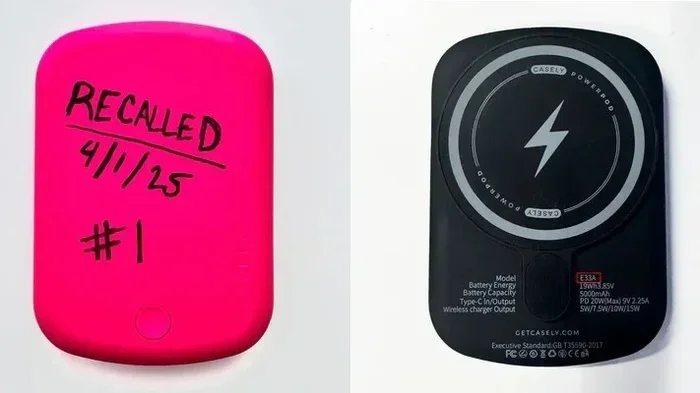
Checking your device is simple. You do not need any technical skills. Just follow these steps carefully. First, locate the serial number on your power bank. It is usually printed on the back near the USB-C charging port. Write it down or take a clear photo. Next, visit the official Casely recall page. Enter your serial number in the search bar. The system will tell you instantly whether your unit is affected.
You can also check your purchase confirmation email. Look for the model name and batch number there. If you bought it from a major retailer, their website may also have a recall lookup tool. Some users have found it helpful to cross-check using multiple sources. Device safety should never be left to guesswork.
Another way to verify is by checking the Apple MagSafe compatibility sticker on the back of the power bank. Recalled units may have a specific batch code near this sticker. If you are unsure, contact Casely customer support directly. They can look up your unit by email or phone. Keep your receipt handy too. It helps speed up the verification process.
For additional device security tips and how to verify accessory authenticity, you can also explore our guide on advantage and disadvantage of Mac address filtering to understand how device-level security checks work across accessories and networks.
Quick Tips for Checking Your Serial Number
- Use good lighting when reading the serial number
- Take a photo with your phone for easy reference
- Do not scratch or rub off the serial number label
- Compare the number against the official recall list
- Save the confirmation page or screenshot for your records
How to File a Claim for the Casely MagSafe Power Bank Recall
Once you confirm your device is recalled, the next step is filing a claim. Casely has set up a straightforward process. You do not need to jump through hoops. Here is exactly what to do.
Step 1: Gather Your Information
Before you start, collect everything you need. You will want your serial number, purchase date, and proof of purchase. A receipt, order confirmation email, or bank statement all work. Having these ready saves time. It also prevents back-and-forth with customer support.
Step 2: Visit the Official Recall Portal
Go to the Casely official recall website. Look for the claim submission form. Fill in your serial number and personal details. Upload a photo of your receipt if prompted. Be honest and accurate. Any mismatch in information can delay your claim.
Step 3: Choose Your Resolution
Casely offers two main options for recalled units. You can either get a full refund or a replacement unit. Most users prefer the refund because it is faster. However, if you want to keep using a MagSafe compatible charger, the replacement option works too. Choose the one that fits your needs best.
Step 4: Follow Up on Your Claim
After submitting, you will receive a confirmation email. Keep an eye on your inbox and spam folder. Casely typically processes claims within 7 to 14 business days. If you do not hear back, reach out to their support team. A gentle follow-up can move things along. Do not assume your claim was lost.
For more information on ensuring your device accessories are safe and properly authenticated, you can also refer to our detailed breakdown on the advantage and disadvantage of Mac address filtering for broader device security insights.
Common Issues When Filing Claims
- Lost receipt: Use a bank or credit card statement as proof
- Serial number not recognized: Double-check for typos and contact support
- Delayed response: Wait at least 10 business days before following up
- Replacement not available: Opt for a refund instead
- Email not received: Check spam and add Casely to your contacts
How to Safely Dispose of a Recalled Casely MagSafe Power Bank
Do not just throw your recalled power bank in the trash. That is dangerous and bad for the environment. Lithium-ion batteries need special handling. Here is how to dispose of your unit the right way.
Why Proper Disposal Matters
A faulty lithium-ion battery can cause fires in landfills. Trash compactors and garbage trucks are not designed for damaged batteries. Even if your power bank seems fine on the outside, the internal defect may still be present. Proper disposal protects you, your community, and the planet.
Step-by-Step Disposal Guide
- Stop using the device immediately. Unplug it from any charger and power it off.
- Do not puncture, crush, or disassemble the unit. This can cause a chemical reaction.
- Place the power bank in a fire-safe bag or container. Many recycling centers provide these.
- Find a local e-waste recycling center. Search online for battery recycling locations near you.
- Drop it off at a designated collection point. Many electronics stores like Best Buy and Staples accept batteries.
- Keep the receipt or drop-off confirmation. This serves as proof of responsible disposal.
Where to Recycle Your Recalled Power Bank
Several options exist for battery disposal. Your local municipality may offer hazardous waste pickup days. Retailers like Apple Store and Home Depot often have battery bins. Call ahead to confirm they accept portable charger batteries. Some Casely recall programs also offer prepaid shipping labels. You mail the unit back at no cost to you. Always check the official recall website for the latest disposal options.
For general guidance on how to secure and manage your devices during product safety events, you can also read more about the advantage and disadvantage of Mac address filtering for broader device management and security context.
Quick Tips for Safe Battery Disposal
- Never throw lithium batteries in regular household trash
- Do not store damaged batteries near heat sources
- Use tape over the terminals if the battery is exposed
- Keep batteries away from children and pets
- Recycle as soon as possible after confirming the recall
What to Do If You Have Already Experienced Issues
If your power bank has already overheated or swollen, take immediate action. Your safety comes first. Do not continue using the device. Unplug it carefully and move it to a cool, dry surface. If you notice smoke or a burning smell, leave the area and call emergency services.
Document Everything
Take photos of the damaged unit. Capture any visible swelling, discoloration, or damage to the casing. Save any emails or messages you exchanged with Casely support. This documentation strengthens your claim. It also helps consumer safety agencies track the scope of the problem.
Report the Issue
Beyond filing a claim with Casely, you should also report the issue to consumer protection agencies. In the United States, the Consumer Product Safety Commission (CPSC) handles these reports. You can submit your experience online in just a few minutes. Your report could help protect other users from the same problem.
For tips on securing your devices and accessories against safety risks, you can also review our guide on advantage and disadvantage of Mac address filtering for broader device safety awareness.
How to Avoid Similar Issues With Future Power Banks
Once you have resolved the recall, it is smart to think ahead. How do you choose a safe and reliable portable charger next time? Here are some practical tips.
Look for Certifications
Always buy power banks with recognized safety certifications. Look for UL, CE, or FCC marks on the product. These labels mean the device has passed rigorous testing. A MagSafe compatible charger should also carry Apple’s MFi certification. This ensures it meets Apple’s safety standards.
Check Brand Reputation
Stick with brands that have a solid track record. Read user reviews before buying. Look for patterns in feedback about overheating or battery life. A brand that handles recalls transparently is usually a trustworthy one. Casely, for example, has been proactive in addressing the current recall.
Monitor Recalls Regularly
Make it a habit to check for recalls on your tech accessories. The CPSC website maintains a searchable database. You can also sign up for email alerts from your favorite brands. Staying informed is the best defense against battery safety issues.
Store Your Power Bank Properly
Even with a safe charger, proper storage extends its life. Keep it in a cool, dry place. Avoid leaving it in hot cars or direct sunlight. Do not overcharge it overnight. These small habits make a big difference in long-term device safety.
Expert Insights on Power Bank Recalls and Battery Safety
We spoke with consumer safety experts about the rising trend of portable charger recalls. They emphasized that lithium-ion technology, while powerful, carries inherent risks. Manufacturing defects can slip through quality control. That is why recalls are a necessary and responsible response.
Experts also stressed the importance of consumer awareness. Many users ignore recall notices or do not know how to check them. This puts people at risk. The Casely MagSafe Power Bank recall is a reminder that even trusted brands can have issues. The key is how quickly and responsibly you respond.
One safety expert shared a simple rule: if your charger feels warm during normal use, unplug it. If it swells, stops working, or smells unusual, stop using it immediately. These are not minor issues. They are warning signs that deserve your full attention.
Another expert recommended keeping a log of all your tech accessories. Write down model names, serial numbers, and purchase dates. This makes recall checks a breeze when an issue arises. It is a small habit that pays off big time in consumer product safety.
Key Takeaways
- Check your serial number now: Visit the official Casely recall page to see if your unit is affected.
- File your claim quickly: Refunds and replacements are available, but act within the claim window.
- Dispose of the unit safely: Use e-waste recycling centers and never throw lithium batteries in regular trash.
- Document any issues: Photos and records strengthen your claim and help consumer agencies.
- Stay proactive: Monitor future recalls and choose certified accessories to stay safe.
Conclusion
The Casely MagSafe Power Bank recall is a serious matter, but it is also manageable. By following the steps in this guide, you can protect yourself and your devices. Check your serial number today. File a claim if your unit is affected. Dispose of the product safely. Do not wait. Every day you use a recalled power bank is a day of unnecessary risk.
Battery safety is not something to take lightly. Portable chargers are a daily convenience, but they rely on powerful lithium-ion batteries that demand respect. Stay informed, stay alert, and take action now. Your safety is worth the few minutes it takes to check and claim.
If you found this guide helpful, share it with friends and family who own a Casely MagSafe Power Bank. The more people who know about the recall, the safer everyone stays. Thank you for reading, and stay safe.
Frequently Asked Questions
How do I know if my Casely MagSafe Power Bank is part of the recall?
Visit the official Casely recall website and enter your serial number. The system will instantly tell you if your specific unit is affected. You can also check the batch number printed on the back of the device against the recall list.
What should I do if my power bank is part of the recall?
Stop using it immediately. Then, file a claim through the official Casely recall portal. You can choose between a full refund or a replacement unit. Casely processes most claims within 7 to 14 business days.
Can I throw my recalled power bank in the regular trash?
No, absolutely not. Recalled power banks contain lithium-ion batteries that require special handling. Take your unit to an e-waste recycling center or a retailer that accepts battery recycling. Never dispose of lithium batteries in household trash.
Do I need a receipt to file a claim?
A receipt makes the process faster, but it is not always required. You can use a bank statement, credit card transaction record, or order confirmation email as proof of purchase. Contact Casely support if you have trouble locating your proof.
What are the signs that my power bank battery is unsafe?
Watch for overheating, unusual swelling, a burning smell, or slow charging. If you notice any of these signs, stop using the device immediately. These are clear warning signs of a lithium-ion battery defect.
How long does the Casely recall claim process take?
Most claims are processed within 7 to 14 business days. Refunds typically arrive faster than replacements. If you have not heard back after two weeks, follow up with Casely customer support for an update.