Complete Cobra Microtalk Instructions and Setup Guide
This guide covers everything you need to know about Cobra Microtalk instructions, from unboxing and setup to programming channels and troubleshooting common issues. Whether you are new to two-way radios or looking to fine-tune your existing device, these step-by-step walkthroughs make the process easy. You will learn how to set up your radio, change channels, adjust privacy codes, and use advanced features like VOX and NOAA weather alerts. By the end, you will feel confident using your Cobra Microtalk for clear, reliable communication every time.
If you just got a Cobra Microtalk and are not sure where to start, you are in the right place. Setting up a new walkie talkie can feel confusing at first. There are buttons, menus, and settings that seem like they belong in a spaceship. But here is the good news. Cobra Microtalk instructions are simpler than they look once you know what to do. This guide walks you through every step with clear, plain language. You will learn how to charge your radio, program channels, set privacy codes, and use cool features like hands-free operation. By the time you finish reading, you will be communicating like a pro.
Two-way radios like the Cobra Microtalk are perfect for camping trips, family events, construction sites, and emergency preparedness. They work without cell towers or Wi-Fi. That makes them incredibly reliable when other communication methods fail. But to get the best experience, you need to set things up correctly. Cobra Microtalk setup is the foundation of everything that follows. When you get the setup right, your radio will work beautifully every single time. So let us dive in and make sure you are fully prepared.
Key Takeaways
- Easy Setup: Setting up your Cobra Microtalk takes only a few minutes with our step-by-step guide.
- Channel Programming: You can quickly program FRS and GMRS channels for clear communication.
- Privacy Codes: Using privacy codes helps keep your conversations private and free from interference.
- Advanced Features: Features like VOX hands-free operation and NOAA weather alerts add real value.
- Troubleshooting: Most common issues can be fixed quickly with simple resets or adjustments.
- Range Tips: Proper positioning and settings help you maximize your walkie talkie range.
📑 Table of Contents
Understanding Your Cobra Microtalk Radio
What Makes the Cobra Microtalk Special
The Cobra Microtalk belongs to a family of compact handheld radios designed for everyday use. These radios are small enough to clip onto a belt or slip into a pocket. Despite their size, they deliver surprisingly strong performance. Most models in the Microtalk line support both FRS and GMRS frequencies. This means you get access to a wide range of channels and communication distances. Unlike cheap toy walkie talkies, Cobra radios are built with real quality and durability in mind.
What sets the Cobra Microtalk apart from other handheld radios? First, the design is user-friendly. The buttons are large and clearly labeled. The display screen, where present, shows channel numbers and signal strength at a glance. Second, the build quality is solid. These radios can handle being dropped, jostled around in a backpack, or exposed to light rain. Third, the battery life is impressive. A full charge can last through an entire day of heavy use. This makes Cobra Microtalk instructions worth learning because the radio is built to perform when you need it most.
Key Features at a Glance
Before we jump into setup, here is a quick look at what your Cobra Microtalk likely includes:
- Multiple FRS and GMRS channel options
- Privacy codes to reduce interference
- VOX hands-free voice activation
- NOAA weather alert reception
- Built-in LED flashlight on some models
- Rechargeable battery with USB charging
- Compact, lightweight design for portability
- Clear audio output even in noisy environments
Knowing these features helps you understand what you are working with. Each one plays a role in getting the best experience from your radio. Now let us move on to the actual setup process.
Step-by-Step Cobra Microtalk Setup Instructions
Unboxing and Initial Setup
When you open the box, you will typically find the radio, a charging cable, a user manual, and sometimes a belt clip or earpiece. Before you do anything else, inspect all the items. Make sure nothing is damaged from shipping. Next, charge your radio fully before the first use. Even if the battery indicator shows some charge, a full charge helps calibrate the battery properly. This is one of the most overlooked steps in Cobra Microtalk instructions, and it makes a big difference in long-term battery health.
Once the radio is charged, press and hold the power button for a few seconds. The screen will light up, and you will see the default channel displayed. Most Cobra Microtalk models start on channel 1 or channel 21. This is your starting point. From here, you can explore the menu and adjust settings to match your needs.
Charging Your Radio Properly
Proper charging extends the life of your radio significantly. Use only the USB cable that came with the unit or a compatible charger. Avoid using cheap, no-name chargers because they can damage the battery over time. When the charging light turns green, your radio is fully charged. Do not leave it plugged in for days at a time. Unplug it once charging is complete. If you are storing the radio for a long period, keep the battery at about 50 percent charge.
A quick tip: charge your radio the night before a big trip. You want a full battery when you need it most. This simple habit is part of every good Cobra radio setup routine.
Turning On and Basic Navigation
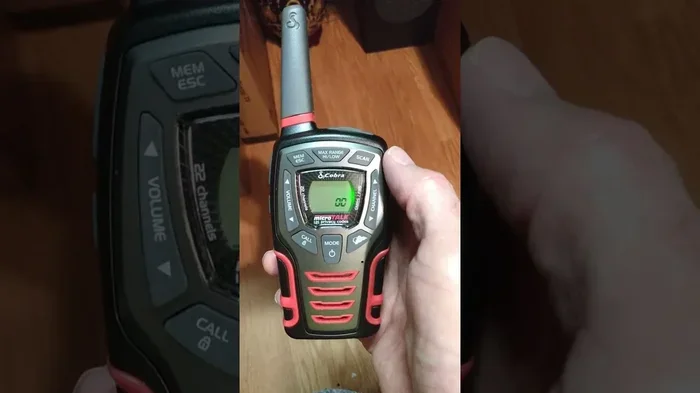
Press the power button to turn the radio on. You will hear a short beep and see the current channel on the display. Use the up and down buttons to scroll through available channels. The side buttons often control volume and menu access. Each Cobra Microtalk model has a slightly different layout, but the basic controls are very similar across the lineup.
Take a few minutes to just explore the menu while you are at home. Press each button gently and see what happens. This hands-on exploration helps you learn the layout without pressure. When you are out in the field, you will already know where everything is. That confidence makes a huge difference in how smoothly your walkie talkie setup goes.
Programming Channels and Frequencies
Understanding FRS and GMRS Channels
One of the most important parts of Cobra Microtalk instructions involves understanding channels. FRS stands for Family Radio Service, and GMRS stands for General Mobile Radio Service. FRS channels are available for everyone without a license. GMRS channels require a license from the FCC, but they offer longer range and more power. Most Cobra Microtalk models support both, giving you flexibility depending on your needs.
FRS channels work great for short-range communication, typically up to 2 miles in open terrain. GMRS channels can reach further, sometimes 5 miles or more, depending on the model and conditions. For family outings and casual use, FRS channels are usually enough. For business or longer-distance needs, GMRS is the better choice. Always check local regulations before using GMRS frequencies.
How to Change Channels on Your Cobra Microtalk
Changing channels is straightforward. Follow these simple steps:
- Press the menu button to enter the channel settings.
- Use the up and down arrows to scroll through channels.
- Select the channel you want by pressing the OK or Enter button.
- Exit the menu by pressing the back or menu button again.
That is it. Your radio is now tuned to the new channel. Make sure both radios you are using are set to the same channel and the same privacy code. If they are not matched, you will not hear each other. This is one of the most common mistakes people make when setting up two-way radio communication. Always double-check both devices before you need to use them.
Setting Privacy Codes for Private Conversations
Privacy codes, also called CTCSS or DCS codes, act like a secret filter on your channel. Even if you and your neighbor are both on channel 1, different privacy codes keep your conversations separate. Think of it like a private phone line. Only radios set to the same code will hear your transmission.
To set a privacy code on your Cobra Microtalk, go into the menu and look for the privacy code or CTCSS option. You will see a list of numbers, usually from 1 to 38 for CTCSS or 1 to 83 for DCS. Pick a number and set it on both radios. This simple step dramatically reduces the noise and interference you hear from other users on the same channel. It is one of the best features of Cobra radio programming and makes a real difference in clarity.
Advanced Features and Settings
Adjusting Volume and Squelch Settings
The volume control on your Cobra Microtalk is easy to find, usually a large button on the side. Press up to increase volume and down to decrease it. But there is another setting that matters just as much: the squelch. Squelch controls how sensitive the radio is to incoming signals. If the squelch is too low, you will hear a lot of static. If it is too high, you might miss quiet transmissions.
To adjust squelch, look for the squelch knob or menu setting. Turn it slowly until the static disappears but you can still hear incoming calls clearly. Finding the right squelch level takes a little practice, but it is worth the effort. Proper squelch settings make your walkie talkie instructions experience much more pleasant and professional.
Using VOX for Hands-Free Operation
VOX stands for Voice Operated Exchange. This feature lets you transmit without pressing a button. When you speak, the radio automatically starts broadcasting. When you stop talking, it switches back to receiving mode. This is incredibly useful when your hands are busy, such as when you are carrying gear, cooking food, or tending to children.
To enable VOX, go into the settings menu and find the VOX option. Turn it on and adjust the sensitivity level. Start with a medium setting and test it out. If the radio keeps turning on by itself from background noise, lower the sensitivity. If it does not pick up your voice, raise it. Cobra Microtalk setup is not complete until you have tested VOX in your actual environment. Different settings work better in quiet rooms versus windy outdoor conditions.
Setting Up NOAA Weather Alerts
Many Cobra Microtalk models include NOAA weather radio capability. This feature receives real-time weather alerts from the National Oceanic and Atmospheric Administration. During storms, hurricanes, or other severe weather events, these alerts can be lifesaving. They work even when cell phone networks are down.
To set up weather alerts, enter the menu and look for the NOAA or weather option. Select your nearest weather station frequency. The radio will automatically alert you when a weather warning is issued for your area. Keep this feature enabled, especially during outdoor trips. It is one of the reasons Cobra Microtalk instructions are so valuable to learn. The weather alert function adds a layer of safety that many people do not even know about.
Common Troubleshooting Tips
Radio Not Turning On
If your Cobra Microtalk will not turn on, the first thing to check is the battery. Connect the charging cable and let it charge for at least 30 minutes before trying again. Sometimes the battery is completely drained and needs a bit of time before it will power on. If the charging light does not come on, try a different USB cable or wall adapter. A faulty cable is a surprisingly common culprit.
If the battery and cable are fine, try a hard reset. Look for a small reset pinhole on the radio. Use a paperclip to gently press the button inside for about 5 seconds. This resets the internal electronics and often fixes frozen or unresponsive radios. This trick is one of the most helpful pieces of Cobra radio troubleshooting advice you can know.
Poor Signal or Static Issues
Static and poor signal quality are frustrating but usually easy to fix. Start by checking that both radios are on the same channel and privacy code. Next, check your squelch setting and adjust it if needed. If you are in a wooded area or near tall buildings, the signal may be blocked. Move to higher ground or an open area for better results.
Another common cause of static is a low battery. When the battery drops below 20 percent, signal quality can degrade noticeably. Charge your radio fully and test again. If static persists, try switching to a different channel. Some channels are simply more congested in certain areas. Keeping a list of your best channels for different locations is a smart practice for anyone serious about two-way radio communication.
Resetting Your Cobra Microtalk
A factory reset wipes all your custom settings and returns the radio to its original state. This is helpful when you have made changes that broke something or when you are selling or giving away the radio. To reset, go to the menu and find the reset or factory default option. Confirm the reset, and the radio will restart with all original settings restored.
After a reset, you will need to reprogram your channels and privacy codes. Keep a written list of your preferred settings so you do not have to start from scratch next time. This is a great habit that saves a lot of frustration with Cobra Microtalk instructions down the road.
Getting the Most Out of Your Cobra Microtalk
Best Practices for Clear Communication
Clear communication on your walkie talkie depends on a few simple habits. First, hold the radio about 2 inches from your mouth when speaking. This ensures the microphone picks up your voice clearly. Second, speak at a steady pace. Do not shout or whisper. A normal, calm speaking voice works best. Third, wait a moment after pressing the transmit button before you start talking. There is a short delay before the radio fully transmits.
Another tip is to use clear, simple language. Avoid slang or code words that the other person might not understand. Say things like “over” when you are finished speaking, so the other person knows they can respond. These small habits make a big difference in the quality of your two-way radio communication.
Extending Your Radio’s Range
The range of your Cobra Microtalk depends on several factors. Open terrain with no obstructions gives you the best range. Forests, hills, and buildings reduce the distance significantly. To get the most out of your radio, try to keep it at a higher elevation. Standing on a hill or going to the roof of a building can extend your range considerably.
You can also improve range by keeping the antenna fully extended at all times. Bending or shortening the antenna weakens the signal. If you are using multiple radios, make sure they are all set to the same channel and privacy code. A little attention to these details goes a long way toward improving your walkie talkie range and overall experience.
Maintenance Tips for Longevity
Taking care of your Cobra Microtalk helps it last for years. Clean the contacts on the battery and charger periodically with a dry cloth. Store the radio in a cool, dry place when not in use. Avoid exposing it to extreme heat or direct sunlight for long periods. If the radio gets wet, dry it thoroughly before charging. A little regular maintenance keeps your radio performing at its best and ensures your Cobra radio setup continues to work reliably whenever you need it.
Another maintenance tip is to update your knowledge of your specific model. Cobra occasionally releases firmware updates or publishes new Cobra Microtalk instructions on their website. Checking for updates periodically ensures you are using the latest features and improvements. It is a small effort that pays off in better performance and fewer headaches over time.
Conclusion
Learning Cobra Microtalk instructions does not have to be complicated. With the right guide, anyone can set up their radio, program channels, and start communicating clearly in just minutes. This guide has covered everything from the basics of unboxing and charging to advanced features like VOX and NOAA weather alerts. You now have the knowledge to troubleshoot common problems and get the best performance from your device.
The key to mastering your Cobra Microtalk is practice. Spend some time at home exploring the settings and testing the range in your neighborhood. Once you are comfortable, you will wonder how you ever managed without a reliable two-way radio. Keep this guide handy for reference, and do not hesitate to revisit the setup steps whenever needed. With your Cobra Microtalk properly configured, you are ready for clear, dependable communication in any situation.
Frequently Asked Questions
How do I set up my Cobra Microtalk for the first time?
Start by fully charging the radio using the included USB cable. Once charged, press and hold the power button to turn it on. Use the menu buttons to select your preferred channel and set a privacy code. Both radios you plan to communicate with must be on the same channel and privacy code for best results.
What is the difference between FRS and GMRS channels on the Cobra Microtalk?
FRS channels do not require a license and are best for short-range communication up to about 2 miles. GMRS channels require an FCC license but offer longer range and higher power. Most Cobra Microtalk models support both, giving you flexibility for different communication needs.
Why is my Cobra Microtalk producing static noise?
Static is usually caused by mismatched channel or privacy code settings between radios. Check that both devices are on the same channel and code. Also try adjusting the squelch setting or moving to a location with fewer obstructions. A low battery can also cause static, so make sure your radio is fully charged.
Can I use VOX mode with my Cobra Microtalk?
Yes, most Cobra Microtalk models support VOX hands-free operation. Go to the settings menu, find the VOX option, and turn it on. Adjust the sensitivity level to match your environment. Test it in a quiet room first, then fine-tune for outdoor use where wind noise may affect performance.
How do I reset my Cobra Microtalk to factory settings?
Navigate to the menu and look for the reset or factory default option. Confirm the reset, and the radio will restart with all original settings restored. After a reset, you will need to reprogram your channels and privacy codes. It is a good idea to write down your preferred settings beforehand.
What should I do if my Cobra Microtalk will not turn on?
First, connect the radio to the charger and let it charge for at least 30 minutes. If it still does not turn on, try a different USB cable or wall adapter. If those steps do not work, use a paperclip to press the small reset pinhole on the radio for about 5 seconds. This hard reset often resolves freezing or unresponsive issues.
=== CONCLUSION ===
Cobra Microtalk instructions become easy once you understand the basic steps and features covered in this guide. From initial charging and channel programming to advanced settings like VOX and weather alerts, you now have everything you need to use your radio with confidence. The key is to practice, explore the settings, and keep your radio well-maintained. With a properly set up Cobra Microtalk, reliable communication is always within reach. Start applying these tips today and enjoy clear, dependable two-way radio communication wherever you go.