Computer Hand Tools For Better Precision And Control
Computer hand tools are essential for anyone who builds, repairs, or upgrades PCs. The right tools give you better precision and control when working with delicate components. This guide covers the top tools you need, how to pick them, and how to use them safely.
If you have ever built a PC or opened one up for repairs, you know how important the right tools are. Computer hand tools make the difference between a smooth build and a frustrating experience. They give you the precision and control you need to handle tiny parts safely.
Whether you are a beginner or a seasoned tech enthusiast, having the right computer hand tools in your kit is a game changer. In this guide, we will walk you through every tool you need, how to choose the best ones, and how to use them without damaging your gear. Let us get into it.
Key Takeaways
- Quality tools matter: Using the right computer hand tools prevents damage to sensitive parts.
- ESD safety is critical: Always use anti-static gear to protect your components.
- A basic kit covers most needs: You do not need dozens of tools to get started.
- Maintenance extends tool life: Clean and store your tools properly for long-term use.
- Wrong tools cause problems: Avoid common mistakes like using the wrong size screwdriver.
- Precision makes the difference: Fine-tipped tools help you work on tiny motherboard parts.
📑 Table of Contents
What Are Computer Hand Tools?
Computer hand tools are small, handheld devices used to build, repair, and maintain computers and their parts. Unlike power tools, these are manual tools that you hold and operate by hand. They are designed for delicate work on motherboard components, hard drives, cables, and other internal parts.
These tools range from simple screwdrivers to specialized prying tools and spudgers. Each one serves a specific purpose in the world of PC assembly and hardware maintenance. Without them, even basic tasks like swapping RAM or installing a CPU cooler become a real challenge.
Why Do You Need Them?
Modern computers are packed with tiny, fragile parts. A single slip can bend a pin on a CPU or crack a circuit board. Precision tools let you work carefully and avoid costly mistakes. They also save you time, since you do not have to fumble around with ill-fitting instruments.
Using the wrong tool can strip screws, scratch surfaces, or cause electrostatic discharge that kills components. This is exactly why investing in a good computer hand tools set is so important. It protects both you and your hardware.
Essential Computer Hand Tools You Need
Not all tools are created equal. Some are must-haves, while others are nice to have. Here is a breakdown of the essential computer hand tools every PC builder or repair person should own.
1. Anti-Static Screwdriver Set
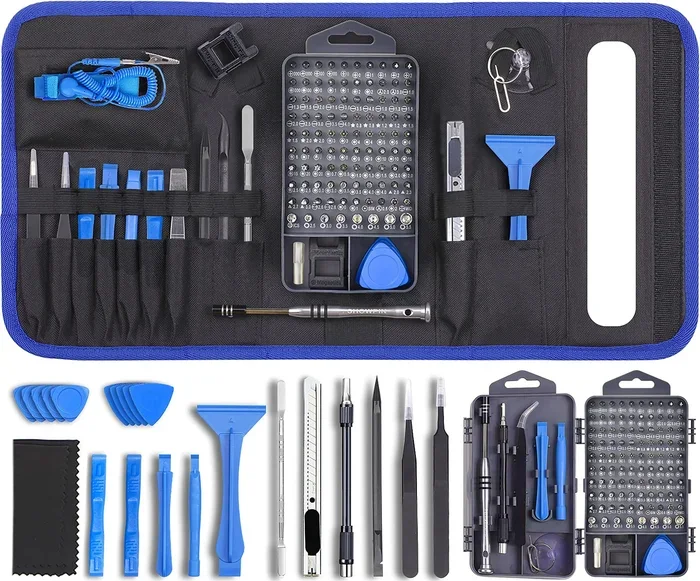
A micro screwdriver set is the backbone of any computer toolkit. You will use it to open cases, secure drives, and mount fans. The best sets come with anti-static handles to prevent ESD damage to sensitive parts.
Look for sets that include Phillips and flathead sizes from 0.8mm to 3.5mm. Magnetic tips are a huge bonus because they hold screws in place while you work.
2. Tweezers for Electronics
Fine-point tweezers for electronics help you place tiny screws, jumpers, and connectors in exact spots. They are especially handy when working on motherboard components where your fingers are too big to be precise.
Go for anti-static, ESD-safe tweezers made of stainless steel. Avoid cheap plastic ones that can generate static charge.
3. Spudger and Prying Tools
A spudger is a flat, non-conductive tool used to pry open cases, disconnect ribbon cables, and release clips. It slides between tight spaces without scratching surfaces. Prying tools serve a similar purpose but are often sturdier and come in different shapes.
Plastic spudgers are the safest choice for electronics assembly because they do not conduct electricity. Metal ones can work but require more care.
4. Wire Stripper and Cutter
If you ever work with cables, a wire stripper is indispensable. It cleanly removes insulation from wires without cutting the copper inside. A good wire cutter also lets you trim cables to the right length for clean cable management.
Many combo tools include both functions in one compact device. They are lightweight and easy to carry in a tool bag.
5. Thermal Paste Applicator
When you replace a CPU cooler, you need to apply fresh thermal paste. A small applicator helps you spread it evenly across the processor surface. Even coverage means better heat transfer and cooler running temperatures.
Some kits come with pre-filled syringes for easy application. You do not need anything fancy — a small plastic card or spatula works too.
6. Compressed Air Duster
Dust buildup is one of the biggest enemies of a healthy PC. A compressed air canister or electric air blower blows dust out of fans, heatsinks, and vents. It keeps your system running cool and quiet.
Hold the canister upright and use short bursts. Never shake it, and always use it in a well-ventilated area.
7. Anti-Static Wrist Strap
An anti-static wrist strap grounds you while you work, preventing static electricity from jumping onto components. It clips to the computer case or a grounded surface and keeps you and your parts safe.
This is one of the most overlooked computer hand tools, but it is arguably the most important. A single spark of static can destroy a CPU or RAM stick without you even noticing.
8. Multimeter
A multimeter measures voltage, current, and resistance. It helps you test PSU outputs, check for short circuits, and verify that connections are working. For serious computer repair tools enthusiasts, it is an essential piece of equipment.
Digital multimeters are easy to read and affordable. You do not need a professional-grade model to get started.
How to Choose the Right Computer Hand Tools
With so many options out there, picking the right set can feel overwhelming. Here are some tips to help you make smart choices.
Consider Your Needs
Are you a casual user who occasionally upgrades RAM? Or are you a full-time PC builder who tears down systems every day? Your usage level determines how much you should invest. A basic computer hand tools kit works for most home users. Professionals may want premium, specialized sets.
Look for ESD-Safe Certification
Always check that your tools are ESD-safe or anti-static rated. This certification means the tools have been tested to prevent static discharge. It is a small detail that makes a big difference in protecting your components.
Check Material Quality
Stainless steel lasts longer than cheap alloy. Plastic spudgers should be sturdy, not flimsy. Read reviews and look for brands known for durability. A well-made tool set might cost a bit more upfront, but it saves money in the long run.
Portability and Storage
If you work on computers in different locations, a portable hand tools kit with a carrying case is a great choice. It keeps everything organized and prevents tools from getting lost or damaged.
Price vs. Value
You do not need to spend a fortune. Many excellent computer repair tools kits are available for under $50. Focus on getting the essentials first and expand your collection over time.
Tips for Using Computer Hand Tools Safely
Using your tools the right way keeps you and your components safe. Follow these practical tips every time you open up a PC.
Always Ground Yourself
Before touching any internal component, touch the metal frame of the computer case. Better yet, wear your anti-static wrist strap. This simple step prevents thousands of dollars in damage from a single static shock.
Use the Right Size Screwdriver
Forcing a screwdriver that is too big or too small will strip the screw head. Match the tip size exactly to the screw. If a screw is stuck, apply a drop of penetrating oil rather than using a bigger driver.
Work on a Clean, Flat Surface
A cluttered desk leads to lost screws and accidental damage. Use a soft mat or anti-static mat to keep parts safe. Good lighting also helps you see tiny connectors and pins clearly.
Keep Components in Anti-Static Bags
When you remove parts, store them in anti-static bags immediately. Never place sensitive electronics on bare surfaces like cardboard or plastic wrap.
Take Breaks When Needed
Fine work with precision tools requires focus and steady hands. If you feel tired or frustrated, step away and come back. Rushing leads to mistakes that can cost you time and money.
Common Mistakes to Avoid
Even experienced builders make errors. Here are the most common mistakes people make when using computer hand tools — and how to avoid them.
Using Household Tools Instead of Proper Ones
Kitchen knives, pliers from the garage, or random screwdrivers might seem convenient. They are not. These tools lack the precision and anti-static properties needed for safe electronics assembly. Always use tools designed for computer work.
Skipping the Anti-Static Wrist Strap
Many people skip this step because it feels unnecessary. But static damage is invisible — your component might work fine at first and fail weeks later. Do not gamble with your parts.
Over-Tightening Screws
Tightening screws too much can crack motherboard mounting points or strip threads. Hand-tighten until snug and stop. You do not need to wrench them down.
Mixing Up Screw Types
PCs use different screw types for different parts. Mixing them up can lead to using the wrong screw in the wrong place, which may damage components. Keep your screws organized by type and size.
Neglecting Tool Maintenance
Dirty or rusty tools perform poorly and can scratch components. Wipe down your tools after each use and store them in a dry place. A little care goes a long way.
Maintaining Your Computer Hand Tools
Your tools are an investment. Proper maintenance keeps them in top shape so they work reliably every time you need them.
Clean After Every Use
Wipe down metal tools with a dry cloth after each session. For stubborn grime, use a small amount of isopropyl alcohol. Keep your spudger and plastic tools clean to prevent them from leaving residue on components.
Store Properly
Use a hard-shell case or a soft pouch with compartments. This prevents tools from knocking against each other and getting dull or scratched. A well-organized hand tools kit also saves you time when you are in the middle of a build.
Replace Worn Tips
Screwdriver tips wear out over time. A worn tip strips screws more easily and can damage screw heads. Replace tips regularly to keep your precision tools performing at their best.
Check for Calibration
If you use a multimeter, check its calibration periodically. A misread multimeter can lead to incorrect diagnoses and unnecessary part replacements.
Comparison: Budget vs. Premium Computer Hand Tools
Not sure whether to go budget or premium? Here is a quick comparison to help you decide.
| Feature | Budget Kit | Premium Kit |
|---|---|---|
| Price Range | $15 – $40 | $50 – $150 |
| Material Quality | Standard steel, basic plastic | Stainless steel, hardened plastic |
| ESD Safety | Limited or none | Full ESD-safe certification |
| Tool Variety | Basic set (5-10 tools) | Comprehensive set (20-50 tools) |
| Durability | Moderate | High |
| Best For | Casual users, beginners | Professionals, frequent builders |
Both options have their place. A budget kit works great if you only open your PC once or twice a year. A premium set pays for itself if you build or repair computers regularly.
Final Thoughts
Computer hand tools are more than just accessories — they are essential for anyone who works with PC hardware. The right set gives you better precision and control, protects your components from damage, and makes every build or repair smoother. From a basic micro screwdriver set to a full ESD-safe toolkit, each tool plays an important role.
Start with the essentials, build your collection over time, and always prioritize safety. Your computer — and your wallet — will thank you. Now go build something great with your computer hand tools and enjoy the satisfaction of a job done right.
Frequently Asked Questions
What are computer hand tools used for?
Computer hand tools are used to build, repair, and maintain PCs and their internal components. They include screwdrivers, tweezers, spudgers, and more that help you work with precision on delicate parts like motherboards and hard drives.
Do I really need anti-static tools for PC building?
Yes, absolutely. Static electricity can damage components without you seeing any visible signs. Using anti-static computer hand tools and an anti-static wrist strap protects your parts from invisible electrostatic discharge that can kill them over time.
Can I use regular household tools to open my computer case?
You can, but it is not recommended. Household tools lack the precision and ESD-safe properties needed for safe hardware maintenance. Proper computer hand tools are designed to fit tiny screws and protect sensitive electronics.
How much should I spend on a computer hand tools set?
A good starter kit costs between $20 and $50. You do not need to spend a lot to get quality essentials. Focus on the core tools like screwdrivers, tweezers, and a wrist strap first, then expand as needed.
What is the most important tool in a computer hand tools kit?
The anti-static screwdriver set is the most important because you use it for almost every task. However, the anti-static wrist strap is arguably the most critical for safety, as it prevents static damage to all your components.
How do I maintain my computer hand tools?
Clean your tools after each use with a dry cloth, store them in a protective case, and replace worn tips regularly. Proper maintenance keeps your precision tools performing well and extends their lifespan significantly.