Do All Smart TVs Have Bluetooth Wireless Capability
Not all smart TVs come with Bluetooth built in. While many modern smart TVs include Bluetooth wireless capability, some budget and older models still lack this feature. You can easily check your TV’s settings or look up the model number to confirm. If your TV doesn’t have Bluetooth, you can add it with a simple adapter or transmitter.
Do you want to stream audio from your smart TV to your wireless headphones or speakers? It is a simple and convenient way to enjoy your favorite shows without disturbing anyone else in the house. But before you start pairing devices, you need to know one important thing. Do all smart TVs have Bluetooth?
The short answer is no. Not every smart TV comes with Bluetooth wireless capability built in. While most modern smart TVs include this feature, there are plenty of models that do not. This is especially true for budget-friendly options and older sets.
In this guide, we will walk you through everything you need to know. You will learn which smart TVs include Bluetooth, how to check if your TV has it, and what to do if it does not. We will also cover the best ways to add Bluetooth to any TV, even if it was not built in from the factory.
Key Takeaways
- Not every smart TV has Bluetooth: Many do, but it depends on the brand, model, and price range.
- Premium brands like Samsung and LG typically include Bluetooth: Most mid-range and high-end models come with built-in wireless capability.
- Budget TVs often skip Bluetooth: To keep costs low, some manufacturers leave out wireless features.
- You can add Bluetooth to any TV: A Bluetooth adapter or transmitter is an affordable and easy fix.
- Check your TV settings first: The fastest way to find out is to look in your TV’s Bluetooth or audio settings menu.
- Bluetooth version matters: Newer versions offer better range, faster connections, and lower power use.
- What Is Bluetooth on a Smart TV?
- Do All Smart TVs Have Bluetooth?
- How to Check if Your Smart TV Has Bluetooth
- Why Some Smart TVs Skip Bluetooth
- How to Add Bluetooth to a Smart TV Without It
- Best Smart TVs With Bluetooth in 2024
- Common Bluetooth TV Problems and How to Fix Them
- Can You Use Bluetooth Headphones with Any Smart TV?
- Frequently Asked Questions
- Final Thoughts
📑 Table of Contents
What Is Bluetooth on a Smart TV?
Bluetooth is a short-range wireless technology that lets devices talk to each other without cables. On a smart TV, Bluetooth allows you to connect wireless headphones, speakers, soundbars, and even your phone. This means you can listen to audio privately or improve your sound setup without running wires across the room.
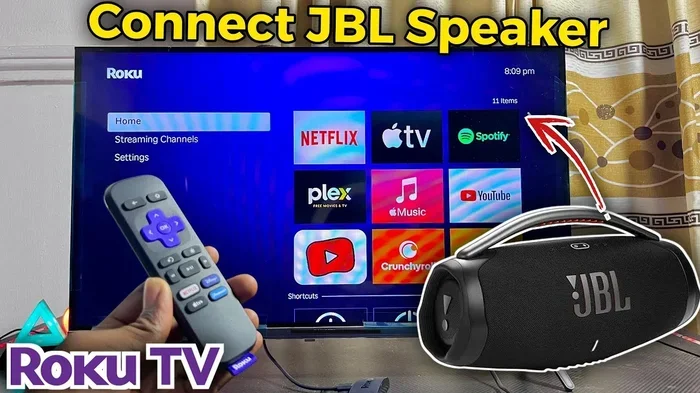
Most smart TVs use Bluetooth to support wireless audio streaming. This lets you pair compatible devices quickly and easily. The TV acts as a source, sending audio signals to your Bluetooth headphones or speaker. Some TVs also support Bluetooth input, which means you can connect a phone or tablet to the TV for screen mirroring or media playback.
The version of Bluetooth your TV uses matters too. Newer versions like Bluetooth 5.0 offer better range and more stable connections. Older versions may have shorter range and more audio lag. If you are planning to connect Bluetooth headphones to your TV, a newer Bluetooth version will give you a much better experience.
Do All Smart TVs Have Bluetooth?
The honest answer is no. While the majority of smart TVs on the market today include Bluetooth, not all of them do. Whether your TV has Bluetooth depends on several factors, including the brand, price point, and year of manufacture.
Here is a closer look at the different categories of smart TVs and their Bluetooth support.
Premium and Mid-Range Smart TVs
Most premium and mid-range smart TVs come with Bluetooth built in. Brands like Samsung, LG, Sony, and Vizio typically include Bluetooth wireless capability in their smart TV lineup. If you buy a TV that costs more than $400, there is a very good chance it has Bluetooth support.
These brands understand that buyers expect modern connectivity features. They know people want to connect wireless headphones, speakers, and other devices. That is why Bluetooth has become a standard feature on most of their models released in the last few years.
Budget and Entry-Level Smart TVs
Budget smart TVs are where you are most likely to run into a lack of Bluetooth. Some manufacturers cut costs by leaving out wireless features. These TVs might still have Wi-Fi for streaming apps, but they skip Bluetooth to keep the price low.
If you are shopping for a cheap smart TV, always check the specifications before you buy. Look for “Bluetooth” in the feature list. If it is not there, you may need to add it later with an adapter. This is one of the biggest hidden costs of buying a very affordable TV.
Older Smart TV Models
Even if you have a mid-range or premium brand, older models might not have Bluetooth. TVs made before 2017 or 2018 often did not include Bluetooth as a standard feature. If you are using an older smart TV, there is a chance it does not support wireless audio connections.
This is also true for some older models from brands that now include Bluetooth in their newer sets. Technology moves fast, and what was standard five years ago might not be on every model today.
How to Check if Your Smart TV Has Bluetooth
Not sure if your TV has Bluetooth? There are a few easy ways to find out. You do not need to be a tech expert to check this.
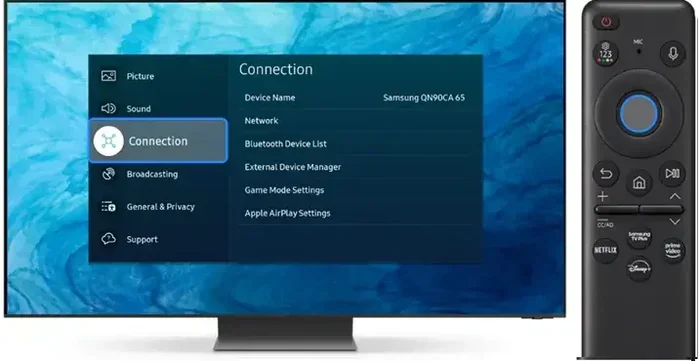
Method 1: Check the Settings Menu. Go to your TV’s home screen and look for Settings. Then find the Sound or Audio section. If you see a Bluetooth option, your TV supports it. Some TVs list it under “Connection” or “Network” settings.
Method 2: Look Up the Model Number. Find your TV’s model number on the back of the set or in the user manual. Search for it online along with the word “specifications.” The product page will list all the features, including whether Bluetooth is included.
Method 3: Check the Remote. Some TV remotes have a dedicated Bluetooth button. If your remote has one, that is a strong sign your TV supports Bluetooth.
Method 4: Try Pairing a Device. Turn on your Bluetooth headphones and put them in pairing mode. Go to your TV’s Bluetooth settings and search for devices. If your headphones show up, your TV has Bluetooth.
Why Some Smart TVs Skip Bluetooth
You might wonder why some TV makers leave out Bluetooth. It is not just about being cheap. There are real reasons behind this decision.
Cost Savings. Adding Bluetooth hardware to every TV increases the manufacturing cost. For budget TVs, every dollar counts. By removing Bluetooth, manufacturers can offer a lower price tag and still compete in the market.
Alternative Connectivity Options. Some TVs rely on Wi-Fi for streaming and use wired audio outputs instead. They may include optical audio ports or HDMI ARC connections. These alternatives serve the same purpose for some users, even if they are not as convenient as Bluetooth.
Target Audience. Some TV brands target users who mainly watch TV with built-in speakers or a wired sound system. These users may not need Bluetooth at all. The manufacturers focus their budget on picture quality and smart features instead.
Security and Stability Concerns. Bluetooth connections can sometimes be less stable than wired connections. Some TV makers prefer to keep things simple and reliable by offering only wired audio outputs.
How to Add Bluetooth to a Smart TV Without It
If your TV does not have Bluetooth, do not worry. You have several options to add wireless audio capability. None of them require expensive equipment or technical skills.
Option 1: Bluetooth Transmitter
A Bluetooth transmitter is a small device that plugs into your TV’s audio output. It sends audio wirelessly to your Bluetooth headphones or speakers. This is the most popular and affordable way to add Bluetooth to any TV.
You plug the transmitter into the 3.5mm headphone jack or optical audio port on your TV. Then you pair it with your Bluetooth device. The process is simple and takes just a few minutes. Most transmitters cost between $15 and $40, making them a great budget option.
When choosing a transmitter, look for one that supports aptX or aptX Low Latency. These codecs reduce audio lag and give you a better experience. A good transmitter also has a long battery life if it is wireless, or a stable USB power connection if it is wired.
Option 2: Bluetooth Adapter
A Bluetooth adapter works similarly to a transmitter but connects differently. You can plug a Bluetooth adapter into a USB port on your smart TV if it has one. Some adapters also connect via the audio output jack.
If you are wondering, can I use a Bluetooth adapter on my TV? The answer is yes, in most cases. Many smart TVs have USB ports that support Bluetooth adapters. Just plug it in, install any needed software, and pair your devices. This is one of the easiest ways to add Bluetooth to your TV without extra cables.
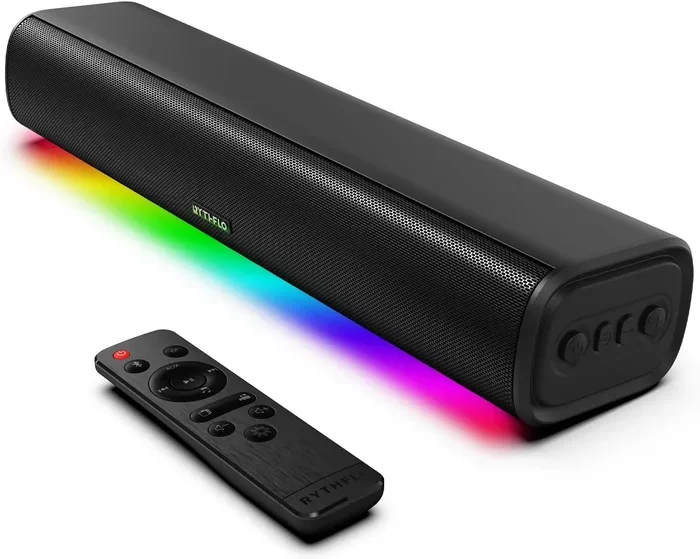
Option 3: Soundbar with Bluetooth
If you want better sound quality and Bluetooth in one package, consider a Bluetooth soundbar. Many soundbars connect to your TV with an HDMI cable or optical cable and also support Bluetooth for wireless audio streaming.
A soundbar is a great choice if you want to improve your TV’s audio while also gaining Bluetooth capability. You get richer sound and the convenience of wireless connections. Some soundbars even let you connect multiple Bluetooth devices at once.
Keep in mind that not all soundbars work the same way with every TV. Make sure the soundbar you choose is compatible with your TV’s audio output options. Also, check if the soundbar supports the Bluetooth version you need for your devices.
Best Smart TVs With Bluetooth in 2024
If you are shopping for a new smart TV and want to make sure it has Bluetooth, here are some top picks across different price ranges.
Samsung QN Series. Samsung has been a leader in smart TV technology for years. Most of their models, from budget to premium, include Bluetooth support. You can easily connect wireless headphones and speakers to Samsung TVs using the built-in Bluetooth settings.
LG OLED and NanoCell Models. LG is another brand that reliably includes Bluetooth in their smart TVs. Whether you are looking at their OLED or NanoCell lineups, Bluetooth is standard. This makes it easy to enjoy private listening or connect external speakers.
Sony Bravia Series. Sony smart TVs are known for their excellent picture quality and solid smart features. Bluetooth is included in most Bravia models, making them a great choice for anyone who wants wireless audio streaming.
Vizio M and P Series. Vizio offers great value for the price, and most of their mid-range and high-end models include Bluetooth. If you want a big screen with wireless audio support without spending a fortune, Vizio is worth considering.
Always double-check the specifications before buying. Even within the same brand, some models may differ in their feature sets. Look for “Bluetooth” in the connectivity section of the product page.
Common Bluetooth TV Problems and How to Fix Them
Even when your TV has Bluetooth, you may run into issues from time to time. Here are some common problems and simple fixes.
Audio Lag or Delay. This is the most common Bluetooth issue with TVs. You see the lips move, but the sound comes a second or two later. This happens because Bluetooth adds a small delay to the audio signal. To fix this, look for a TV or transmitter that supports aptX Low Latency. You can also lower the audio delay settings in your TV’s sound menu.
Device Not Showing Up. If your Bluetooth device does not appear when you search, try turning Bluetooth off and back on. Also make sure your device is in pairing mode. Sometimes restarting both the TV and the Bluetooth device solves the problem.
Connection Keeps Dropping. This usually happens when the Bluetooth device is too far from the TV. Stay within 10 to 15 feet for the best connection. Walls and other electronics can also interfere with the signal. Try moving closer to the TV or removing obstacles between the devices.
Poor Audio Quality. If the sound sounds fuzzy or compressed, your Bluetooth version might be outdated. Newer Bluetooth versions support higher quality audio codecs. Upgrading to a Bluetooth 5.0 transmitter can make a big difference in sound quality.
Can You Use Bluetooth Headphones with Any Smart TV?
This is a question many people ask, especially if they own a specific TV brand. The answer depends on what your TV supports.
If you have a Samsung smart TV, you will be happy to know that Samsung TVs generally support Bluetooth headphones. You can pair most Bluetooth headphones with a Samsung TV through the settings menu. The experience is smooth and straightforward on most Samsung models.
But what about other brands? Most modern smart TVs from LG, Sony, Vizio, and others support Bluetooth headphones. The key is to check your specific model’s Bluetooth compatibility. Some TVs may only support certain types of Bluetooth profiles for audio, so not every headphone will work perfectly.
If you want a reliable experience, look for headphones that support the AVRCP (Audio/Video Remote Control Profile). This profile lets you control volume and playback directly from your TV remote, which is a nice bonus.
Also, keep in mind that some smart TVs work better with certain Bluetooth codecs. If you notice audio issues, try adjusting the Bluetooth settings on your TV or using a different Bluetooth transmitter for better compatibility.
Frequently Asked Questions
Can I listen to my Samsung TV with Bluetooth headphones?
Yes, most Samsung smart TVs support Bluetooth headphones. Simply go to your TV’s Settings, find the Sound or Bluetooth menu, and pair your headphones. Samsung TVs make the pairing process easy and straightforward for most Bluetooth headphone brands.
Can I make my TV Bluetooth with an adapter?
Yes, you can make almost any TV Bluetooth-capable with a Bluetooth adapter or transmitter. These devices plug into your TV’s audio output and send wireless audio to your Bluetooth headphones or speakers. They are affordable and easy to set up, making them a great solution for TVs without built-in Bluetooth.
Can I use any Bluetooth headphones with my TV?
Most Bluetooth headphones work with smart TVs that support Bluetooth. However, some TVs may only support specific Bluetooth profiles or codecs. Check your TV’s manual or specifications to confirm compatibility. A Bluetooth transmitter can also help improve compatibility with any headphone brand.
Do smart TVs use Bluetooth for anything besides audio?
Yes, smart TVs can use Bluetooth for more than just audio. Some models support Bluetooth for screen mirroring from phones and tablets. Others use Bluetooth for connecting wireless keyboards, game controllers, or remote controls. The specific uses depend on your TV’s model and software features.
Is Bluetooth on a smart TV the same as Wi-Fi?
No, Bluetooth and Wi-Fi are different wireless technologies. Wi-Fi is used for internet connectivity and streaming apps. Bluetooth is used for short-range device connections like headphones and speakers. Your smart TV can have both Wi-Fi and Bluetooth, or just one of them, depending on the model.
What Bluetooth version do I need for a good TV experience?
Bluetooth 5.0 or newer is recommended for the best TV experience. It offers longer range, more stable connections, and lower audio latency. If your TV only has an older Bluetooth version, you can still use Bluetooth devices, but you may notice more lag or connection issues over time.
Final Thoughts
So, do all smart TVs have Bluetooth? The answer is clear. Not every smart TV includes Bluetooth wireless capability, but most modern ones do. Premium and mid-range brands like Samsung, LG, Sony, and Vizio typically include Bluetooth as a standard feature. Budget and older models are the ones most likely to leave it out.
The good news is that adding Bluetooth to any TV is simple and affordable. A Bluetooth transmitter or adapter can give you wireless audio in minutes. Whether you want to connect Bluetooth headphones for private listening or pair a wireless speaker for better sound, the solution is within reach.
Before you buy a new smart TV, always check the specifications for Bluetooth support. It is a small detail that can make a big difference in how you enjoy your entertainment. And if you already own a TV without Bluetooth, do not stress. The options for adding it are easier than ever.
Take a few minutes to check your current TV or research your next purchase. You will be glad you did. Wireless audio on your smart TV opens up a whole new world of convenience and flexibility. You will wonder how you ever watched TV without it.