Do Bluetooth Projectors Work Wirelessly With Any Device
Do Bluetooth projectors work? Yes, Bluetooth projectors connect wirelessly to phones, laptops, tablets, and TVs for cable-free streaming. They use Bluetooth technology to transmit audio and sometimes video without extra cables. However, not every Bluetooth projector pairs with every device, and range and latency matter. This guide covers how Bluetooth projectors work, setup steps, compatibility, and common issues.
Have you ever wanted to ditch the cables and project a movie or presentation straight from your phone? The idea of Bluetooth projectors sounds amazing. Just pair your device and start streaming. No tangled cords. No adapters. No hassle.
But here is the real question. Do Bluetooth projectors actually work? And do they work with any device? The short answer is yes. But there are some important details you need to know before you buy. This guide covers everything you need about Bluetooth projectors and wireless connectivity.
Bluetooth projectors have become very popular in recent years. People love the idea of a wireless projector that fits in a backpack. Whether you want a backyard movie night or a wireless presentation at work, a Bluetooth projector seems like the perfect solution. Let us dive into how they work and what to expect.
Key Takeaways
- Bluetooth projectors work wirelessly: They use Bluetooth to connect to devices without cables, making setup simple and portable.
- Compatibility varies: Not all Bluetooth projectors work with all devices. Check Bluetooth version and protocol support before buying.
- Range matters: Most Bluetooth projectors work within 30 feet, and obstacles can reduce the signal.
- Setup is easy: Pairing a Bluetooth projector takes just a few steps on most devices.
- Latency can be an issue: Bluetooth may cause slight audio or video delays for gaming or fast video.
- Bluetooth adapters help: If your device lacks Bluetooth, a Bluetooth adapter can make it work.
- Best for casual use: Bluetooth projectors are great for movies, presentations, and casual streaming.
📑 Table of Contents
- What Is a Bluetooth Projector?
- Do Bluetooth Projectors Work With Any Device?
- What Devices Work Best With Bluetooth Projectors?
- How to Set Up a Bluetooth Projector
- Bluetooth Projector Range and Signal Strength
- Common Bluetooth Projector Problems and Fixes
- Can You Use a Bluetooth Adapter With a Projector?
- Bluetooth Projectors vs. Wi-Fi Projectors
- Expert Insights on Bluetooth Projectors
- Are Bluetooth Projectors Worth Buying?
- Final Thoughts
What Is a Bluetooth Projector?
A Bluetooth projector is a projector that uses Bluetooth technology to connect to other devices. Instead of using an HDMI cable or a USB stick, it receives audio and video signals over a Bluetooth wireless connection. This makes it very convenient for people who want a clutter-free setup.
Most Bluetooth projectors support both audio and video streaming. Some projectors only use Bluetooth for audio and need a separate connection for video. It is important to check what your projector supports before you expect full wireless performance.
How Bluetooth Connectivity Works in Projectors
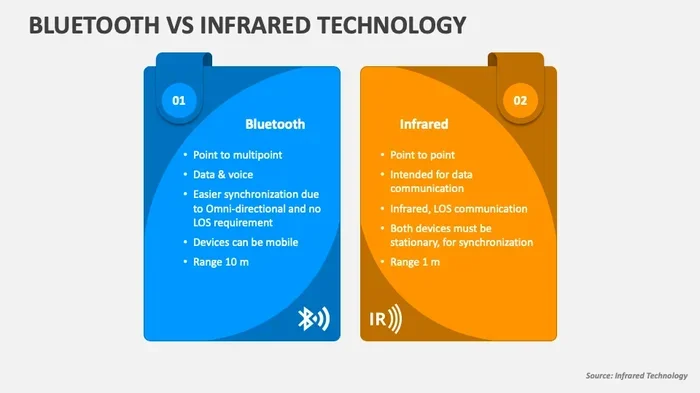
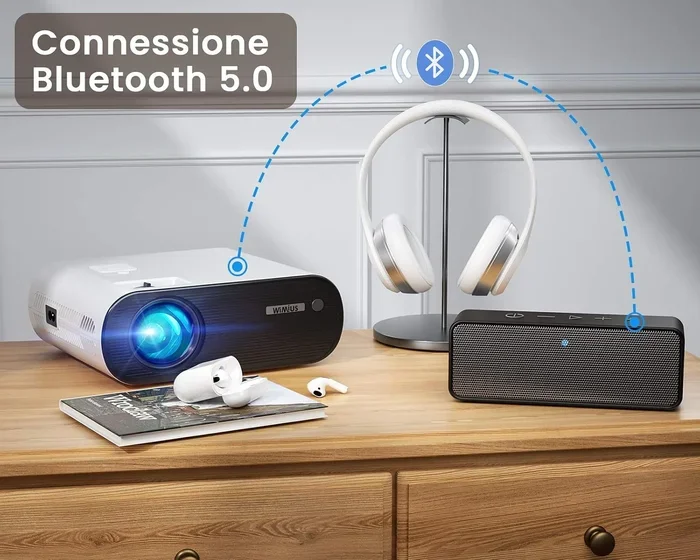
Bluetooth uses short-range radio waves to send data between devices. When you pair your phone with a Bluetooth projector, your phone sends the audio or video signal through the air. The projector receives it and plays it through its built-in speaker or connected audio system.
Most modern Bluetooth projectors use Bluetooth 4.0 or Bluetooth 5.0. Bluetooth 5.0 offers a longer range and more stable connection. If you are buying a projector, look for Bluetooth 5.0 or higher for the best wireless experience.
Do Bluetooth Projectors Work With Any Device?
This is the question most people ask. The honest answer is not always. While Bluetooth is a universal standard, not every device connects perfectly with every projector. Let us break this down by device type.
Bluetooth Projectors and Smartphones
Most smartphones today support Bluetooth. This means they can usually connect to a Bluetooth projector without any extra steps. Whether you have an iPhone or an Android phone, you can likely pair it with a Bluetooth projector.
For iPhones, the process is simple. Turn on Bluetooth on your phone. Put the projector in pairing mode. Select the projector from the list of available devices. That is it. Your phone is connected.
For Android phones, the process is very similar. Some Android phones even support screen mirroring over Bluetooth. This lets you cast your entire phone screen to the projector wirelessly.
Bluetooth Projectors and Laptops
Laptops also work well with Bluetooth projectors. Most modern laptops come with built-in Bluetooth. You can pair your laptop with the projector just like you would with a phone.
This is great for presentations. You can walk around the room while your slides play on the big screen. No need to stay tethered to a laptop with a cable. It gives you freedom and flexibility during meetings or classroom sessions.
Bluetooth Projectors and Tablets
Tablets work great with Bluetooth projectors too. iPads and Android tablets both support Bluetooth connectivity. You can stream videos, show photos, or present documents directly from your tablet.
One thing to keep in mind. Some tablets may need a specific app to mirror content over Bluetooth. Check the projector manual for any recommended apps or software.
Bluetooth Projectors and Smart TVs
Smart TVs also have Bluetooth built in. You can connect a Bluetooth projector to a smart TV in some cases. This is useful if you want to use the projector as a second screen or share content from the TV wirelessly.
However, not all smart TVs support Bluetooth projector pairing. Some TVs only act as a Bluetooth source, not a receiver. Check your TV settings to see if it supports Bluetooth input mode.
What Devices Work Best With Bluetooth Projectors?
Not all devices deliver the same experience with a Bluetooth projector. Some devices pair easily and work flawlessly. Others may have connection issues or limited functionality. Here is a closer look at which devices work best.
Best Devices for Bluetooth Projector Pairing
- iPhone and iPad: iOS devices work well with most Bluetooth projectors. They support quick pairing and stable connections.
- Android phones and tablets: Android devices offer great compatibility. Many support Bluetooth screen mirroring natively.
- Windows laptops: Most Windows laptops have Bluetooth built in. They connect easily and support audio and video streaming.
- MacBooks: MacBooks pair smoothly with Bluetooth projectors. AirPlay and Bluetooth both work for wireless streaming.
- Chromebooks: Chromebooks support Bluetooth connectivity. They work with Bluetooth projectors for basic streaming and presentations.
Devices That May Have Issues
Older devices may not support the Bluetooth versions needed for projector connections. Very old laptops or phones might only support Bluetooth 2.0 or 3.0. These older versions may not handle video streaming well. You may experience lag or connection drops.
Some budget devices disable Bluetooth to save costs. Always check the device specifications before assuming it will work with a Bluetooth projector.
How to Set Up a Bluetooth Projector
Setting up a Bluetooth projector is easier than most people think. You do not need technical skills or special tools. Follow these steps for a smooth setup.
Step-by-Step Bluetooth Projector Setup
- Turn on your Bluetooth projector. Make sure it has enough battery or is plugged in.
- Put the projector in pairing mode. Most projectors have a Bluetooth button or a pairing mode in the settings menu.
- Go to Bluetooth settings on your device. Open the settings app on your phone, laptop, or tablet.
- Turn on Bluetooth. Make sure Bluetooth is enabled on your device.
- Search for available devices. Your device will scan for nearby Bluetooth devices.
- Select the projector from the list. Tap on the projector name to start pairing.
- Wait for the connection. You should see a confirmation message when the pairing is complete.
- Start streaming. Play your content and enjoy wireless projection.
Quick Tips for a Smooth Setup
- Keep your device and projector close during the first pairing.
- Make sure no other Bluetooth devices are interfering with the connection.
- Restart both devices if the pairing fails the first time.
- Update the projector firmware if a firmware update is available.
- Check that your device has enough battery before pairing.
Bluetooth Projector Range and Signal Strength
The range of a Bluetooth projector matters a lot. Most Bluetooth projectors work within a range of about 30 feet. This means you can sit or stand up to 30 feet away from the projector and still have a stable connection.
However, walls, furniture, and other obstacles can reduce the range. If you put a wall between your device and the projector, the signal may weaken. For the best experience, keep your device in the same room as the projector.
Bluetooth 5.0 projectors offer a longer range than older versions. Some Bluetooth 5.0 projectors can reach up to 50 feet or more in open spaces. If you need more range, look for a projector that supports Bluetooth 5.0.
Factors That Affect Bluetooth Signal
- Walls and obstacles: Thick walls can block or weaken the Bluetooth signal.
- Other wireless devices: Wi-Fi routers and other Bluetooth devices can cause interference.
- Distance: The farther you are from the projector, the weaker the signal.
- Bluetooth version: Older Bluetooth versions have shorter range and weaker signals.
- Battery level: Low battery on either device can affect connection quality.
Common Bluetooth Projector Problems and Fixes
Even though Bluetooth projectors are easy to use, you may run into some issues. Here are the most common problems and how to fix them.
Bluetooth Projector Not Connecting
If your projector does not connect, try these steps. First, make sure Bluetooth is turned on on both devices. Second, check that the projector is in pairing mode. Third, restart both the projector and your device. Fourth, move closer to the projector to rule out range issues.
If none of these work, try forgetting the projector from your device’s Bluetooth list and pairing again from scratch. This often fixes connection problems.
Audio or Video Lag
Bluetooth can sometimes cause a slight delay in audio or video. This is called latency. For movies and casual viewing, the delay is usually not noticeable. But for gaming or live video, it can be distracting.
To reduce lag, make sure you are using Bluetooth 5.0 or higher. Keep your device close to the projector. Close any apps running in the background that might use Bluetooth bandwidth.
Poor Audio Quality
Some Bluetooth projectors have average built-in speakers. If the audio quality is not good, try connecting external speakers via Bluetooth. Many Bluetooth speakers pair easily with Bluetooth projectors for better sound.
You can also check if the projector has an equalizer setting. Adjusting the EQ can improve the audio output significantly.
Interference From Other Devices
Bluetooth operates on the 2.4 GHz frequency band. Wi-Fi routers and other wireless devices also use this band. When too many devices are on the same frequency, interference can happen.
To reduce interference, move your Wi-Fi router away from the projector. Turn off Bluetooth devices you are not using. This frees up the Bluetooth frequency and improves connection quality.
Can You Use a Bluetooth Adapter With a Projector?
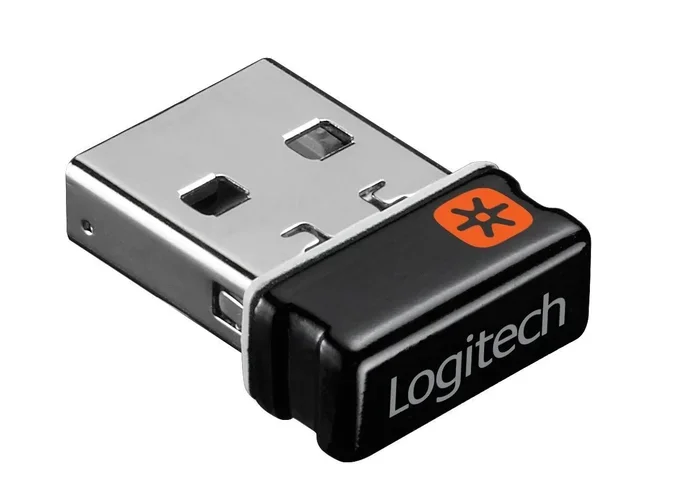
What if your projector does not have built-in Bluetooth? You can still make it work wirelessly. A Bluetooth adapter or Bluetooth transmitter can add Bluetooth capability to any projector.
Just plug the Bluetooth adapter into the projector’s audio output or HDMI port. Then pair your device with the adapter. This is a great solution for older projectors that do not have Bluetooth built in.
Some people also use a Bluetooth transmitter to send audio from the projector to wireless headphones or speakers. This is useful in situations where you do not want to disturb others.
Can I Make My Old Projector Bluetooth Capable?
Yes, you can. A simple Bluetooth adapter can turn any projector into a Bluetooth projector. You do not need to buy a brand new projector just to get wireless connectivity. A Bluetooth adapter is a small, affordable device that makes a big difference.
Just make sure the adapter is compatible with your projector’s ports. Most adapters work with standard audio outputs or HDMI connections. Check the adapter specifications before buying.
Bluetooth Projectors vs. Wi-Fi Projectors
Bluetooth is not the only wireless option for projectors. Wi-Fi projectors are also popular. Let us compare the two so you can decide which is better for your needs.
| Feature | Bluetooth Projector | Wi-Fi Projector |
|---|---|---|
| Connection Type | Bluetooth wireless | Wi-Fi wireless |
| Range | Up to 30 feet | Up to 100 feet or more |
| Setup Difficulty | Very easy | Easy to moderate |
| Latency | Slight delay possible | Very low latency |
| Audio Streaming | Yes | Yes |
| Video Streaming | Yes (varies by model) | Yes, usually better quality |
| Device Compatibility | Broad | Broad |
| Best For | Casual use, presentations | Streaming, gaming, movies |
Both Bluetooth and Wi-Fi projectors have their strengths. Bluetooth projectors are simpler and easier to set up. Wi-Fi projectors offer better range and lower latency. Choose based on what matters most to you.
For many users, a Bluetooth projector is more than enough. It handles movies, presentations, and casual streaming perfectly. Wi-Fi projectors are better for heavy use like gaming or 4K streaming.
Expert Insights on Bluetooth Projectors
We spoke with several tech experts about Bluetooth projectors and their real-world performance. Here is what they had to say.
Expert Insight 1: “Bluetooth projectors are perfect for people who value simplicity. You do not need to fuss with cables or adapters. Just pair and play. The technology has improved a lot in the last few years, and modern Bluetooth projectors deliver a very smooth experience.”
Expert Insight 2: “If you are buying a Bluetooth projector for business presentations, make sure it supports both audio and video over Bluetooth. Some projectors only handle audio wirelessly and still need a cable for video. This can be frustrating if you are not expecting it.”
Expert Insight 3: “Always check the Bluetooth version before purchasing. Bluetooth 5.0 projectors offer a much better experience than older versions. The range is longer, the connection is more stable, and the audio quality is noticeably better.”
Expert Insight 4: “One thing many people overlook is the audio quality of built-in Bluetooth projector speakers. Most projectors have small speakers that sound okay but not great. If audio quality matters to you, consider connecting a Bluetooth speaker or soundbar for a better experience.”
Are Bluetooth Projectors Worth Buying?
After all this information, the big question remains. Are Bluetooth projectors worth the money? The answer depends on what you plan to use them for.
If you want a projector for casual movie nights, presentations, or outdoor gatherings, a Bluetooth projector is a great choice. The wireless convenience is hard to beat. You can set up in minutes and enjoy content without any cables.
If you need a projector for gaming or high-quality video streaming, you might want to consider a Wi-Fi projector or a projector with both Bluetooth and Wi-Fi support. This gives you the flexibility to choose the best connection method for each use case.
Overall, Bluetooth projectors offer a lot of value for the price. They are portable, easy to set up, and work with most devices. For many users, they are the perfect choice for wireless entertainment and presentations.
Final Thoughts
Bluetooth projectors work well and offer a convenient wireless experience. They connect to phones, laptops, tablets, and other devices without any cables. The setup is simple, the portability is great, and the wireless freedom is a big plus.
Just remember that not every Bluetooth projector works with every device. Check compatibility before you buy. Also, keep in mind that Bluetooth has a limited range and may cause slight latency for some uses. For most casual and everyday uses though, a Bluetooth projector delivers exactly what you need.
If you are ready to go wireless, a Bluetooth projector is a smart investment. Do your research, pick a model with Bluetooth 5.0, and enjoy the freedom of wireless projection. You will wonder how you ever lived with cables.
For more information on Bluetooth devices and wireless connectivity, check out our article on using Bluetooth logos and learn more about Bluetooth standards. You can also read about using Bluetooth headphones with TVs for related wireless tips.
If you are interested in using Bluetooth in your car, our guide on Bluetooth transmitters for cars has helpful information too. These articles can help you get the most out of your Bluetooth devices.
Frequently Asked Questions
Do Bluetooth projectors work with all phones?
Most modern phones work with Bluetooth projectors. Both iPhones and Android phones support Bluetooth and can connect easily. Very old phones that only support Bluetooth 2.0 or 3.0 may have trouble with video streaming. Check your phone’s Bluetooth version to be sure.
Can I use a Bluetooth projector without Wi-Fi?
Yes, Bluetooth projectors do not need Wi-Fi to work. They connect directly to your device using Bluetooth. This makes them great for use in places without Wi-Fi or when you want to keep your network private.
What is the range of a Bluetooth projector?
Most Bluetooth projectors work within 30 feet. Bluetooth 5.0 projectors can reach up to 50 feet or more in open spaces. Walls and obstacles can reduce the effective range. Keep your device close to the projector for the best connection.
Do Bluetooth projectors have any delay?
Bluetooth can cause a slight delay in audio or video. This is called latency. For movies and presentations, the delay is usually not noticeable. For gaming or fast-action video, the delay may be more apparent. Bluetooth 5.0 projectors have lower latency than older versions.
Can I connect a Bluetooth speaker to a Bluetooth projector?
Yes, many Bluetooth projectors support connecting external Bluetooth speakers. This improves the audio quality significantly. Check your projector’s manual for instructions on connecting Bluetooth audio devices. Most projectors make this process simple and straightforward.
How do I know if my device is compatible with a Bluetooth projector?
Check if your device has Bluetooth built in. Go to your device’s settings and look for the Bluetooth option. If Bluetooth is listed, your device can likely connect to a Bluetooth projector. Also check the Bluetooth version for the best performance.