Do Fiber Optic HDMI Cables Support Earc for Your Home
Do fiber optic HDMI cables support eARC? The short answer is no — standard fiber optic HDMI cables cannot transmit eARC signals. eARC requires an HDMI cable that meets the HDMI 2.1 standard with Ethernet and enhanced audio return channel support. If you want lossless Dolby Atmos and uncompressed audio from your TV to your soundbar or receiver, you need the right cable type. This guide breaks down everything you need to know about eARC, fiber optic HDMI cables, and how to get the best audio experience at home.
If you have a home theater setup, you have probably wondered about the best way to get premium sound from your TV to your soundbar or receiver. The question comes up a lot. People search for answers like “do fiber optic HDMI cables support eARC” because they want to make sure their audio setup is top-notch. The truth is, the answer is not as simple as a yes or no. It depends on the type of cable, the HDMI version, and what your devices can handle. Let us dive into this topic and clear up the confusion once and for all.
Audio return channel, or ARC, has been around for a while. It lets your TV send audio back to your sound system through a single HDMI cable. This is super convenient. You do not need extra cables running around your entertainment center. But eARC, which stands for enhanced audio return channel, takes things to the next level. It supports higher-quality audio formats like Dolby Atmos and uncompressed surround sound. The problem? Not all HDMI cables can handle eARC. And this is where fiber optic HDMI cables come into the picture — but not in the way many people think.
Key Takeaways
- Fiber optic HDMI cables do not support eARC: Standard fiber optic cables lack the bandwidth and protocol needed for enhanced audio return channel.
- eARC needs HDMI 2.1 cables: Only high-speed HDMI cables certified for HDMI 2.1 can carry eARC signals reliably.
- Regular ARC is different from eARC: ARC supports basic audio formats, while eARC handles lossless Dolby Atmos and uncompressed surround sound.
- Check your devices first: Both your TV and soundbar or AV receiver must support eARC for it to work.
- Look for the right certification: Choose cables labeled “Ultra High Speed HDMI” to ensure eARC compatibility.
- Fiber optic cables have their place: They excel at long-distance signal transmission but are not ideal for eARC setups.
- Setup is simple once you have the right cable: Enable eARC in your TV settings and enjoy premium audio.
📑 Table of Contents
- What Is eARC and Why Does It Matter?
- Do Fiber Optic HDMI Cables Support eARC?
- What Kind of HDMI Cable Do You Need for eARC?
- How to Set Up eARC with Your Devices
- When Should You Use a Fiber Optic HDMI Cable?
- Quick Tips for Choosing the Right HDMI Cable for eARC
- Common Mistakes People Make with eARC and HDMI Cables
- Expert Insights on eARC and HDMI Cable Selection
- Key Takeaways
- Conclusion
What Is eARC and Why Does It Matter?
Before we get into cables, let us talk about what eARC actually is. eARC is a feature built into HDMI 2.1. It allows your TV to send high-quality audio to an external sound system. Think of it as a highway for audio data. The wider the highway, the more data it can carry. eARC is a much wider highway than regular ARC.
The Difference Between ARC and eARC
Regular ARC has been around since HDMI 1.4. It supports basic audio formats like Dolby Digital and DTS. That is fine for many people. But if you want to enjoy Dolby Atmos or uncompressed 7.1 surround sound, ARC just will not cut it. eARC solves this problem. It supports:
- Dolby Atmos — the immersive 3D audio format used in movies and streaming
- Uncompressed stereo audio — pure, lossless sound quality
- Multi-channel surround sound — up to 7.1 channels without compression
- Automatic audio sync — fewer lip-sync issues
- CEC control — you can control your soundbar volume with your TV remote
So eARC matters because it unlocks the full audio potential of your home theater. Without it, you are leaving premium sound quality on the table. If you have invested in a good TV or a quality soundbar, you deserve the best audio experience possible.
Why eARC Is a Game-Changer for Home Theaters
Here is a real-world example. You are watching a Netflix movie with Dolby Atmos. The TV sends the audio signal to your soundbar. With regular ARC, the TV might compress that signal or strip out some audio channels. With eARC, the full, uncompressed Atmos signal passes through. The result is a richer, more immersive sound that fills your room. This is why eARC has become a must-have feature for serious home theater fans.
Do Fiber Optic HDMI Cables Support eARC?
Now let us tackle the big question. Do fiber optic HDMI cables support eARC? The answer is generally no. Standard fiber optic HDMI cables are designed for a different purpose. They use light to transmit signals over long distances without loss. This makes them great for running cables through walls or across large rooms. But they do not always support the advanced features that eARC requires.
Why Fiber Optic HDMI Cables Fall Short for eARC
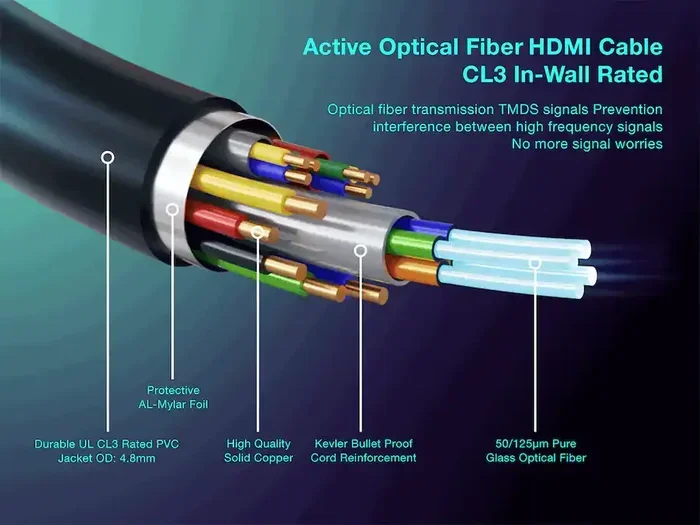
Fiber optic HDMI cables convert electrical HDMI signals into light pulses. These light pulses travel through glass or plastic fibers. This technology works well for basic video and audio transmission. But eARC needs more than just a basic signal path. It needs HDMI 2.1 bandwidth and specific protocol support. Most fiber optic HDMI cables on the market are built for HDMI 2.0 or earlier standards. They simply do not have the bandwidth or the protocol handshake needed for eARC.
Here is what you need to know:
- Fiber optic cables prioritize signal distance: They are designed to carry signals over 50 feet or more without degradation.
- eARC requires HDMI 2.1 protocol support: This is a software-level feature, not just a hardware capability.
- Many fiber optic cables are passive: They do not have the active chipsets needed for eARC communication.
- Bandwidth limitations: Standard fiber optic cables may not support the 48 Gbps bandwidth that HDMI 2.1 demands.
So if you are shopping for a cable specifically for eARC, a standard fiber optic HDMI cable is probably not the right choice. You need a cable that is specifically certified for HDMI 2.1 and eARC support.
Are There Fiber Optic Cables That Support eARC?
There are some active fiber optic HDMI cables on the market that claim HDMI 2.1 compatibility. These cables have built-in signal boosters and chipsets that can handle the eARC protocol. However, they are rare and often expensive. Before buying any fiber optic cable for eARC, check the specifications carefully. Look for:
- HDMI 2.1 certification on the packaging
- eARC support listed in the product description
- Ultra High Speed HDMI certification
- 48 Gbps bandwidth rating
If a fiber optic cable does not clearly state eARC support, assume it does not work for this feature. It is better to be safe than sorry and end up with an audio setup that does not deliver the sound quality you expected.
What Kind of HDMI Cable Do You Need for eARC?
If fiber optic HDMI cables are not the answer, what is? You need an Ultra High Speed HDMI cable. This is the official HDMI 2.1 certification. These cables are designed to handle the full bandwidth required for 4K video at 120Hz and eARC audio.
Understanding HDMI Cable Categories
The HDMI organization has created a clear labeling system. Here is a quick breakdown of the main cable types:
- Standard HDMI Cable: Supports 1080p. Not suitable for eARC or 4K.
- High Speed HDMI Cable: Supports 4K at 30Hz. May support basic ARC but not eARC.
- Premium High Speed HDMI Cable: Supports 4K at 60Hz and HDR. May support eARC on some devices.
- Ultra High Speed HDMI Cable: Supports 4K at 120Hz, 8K, and eARC. This is the one you need.
The Ultra High Speed HDMI cable is the only type guaranteed to support eARC. It also supports the HDMI Ethernet Channel and advanced features like Variable Refresh Rate and Auto Low Latency Mode. If you want the best audio and video experience, this is the cable to buy.
Copper vs. Fiber Optic: Which Is Better for eARC?
Copper HDMI cables are the standard choice for most home setups. They work well for runs up to about 15 feet. They are affordable and widely available. Ultra High Speed copper cables carry eARC signals without any issues. Fiber optic HDMI cables, on the other hand, are better for long distances. They can run 50, 100, or even 300 feet without signal loss. But for eARC, copper is usually the simpler and more reliable choice.
Here is a quick comparison:
Copper vs. Fiber Optic HDMI Cables for eARC
| Feature | Copper HDMI 2.1 | Fiber Optic HDMI |
|---|---|---|
| eARC Support | Yes (Ultra High Speed) | Usually No |
| Max Bandwidth | 48 Gbps | Varies |
| Max Recommended Length | Up to 15 feet | Up to 100+ feet |
| Price Range | $$ to $$$ | $$$ to $$$$ |
| Durability | Good | Fragile (glass fibers) |
| Best Use Case | Home theater setups | Long-distance runs |
For most people setting up a home theater, a copper Ultra High Speed HDMI cable is the way to go. It is reliable, affordable, and fully supports eARC. Save fiber optic cables for situations where you need to run a signal across a large building or through walls.
How to Set Up eARC with Your Devices
Getting eARC to work is not hard, but it does require a few steps. Here is a simple guide to help you set it up correctly.
Step-by-Step eARC Setup
- Check compatibility: Make sure your TV and soundbar or AV receiver both support eARC. Look in the user manual or check the manufacturer’s website.
- Use the right cable: Connect your TV to your sound system using an Ultra High Speed HDMI cable. Plug it into the HDMI port labeled eARC or ARC on your TV.
- Enable eARC in TV settings: Go to your TV’s audio settings. Look for HDMI eARC or Enhanced Audio Return Channel. Turn it on.
- Enable CEC control: This lets you control your soundbar with your TV remote. The setting might be called Simplink, Bravia Sync, or Anynet+ depending on your TV brand.
- Set your audio output format: In the TV audio settings, set the output to Dolby Atmos or Bitstream (Auto). This ensures the TV sends the full-quality audio signal.
- Test your setup: Play a movie with Dolby Atmos. Check if your soundbar displays the Atmos logo or if you can hear the overhead audio channels.
Common eARC Setup Problems and Fixes
Sometimes eARC does not work right away. Here are a few common issues and how to fix them:
- No sound at all: Check that the cable is firmly connected. Try a different HDMI port on your TV. Make sure eARC is enabled in settings.
- Audio drops out occasionally: This can happen with long cables or cheap HDMI cables. Use a certified Ultra High Speed cable.
- Dolby Atmos does not activate: Make sure your streaming app and TV both support Atmos. Also check that the audio output format is set correctly.
- Lip-sync issues: Enable the audio sync or lip-sync correction feature on your TV or soundbar.
When Should You Use a Fiber Optic HDMI Cable?
Fiber optic HDMI cables are not useless just because they do not support eARC. They shine in specific situations where copper cables fall short. If you need to run an HDMI cable over a long distance, fiber optic is the best choice. They are also great for installations where cables need to be hidden inside walls or conduits.
Best Use Cases for Fiber Optic HDMI Cables
- Large living rooms or conference rooms: When your TV and source device are more than 15 feet apart.
- In-wall installations: Fiber optic cables are thinner and safer to run inside walls.
- Outdoor setups: Some fiber optic cables are rated for outdoor use.
- Gaming setups with long cable runs: You get low-latency 4K 120Hz signals over long distances.
- Commercial AV installations: Auditoriums, classrooms, and retail displays often use fiber optic HDMI cables.
Just remember that for eARC audio, you should pair your fiber optic cable with a separate optical audio cable or use a copper HDMI 2.1 cable for the audio connection. This ensures you get the best of both worlds — long-distance video and high-quality eARC audio.
Quick Tips for Choosing the Right HDMI Cable for eARC
Shopping for an HDMI cable can be confusing. There are so many options and marketing terms flying around. Here are some quick tips to help you make the right choice:
- Look for the Ultra High Speed label: This is the official HDMI 2.1 certification mark. It guarantees eARC support.
- Check the bandwidth rating: The cable should support at least 48 Gbps.
- Buy from reputable brands: Brands like Belkin, Cable Matters, and Monoprice offer certified HDMI 2.1 cables.
- Do not overpay for “gaming” cables: A standard Ultra High Speed cable works just as well for eARC and gaming.
- Keep cable length reasonable: For eARC, keep the cable under 15 feet for the best performance.
- Avoid adapters when possible: Adapters can cause signal issues and may block eARC functionality.
These simple tips can save you from buying the wrong cable and ending up with a disappointing audio setup. Take a few minutes to check the specifications before you buy.
Common Mistakes People Make with eARC and HDMI Cables
Even with the right cable, people still run into problems. Here are some common mistakes to avoid:
Mistake 1: Assuming All HDMI Cables Support eARC
Not all HDMI cables are created equal. A cheap cable from a dollar store might support basic video but will not handle eARC. Always check the cable specifications and look for the Ultra High Speed certification.
Mistake 2: Using a Fiber Optic Cable for eARC Without Checking
Just because a cable is labeled “fiber optic HDMI” does not mean it supports eARC. Many fiber optic cables are built for HDMI 2.0 and lack the protocol support needed for enhanced audio return channel. Always verify eARC compatibility before purchasing.
Mistake 3: Forgetting to Enable eARC in TV Settings
Even with the perfect cable, eARC will not work if it is not enabled in your TV settings. Take the time to go through your TV’s audio menu and turn on the eARC feature. This is one of the most overlooked steps.
Mistake 4: Using a Soundbar That Does Not Support eARC
Your TV might support eARC, but if your soundbar or receiver does not, you will not get the full benefit. Check both devices before setting up your system. Look for the eARC label on the soundbar packaging or in its specifications.
Mistake 5: Ignoring Audio Format Settings
Even with eARC enabled, your TV might be set to output compressed audio. Go into your TV’s audio settings and select Bitstream or Dolby Atmos passthrough. This ensures your soundbar receives the highest quality audio signal possible.
Expert Insights on eARC and HDMI Cable Selection
Audio engineers and AV specialists agree on one thing: the cable matters, but the devices matter more. Before buying any cable, make sure both your TV and your audio system support eARC. A great cable cannot add eARC to a device that does not have it. Once you have compatible devices, the right cable makes all the difference.
Many experts recommend the Ultra High Speed HDMI cable from the HDMI Licensing Administrator. This is the official certification and guarantees compatibility with eARC, 4K 120Hz, and HDR. Avoid cables that do not carry this certification, even if they claim to be “HDMI 2.1 compatible.” The certification label is your best assurance of quality.
Another expert tip is to keep your cable runs as short as possible. eARC signals are sensitive, and longer copper cables can introduce signal degradation. If you need a longer run, consider using an active HDMI extender or a fiber optic cable for video paired with a separate eARC-capable connection for audio.
Key Takeaways
- Fiber optic HDMI cables typically do not support eARC: They lack the HDMI 2.1 protocol and bandwidth needed for enhanced audio return channel.
- Ultra High Speed HDMI cables are the standard for eARC: Look for the official HDMI 2.1 certification on the packaging.
- Both devices must support eARC: Your TV and soundbar or receiver need to be eARC-compatible for the feature to work.
- Copper cables are more practical for most home setups: They are affordable, reliable, and fully support eARC at typical room distances.
- Fiber optic cables excel at long-distance runs: Use them for video when you need to cover large distances, but pair them with a separate eARC-capable connection for audio.
- Always enable eARC in your TV settings: This is a simple step that many people overlook.
- Check audio output settings too: Set your TV to Bitstream or Dolby Atmos passthrough for the best sound quality.
Conclusion
So, do fiber optic HDMI cables support eARC? The clear answer is that most standard fiber optic HDMI cables do not support eARC. eARC requires an Ultra High Speed HDMI cable that meets the HDMI 2.1 standard. This type of cable provides the bandwidth and protocol support needed for enhanced audio return channel. Fiber optic cables are excellent for long-distance signal transmission, but they are not the go-to choice for eARC setups.
If you want to enjoy Dolby Atmos, uncompressed surround sound, and the best audio quality from your TV, invest in a certified Ultra High Speed HDMI cable. Pair it with eARC-compatible devices, enable the right settings, and you will be rewarded with a truly immersive home theater experience. The right cable makes a real difference. Do not let the wrong choice hold back your audio setup.
Take the time to understand your devices, check the cable specifications, and set everything up correctly. Your ears will thank you. A great home theater is about more than just a big screen. It is about the complete experience — crystal-clear video and rich, room-filling sound. Get the right cable, and you are well on your way to enjoying both.
Frequently Asked Questions
Can I use a fiber optic HDMI cable with eARC if it says HDMI 2.1 on the box?
Some fiber optic HDMI cables do carry HDMI 2.1 certification and may support eARC, but this is rare. Always check the product specifications carefully. Look for explicit mention of eARC support. If it is not clearly stated, assume the cable does not support eARC and choose a different cable to avoid disappointment.
What happens if I use a regular HDMI cable for eARC?
A regular HDMI cable that does not meet HDMI 2.1 standards may not carry the eARC signal at all. You might experience no sound, compressed audio, or intermittent audio dropouts. For reliable eARC performance, always use an Ultra High Speed HDMI cable that is certified for HDMI 2.1.
Do I need a special soundbar for eARC to work?
Yes, your soundbar or AV receiver must support eARC. Check the product specifications or the back of the device for an HDMI port labeled eARC or ARC. If the soundbar only has optical audio input, it will not support eARC. In that case, you can use an optical cable for basic audio or upgrade to an eARC-compatible soundbar.
Is eARC the same as Dolby Atmos?
No, but they work together. eARC is a feature that allows high-quality audio to travel from your TV to your sound system. Dolby Atmos is an audio format that delivers immersive 3D sound. eARC can carry Dolby Atmos signals from your TV to your soundbar, which is why eARC is essential for the full Atmos experience at home.
Can I run eARC through an HDMI splitter or switch?
Some HDMI splitters and switches support eARC, but many do not. Cheap splitters often strip out the eARC signal. If you need to use a splitter or switch, make sure it is specifically rated for HDMI 2.1 and eARC support. Look for products that explicitly mention eARC passthrough in their specifications.
How do I know if my TV supports eARC?
Check your TV’s user manual or visit the manufacturer’s website. Look for HDMI port labels on the back of your TV. If a port is labeled eARC, your TV supports it. You can also go to your TV’s audio settings and look for an HDMI eARC or Enhanced Audio Return Channel option. If you see it, your TV is eARC-compatible.
=== END ===