Do I Need Internet Or Wi Fi For Roku Streaming Device
You need an internet connection to use a Roku streaming device for most features, but Wi-Fi is the most common way to connect. Without internet, your Roku can still do a few things like play media from a USB drive or act as a screen mirroring display. This guide explains exactly when you need Wi-Fi, when you don’t, and how to set up your Roku for the best experience.
Key Takeaways
- You need internet for streaming: Roku requires an active internet connection to access streaming channels and content.
- Wi-Fi is the default connection method: Most Roku devices connect wirelessly to your home router.
- You can use Roku offline in limited ways: Playing local files via USB or using screen mirroring are possible without internet.
- Ethernet is an option: Some Roku models support wired connections for a more stable experience.
- Mobile hotspot works as a backup: You can tether your phone to keep Roku running when home internet is down.
- Internet speed matters: At least 3-5 Mbps is recommended for smooth HD streaming on Roku.
📑 Table of Contents
- Do I Need Internet Or Wi-Fi For Roku Streaming Device?
- What Exactly Is a Roku Streaming Device?
- Do You Need Internet for Roku to Work?
- Do You Need Wi-Fi Specifically for Roku?
- Can You Use Roku Without Wi-Fi or Internet?
- How to Set Up Your Roku Device for the Best Experience
- Common Roku Connection Problems and How to Fix Them
- Expert Tips for Getting the Most Out of Your Roku
- Key Takeaways
- Conclusion
Do I Need Internet Or Wi-Fi For Roku Streaming Device?
If you just bought a Roku streaming device, you might be wondering about one simple thing: do you actually need the internet or Wi-Fi to make it work? The short answer is yes, you need internet. But the longer answer is more interesting, and it might surprise you.
Roku is one of the most popular streaming players on the market. It gives you access to Netflix, Hulu, Disney+, and hundreds of other streaming channels. To unlock all of that content, you need a working internet connection. But there are also ways to use your Roku even when the Wi-Fi is down or you don’t have a home network at all.
In this guide, I’ll walk you through everything you need to know. I’ll explain when you need Wi-Fi, when you don’t, and how to get the most out of your Roku device no matter what kind of setup you have. Let’s dive right in.
What Exactly Is a Roku Streaming Device?
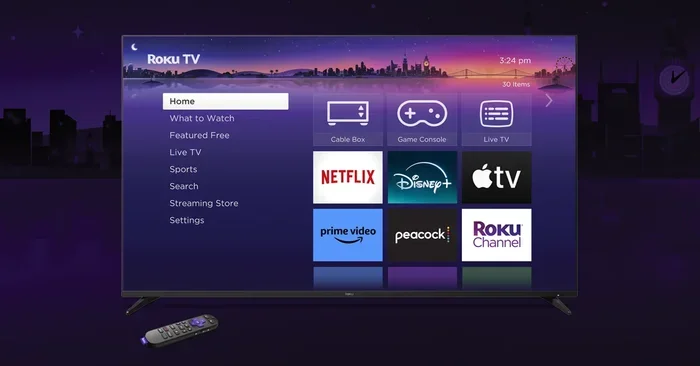
A Roku streaming device is a small box or stick that plugs into your TV’s HDMI port. It connects to your home wireless network and lets you watch movies, TV shows, live sports, and more. Think of it as a gateway to a huge world of streaming entertainment.
Roku makes several models. Some are tiny sticks that plug directly into the back of your TV. Others are larger boxes with more features. But no matter which model you pick, they all work the same way at their core. They need a connection to the internet to pull up content.
How Does Roku Connect to the Internet?
Most Roku devices connect to your home network through Wi-Fi. You go through the Roku setup process, select your wireless network, type in the password, and you’re good to go. Some newer Roku models also support a wired Ethernet connection. This means you can plug a cable directly from your router to the Roku for a more stable link.
The Roku mobile app also plays a role during setup. You can use your phone to help configure the connection, send Wi-Fi credentials, and even use your phone as a remote control. This makes the whole Roku setup process quick and painless.
Do You Need Internet for Roku to Work?
Here’s the honest truth. You need internet for almost everything people buy a Roku for. Streaming movies, watching live TV, browsing channels, and downloading new apps all require a live internet connection. Without it, your Roku is basically a blank screen.
But let me be clear about something. There’s a difference between internet and Wi-Fi. And understanding that difference matters.
Internet vs. Wi-Fi: What’s the Difference?
People use these terms interchangeably all the time, but they’re not the same thing. Internet is the global network that brings content to your home. Wi-Fi is the wireless signal that connects your devices to your router, which then connects to the internet.
So when you hear someone say “my Wi-Fi is down,” they usually mean their internet connection isn’t working either. But technically, you could have Wi-Fi without internet. Your router might be broadcasting a signal, but if your internet service provider has an outage, you won’t get anywhere online.
For Roku, you need both. A working Wi-Fi signal and a live internet connection. That’s how you access all those streaming channels and watch your favorite shows.
What Happens If You Don’t Have Internet?
If you try to use Roku without an active internet connection, you’ll see a limited experience. The home screen might load if it was cached before. But you won’t be able to open any channels or stream content. You also won’t be able to download new apps from the Roku channel store.
That said, there are a few workarounds. I’ll cover those in detail later in this article. But for now, just know that internet is essential for the full Roku experience.
Do You Need Wi-Fi Specifically for Roku?
Most people connect their Roku through Wi-Fi, and that’s the standard way to set things up. But do you absolutely need Wi-Fi? Not always. There are alternatives, and I’ll walk you through each one.
Using a Wired Ethernet Connection
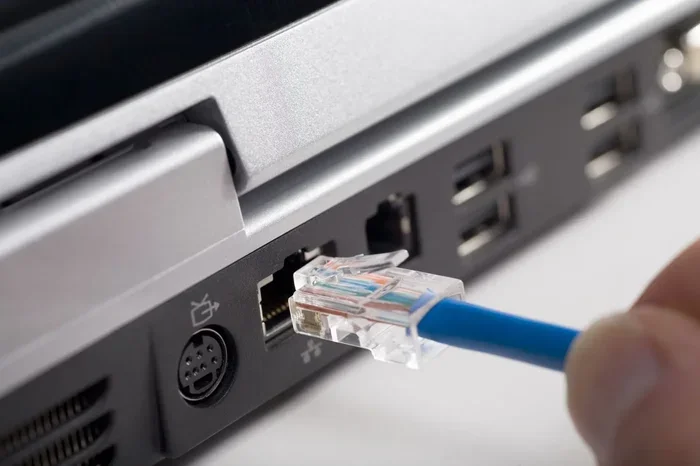
Some Roku models come with an Ethernet port. If you have one of those models, you can skip Wi-Fi entirely and plug a cable directly into your router. This gives you a wired connection that’s often faster and more stable than wireless.
A wired Ethernet connection is great for people who experience Wi-Fi interference or slow speeds. If your router is close to your TV, an Ethernet cable can make a big difference in streaming quality. You get fewer buffering pauses and smoother playback.
Keep in mind that not all Roku devices support Ethernet. You’ll need to check your specific model. The Roku Ultra and Roku TV models with Ethernet ports are the most common ones that offer this option.
Using a Mobile Hotspot Instead of Home Wi-Fi
Can you use a mobile hotspot with Roku? Yes, you can. If your home internet goes down, you can tether your phone to your Roku and keep watching. Your phone becomes a portable wireless router of sorts.
Just be aware that this uses a lot of data. Streaming HD content can eat through a few gigabytes per hour. If you have a limited data plan on your phone, this isn’t a long-term solution. But for a quick fix or a weekend movie night, it works well.
To set this up, turn on the hotspot feature on your phone. Then go to your Roku’s wireless settings and select your phone’s network. Enter the hotspot password, and your Roku will connect just like it would to a home router.
Can Roku Connect to a Guest Network?
Yes, Roku can connect to a guest network. Many people set up a separate guest Wi-Fi network for visitors. Your Roku can connect to it just fine. As long as the guest network provides internet access, your streaming will work normally.
Some people prefer this setup because it keeps their main network less crowded. If you have a lot of smart home devices competing for bandwidth, putting your Roku on a guest network can sometimes improve performance.
Can You Use Roku Without Wi-Fi or Internet?
This is one of the most common questions I get. And the answer is: yes, but with serious limitations. You can’t access streaming channels without the internet. But there are a few things you can still do.
Playing Media from a USB Drive
Some Roku models support USB playback. If you have a flash drive or external hard drive with movies or music files on it, you can plug it into your Roku and watch or listen directly. This works without any internet connection at all.
You’ll need to format your USB drive properly, usually as NTFS or FAT32. And the files need to be in formats that Roku supports, like MP4 for video or MP3 for audio. This is a great way to watch downloaded movies or listen to your personal music library on the big screen.
Screen Mirroring Without Internet
If you have a phone or tablet, you can mirror your screen to the Roku using a feature called screen mirroring or casting. In some cases, this can work on a local network without internet access.
For this to work, your phone and Roku need to be on the same local network. If your router is on but your internet is out, you might still be able to mirror content from your device to your TV. This is handy for showing photos or playing local videos without needing the internet.
Using the Roku Remote Without Wi-Fi
Your Roku remote uses infrared or Bluetooth to communicate with the device. This means you can still navigate the home screen and control basic functions even without Wi-Fi. You just won’t be able to open any channels or stream content.
The remote works through the Roku device itself, not through the internet. So basic navigation is still possible. It’s not super useful without content to watch, but it shows that not everything on Roku depends on a live connection.
How to Set Up Your Roku Device for the Best Experience
Setting up your Roku properly makes a huge difference. A good setup means fewer buffering issues, faster channel loading, and a smoother overall experience. Here’s how to do it right.
Step-by-Step Roku Setup Process
Follow these steps to get your Roku device up and running:
- Plug your Roku into your TV’s HDMI port.
- Connect the power cable and turn on your TV.
- Follow the on-screen instructions to select your language.
- Connect to your Wi-Fi network by selecting it from the list.
- Enter your Wi-Fi password carefully.
- Let the Roku download any available updates.
- Sign in to your streaming accounts like Netflix or Hulu.
- Start watching your favorite content.
That’s really all there is to it. The whole process takes about 10 to 15 minutes. Make sure you’re close to your router during setup for the best wireless connection quality.
Optimizing Your Home Network for Roku
Want the best performance from your streaming device? Pay attention to your home network. Here are some quick tips:
- Place your router centrally: This helps spread the Wi-Fi signal evenly throughout your home.
- Use the 5GHz band: If your router supports it, connect your Roku to the 5GHz network for faster speeds.
- Reduce interference: Keep your router away from microwaves, cordless phones, and thick walls.
- Restart your router regularly: A quick reboot can fix slow speeds and connection drops.
- Check your internet speed: Use a speed test tool to make sure you’re getting enough bandwidth for HD or 4K streaming.
How Much Internet Speed Do You Need for Roku?
The internet speed you need depends on the quality of video you want to watch. Here’s a simple breakdown:
- SD (standard definition): 3 Mbps minimum
- HD (720p-1080p): 5-8 Mbps recommended
- 4K Ultra HD: 15-25 Mbps or more
If your internet plan doesn’t meet these requirements, you might experience buffering or lower picture quality. Upgrading your plan or switching to a wired Ethernet connection can help a lot.
Common Roku Connection Problems and How to Fix Them
Even with a good setup, you might run into connection issues now and then. Here are the most common problems and how to solve them.
Roku Won’t Connect to Wi-Fi
This is the number one issue Roku users face. If your Roku device won’t connect to your wireless network, try these steps:
- Restart your Roku and your router.
- Make sure you’re entering the correct Wi-Fi password.
- Move your Roku closer to the router.
- Check if your router is set to a frequency band your Roku supports.
- Remove other devices from the network to reduce congestion.
Buffering and Slow Streaming
Buffering happens when your internet connection can’t keep up with the video quality. To fix this, try lowering the streaming quality in your Roku settings. You can also restart your router or switch to a wired connection for better stability.
Roku Keeps Disconnecting from Wi-Fi
If your Roku keeps dropping the connection, your router might be the culprit. Try updating your router’s firmware, changing the wireless channel, or moving the router closer to your TV. A wireless repeater or mesh network system can also help extend your signal to the Roku.
Expert Tips for Getting the Most Out of Your Roku
Here are a few insider tips that can level up your streaming experience:
- Use the Roku mobile app: It turns your phone into a powerful remote with a keyboard for easy searching.
- Enable automatic updates: Your Roku will stay current with the latest features and security patches.
- Organize your channels: Pin your most-used channels to the home screen for quick access.
- Use voice search: Many Roku remotes have a microphone button for fast voice commands.
- Check for hidden channels: Some channels aren’t listed in the main store but can be added with a code.
Key Takeaways
- You need internet for streaming: Roku requires an active internet connection to access streaming channels and content.
- Wi-Fi is the default connection method: Most Roku devices connect wirelessly to your home router.
- You can use Roku offline in limited ways: Playing local files via USB or using screen mirroring are possible without internet.
- Ethernet is an option: Some Roku models support wired connections for a more stable experience.
- Mobile hotspot works as a backup: You can tether your phone to keep Roku running when home internet is down.
- Internet speed matters: At least 3-5 Mbps is recommended for smooth HD streaming on Roku.
Conclusion
So, do you need internet or Wi-Fi for a Roku? The answer is clear. You need an internet connection to stream content, and Wi-Fi is the most common way to get that connection. Without it, your Roku is limited to a few offline features like USB playback and basic remote control functions.
But the good news is that setting up your Roku is simple. Whether you use a wireless home network or plug in an Ethernet cable, getting connected takes just a few minutes. And once you’re online, you’ll have access to a world of streaming entertainment right at your fingertips.
If you run into connection issues, don’t panic. Most problems have simple fixes. Restart your router, check your Wi-Fi password, or move closer to the signal. With a little troubleshooting, your Roku will be back to streaming in no time.
Now that you know exactly what you need for your Roku to work, you can set it up with confidence. Grab your remote, pick your favorite channel, and enjoy the show.
Can I Use Roku Without Internet?
You can use a Roku without internet for very limited tasks. Playing media from a USB drive and basic remote navigation work offline. But you cannot access any streaming channels or download new apps without an active internet connection.
Does Roku Work With a Mobile Hotspot?
Yes, Roku can connect to a mobile hotspot just like any Wi-Fi network. This is useful when your home internet is down. Just keep in mind that streaming uses a lot of data, so check your phone plan before relying on a hotspot for regular use.
What Internet Speed Do I Need for Roku Streaming?
For standard definition, you need at least 3 Mbps. For HD streaming, aim for 5 to 8 Mbps. And for 4K content, you should have 15 Mbps or more. Faster speeds mean fewer buffering interruptions and better picture quality.
Can I Connect Roku to Ethernet Instead of Wi-Fi?
Yes, if your Roku model has an Ethernet port. This provides a wired connection that is often faster and more stable than Wi-Fi. The Roku Ultra and certain Roku TV models support this feature.
Why Won’t My Roku Connect to Wi-Fi?
Common reasons include an incorrect password, router issues, or too much distance between the Roku and the router. Try restarting both your Roku and your router, double-checking your password, and moving the Roku closer to the router to fix the problem.
Can I Mirror My Phone Screen to Roku Without Wi-Fi?
Screen mirroring usually requires both devices to be on the same local network. If your router is on but the internet is out, mirroring might still work. However, without any network connection at all, screen mirroring will not function.
Frequently Asked Questions
What is Do I Need Internet Or Wi Fi For Roku?
Do I Need Internet Or Wi Fi For Roku is an important topic with many practical applications.