Does Bluetooth Just Mean Wireless or Something More
Bluetooth is more than just a buzzword for wireless tech — it is a specific short-range wireless standard that connects devices seamlessly. While people often use “Bluetooth” and “wireless” interchangeably, they are not the same thing. Understanding the difference helps you make better choices for your gadgets, home setup, and daily tech life.
We hear the word Bluetooth all the time. It pops up on phone specs, speaker boxes, and car infotainment screens. But does Bluetooth just mean wireless? The short answer is no. Bluetooth is a specific type of wireless technology, but it is not the only one. There is a lot more going on under the hood than most people realize.
When someone says a device is wireless, they could mean Wi-Fi, infrared, radio frequency, or any number of connection types. Bluetooth is just one member of the wireless family. It has its own rules, its own range, and its own purpose. Knowing what makes Bluetooth unique helps you troubleshoot issues, choose the right gear, and get the most out of your devices.
In this article, we will break down exactly what Bluetooth is, how it differs from other wireless tech, and why it has become so essential in everyday life. Whether you are connecting wireless headphones or setting up a smart home, this guide covers it all.
Key Takeaways
- Bluetooth is a specific wireless technology: It is not a synonym for all wireless connections.
- Bluetooth uses short-range radio waves: Typically within 30 feet, depending on the version and device.
- Multiple Bluetooth versions exist: Each one brings faster speeds, better range, and lower energy use.
- Bluetooth is everywhere: From headphones and speakers to cars and smart home devices.
- Bluetooth is different from Wi-Fi: They serve different purposes even though both are wireless.
- You can add Bluetooth to non-Bluetooth devices: Using adapters and transmitters is a simple fix.
📑 Table of Contents
What Is Bluetooth, Really?
Bluetooth is a wireless communication standard that lets devices exchange data over short distances. It uses radio waves in the 2.4 GHz frequency band. This is the same general frequency range that Wi-Fi uses, but Bluetooth handles things very differently.
The technology was named after a Viking king, Harald Bluetooth, who united warring tribes in Scandinavia. Fitting, right? The idea behind Bluetooth is similar — it unites different devices so they can talk to each other without wires. It was first developed in the 1990s and has evolved dramatically since then.
How Bluetooth Technology Works
Bluetooth creates a small personal area network, often called a PAN. This is also known as a piconet. One device acts as the master, and up to seven other devices can connect as slaves. All of them communicate within a tiny bubble of connectivity.
Here is how the process typically works:
- One device sends out a signal looking for nearby Bluetooth-enabled devices.
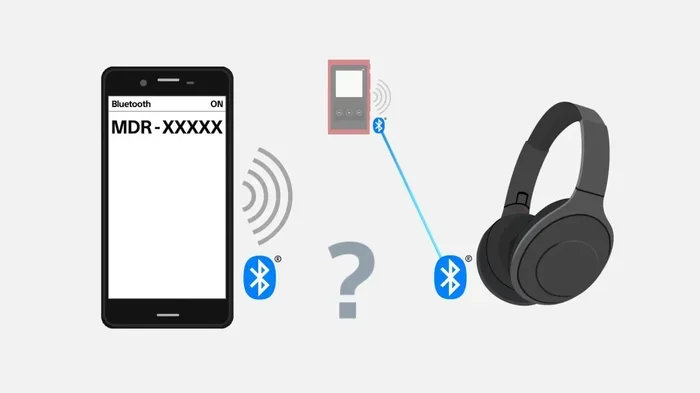
- Devices respond and begin a process called Bluetooth pairing.
- Once paired, they form a secure connection and start sharing data.
- The connection stays active until one device turns off Bluetooth or moves out of range.
The whole process happens in seconds. You do not need to enter passwords or configure network settings. That is the beauty of Bluetooth — it is designed to be simple and automatic.
Bluetooth vs. Other Wireless Technologies
People often confuse Bluetooth with other wireless technologies. Let us clear up a few common mix-ups:
- Bluetooth vs. Wi-Fi: Wi-Fi handles high-speed internet connections over longer distances. Bluetooth is for short-range device-to-device communication. They work together but serve very different roles.
- Bluetooth vs. Infrared: Infrared requires line of sight and a short range. Bluetooth goes through walls and around corners.
- Bluetooth vs. NFC: Near Field Communication works at extremely close range — almost touching. Bluetooth has a wider reach.
So when someone asks, “does Bluetooth just mean wireless,” the answer is clear. Bluetooth is one specific flavor of wireless, not a blanket term for all wireless tech.
How Bluetooth Has Evolved Over the Years
Bluetooth has come a long way since its debut. Each new version brought improvements in speed, range, and power efficiency. Here is a quick look at how the technology has grown.
Bluetooth Versions and What Changed
The Bluetooth Special Interest Group, or SIG, releases updates regularly. Here are the major versions that shaped the technology:
- Bluetooth 1.0 and 1.1: The early days. These versions had limited range and suffered from interference issues. They were functional but not great.
- Bluetooth 2.0: Introduced Enhanced Data Rate, which boosted speed significantly. This made wireless audio more practical.
- Bluetooth 3.0: Added a high-speed feature that used Wi-Fi for data transfer when needed. A smart hybrid approach.
- Bluetooth 4.0: This was a game-changer. It introduced Low Energy Bluetooth, which allowed small devices like fitness trackers to run for months on a single battery.
- Bluetooth 5.0: Doubled the speed and quadrupled the range compared to Bluetooth 4.0. It also improved support for multiple devices.
- Bluetooth 5.3 and beyond: The latest versions focus on better connection stability, lower power use, and improved audio quality.
If you have ever wondered why your older wireless headphones disconnect more often than newer ones, the Bluetooth version is usually the reason. Newer versions handle interference better and maintain stronger connections.
Why Version Numbers Matter for You
You do not need to memorize every version number. But knowing that newer is better helps when buying gadgets. A device with Bluetooth 5.0 or higher will generally offer a more reliable wireless connection. Look for the latest version when shopping for Bluetooth enabled speakers, keyboards, or trackers.
Common Devices That Use Bluetooth
Bluetooth is everywhere in modern life. Chances are, you interact with Bluetooth devices every single day without even thinking about it. Let us look at the most common ones.
Audio Devices
Wireless headphones and speakers are the most popular Bluetooth devices. When you want to listen to your Samsung TV with Bluetooth headphones, the connection happens through this technology. The same goes for wireless speakers at the park or in the kitchen.
Many people also use Bluetooth transmitters to make older audio gear wireless. For example, you can add Bluetooth capability to a car stereo or a traditional bookshelf speaker. This is a simple and affordable upgrade that breathes new life into old equipment.
Phones and Computers
Smartphones and laptops come with Bluetooth built in. You can connect a wireless keyboard, a mouse, or even a printer. Some people use Bluetooth adapters on their PCs to add this capability to older machines.
If you have ever wondered whether you can use Bluetooth headphones with a PS4, the answer is yes — but it may require a Bluetooth adapter since the console does not support all Bluetooth profiles natively.
Cars and Home Automation
Modern cars use Bluetooth for hands-free calling and audio streaming. You can also turn your car radio into Bluetooth using a simple transmitter that plugs into the auxiliary port. This is one of the most popular Bluetooth upgrades for older vehicles.
Smart home devices also rely heavily on Bluetooth. Smart locks, light bulbs, and sensors often use this technology to communicate with your phone. It is a low-power, reliable choice for home automation.
Does Bluetooth Mean Wireless Freedom?
One of the biggest misconceptions about Bluetooth is that it gives you unlimited wireless freedom. In reality, Bluetooth has limits. Understanding these limits helps you set realistic expectations.
Bluetooth Range Explained
Most Bluetooth devices work within a range of about 30 feet. Class 2 devices, which are the most common, have this standard range. Class 1 devices can reach up to 300 feet, but they are rare and typically used in industrial settings.
Several factors affect Bluetooth range:
- Walls and obstacles reduce the signal strength.
- Other wireless devices in the same frequency band can cause interference.
- Older Bluetooth versions have shorter effective ranges.
- Battery level on the transmitting device can impact signal strength.
So when you are using wireless headphones in another room, you might notice the connection dropping. That is Bluetooth doing its job — staying within its designed range. If you need longer range, Wi-Fi-based streaming or a Bluetooth transmitter with extended range might be a better solution.
Bluetooth and Wireless Streaming
Bluetooth is great for streaming audio, but it is not the best choice for every situation. The technology compresses audio data to save bandwidth. This means the sound quality is good but not perfect. Audiophiles often prefer wired connections or Wi-Fi-based streaming for lossless audio.
For everyday listening — podcasts, music, videos, and phone calls — Bluetooth more than delivers. The convenience of going completely wireless outweighs the slight quality trade-off for most people.
How to Add Bluetooth to Devices That Do Not Have It
Not every device comes with Bluetooth built in. But you can still enjoy the benefits of this technology with a few simple accessories.
Bluetooth Adapters and Transmitters
A Bluetooth adapter plugs into a USB port or an audio jack and gives your device Bluetooth capability. These adapters are inexpensive and easy to use. They work with TVs, stereos, computers, and even car audio systems.
A Bluetooth transmitter is similar but designed specifically for sending audio out to wireless headphones or speakers. If you want to make your old Bose speakers Bluetooth, a transmitter is the way to go. Just plug it into the speaker’s audio output and pair your phone. Done.
Quick Tips for Choosing the Right Adapter
- Check the Bluetooth version. Go for 5.0 or higher if possible.
- Make sure the adapter supports the profiles you need, like A2DP for audio or AVRCP for remote controls.
- Look for adapters with good range and stable connections.
- Read reviews for real-world performance feedback.
Adding Bluetooth to an older device is one of the best budget upgrades you can make. It costs less than a meal and extends the life of your favorite gear significantly.
Common Bluetooth Problems and How to Fix Them
Bluetooth is reliable, but it is not perfect. Every user runs into connection issues at some point. Here are the most common problems and their solutions.
Devices Won’t Pair
If two devices refuse to connect, try these steps:
- Turn Bluetooth off and back on both devices.
- Remove the device from the paired list and try again.
- Make sure the devices are within range of each other.
- Check if the other device is already connected to something else.
Connection Keeps Dropping
Intermittent disconnections are frustrating. They usually happen because of interference from other wireless devices. Moving closer to the source device often fixes the issue. Also, updating your device firmware can improve Bluetooth pairing stability.
Audio Lag or Latency
You might notice a delay between the video on your screen and the audio in your headphones. This is called latency. Bluetooth 5.0 and newer versions handle this much better. If you have an older device, a Bluetooth adapter with aptX or LDAC codecs can reduce the lag significantly.
Key Takeaways
- Bluetooth is a specific wireless technology: It is not a synonym for all wireless connections.
- Bluetooth uses short-range radio waves: Typically within 30 feet, depending on the version and device.
- Multiple Bluetooth versions exist: Each one brings faster speeds, better range, and lower energy use.
- Bluetooth is everywhere: From headphones and speakers to cars and smart home devices.
- Bluetooth is different from Wi-Fi: They serve different purposes even though both are wireless.
- You can add Bluetooth to non-Bluetooth devices: Using adapters and transmitters is a simple fix.
Conclusion
So, does Bluetooth just mean wireless? The answer is a clear no. Bluetooth is a powerful, specific type of wireless technology that connects devices in a unique way. It has its own rules, its own range, and its own strengths. Understanding what Bluetooth really is — and what it is not — empowers you to use your devices smarter.
From wireless headphones and car audio systems to smart home gadgets and gaming controllers, Bluetooth touches almost every part of our digital lives. The next time you pair a device, you will know exactly what is happening behind the scenes.
Whether you are adding Bluetooth to an old speaker or buying a new Bluetooth enabled gadget, you now have the knowledge to make the best choice. Embrace the technology, enjoy the wireless freedom, and never let the terminology confuse you again.
Frequently Asked Questions
Is Bluetooth the same as Wi-Fi?
No, Bluetooth and Wi-Fi are different wireless technologies. Wi-Fi is designed for high-speed internet access over longer distances. Bluetooth is for short-range device-to-device connections like headphones, speakers, and accessories.
Can I use Bluetooth without an internet connection?
Yes, Bluetooth does not need the internet to work. It creates its own local connection between devices. You can pair headphones, speakers, and keyboards without any Wi-Fi or data connection.
How far can Bluetooth reach?
Most Bluetooth devices work within 30 feet. Class 1 devices can reach up to 300 feet, but these are uncommon in everyday consumer gear. Walls and other wireless signals can reduce the effective range.
Does Bluetooth use a lot of battery?
Modern Bluetooth uses very little battery, especially with Low Energy Bluetooth introduced in version 4.0. Wireless headphones and fitness trackers can last days or even weeks on a single charge thanks to efficient Bluetooth power management.
Can I add Bluetooth to any device?
You can add Bluetooth to most audio devices and computers using a Bluetooth adapter or transmitter. These small accessories plug in and instantly give your device wireless capability. They are affordable and easy to set up.
Is Bluetooth safe to use?
Yes, Bluetooth is considered safe. It uses low-power radio waves that are well within safety guidelines. The technology has been used worldwide for decades with no known health risks. It is one of the safest wireless connection options available.