Does a Faster Internet Connection Mean Faster Wi Fi
Faster internet and faster Wi-Fi are not the same thing. Your internet plan sets the speed limit, but your router, placement, and device settings determine how fast Wi-Fi actually feels. Understanding this gap helps you fix slow connections and get better performance from every plan.
Key Takeaways
- Internet speed and Wi-Fi speed are different: Your ISP delivers internet speed, but Wi-Fi speed depends on your router, signal strength, and interference.
- A fast internet plan does not guarantee fast wireless speeds: Old routers, distance, and walls can slow down even the best connections.
- Your Wi-Fi band matters: 2.4 GHz travels farther but is slower; 5 GHz is faster but has shorter range.
- Testing both speeds helps you diagnose problems: Run a wired speed test and a wireless test to see where the bottleneck is.
- Upgrading your router can unlock faster Wi-Fi: A modern router with Wi-Fi 6 support makes a big difference.
- Placement and interference play huge roles: Router position and household devices affect wireless performance more than most people realize.
📑 Table of Contents
- Does Faster Internet Mean Faster Wi-Fi?
- What Does Faster Internet Actually Mean?
- How Wi-Fi Speed Differs From Internet Speed
- Factors That Affect Your Wi-Fi Speed
- How to Test Your Wi-Fi Speed vs Internet Speed
- When Faster Internet Plans Actually Help Your Wi-Fi
- How to Get the Most Out of Your Internet Plan
- Common Mistakes That Slow Down Wi-Fi
- Expert Insight: The Real Bottleneck
- Final Thoughts
Does Faster Internet Mean Faster Wi-Fi?
Here is a question that confuses a lot of people. You sign up for a faster internet plan. You pay more money every month. But your wireless connection still feels slow. What gives?
The truth is that faster internet does not always mean faster Wi-Fi. These two things are connected, but they are not the same. Your internet provider delivers a certain speed to your home. But how that speed reaches your phone, laptop, or smart TV depends on many other factors. Your router plays a huge role. Your home layout matters too. Even the devices you use can create bottlenecks.
In this article, we will break down the difference between internet speed and Wi-Fi speed. We will look at what slows you down. And we will share practical tips to help you get the most out of your connection. Whether you stream movies, work from home, or game online, understanding this difference is the first step to a better experience.
Let us start with the basics. Because once you understand how these two speeds work, everything else starts to make sense.
What Does Faster Internet Actually Mean?
When your internet provider sells you a plan, they are talking about internet speed. This is the speed of the data traveling from the internet to your home. It comes through a wire, a cable, or a fiber line. That speed is measured in megabits per second, or Mbps.
Think of it like a highway. The internet plan is the number of lanes on the highway. A 100 Mbps plan gives you a wider road than a 25 Mbps plan. More data can travel at the same time. That is the promise of a faster internet connection.
But here is the catch. That highway only goes to your house. It stops at your modem or router. From there, the data has to travel wirelessly to your devices. That is where things can slow down.
How Internet Speed Is Measured
Internet speed has two main parts. Download speed is how fast data comes to you. That is what matters when you watch a video or load a webpage. Upload speed is how fast data goes out. That matters when you send a file or join a video call.
Most people care more about download speed. ISPs advertise those numbers because they sound impressive. But upload speed is just as important for many tasks. A fast download speed with a slow upload speed can still cause frustration.
Also, keep in mind that latency, or ping, affects how responsive your connection feels. A plan with high speed but high latency can still feel sluggish when gaming or video calling.
How Wi-Fi Speed Differs From Internet Speed
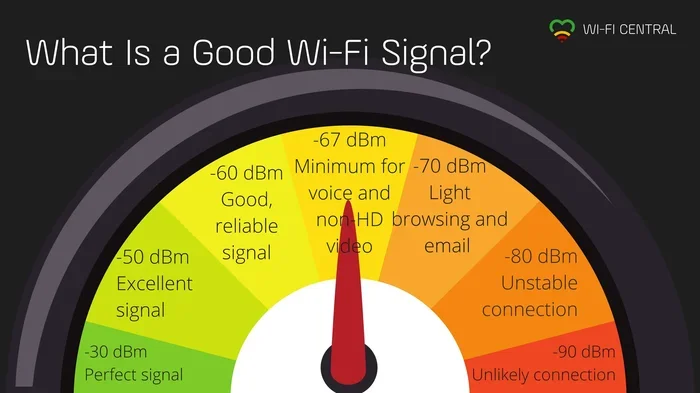
This is where most people get confused. Wi-Fi speed is not the same as internet speed. Wi-Fi speed is the speed of the wireless signal between your router and your device. It can be much slower than your internet plan, even if you pay for a fast connection.
Think of it this way. Your internet plan is the size of the water pipe coming into your house. Wi-Fi is the faucet in your kitchen. If the pipe is big but the faucet is small, you only get a trickle. You need both to work well.
Several things affect wireless speed. The age of your router matters a lot. Older routers use older standards that cannot handle modern speeds. The distance between your device and the router matters too. Walls, furniture, and even microwaves can weaken the signal.
The Role of Your Router
Your router is the bridge between your internet connection and your devices. A slow router will hold back even the fastest internet plan. If you have a 500 Mbps plan but an old single-band router, your wireless speed might cap at 50 Mbps or less.
Modern routers support Wi-Fi 6 and Wi-Fi 6E standards. These offer much faster wireless speeds and handle multiple devices better. If your router is more than a few years old, upgrading can make a noticeable difference.
Some people wonder if they can buy a modem and have internet on their own. The answer is yes, but you still need a compatible router to turn that wired connection into a wireless one. The modem brings the internet in, and the router spreads it around your home.
Factors That Affect Your Wi-Fi Speed
Many things can slow down your wireless connection. Some are easy to fix. Others need a bit more effort. Let us walk through the biggest factors.
Router Placement
Where you put your router matters more than you might think. If your router is hidden in a closet or tucked behind a TV, the signal has to fight through walls and furniture. That weakens the wireless signal and reduces speed.
Try to place your router in a central, open area. Higher is better. A shelf or a table works well. Avoid placing it near metal objects or large appliances. These can block or interfere with the signal.
Distance and Range
The farther you are from your router, the weaker the signal becomes. If your bedroom is on the other side of the house, your wireless speed will likely drop. Walls, floors, and doors all weaken the signal as it travels.
If you have a large home, you might need help extending coverage. A Wi-Fi booster or mesh system can help spread the signal to far corners of your house. This ensures every room gets a strong connection.
Some people try to extend their Wi-Fi to 200 feet away with special equipment. While that is possible, it often comes with speed losses. The farther the signal travels, the weaker it gets.
Interference From Other Devices
Your home is full of devices that use wireless signals. Baby monitors, cordless phones, Bluetooth speakers, and even microwave ovens can interfere with your Wi-Fi. This interference slows things down.
Neighboring Wi-Fi networks can also cause problems. If you live in an apartment building, dozens of networks might be competing for the same airspace. This congestion reduces speed for everyone.
Your Wi-Fi Band
Most modern routers broadcast on two bands: 2.4 GHz and 5 GHz. The 2.4 GHz band travels farther but is slower and more crowded. The 5 GHz band is faster but has a shorter range.
If you are close to your router, use the 5 GHz band for the best speeds. If you are far away, the 2.4 GHz band might give you a more stable connection, even if it is slower.
You can often switch your Wi-Fi band in your router settings. Some routers let you choose which band to use. Others combine both into one network and let the router decide.
Number of Connected Devices
Every device connected to your network shares the available bandwidth. If you have ten smart home devices, three phones, two laptops, and a smart TV all connected at once, they are all competing for the same internet speed.
This does not mean you need to disconnect devices. But it does explain why your connection slows down during busy times. A better router handles multiple devices more gracefully.
How to Test Your Wi-Fi Speed vs Internet Speed
If you suspect your wireless speed is slower than your internet plan, it is time to test both. Testing helps you find the bottleneck. Once you know where the problem is, you can fix it.
Step 1: Test Your Internet Speed
Connect a device directly to your modem using an ethernet cable. Run a speed test on a site like Speedtest.net. This gives you your true internet speed. It bypasses Wi-Fi entirely.
If the result matches what your ISP promises, your internet connection is fine. If it does not, contact your provider. You might have a line or equipment issue.
Step 2: Test Your Wi-Fi Speed
Now disconnect the ethernet cable. Run the same speed test over Wi-Fi from the same spot. Compare the two results.
If your wired speed is fast but your wireless speed is much slower, the problem is your Wi-Fi, not your internet plan. This tells you exactly where to focus your efforts.
What the Numbers Mean
A good rule of thumb is that wireless speeds should be at least 50 to 60 percent of your wired speed. If your wired speed is 200 Mbps and your wireless speed is 80 Mbps, that is normal. But if your wireless speed drops to 20 Mbps, something needs fixing.
Keep in mind that wireless speeds fluctuate. They change based on signal strength, interference, and the number of connected devices. One slow test does not mean you have a problem. Run tests at different times for a clearer picture.
When Faster Internet Plans Actually Help Your Wi-Fi
Not all faster internet plans are pointless. In some situations, upgrading your plan genuinely improves your wireless experience. Let us look at when it makes sense.
You Have Many Heavy Users
If multiple people in your household stream 4K video, game online, or work from home at the same time, a faster plan helps. More bandwidth means everyone can do more without slowdowns.
A slow plan with many users creates a traffic jam. A faster plan gives everyone more room. But remember, a better router still helps distribute that speed wirelessly.
You Use Smart Home Devices
Smart cameras, doorbells, and sensors constantly send and receive data. A faster internet plan gives them more headroom. This keeps everything running smoothly without lag or delays.
You Want Future-Proofing
Internet speeds keep going up. Content quality keeps improving. A faster plan today means you are ready for what comes next. Just make sure your router can handle the speed too.
Otherwise, you are paying for speed you cannot use over Wi-Fi. That is like buying a sports car and only driving it in first gear.
How to Get the Most Out of Your Internet Plan
Now that you understand the difference between internet speed and Wi-Fi speed, here are practical steps to improve your wireless performance.
Upgrade Your Router
If your router is more than three to four years old, consider replacing it. Look for one that supports Wi-Fi 6 or newer. These routers offer faster wireless speeds, better range, and improved handling of multiple devices.
Optimize Router Placement
Put your router in a central, elevated location. Keep it out in the open. Avoid walls and large objects between the router and your most-used devices.
Use the Right Band
Connect speed-critical devices to the 5 GHz band when possible. Use the 2.4 GHz band for devices that are farther away or need more range.
Reduce Interference
Keep your router away from microwaves, cordless phones, and baby monitors. Change your Wi-Fi channel if neighboring networks are causing congestion. Many routers have an auto-select feature that picks the least crowded channel.
Consider a Mesh System
For larger homes, a mesh Wi-Fi system spreads coverage more evenly than a single router. These systems use multiple nodes to create a seamless network throughout your home.
If you are dealing with dead zones or weak signals in distant rooms, a mesh system can be a game changer. It is one of the best ways to ensure every corner of your home gets strong wireless coverage.
Run Regular Speed Tests
Make speed testing a habit. Run a wired test and a wireless test once a month. This helps you catch problems early and track improvements over time.
Common Mistakes That Slow Down Wi-Fi
Many people make simple mistakes that hurt their wireless speed without realizing it. Here are the most common ones.
- Placing the router on the floor: Signals spread outward and downward. A floor-level router loses signal strength fast.
- Ignoring router updates: Firmware updates fix bugs and improve performance. Check for updates regularly.
- Using old devices: An old phone or laptop might not support modern Wi-Fi standards. Even with a fast router, old hardware limits your speed.
- Not restarting the router: A simple restart can clear congestion and improve performance. Try it once a month.
- Assuming the ISP is always at fault: Often the problem is local, not with your provider. Testing helps you find the real cause.
Expert Insight: The Real Bottleneck
Most people assume their slow connection is the fault of their internet provider. But in our experience, the real bottleneck is usually the local network. The router, the placement, the interference, or the devices themselves are often the culprit.
Before you upgrade your internet plan, fix your local setup first. A better router and smarter placement can unlock speeds you already pay for. That saves you money and gives you better results.
Only after optimizing your local network should you consider paying for a faster plan. That way, you are not throwing money at a problem that a better router could solve.
Final Thoughts
So, does faster internet mean faster Wi-Fi? The short answer is no, not automatically. A faster internet plan gives you more speed potential. But how much of that speed actually reaches your devices depends on your router, your setup, and your home environment.
Faster internet and faster Wi-Fi go hand in hand, but they are not the same thing. Understanding this difference puts you in control. You can make smarter decisions about upgrades, placement, and troubleshooting.
Start by testing your speeds. Find the bottlenecks. Fix what you can. And then decide if a faster plan or a better router is the right next step. With the right approach, you can enjoy a fast, reliable wireless connection no matter what internet plan you have.
Take action today. A few small changes can make a big difference in how your Wi-Fi feels every single day.
Frequently Asked Questions
Does a faster internet plan automatically make my Wi-Fi faster?
Not always. Your internet plan sets the maximum speed, but your router, placement, and devices determine how fast your Wi-Fi actually is. A fast plan with an old router may still feel slow.
Why is my Wi-Fi slower than my internet speed?
This usually happens because of router limitations, distance, walls, or interference. Your wireless signal loses strength as it travels. Old routers cannot handle modern speeds over Wi-Fi.
Can I improve my Wi-Fi speed without changing my internet plan?
Yes. Moving your router to a central location, switching to the 5 GHz band, reducing interference, and upgrading your router can all improve wireless speed without changing your plan.
Does the number of connected devices affect Wi-Fi speed?
Yes. Every device shares your available bandwidth. More devices means less speed per device. A better router handles multiple connections more efficiently.
Should I upgrade my router or my internet plan first?
Upgrade your router first. A modern router can unlock the speed you already pay for. Only upgrade your plan after fixing your local network setup.
What is the difference between internet speed and Wi-Fi speed?
Internet speed is the data rate from your ISP to your home. Wi-Fi speed is the wireless rate between your router and your devices. They are connected but not the same.