Does Ihome Only Work With Iphones Or Any Other Device
Does iHome only work with iPhones? The short answer is no. iHome speakers and devices work with a wide range of gadgets, not just Apple products. You can connect iHome Bluetooth speakers to Android phones, tablets, laptops, and even desktop computers. Whether you use an iPhone, Android device, or any Bluetooth-enabled gadget, iHome has you covered. Keep reading to learn exactly how iHome compatibility works across different devices and platforms.
Key Takeaways
- iHome works with more than just iPhones: iHome speakers are compatible with Android phones, tablets, laptops, and desktop computers.
- Bluetooth connectivity is universal: Most iHome speakers use Bluetooth, which works with any device that supports it.
- AirPlay is Apple-only: Features like AirPlay and Siri integration are exclusive to Apple devices and iOS.
- USB and aux inputs work everywhere: Wired connections on iHome speakers are not tied to any specific brand or operating system.
- Check your iHome model: Not every iHome speaker has the same features, so always verify what your specific model supports.
- Setup is simple across platforms: Pairing iHome speakers with non-Apple devices takes just a few minutes.
- iHome offers great value: You do not need to own an iPhone to enjoy iHome speaker quality and features.
📑 Table of Contents
- What Is iHome and What Devices Does It Support?
- Does iHome Only Work With iPhones?
- How to Connect iHome Speakers to Different Devices
- iHome Compatibility With Android Phones and Tablets
- Features That Work Across All Devices
- Common iHome Connection Issues and How to Fix Them
- Is iHome Worth Buying if You Do Not Own an iPhone?
- Final Thoughts on iHome Device Compatibility
What Is iHome and What Devices Does It Support?
iHome is a well-known brand that makes speakers, alarm clocks, charging docks, and smart home gadgets. The company has been around for years and builds products for everyday use. You will find iHome devices in bedrooms, kitchens, offices, and dorm rooms.
But here is the big question many people ask: does iHome only work with iPhones? The truth is, iHome makes products for a broad audience. The brand does not limit itself to Apple users alone. Let us break down what iHome really offers and who it is for.
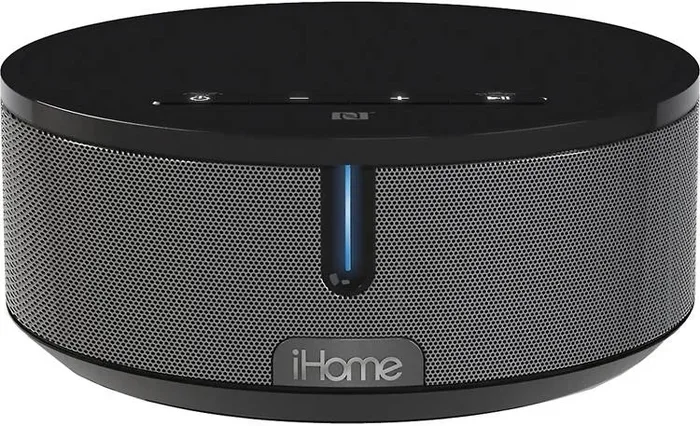
iHome speakers come in many shapes and sizes. Some are portable Bluetooth speakers. Others are desk clocks with built-in speakers. There are also home theater systems and charging docks. Each product has its own set of features. But most share one thing in common: they connect to devices using standard methods like Bluetooth, USB, or auxiliary cables.
This means iHome products are designed to be flexible. They do not lock you into one ecosystem. Whether you love Apple or prefer Android, there is a good chance iHome has something that fits your needs.
Types of iHome Products
iHome makes a wide range of audio and charging products. Here are some of the most popular categories:
- iHome Bluetooth speakers — Portable speakers that connect wirelessly to any Bluetooth device.
- iHome alarm clocks — Desk clocks with speakers, USB charging ports, and sometimes Bluetooth.
- iHome docking stations — Charging docks for iPhones and other devices with built-in speakers.
- iHome smart speakers — Wi-Fi connected speakers with voice assistant support.
- iHome home theater systems — Larger setups for watching movies and listening to music.
Each product type has different connection options. But the key takeaway is this: iHome builds products that work across platforms, not just with one brand.
Does iHome Only Work With iPhones?
This is the question most people want answered. And the answer is a clear no. iHome does not only work with iPhones. While iHome and Apple have a long history together, the brand has expanded far beyond the Apple ecosystem.
Here is why iHome works with more than just iPhones:
- Bluetooth is universal: Almost every modern phone, tablet, and laptop supports Bluetooth. iHome Bluetooth speakers use this standard technology, so they pair with any device that has Bluetooth.
- USB charging is universal: iHome docking stations and speakers often include USB ports. These ports charge any device that uses USB, not just iPhones.
- Aux input works with everything: iHome speakers with a 3.5mm aux input can connect to any device with a headphone jack. This includes Android phones, Windows laptops, gaming consoles, and more.
- Wi-Fi connectivity is platform-agnostic: iHome smart speakers connect to Wi-Fi networks. They work with any device on the same network, regardless of the operating system.
Now, there are some iHome features that work best with iPhones. Apple AirPlay, Siri voice control, and iCloud integration are all Apple-specific. But the core functions — playing music, charging devices, and using the speaker — work with any compatible device.
Why the Confusion Exists
You might wonder why so many people think iHome only works with iPhones. There are a few reasons for this misconception. First, iHome started as an Apple accessory brand. Many of their early products were iPhone docking stations. Second, iHome packaging and marketing often highlights Apple compatibility. Third, Apple users make up a large portion of iHome’s customer base.
But none of this means iHome locks you into Apple. The brand has made a conscious effort to support multiple platforms. If you own an Android phone, you can still use iHome speakers and accessories without any problems.
How to Connect iHome Speakers to Different Devices
Connecting iHome speakers to your device is usually quick and easy. The process depends on the type of connection you are using. Let us walk through the most common methods.
Connecting via Bluetooth
Bluetooth is the most popular way to connect iHome speakers. Here is how to do it with any device:
- Turn on your iHome speaker and put it in pairing mode. Most iHome speakers have a Bluetooth button or a dedicated pairing mode switch.
- Open the Bluetooth settings on your phone, tablet, or laptop.
- Look for the iHome speaker name in the list of available devices.
- Tap or click on the iHome speaker name to pair.
- Once connected, you should hear a confirmation sound. Your speaker is now ready to play audio from your device.
This process works the same way whether you have an iPhone, an Android phone, a Windows laptop, or a Chromebook. Bluetooth does not care what operating system you use. It just needs both devices to support the Bluetooth standard.
Connecting via USB
Many iHome speakers and alarm clocks have USB ports. You can use these to charge your phone or connect a USB drive with music files. Here are the steps:
- Plug a USB cable into the iHome speaker’s USB port.
- Connect the other end to your device or a USB flash drive.
- If connecting a phone, it should start charging automatically.
- If using a USB drive, the iHome speaker should detect the audio files and let you play them.
USB charging and USB audio playback work with any device that uses standard USB. This includes iPhones, Android phones, iPads, and even some cameras and e-readers.
Connecting via Aux Cable
The aux input on iHome speakers is a simple 3.5mm jack. It works like the headphone jack on any device. Here is how to use it:
- Take a standard 3.5mm aux cable.
- Plug one end into the iHome speaker’s aux port.
- Plug the other end into the headphone jack of your device.
- Play music on your device. The sound will come through the iHome speaker.
This method works with literally any device that has a headphone jack. It does not matter if you use an iPhone, Android phone, iPad, or even an older MP3 player.
iHome Compatibility With Android Phones and Tablets
Android users often wonder if iHome speakers will work with their devices. The answer is yes. iHome speakers work great with Android phones and tablets. Let us look at how the experience compares.
What Works With Android
Most iHome features work perfectly with Android devices:
- Bluetooth audio streaming: Play music, podcasts, and audiobooks from any Android phone.
- USB charging: Charge your Android phone using the iHome speaker’s USB port.
- Aux input: Connect Android devices using a standard aux cable.
- Wi-Fi streaming: Some iHome smart speakers support Wi-Fi and work with Android through their companion apps or web interfaces.
- FM radio: iHome alarm clocks with FM radio work independently of your phone.
What Does Not Work With Android
There are a few iHome features that are Apple-exclusive:
- AirPlay: This Apple streaming protocol only works with iOS and macOS devices.
- Siri voice control: Siri is Apple’s voice assistant and is not available on Android.
- iCloud integration: iHome does not connect directly to iCloud for Android users.
But honestly, these missing features are not a big deal for most people. The core experience — playing music, charging your phone, and using the speaker — works just as well on Android as it does on iPhone.
Features That Work Across All Devices
iHome speakers come packed with features. Many of these features work regardless of what device you own. Let us explore the ones that are truly universal.
Bluetooth Connectivity
Bluetooth is the backbone of most iHome speakers. It is a wireless technology standard that works across all platforms. When you pair an iHome speaker with any device via Bluetooth, the experience is essentially the same. You get wireless audio streaming with no hassle.
The Bluetooth range on most iHome speakers is about 30 feet. This means you can leave your phone in another room and still play music. Just keep in mind that walls and obstacles can reduce the range slightly.
Built-In Alarm Clock
Many iHome speakers double as alarm clocks. This feature does not depend on your phone at all. You set the alarm directly on the iHome device using its buttons or display. It works whether you have an iPhone, Android phone, or no phone at all.
USB Charging Port
The USB port on iHome speakers is not just for iPhones. It charges any device that uses USB charging. This includes Android phones, tablets, smartwatches, earbuds, and even some cameras. It is one of the most universal features across the iHome lineup.
FM Radio
iHome alarm clocks with FM radio let you listen to live radio stations. This feature works independently of any phone or device. You just tune in to your favorite station and enjoy. It is perfect for people who like waking up to the radio.
Common iHome Connection Issues and How to Fix Them
Even though iHome speakers work with many devices, you might run into connection problems sometimes. These issues are usually easy to fix. Here are the most common problems and their solutions.
Speaker Will Not Pair via Bluetooth
If your iHome speaker will not connect to your device, try these steps:
- Make sure Bluetooth is turned on on your device.
- Turn the iHome speaker off and back on.
- Put the speaker back into pairing mode.
- Remove the speaker from your device’s Bluetooth memory and try pairing again.
- Move closer to the speaker. Bluetooth works best within 30 feet.
Audio Cuts Out or Sounds Scratchy
If the audio keeps cutting out, try these fixes:
- Move your device closer to the iHome speaker.
- Remove any obstacles between the device and the speaker.
- Check if other Bluetooth devices are interfering.
- Restart both your device and the iHome speaker.
- Update your device’s Bluetooth firmware if available.
USB Port Not Charging Your Device
If the USB port on your iHome speaker is not charging your phone, try this:
- Use a different USB cable.
- Try a different USB port on the iHome speaker if it has more than one.
- Check if your phone’s charging port is clean and free of debris.
- Some iHome USB ports are for data only, not charging. Check your user manual to confirm.
Speaker Not Showing Up in Bluetooth List
If your device cannot find the iHome speaker:
- Make sure the speaker is in pairing mode. Look for a flashing light or voice prompt.
- Check if the speaker is already connected to another device. Disconnect it first.
- Reset the iHome speaker to factory settings. Refer to the user manual for instructions.
- Restart your phone or tablet and try again.
Is iHome Worth Buying if You Do Not Own an iPhone?
This is a fair question. If you do not own an iPhone, should you buy an iHome speaker? The answer depends on what you need. Let us look at the pros and cons.
Pros of iHome for Non-Apple Users
- Great Bluetooth speakers at affordable prices: iHome speakers offer solid sound quality without breaking the bank.
- Works with Android, Windows, and more: You are not limited to Apple devices.
- Built-in alarm clock and USB charging: These features add real value, especially for iHome alarm clock models.
- Compact and portable: Many iHome speakers are small and lightweight, making them easy to carry around.
- Simple setup: Pairing iHome speakers via Bluetooth takes just a few minutes.
Cons of iHome for Non-Apple Users
- No AirPlay support: If you are used to AirPlay, you will miss it on non-Apple devices.
- No Siri integration: You cannot use voice commands through Siri with iHome on Android.
- Some features require the iHome app: The iHome app may have limited functionality on Android compared to iOS.
Overall, iHome is still a great choice even if you do not own an iPhone. The core features — Bluetooth audio, USB charging, aux input, and alarm clock — work just as well across all platforms. You get good value for your money.
Final Thoughts on iHome Device Compatibility
So, does iHome only work with iPhones? Absolutely not. iHome speakers and devices are designed to work with a wide range of gadgets. Bluetooth connectivity makes iHome speakers compatible with virtually any modern device. USB ports and aux inputs add even more flexibility. While some Apple-specific features like AirPlay and Siri are exclusive to iPhone users, the core iHome experience is completely platform-agnostic.
Whether you use an iPhone, an Android phone, a Windows laptop, or a Chromebook, you can enjoy iHome products. The brand has made smart choices by embracing universal standards like Bluetooth and USB. This means you get a great audio experience no matter what device you own.
Before buying an iHome speaker, check the specific model’s features. Some iHome products are more advanced than others. But for the most part, iHome delivers quality sound and useful features that work for everyone, not just Apple fans.
If you have been hesitant to buy iHome because you do not own an iPhone, now is the time to reconsider. iHome has something for everyone, and the compatibility is broad and reliable.
Frequently Asked Questions
Can I use an iHome speaker with an Android phone?
Yes, absolutely. iHome speakers connect to Android phones through Bluetooth, USB, or aux cable. The core features work just as well with Android as they do with iPhone. You may miss out on AirPlay and Siri, but the speaker experience is the same.
Do I need an iPhone to set up an iHome speaker?
No, you do not need an iPhone to set up an iHome speaker. Most iHome speakers use Bluetooth, which works with any device. You can pair the speaker with an Android phone, Windows laptop, or any Bluetooth-enabled device in minutes.
Can I charge my Android phone using an iHome speaker’s USB port?
Yes, you can. iHome speakers with USB ports charge any device that uses standard USB charging. This includes Android phones, iPads, tablets, smartwatches, and more. Just use your regular USB cable and plug it into the iHome speaker.
Does iHome work with Windows laptops?
Yes, iHome speakers work with Windows laptops through Bluetooth or aux cable. You can stream music, podcasts, and video audio from your laptop to the iHome speaker. The setup process is simple and takes less than a minute.
What iHome features are exclusive to iPhone users?
iPhone users get access to Apple AirPlay, Siri voice control, and iCloud integration with certain iHome models. These features are not available on Android or Windows devices. However, the basic speaker functions work the same across all platforms.
Are all iHome speakers Bluetooth-enabled?
Most modern iHome speakers support Bluetooth. However, some older or basic models may only have aux input or USB connections. Always check the product specifications before buying to make sure it has the connectivity options you need.
=== CONCLUSION ===
iHome does not only work with iPhones. The brand builds products that work across platforms, including Android, Windows, and any device with Bluetooth or aux support. You can enjoy iHome speakers, alarm clocks, and charging docks no matter what device you own. The universal connection options make iHome a versatile choice for anyone who wants reliable audio and charging in one package. Do not let the Apple association stop you from exploring what iHome has to offer. Check out the iHome lineup today and find the perfect speaker for your needs.