Does Tws Have Surround Sound What You Need To Know
Does TWS have surround sound? The short answer is that most true wireless stereo earbuds create a spatial audio effect but do not deliver true surround sound like a home theater system. TWS technology uses Bluetooth to connect two earbuds independently, creating a stereo experience that can feel immersive. Some premium models use advanced audio processing to simulate surround sound, but the results vary widely by brand and model.
Do you love the convenience of wireless earbuds but wish they could fill your world with richer, more immersive sound? You are not alone. Many people ask does TWS have surround sound when shopping for their next pair of true wireless earbuds. The answer is more nuanced than a simple yes or no.
True Wireless Stereo, or TWS, has revolutionized how we listen to music, watch movies, and take calls. These tiny devices pack impressive technology into a small form factor. But when it comes to surround sound, things get interesting. Let us break it all down so you know exactly what to expect from your TWS earbuds.
The term “surround sound” can mean different things depending on who you ask. Some people think of the big home theater setup with speakers all around the room. Others think of the immersive audio they feel when wearing a good pair of headphones. TWS earbuds can deliver a version of surround sound, but it works very differently from a traditional setup. Understanding this difference is key to making the right choice.
Key Takeaways
- TWS stands for True Wireless Stereo: It means both earbuds connect to your device independently without a wire between them.
- Most TWS earbuds offer stereo sound, not true surround sound: They create a spatial effect but lack the multi-channel setup of a real surround system.
- Premium TWS models use software tricks to simulate surround sound: Features like spatial audio and head tracking can enhance the listening experience.
- Bluetooth connectivity matters for audio quality: The Bluetooth codec and version affect how well your TWS earbuds deliver sound.
- Audio device ecosystems play a role: Some brands integrate TWS earbuds with their broader device ecosystem for a better experience.
- Look for specific features if you want immersive audio: Check for support for Dolby Atmos, Sony 360 Reality Audio, or similar technologies.
📑 Table of Contents
- What Is TWS Technology and How Does It Work?
- Does TWS Have Surround Sound? The Real Answer
- How TWS Earbuds Simulate Surround Sound
- Factors That Affect Surround Sound Quality in TWS Earbuds
- Top TWS Earbuds That Offer the Best Surround Sound Experience
- Common Myths About TWS and Surround Sound
- Quick Tips for Getting the Best Surround Sound From Your TWS Earbuds
- Common Mistakes People Make With TWS Earbuds and Audio
- Expert Insights on TWS Audio and Immersive Listening
- Final Thoughts on TWS Surround Sound
What Is TWS Technology and How Does It Work?
Before diving into surround sound, let us first understand what TWS actually means. True Wireless Stereo refers to earbuds that connect to your phone or device completely wirelessly. There is no cable between the left and right earbuds. Each earbud connects directly to your source device using Bluetooth.
How Bluetooth Connects TWS Earbuds
When you pair your TWS earbuds, the source device sends audio signals to both earbuds independently. The left earbud receives the left channel, and the right earbud receives the right channel. This creates a stereo sound experience that feels natural and balanced.
Bluetooth technology has come a long way. Modern versions like Bluetooth 5.3 offer faster data transfer and lower latency. This means better audio quality and less delay between what you see on screen and what you hear. Bluetooth connectivity is the backbone of every TWS device, and improvements in this area directly impact your listening experience.
Some people wonder if Bluetooth works on Apple Watch without iPhone in certain scenarios. Similarly, TWS earbuds rely heavily on the strength and stability of the Bluetooth connection. A weak signal can degrade audio quality and reduce the immersive feel of any surround sound simulation.
The Role of Audio Drivers in TWS Earbuds
Inside every TWS earbud, you will find small but powerful audio drivers. These are the tiny speakers that produce sound. The size and quality of the driver affect everything from bass response to clarity. Larger drivers generally produce richer sound, but the design and tuning of the earbud matter just as much.
Premium TWS earbuds often use custom-tuned drivers from well-known audio brands. These partnerships can significantly boost sound quality and make the stereo image feel wider and more detailed.
Does TWS Have Surround Sound? The Real Answer
Now for the big question: does TWS have surround sound? The honest answer is that most TWS earbuds provide stereo sound, not true surround sound. A real surround sound system uses multiple speakers placed around you to create a three-dimensional audio environment. TWS earbuds only have two speakers, one in each ear.
However, that does not mean you cannot enjoy an immersive experience. Many TWS brands use clever software and audio processing to simulate surround sound. These technologies trick your brain into thinking sound is coming from different directions.
Stereo vs. Surround Sound in TWS Devices
Here is a quick look at the key differences between stereo and surround sound in TWS earbuds:
- Stereo sound: Uses two channels (left and right) to create a sense of space. This is what most TWS earbuds deliver out of the box.
- Simulated surround sound: Uses software processing, head tracking, and psychoacoustic tricks to create a wider, more immersive soundstage.
- True surround sound: Requires multiple physical speakers placed around the listener. This is not possible with TWS earbuds alone.
The gap between stereo and true surround sound has narrowed thanks to modern audio processing. Some TWS earbuds now sound surprisingly immersive, even if they are not technically surround sound systems.
How TWS Earbuds Simulate Surround Sound
Even though TWS earbuds cannot produce true surround sound, they can come surprisingly close. Brands use several techniques to create a more immersive listening experience.
Spatial Audio and Head Tracking
Spatial audio is one of the most popular technologies in TWS earbuds today. It uses built-in sensors to track the position of your head and adjust the audio accordingly. When you turn your head, the sound stays anchored to your device, creating a cinema-like feel.
Apple’s Dolby Atmos support is a great example. When paired with compatible content, AirPods Pro and AirPods Max create a surround-like experience. Samsung also offers similar technology with their Galaxy Buds series.
360-Degree Sound Processing
Some TWS brands use 360-degree sound processing to widen the perceived audio field. This technology analyzes the audio signal and spreads it across a broader soundstage. The result is a more spacious listening experience that can feel like surround sound.
Sony’s 360 Reality Audio is a prime example of this approach. It uses metadata to place sounds in a three-dimensional space around the listener. When paired with compatible TWS earbuds, it creates a surprisingly immersive effect.
Custom Sound Profiles and EQ Settings
Many TWS earbuds come with companion apps that let you adjust the sound profile and equalizer settings. By tweaking bass, midrange, and treble, you can enhance the sense of space and depth in your audio. Some apps even offer pre-set surround sound modes that boost the immersive feel.
Factors That Affect Surround Sound Quality in TWS Earbuds
Not all TWS earbuds deliver the same level of surround sound simulation. Several factors play a role in how immersive the experience feels.
Bluetooth Codec Support
The Bluetooth codec determines how audio data is compressed and transmitted between your device and the earbuds. Higher-quality codecs like LDAC, aptX Adaptive, and AAC deliver better audio fidelity. Better fidelity means a more convincing surround sound simulation.
Some budget TWS earbuds only support basic codecs like SBC, which limits audio quality. If immersive sound matters to you, look for earbuds that support advanced codecs.
Driver Size and Quality
Larger, higher-quality audio drivers produce clearer and more detailed sound. This detail contributes to a wider soundstage, which is essential for any surround sound effect. Cheap earbuds with small drivers often sound flat and lifeless, which kills the immersive feel.
Fit and Seal
This one surprises many people. The way your TWS earbuds fit in your ears has a huge impact on sound quality. A good seal blocks outside noise and keeps bass tight. It also helps the audio feel more enclosed and immersive, which enhances any surround sound simulation.
Most TWS earbuds come with multiple ear tip sizes. Experiment with different tips to find the best fit for your ears.
Source Content Quality
Even the best TWS earbuds cannot create surround sound from low-quality audio files. High-resolution audio and content mixed with spatial audio formats make a massive difference. Streaming services like Apple Music, Tidal, and Amazon Music offer content in immersive formats that bring out the best in TWS earbuds.
Top TWS Earbuds That Offer the Best Surround Sound Experience
If you want the most immersive TWS experience, here are some brands and models worth considering. Each of these earbuds uses different approaches to deliver a surround-like sound.
- Apple AirPods Pro 2: Supports spatial audio with dynamic head tracking and Dolby Atmos. Works seamlessly within the Apple ecosystem.
- Samsung Galaxy Buds2 Pro: Offers 360-degree audio and works well with Samsung devices for an immersive experience.
- Sony WF-1000XM5: Features LDAC support and Sony’s 360 Reality Audio for a wide, immersive soundstage.
- Sennheiser Momentum True Wireless 3: Delivers audiophile-grade sound with a wide stereo image that feels spacious.
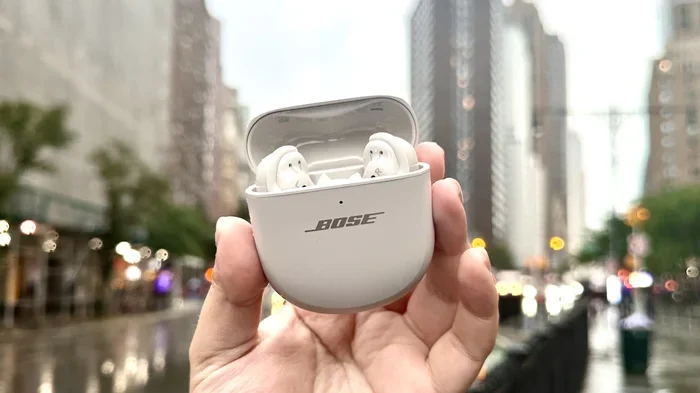
- Bose QuietComfort Ultra Earbuds: Uses Bose Immersive Audio technology to create a rich, enveloping sound experience.
Each of these earbuds approaches surround sound simulation differently. Your choice should depend on your device ecosystem, budget, and personal sound preferences.
Common Myths About TWS and Surround Sound
There is a lot of misinformation floating around about TWS earbuds and surround sound. Let us clear up a few common myths.
Myth 1: TWS Earbuds Can Replace a Home Theater System
This is simply not true. TWS earbuds are designed for personal listening. They cannot fill a room with sound the way a home theater system can. While they can simulate surround sound for your ears, they do not create the same environmental audio experience.
Myth 2: More Expensive Earbuds Always Have Better Surround Sound
Price does not always equal surround sound quality. Some mid-range TWS earbuds offer excellent spatial audio processing that rivals more expensive models. It is more important to look at the specific audio features and codecs supported rather than just the price tag.
Myth 3: All Wireless Earbuds Are TWS
Some wireless earbuds have a wire connecting the two earpieces. These are called neckband-style or wireless stereo earbuds, not TWS. True Wireless Stereo specifically means no connection between the earbuds at all. This distinction matters because the lack of a connecting wire can affect Bluetooth stability and audio sync.
Quick Tips for Getting the Best Surround Sound From Your TWS Earbuds
- Use high-quality audio files: Choose lossless or high-resolution streaming options when possible.
- Enable spatial audio features: Check your device settings and earbud app for spatial audio or surround modes.
- Keep your earbuds clean: Wax and debris can block drivers and reduce sound quality.
- Update your firmware: Brands often release updates that improve audio processing and surround sound features.
- Use a good fit: The right ear tip size makes a big difference in sound isolation and immersion.
- Stay close to your source device: A strong Bluetooth connection ensures the best audio quality and fewer dropouts.
Common Mistakes People Make With TWS Earbuds and Audio
Avoid these mistakes to get the most out of your TWS earbuds and their surround sound capabilities.
- Skipping the ear tip fit test: A poor fit ruins both sound quality and the immersive feel of surround simulation.
- Ignoring EQ settings: Default settings are often not optimized for surround sound. Spend a few minutes tweaking the equalizer in your earbud app.
- Using outdated Bluetooth versions: Older Bluetooth versions limit audio quality and can introduce latency that breaks the surround sound illusion.
- Listening to compressed audio only: Low-bitrate audio lacks the detail needed for convincing surround sound simulation.
- Not updating firmware: Manufacturers regularly improve audio processing through firmware updates. Skipping these means missing out on better performance.
Expert Insights on TWS Audio and Immersive Listening
Audio engineers agree that TWS technology has come a long way in the past few years. While true surround sound remains out of reach for earbuds, the gap is closing fast. Spatial audio processing and advanced Bluetooth codecs are the biggest game changers.
One expert notes that the future of TWS audio lies in on-device AI processing. This technology could analyze audio in real time and adjust the surround sound simulation based on your ear shape, listening environment, and content type. We are already seeing early versions of this in flagship earbuds from Apple, Sony, and Samsung.
Another trend to watch is multipoint connectivity. Some TWS earbuds can connect to two devices simultaneously. This allows seamless switching between your phone and laptop, which is great for watching videos or taking calls without audio interruptions.
The audio ecosystem around TWS earbuds also matters. Brands that invest in their broader ecosystem, like how iHome integrates with Apple devices, often provide a more polished surround sound experience. The synergy between devices can enhance audio processing and deliver better results.
Similarly, Bluetooth device compatibility plays a role. Just as Bluetooth works on Apple Watch without iPhone in certain configurations, TWS earbuds can sometimes connect to devices in unexpected ways that improve the audio experience. Understanding these connectivity options helps you get the most from your setup.
Final Thoughts on TWS Surround Sound
So, does TWS have surround sound? The answer is both yes and no. Most TWS earbuds deliver stereo sound that can feel surprisingly immersive thanks to advanced processing and spatial audio features. They cannot replace a true surround sound system, but for personal listening, they come impressively close.
If you want the best surround-like experience from your TWS earbuds, focus on models that support spatial audio, high-quality Bluetooth codecs, and custom EQ settings. Pair them with high-resolution audio content and a proper ear tip fit, and you will be amazed at the immersive sound you can get from a pair of wireless earbuds.
The world of TWS audio is evolving fast. Every new generation brings better processing, richer sound, and more convincing surround simulations. Whether you are a casual listener or an audiophile, there has never been a better time to invest in quality TWS earbuds.
Keep experimenting with settings, stay curious about new features, and most importantly, enjoy the music. The best surround sound is the kind that makes you forget you are wearing earbuds at all.
Frequently Asked Questions
Can TWS earbuds deliver true surround sound like a home theater?
No, TWS earbuds cannot produce true surround sound because they only have two speakers. However, they can simulate surround sound using spatial audio, head tracking, and advanced audio processing to create an immersive listening experience.
Which TWS earbuds have the best surround sound simulation?
Apple AirPods Pro 2, Samsung Galaxy Buds2 Pro, Sony WF-1000XM5, and Bose QuietComfort Ultra Earbuds are among the top models that offer excellent surround sound simulation through spatial audio and 360-degree sound processing.
Does Bluetooth version affect surround sound quality in TWS earbuds?
Yes, newer Bluetooth versions support higher-quality audio codecs like LDAC and aptX Adaptive. These codecs deliver better audio fidelity, which enhances the surround sound simulation and overall listening experience.
Can I use any audio content to experience TWS surround sound?
For the best results, use content mixed in spatial audio formats like Dolby Atmos or Sony 360 Reality Audio. Regular stereo content will still work but will not fully take advantage of surround sound simulation features.
Why does my TWS earbud surround sound feel different from one ear to the other?
This is usually caused by an improper fit or earwax buildup. Make sure you are using the right ear tip size and clean your earbuds regularly. A good seal in both ears is essential for balanced surround sound simulation.
Are there any settings I should enable for the best TWS surround sound experience?
Yes, enable spatial audio and head tracking in your device settings. Also check your earbud companion app for surround sound modes and custom EQ presets. Using high-resolution audio sources will further improve the experience.
=== CONCLUSION ===
Does TWS have surround sound? The truth is that TWS earbuds offer a simulated surround sound experience rather than true multi-channel surround. But the technology has come so far that the difference is often imperceptible during everyday listening. With spatial audio, head tracking, and advanced Bluetooth codecs, modern TWS earbuds deliver immersive sound that rivals many traditional setups.
Choose your earbuds wisely, use high-quality content, and take advantage of the software features available. You will be amazed at what a pair of true wireless stereo earbuds can do. The future of personal audio is here, and it sounds incredible.