Emerson Smartset Instructions Made Easy for Beginners
The Emerson Smartset thermostat is a simple, programmable device that helps you control your home heating and cooling with ease. This guide walks you through every step, from initial setup to daily use, so you can start enjoying comfort right away. Whether you are new to programmable thermostats or just new to this model, you will find clear instructions that make the process smooth and stress-free.
Setting up a new thermostat can feel overwhelming. There are wires, buttons, and settings that seem to come from another world. But the Emerson Smartset was built to change all of that. It is one of the most popular programmable thermostats on the market, and for good reason. It is simple, reliable, and designed with real people in mind.
In this guide, we will walk you through every step of the Emerson Smartset instructions. You will learn how to install it, program your first schedule, read the display, and solve common problems. By the end, you will feel confident and in control of your home comfort. Think of it as your personal walkthrough, just like following Cobra Microtalk instructions for setting up your radio — clear, step-by-step, and made for beginners.
So grab a cup of coffee, and let us get started. No prior experience needed. Just a few minutes of your time, and you will have your Emerson Smartset running like a pro.
Key Takeaways
- Easy Setup: The Emerson Smartset is designed for beginners, with straightforward controls and a clear display.
- Programmable Schedules: You can set different temperatures for different times of the day to save energy.
- Energy Savings: Using the Smartset properly can lower your heating and cooling bills significantly.
- Quick Troubleshooting: Most common issues have simple fixes you can do yourself in minutes.
- Battery and Maintenance Tips: Simple habits keep your thermostat running smoothly for years.
- User-Friendly Display: The interface is intuitive, even if you have never used a programmable thermostat before.
📑 Table of Contents
- What Is the Emerson Smartset Thermostat?
- Getting Started with Your Emerson Smartset
- Programming Your Temperature Schedule
- Understanding the Thermostat Display and Controls
- Common Issues and How to Fix Them
- Tips for Maximizing Comfort and Energy Savings
- Expert Insights and Common Mistakes to Avoid
- Final Thoughts
What Is the Emerson Smartset Thermostat?
The Emerson Smartset is a digital programmable thermostat. It lets you set automatic temperature schedules for your home. Instead of manually adjusting the heat or air every day, the Smartset does it for you. This means your home is comfortable when you need it and saves energy when you do not.
Here is what makes the Emerson Smartset stand out:
- Simple digital display that shows the current temperature and your settings.
- Programmable schedules for weekday and weekend routines.
- Heating and cooling mode selection with a single button press.
- Battery-powered operation for easy installation without wiring complications.
- Compact design that fits most standard wall plates.
If you have ever struggled with a complicated thermostat manual, the Smartset is a refreshing change. The interface is clean, the buttons are labeled clearly, and the setup process is intuitive. It is a great entry point for anyone exploring programmable thermostat options for the first time.
Why Choose a Programmable Thermostat?
Many people still use manual thermostats. They adjust the temperature by hand every time they feel too hot or too cold. A programmable thermostat like the Emerson Smartset takes the guesswork out of this. You set it once, and it follows your schedule automatically.
The benefits are real:
- Lower energy bills: You heat or cool your home only when needed.
- Better comfort: Your home is at the right temperature when you wake up, come home, or go to bed.
- Reduced waste: Less energy is used when nobody is home.
- Easy to adjust: You can always override the schedule manually if your plans change.
These advantages make the Emerson Smartset instructions worth learning. Once you see how simple it is to program, you will wonder why you did not switch sooner.
Getting Started with Your Emerson Smartset
Before you touch any wires or mount the unit, you need to gather a few things. The setup process is quick, but having everything ready saves time and frustration. Think of it like preparing before you follow Cobra Microtalk instructions — having your batteries and manual ready makes everything smoother.
What You Will Need Before Starting
Here is a short checklist of items you should have before you begin:
- A Phillips-head screwdriver for removing the old thermostat and mounting the new one.
- Two AA batteries for powering the Smartset.
- A pencil or small tool for pressing the reset button if needed.
- A label maker or masking tape to label your wires (this is a pro tip many people skip).
- A level to ensure the thermostat mounts straight on the wall.
Step-by-Step Installation
Now let us walk through the actual installation. Follow these steps carefully, and you will be done in under 30 minutes.
Step 1: Turn off the power. Go to your breaker box and switch off the power to your heating or cooling system. This is a safety step you should never skip.
Step 2: Remove the old thermostat. Unscrew the cover of your current thermostat. Take a photo of the wires before you disconnect them. This makes it much easier to match wires to the correct terminals on the new Smartset.
Step 3: Label the wires. Use tape or a label maker to mark each wire. Most systems have a common wire (C), a heating wire (W), and a cooling wire (Y). If you are unsure, take a clear photo and refer to the Emerson Smartset instructions manual for your specific wiring diagram.
Step 4: Mount the base plate. Thread the wires through the wall hole. Attach the base plate to the wall using the screws provided. Use a level to make sure it is straight.
Step 5: Connect the wires. Match each labeled wire to the correct terminal on the Smartset base. Press each wire firmly into place. Double-check your connections against your photo or labels.
Step 6: Insert batteries and attach the display. Place two AA batteries into the battery compartment. Snap the display unit onto the base plate. The screen should light up.
Step 7: Restore power and test. Go back to your breaker box and turn the power back on. Wait a minute for the system to start. Adjust the temperature up and down to confirm the heating or cooling kicks in.
That is it! Your Emerson Smartset is physically installed. Now let us move on to programming it.
Programming Your Temperature Schedule
The real power of the Emerson Smartset comes from its scheduling feature. A good schedule matches your daily routine. You do not need to heat an empty house, and you do not need to blast the AC when you are asleep. The Smartset handles all of this automatically.
Understanding the Schedule Modes
The Smartset offers two main schedule modes:
- Weekday Schedule: This covers Monday through Friday. It is ideal for people who work outside the home during the day.
- Weekend Schedule: This covers Saturday and Sunday. It works best for people who stay home more on weekends or have different routines.
Each mode lets you set four different temperature periods:
- Wake: The temperature when you first get out of bed.
- Day: The temperature while you are away from home.
- Evening: The temperature when you return home.
- Sleep: The temperature while you are sleeping at night.
How to Set Your First Schedule
Follow these steps to program your initial schedule:
- Press the Schedule button on the Smartset display.
- Select either Weekday or Weekend using the navigation arrows.
- For each time period, press Set and then use the up or down arrows to adjust the temperature.
- Confirm each setting by pressing Set again.
- Repeat for all four periods and both schedule types.
Once your schedule is set, the Smartset will automatically adjust the temperature throughout the day. You can always make changes by going into the schedule menu. The process is simple and mirrors the clear layout you find in quality instruction guides like Cobra Microtalk instructions — logical, visual, and easy to follow.
Quick Tips for Better Scheduling
- Start small: If you are new to programmable thermostats, set just a wake and sleep temperature first. You can add more later.
- Use the hold function: If your routine changes for a day, use the temporary hold to override the schedule without deleting it.
- Be realistic: Set the “away” temperature a few degrees higher in summer and a few degrees lower in winter. This saves the most energy.
- Adjust seasonally: Review your schedule every few months to make sure it still matches your lifestyle.
Understanding the Thermostat Display and Controls
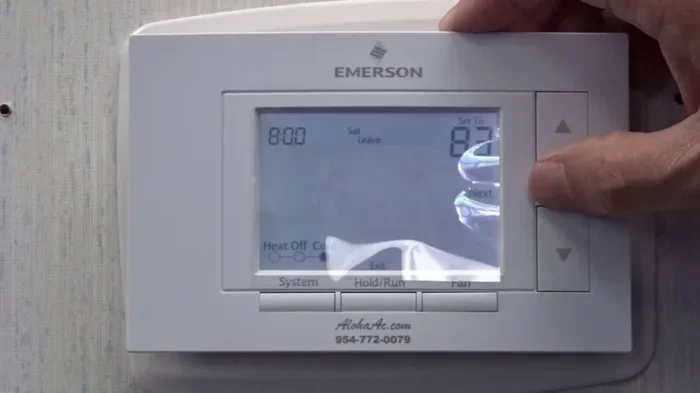
The Emerson Smartset display is designed to be simple and easy to read. At a glance, you can see the current room temperature, your set temperature, and the active mode. Understanding what each symbol and number means helps you make the most of your device.
Reading the Display
The top of the display shows the current room temperature. The middle section shows the temperature you have set. The bottom area displays the active mode — heating, cooling, or off. A small leaf icon may appear when the system is running in an energy-saving mode.
Mode Selection Explained
The Smartset has three main modes:
- Heat Mode: The system runs your furnace or heater when the room drops below your set temperature.
- Cool Mode: The system runs your air conditioner when the room rises above your set temperature.
- Off Mode: The system shuts down completely. Neither heating nor cooling is active.
Switching between modes is as simple as pressing the mode button. The display updates immediately to show your selection. This straightforward control layout is one reason the Emerson Smartset instructions are so beginner-friendly.
Using the Hold and Override Functions
Sometimes your routine changes unexpectedly. Maybe you are staying home sick, or you have guests over. The hold function lets you temporarily override your schedule.
To use the hold function:
- Press the Hold button to lock in your current temperature setting.
- The display will show “Hold” instead of your schedule.
- When you are ready to return to your normal schedule, press Run to resume.
This feature is incredibly useful and makes the Smartset flexible for real-life situations. You are never locked into a rigid schedule that does not fit your day.
Common Issues and How to Fix Them
Even the simplest devices can have occasional hiccups. The good news is that most problems with the Emerson Smartset are easy to fix. Before you call a technician, try these troubleshooting steps.
The Display Is Blank or Unresponsive
This is the most common issue. It usually means the batteries need replacing. Open the battery compartment and swap in fresh AA batteries. If the display still does not turn on, try pressing and holding the reset button for five seconds. This will restart the unit.
The System Will Not Turn On
First, check that the power is on at the breaker box. Next, make sure the thermostat is set to Heat or Cool mode and not Off. If the temperature you have set is more extreme than the current room temperature, the system should kick in within a few minutes. If it does not, double-check your wiring connections.
The Temperature Does Not Match the Actual Room Temperature
Thermostats can sometimes read incorrectly if they are placed in a bad location. Make sure the Smartset is not near a drafty window, a heat source, or direct sunlight. If the sensor seems off, you can calibrate it by accessing the setup menu and following the on-screen prompts.
The Schedule Keeps Resetting
If your programmed schedule resets after a power outage, you may need to replace the batteries. A weak battery can cause the memory to clear. Always use fresh alkaline batteries for the best results.
When to Call a Professional
Most issues are simple to fix. But if you smell gas, notice a burning odor, or see sparks, turn off the power immediately and call a professional. Safety always comes first.
Tips for Maximizing Comfort and Energy Savings
Installing the Emerson Smartset is only the first step. To truly get the most out of your thermostat, you need to use it wisely. Small adjustments to your habits can lead to big savings on your energy bills.
The 78-Degree Rule for Summer
During summer, set your cooling temperature to 78 degrees Fahrenheit when you are home. When you are asleep or away, raise it a few degrees higher. This simple adjustment can reduce your cooling costs by up to 10 percent.
The 68-Degree Rule for Winter
In winter, set your heating temperature to 68 degrees when you are awake and at home. Lower it to around 62 degrees when you are asleep or away. Each degree lower can save you about 1 to 3 percent on your heating bill.
Use the Fan Function Wisely
The Smartset has a fan setting that circulates air without heating or cooling. Use the “Auto” fan setting to save energy. The fan runs only when the system is actively heating or cooling. Running the fan constantly uses extra electricity.
Keep Your System Maintained
A well-maintained HVAC system runs more efficiently. Replace your air filters every one to three months. Clean the area around your outdoor unit to keep airflow unobstructed. Schedule annual professional maintenance to catch small problems before they become big ones.
Compare Your Settings to Your Old Thermostat
If you are switching from a manual thermostat, you might be tempted to set the Smartset to the same temperatures you used before. But a programmable thermostat lets you be smarter about it. Use the schedule feature to reduce heating and cooling during hours when nobody is home. This alone can make a noticeable difference on your monthly bill.
The Emerson Smartset is a tool that rewards consistent use. The more you stick to your schedule, the more you save. It is like following a good fitness routine — the results come from showing up every day.
Expert Insights and Common Mistakes to Avoid
Top Mistakes Beginners Make
Even with clear Emerson Smartset instructions, beginners sometimes make avoidable mistakes. Here are the most common ones:
- Skipping the wiring labels: Without labels, reconnecting wires can be confusing and risky. Always label before disconnecting.
- Setting extreme temperatures: Cranking the thermostat up does not heat your home faster. It just makes the system run longer and waste energy.
- Ignoring the schedule: A programmable thermostat only saves money if you actually use the schedule feature.
- Forgetting to replace batteries: Weak batteries cause resets and display issues. Replace them once a year at minimum.
- Placing the thermostat near vents: This causes the sensor to read the wrong temperature, leading to short cycling and inefficiency.
Expert Tips from HVAC Professionals
HVAC technicians recommend a few extra habits that make a big difference:
- Use a programmable thermostat with a smart home system if possible. While the Smartset is not a Wi-Fi model, it still offers excellent scheduling for its price range.
- Keep a maintenance log. Write down when you replaced filters or batteries. This helps you stay on track.
- Teach everyone in the household. Make sure all family members know how to use the basic controls. This prevents accidental overrides and confusion.
These small habits add up over time. They keep your Emerson Smartset running smoothly and your home comfortable year-round.
Final Thoughts
The Emerson Smartset is one of the best choices for anyone who wants a simple, reliable programmable thermostat. The setup is straightforward, the programming is intuitive, and the daily use is effortless. You do not need to be a tech expert to get great results from this device.
By following the Emerson Smartset instructions in this guide, you have everything you need to install, program, and maintain your thermostat with confidence. The key is to start simple, use the schedule feature consistently, and make small adjustments as your needs change.
Remember, the goal of a programmable thermostat is to make your life easier and your home more comfortable. The Emerson Smartset delivers on both fronts. So take a few minutes today to set up your schedule, check your batteries, and enjoy the comfort of a home that adjusts itself to your life.
You have made a smart choice by choosing the Emerson Smartset. Now put it to work for you. Your home — and your energy bill — will thank you.
Frequently Asked Questions
How do I reset my Emerson Smartset thermostat?
To reset your Smartset, press and hold the reset button on the back of the unit for about five seconds. The display will flash and return to the default settings. You will need to reprogram your schedule after a reset. Always replace the batteries before resetting to avoid memory loss.
Can I install the Emerson Smartset myself?
Yes, the Smartset is designed for DIY installation. The process is straightforward if you follow the wiring diagram in the manual. However, if you are uncomfortable with electrical work, it is always best to hire a licensed HVAC professional. Safety should always come first.
What type of batteries does the Emerson Smartset use?
The Smartset runs on two AA alkaline batteries. These are widely available and easy to replace. You should replace the batteries once a year or when the display starts to dim. Using rechargeable batteries is not recommended, as they may not provide consistent power.
Why does my Emerson Smartset keep resetting the schedule?
This usually happens when the batteries are weak or when there is a brief power outage. Replacing the batteries with fresh ones should fix the issue. If the problem continues, check that the wiring connections are secure and that the base plate is properly mounted.
Can I use the Emerson Smartset with both a furnace and an air conditioner?
Yes, the Smartset supports both heating and cooling systems. You simply switch between Heat and Cool modes using the mode button. Make sure your wiring matches the correct terminals for both systems. Refer to the wiring diagram in the manual for guidance.
Is the Emerson Smartset compatible with smart home systems?
The standard Emerson Smartset is not a Wi-Fi-enabled model. It does not connect to smart home apps or voice assistants. However, it offers excellent scheduling and energy-saving features on its own. If you need smart home integration, you may want to look at the Emerson Smartset Wi-Fi models instead.
=== CONCLUSION ===
The Emerson Smartset instructions are clear, simple, and designed for real people. Whether you are installing your first thermostat or upgrading from an older model, this guide gives you everything you need to succeed. From the initial setup to daily scheduling and troubleshooting, you now have the knowledge to take full control of your home comfort.
Remember to start with a solid schedule, keep your batteries fresh, and make small adjustments as your routine changes. The Emerson Smartset is a reliable companion for year-round comfort and energy savings. Put what you have learned today into practice, and you will see the difference in your home — and on your energy bill — starting tomorrow.