Difference Between Flash Memory and RAM Explained Simply
The difference between flash memory and RAM comes down to how your computer stores and uses data. Flash memory holds data permanently even when the power is off, while RAM is volatile and clears when you shut down. Understanding this gap helps you make smarter choices about storage, speed, and system performance.
Have you ever wondered why your computer has different types of memory? You might hear people talk about RAM and flash storage, and it can feel confusing. The difference between flash memory and RAM is simpler than you think. Both are essential parts of your computer, but they do very different jobs. One holds your data forever, and the other works only while the machine is on. Once you understand this gap, everything about how your device works starts to make sense.
In this guide, we will break down the difference between flash memory and RAM in plain, easy-to-understand language. You will learn what each type does, how fast they are, and why your computer needs both. We will also look at real-world examples and common mistakes people make. By the end, you will know exactly which type of memory matters for your needs. Let us dive in and make this topic crystal clear.
Key Takeaways
- Flash memory is non-volatile: It retains data without power, making it ideal for long-term storage in devices like phones and laptops.
- RAM is volatile: It loses all stored data when the power turns off but provides blazing-fast access for active tasks.
- Speed matters: RAM operates far faster than flash memory, handling real-time processes while flash stores files for the long haul.
- They work together: Your computer uses both types of memory in a memory hierarchy to balance speed and storage capacity.
- Use cases differ: Flash memory suits storage needs, while RAM excels at running active applications and multitasking.
- Upgrade wisely: Knowing the difference helps you decide whether to add more RAM or upgrade your flash storage for better performance.
📑 Table of Contents
What Is Flash Memory?
Flash memory is a type of non-volatile storage. This means it keeps your data even when the device is turned off. You find flash memory in USB drives, smartphones, tablets, and solid-state drives (SSDs). It uses special memory chips called NAND flash to store information permanently. Unlike older hard drives with spinning disks, flash storage has no moving parts. This makes it faster, quieter, and more reliable.
How Flash Memory Works
Flash memory stores data using tiny electrical cells. Each cell holds a charge that represents a 0 or a 1, which is the basis of all digital data. When you save a photo, document, or app, the flash memory traps that charge in place. The data stays put until you decide to delete it or overwrite it. This is why your files survive a power outage or a restart. Flash memory uses a process called tunneling to move electrons into the memory cells, and it traps them there without needing constant power.
Types of Flash Memory
There are two main kinds of flash memory you should know about:
- NAND Flash: This is the most common type. It is found in SSDs, memory cards, and USB drives. NAND flash writes and reads data in blocks, which makes it efficient for storing large amounts of information.
- NOR Flash: This type is faster for reading but more expensive. You will find it in devices that need to store and run small programs directly, like some embedded systems and BIOS chips.
Both types serve the same core purpose: they keep your data safe without power. But they differ in speed, cost, and use cases. NAND flash wins for mass storage, while NOR flash works best for code execution.
Where You Will Find Flash Memory
Flash memory is everywhere in modern technology. Here are some common places you will see it:
- Solid-state drives (SSDs) in laptops and desktop computers
- Smartphone internal storage
- SD cards and microSD cards for cameras and tablets
- USB flash drives for portable data transfer
- Game consoles like the Nintendo Switch and PlayStation
- Embedded systems in cars and appliances
The difference between flash memory and RAM becomes very clear when you look at where flash is used. It is built for storing files, apps, and operating systems over the long term. It is not meant for fast, temporary calculations.
What Is RAM?
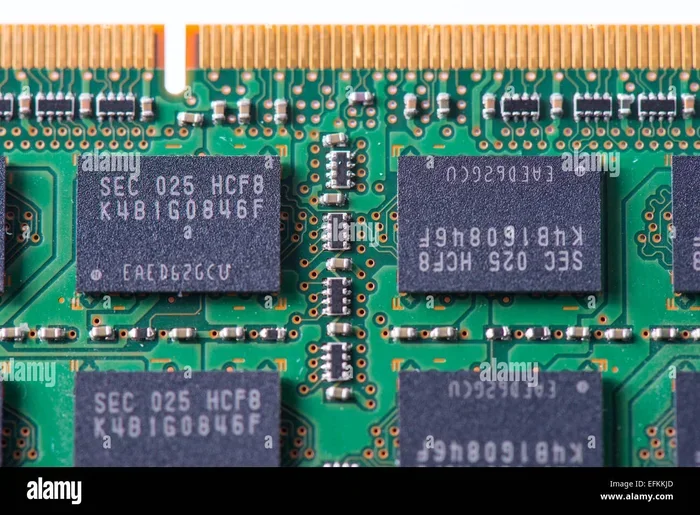
RAM stands for Random Access Memory. It is a type of volatile memory, which means it loses all stored data the moment you turn off your computer. Think of RAM as your computer’s short-term workspace. When you open a browser, a game, or a video editor, the program loads into RAM. This allows the processor to access data almost instantly. Without RAM, your computer would have to fetch everything from long-term storage every single time, and that would be painfully slow.
How RAM Works
RAM works by holding data that your processor needs right now. It uses tiny capacitors and transistors to store each bit of information. These capacitors hold electrical charges that represent 0s and 1s. Because RAM is so close to the processor, data transfers happen at incredible speeds. A typical modern DDR4 RAM module can deliver data at speeds of 3,200 megabytes per second or more. That is orders of magnitude faster than any flash storage device.
However, RAM needs constant power to maintain those electrical charges. The moment you unplug your computer or press the power button to shut down, the capacitors drain. All the data in RAM disappears. This is why you need to save your work before closing your laptop. RAM is designed for speed, not permanence.
Types of RAM
There are two primary types of RAM used in computers today:
- DRAM (Dynamic RAM): This is the most common type found in personal computers and laptops. DRAM needs to be refreshed thousands of times per second to maintain data. It offers a good balance of speed and cost.
- SRAM (Static RAM): This type is faster and does not need refreshing, but it is much more expensive. SRAM is typically used in cache memory inside processors, where speed is the top priority.
When people talk about upgrading their computer’s memory, they almost always mean adding more DRAM. Understanding the difference between flash memory and RAM helps you see why RAM upgrades can make your system feel snappier in daily use.
Key Differences Between Flash Memory and RAM
The difference between flash memory and RAM shows up in several important ways. Let us break down the main contrasts so you can see them side by side.
Speed Comparison
RAM is dramatically faster than flash memory. While RAM can deliver data in nanoseconds, flash storage takes microseconds to respond. That might sound like a small gap, but in computing terms, it is enormous. RAM is built for instant access, while flash memory is optimized for storing large amounts of data at reasonable cost.
Volatility
This is the biggest difference between flash memory and RAM. Flash memory is non-volatile, meaning it keeps your data without power. RAM is volatile, meaning it forgets everything when the power goes away. This single fact shapes how and why each type of memory is used.
Cost Per Gigabyte
Flash storage is much cheaper per gigabyte than RAM. A 1TB SSD might cost around $60 to $100, while 1TB of RAM would cost thousands of dollars. This price gap explains why computers use flash for storage and RAM only for active, temporary workspace.
Capacity
Flash memory is available in much larger capacities than RAM. You can buy flash storage in sizes up to 8TB or more for consumer devices. RAM modules typically max out at 64GB or 128GB for most consumer systems. Flash memory is built to hold your entire library of files, while RAM handles only what you are actively working on.
Read and Write Cycles
Flash memory has a limited number of write cycles. Each time you write data to a flash cell, it degrades slightly. Over thousands or millions of cycles, the cell can fail. RAM does not have this limitation. It can be read from and written to billions of times without wear. This makes RAM far more durable for constant, rapid data operations.
Role in the System
Flash memory stores your operating system, applications, and files permanently. RAM temporarily holds the data your processor is actively using. They complement each other perfectly. The computer loads what it needs from flash into RAM, works on it at top speed, and then writes results back to flash when you save.
| Feature | Flash Memory | RAM |
|---|---|---|
| Volatility | Non-volatile (keeps data without power) | Volatile (loses data without power) |
| Speed | Slower (microseconds to respond) | Very fast (nanoseconds to respond) |
| Cost Per GB | Low (affordable for large storage) | High (expensive per gigabyte) |
| Capacity | Up to 8TB or more | Typically up to 128GB |
| Write Cycles | Limited (wears out over time) | Virtually unlimited |
| Primary Role | Long-term data storage | Short-term active workspace |
| Common Forms | SSD, USB drive, SD card | DDR4, DDR5 DIMM modules |
How Flash Memory and RAM Work Together
Your computer does not choose between flash memory and RAM. It uses both in harmony. This partnership is part of what computer engineers call the memory hierarchy. The idea is simple: use fast memory for active work and slower storage for keeping data safe over time.
When you boot up your computer, the operating system loads from flash storage into RAM. Once it is in RAM, the processor can access it at full speed. When you open a document, that file moves from flash into RAM. When you hit save, the data travels back from RAM to flash for permanent storage. This constant back-and-forth is what makes your computer feel responsive.
The difference between flash memory and RAM is most visible during this process. If you have slow flash storage, your computer takes longer to boot and load apps. If you have too little RAM, your system slows down when you have many programs open because it runs out of workspace. Both components matter, but they serve different purposes in the overall system.
Memory Hierarchy Explained
The memory hierarchy arranges storage types from fastest and smallest to slowest and largest:
- CPU Cache: The fastest memory, built directly into the processor. It holds the most frequently used data.
- RAM: Fast and volatile, used for active programs and processes.
- Flash Storage: Slower but non-volatile, used for storing the operating system and all your files.
- External Storage: Hard drives, cloud storage, and backup drives for long-term archiving.
Each level in this hierarchy serves a specific role. RAM bridges the gap between the ultra-fast CPU cache and the much slower flash storage. Understanding this flow helps you appreciate why both flash memory and RAM are essential parts of any modern computer.
When to Upgrade Flash Storage vs RAM
Knowing the difference between flash memory and RAM helps you decide what upgrade will actually help your system. Many people buy more RAM when they really need faster flash storage, or vice versa. Let us look at when each upgrade makes sense.
Upgrade Your RAM When
You should consider adding more RAM if you experience any of these problems:
- Your computer freezes or slows down when you have many browser tabs open
- Video editing or photo processing software crashes frequently
- Your system uses swap memory (using flash storage as fake RAM), which is very slow
- You run virtual machines or multiple applications at the same time
- Your task manager shows RAM usage consistently above 80 percent
More RAM gives your processor a bigger workspace. It can hold more active data without needing to fetch it from slower flash storage. For most users, 16GB of RAM is the sweet spot for everyday tasks. Power users and gamers may want 32GB or more.
Upgrade Your Flash Storage When
You should consider upgrading your flash storage if you notice:
- Your computer takes a long time to boot up
- Apps and files take forever to open or save
- You constantly run out of storage space
- Your system uses an old hard disk drive instead of an SSD
- File transfers are painfully slow
Swapping a traditional hard drive for an SSD is one of the most impactful upgrades you can make. An SSD uses flash memory technology to deliver dramatically faster read and write speeds. Your boot times, app launches, and file transfers will all improve significantly.
Quick Tips for Upgrading
- Check your system specifications before buying any component
- Use tools like Task Manager (Windows) or Activity Monitor (Mac) to identify bottlenecks
- If your budget is tight, upgrading from a hard drive to an SSD gives the biggest performance boost
- Adding RAM is usually cheaper and easier than replacing a storage drive
- Always back up your data before opening your computer for upgrades
Common Mistakes People Make
Many users misunderstand the difference between flash memory and RAM, leading to common mistakes. Let us clear up some of the biggest confusions.
Thinking More Storage Means Faster Performance
Some people believe that having a 1TB drive means their computer will be fast. But storage capacity and speed are two different things. A large flash drive does not make your system run faster if you do not have enough RAM. Capacity is about how much you can store. Speed is about how quickly you can access and work with that data.
Confusing Storage and Memory
This is the most common mistake. People often say “my computer has 512GB of memory” when they really mean storage. In computing, memory usually refers to RAM. Storage refers to flash memory or hard drives. Mixing up these terms can lead to poor purchasing decisions. If you want your computer to run faster, you need more RAM. If you want to store more files, you need more flash storage.
Ignoring the Flash Memory Write Limit
Because flash memory has a limited number of write cycles, some users worry about wearing it out. For most everyday users, this is not a real concern. Modern flash storage can handle years of normal use. However, heavy write workloads like constant video rendering or server logging can shorten the lifespan of flash cells. Understanding this helps you make informed decisions about storage for demanding tasks.
Skipping RAM When Building a Budget PC
Some builders cut costs by skimping on RAM and maxing out flash storage instead. This is a backwards approach. Insufficient RAM will bottleneck your system far more than a smaller SSD would. Always prioritize enough RAM first, then add storage as needed.
Expert Insights on Memory Technology
Computer engineers and tech experts emphasize that the difference between flash memory and RAM is not just about specs on a spec sheet. It is about how your device actually feels during daily use. A system with fast flash storage and plenty of RAM will feel responsive and smooth. A system with slow storage and low RAM will feel sluggish no matter how powerful the processor is.
Experts also point out that emerging technologies are blurring the lines slightly. Technologies like Intel Optane Memory aim to bridge the gap between flash storage and RAM. These hybrid solutions use fast flash-based memory to cache frequently used data, speeding up access times. However, they do not replace RAM entirely. The fundamental difference between flash memory and RAM in terms of volatility and speed remains a core principle of computer design.
Looking ahead, experts predict that non-volatile memory technologies may one day combine the speed of RAM with the persistence of flash storage. But for now, both types of memory remain essential and distinct. Understanding their roles helps you build, buy, and troubleshoot computers with confidence.
Key Takeaways
- Flash memory is non-volatile: It retains your files and apps even when the power is off, making it perfect for long-term storage in SSDs, phones, and USB drives.
- RAM is volatile: It provides lightning-fast workspace for active tasks but forgets everything when the power is cut.
- The speed gap is huge: RAM operates at nanosecond speeds while flash memory is much slower, making RAM essential for real-time processing.
- Cost and capacity differ: Flash storage is cheap and available in large sizes, while RAM is expensive and comes in smaller capacities.
- They work as a team: Your computer constantly moves data between flash storage and RAM to balance speed and permanence.
- Upgrade based on need: Slow boot times and loading point to flash storage upgrades, while slowdowns during multitasking point to RAM upgrades.
- Know the terms: Understanding the difference between flash memory and RAM helps you avoid common buying mistakes and communicate better with tech support.
Conclusion
The difference between flash memory and RAM comes down to one simple idea: permanence versus speed. Flash memory holds your data safely for the long term, even without power. RAM gives your processor a blazing-fast workspace for everything you are doing right now. Neither one is better than the other. They are both essential, and they work best when they work together.
Next time you think about upgrading your computer, remember what you have learned here. Check whether your bottleneck is storage speed or workspace capacity. That single insight will guide you to the right upgrade. Whether you are a casual user, a student, or a power user, understanding these two types of memory puts you ahead of the curve. The difference between flash memory and RAM is not just a technical detail. It is the foundation of how every computer, phone, and tablet you own actually works.
Take this knowledge and use it. Share it with friends who are confused by tech jargon. And the next time someone asks you about computer memory, you will have a clear, confident answer ready. That is the real power of understanding how your devices use memory.
Frequently Asked Questions
Is flash memory the same as RAM?
No, they are completely different. Flash memory is non-volatile and stores data permanently, while RAM is volatile and only holds data temporarily while the computer is on. The difference between flash memory and RAM is one of the most important concepts in computing.
Can I use flash memory instead of RAM in my computer?
No, you cannot. Flash memory is far too slow to replace RAM. Your processor needs the ultra-fast access that RAM provides for active tasks. Flash storage is meant for long-term storage, not real-time processing.
Does more RAM make my computer faster?
Yes, but only up to a point. More RAM helps when you run many programs at once or use memory-heavy applications. If you already have enough RAM, adding more will not make a noticeable difference. The difference between flash memory and RAM matters here because adding RAM helps active tasks, while upgrading flash storage helps boot times and file loading.
Why does my computer lose unsaved work when it crashes?
Because RAM is volatile, it loses all data the moment power is cut. This is why saving your work frequently is so important. Flash memory would keep your data safe, but it is too slow to serve as your active workspace. That is why both types of memory exist in your computer.
What is the lifespan of flash memory compared to RAM?
Flash memory has a limited number of write cycles, typically ranging from thousands to millions depending on the type. RAM can handle billions of read and write cycles without wearing out. However, for normal consumer use, both will last many years without any issues related to wear.
Should I upgrade my RAM or my flash storage first?
It depends on your symptoms. If your computer is slow to boot or open apps, upgrade your flash storage to an SSD. If your computer slows down when you have many programs open, add more RAM. Understanding the difference between flash memory and RAM makes it easy to diagnose and fix the right problem.