Can You Play Gamecube Games On A Modern Flat Screen Tv
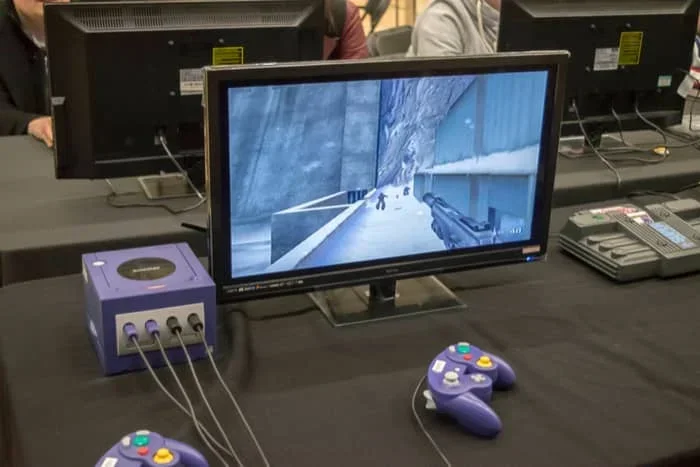
Yes, you can play Gamecube games on a modern flat screen TV, but it requires the right cables, adapters, or emulators. The GameCube uses component or composite video outputs that don’t always plug directly into today’s HDMI-only displays. With a few affordable adapters or a software emulator, you can enjoy your favorite retro titles on a big modern screen in high definition.
You dust off your old Nintendo GameCube, plug it into your brand new flat screen TV, and… nothing. Or maybe you get a fuzzy picture, or no picture at all. It is frustrating. You bought this console to relive classic games like Super Mario Sunshine or The Legend of Zelda: The Wind Waker, but your modern TV does not seem to want to play nice with it.
The good news is that you absolutely can play Gamecube games on a modern flat screen TV. It just takes a little know-how. Whether you want to use the original hardware or try a software emulator, there are several paths that work. In this guide, we walk you through every option, every adapter, and every trick you need to get those classic games looking great on your big screen.
Let us get into it. No jargon. No fluff. Just clear steps to bring your GameCube into the modern age.
Key Takeaways
- The GameCube uses component and composite cables that need adapters to work with modern HDMI TVs.
- An HDMI converter is the easiest way to get GameCube video on a flat screen without losing quality.
- Emulators let you play GameCube games digitally on a PC and then cast or stream to your TV wirelessly.
- Input lag and resolution scaling are common issues that can be fixed with the right settings.
- Modding your GameCube opens up more display options and better compatibility with modern screens.
- PAL and NTSC region differences can affect how games look and run on modern TVs.
- Keeping your audio in sync is important when using adapters or converters with a GameCube.
📑 Table of Contents
Understanding How the GameCube Connects to TVs
The Nintendo GameCube came out in 2001. At that time, most TVs had RCA composite inputs or S-Video ports. Some higher-end sets even had component video inputs. Fast forward to today, and most modern flat screen TVs only have HDMI ports. That is the core problem. Your GameCube does not speak HDMI natively.
The Original Connection Methods
The GameCube shipped with a composite AV cable that plugs into the red, white, and yellow RCA ports on your TV. This was standard for its era. A step up was the component cable, which used red, green, and blue video cables plus red and white audio cables. Component cables gave a much sharper picture than composite.
Here is the thing. Neither of these cable types plugs directly into an HDMI port. So if your TV only has HDMI inputs, you need a bridge. That bridge comes in the form of a converter box or an adapter.
Why Modern TVs Are Different
Modern TVs are designed for digital signals. They expect HDMI, which carries both video and audio through a single cable. The GameCube outputs an analog signal. That means the TV has to convert that analog signal into a digital one. Some TVs handle this better than others. Older flat screens from the mid-2000s sometimes had RCA or component inputs built in. But most TVs made after 2015 dropped those inputs entirely.
This is why connecting a device to your TV wirelessly has become so popular. It bypasses the cable compatibility issue altogether. The same idea applies when you want to play GameCube games on a modern display.
Can You Actually Play GameCube Games on a Modern TV?
The short answer is yes. The long answer depends on which method you choose. Let us break down the three main approaches.
Using Component Cables with a Modern TV
If your TV still has component video inputs, you are in luck. The GameCube component cable gives you a decent picture. It supports 480p, which is the highest resolution the GameCube can output. On a modern 1080p or 4K TV, that picture will be scaled up. Most TVs do a decent job of scaling 480p content. The image will look sharp enough, especially for a 20-year-old console.
However, many modern TVs do not have component inputs anymore. If yours does not, do not worry. There is another way.
Using an HDMI Adapter or Converter
This is the most popular method. An HDMI converter takes the analog signal from your GameCube and converts it to a digital HDMI signal. You plug the GameCube into the converter using the composite or component cable, and then run an HDMI cable from the converter to your TV.
These converters are affordable. You can find them for under 30 dollars online. Some models also handle the HDMI to RCA conversion in reverse, which is useful if you ever need to connect newer devices to older displays. For GameCube to modern TV, you want the converter that goes from composite or component to HDMI.
Here are some tips for getting the best results with an HDMI converter:
- Buy a converter that supports 480p input. Not all converters handle this resolution well.
- Use a component cable if possible. It gives a better picture than composite.
- Check that the converter supports your TV’s refresh rate. Most modern TVs run at 60Hz, which works fine with the GameCube.
- Make sure the converter has audio output. You want both video and sound to come through the HDMI cable.
Using an Emulator and Streaming to Your TV
This is a completely different approach. Instead of using the original GameCube hardware, you use a computer emulator. An emulator is software that mimics the GameCube’s hardware. It lets you load GameCube game files, called ISOs, on your PC or laptop.
Once you are running the game on your computer, you can display it on your TV. One easy way is to connect your laptop to your TV wirelessly using features like Miracast, Chromecast, or a smart TV’s built-in screen mirroring. Another option is to use an HDMI cable directly from your laptop to the TV.
You can also stream your gameplay from a PC to your TV using tools similar to how you would stream your Steam Deck to your TV. This gives you flexibility. You do not need the original console at all.
The best GameCube emulators include Dolphin and PrimeHack. Dolphin is the most well-known and supports a huge library of GameCube games. It also lets you upscale the resolution to 1080p or even 4K. That means your GameCube games can look better on a modern TV than they ever did on the original hardware.
The Role of Mods and Custom Hardware
Some gamers want to go deeper than just plugging in a cable. Modding your GameCube opens up possibilities that the stock console does not offer.
What Does Modding a GameCube Involve?
Modding typically means installing a custom firmware or a mod chip. This allows the console to run backup copies of games, homebrew software, and custom video outputs. One popular modification is the Swiss game loader, which lets you load games from an SD card or USB drive.
With Swiss, you can also change the video output settings. You can force the GameCube to output a signal that your modern TV handles better. Some modders even install HDMI output boards directly into the console. These custom boards replace the old analog video hardware with a digital HDMI output. The result is a clean, crisp signal that goes straight into your TV.
Is Modding Worth It?
It depends on how serious you are about retro gaming. If you want the best possible picture quality and the most convenience, a custom HDMI board is excellent. But it requires soldering skills and voids your warranty. For most people, a simple HDMI converter does the job just fine.
Best Adapters and Accessories for GameCube on Modern TVs
Not all adapters are created equal. Here are some of the best options you should consider.
| Adapter Type | Price Range | Quality | Ease of Use |
|---|---|---|---|
| Composite to HDMI Converter | $15 – $25 | Good | Very Easy |
| Component to HDMI Converter | $25 – $50 | Great | Very Easy |
| USB GameCube Controller Adapter | $20 – $40 | Excellent | Easy |
| Custom HDMI Mod Board | $50 – $100 | Best | Difficult |
| Dolphin Emulator (Software) | Free | Excellent | Moderate |
The component to HDMI converter gives you the best balance of price and quality. It preserves the original GameCube experience while giving you a clean digital signal. If you also want to use modern controllers, a USB adapter lets you plug in GameCube controllers into your PC or even a modern console setup.
One thing many people overlook is audio. Some converters handle video but not audio well. Make sure your converter passes both video and audio through HDMI. Otherwise, you will need a separate audio cable from the converter to your TV or sound system.
Common Problems and How to Fix Them
Even with the right setup, you might run into issues. Here are the most common ones and how to solve them.
No Picture or Black Screen
This usually means your TV is not recognizing the input signal. Try switching your TV to the correct HDMI input. If you are using a converter, make sure it is powered on. Some converters need their own power source. Check that the GameCube is fully powered and that all cables are firmly connected.
Fuzzy or Poor Picture Quality
If the picture looks fuzzy, you might be using a composite cable instead of a component cable. Switch to component if possible. Also check your TV’s sharpness and noise reduction settings. Sometimes TVs apply too much processing to older analog signals, which makes them look bad. Turn off any noise reduction or smoothing features.
Audio and Video Out of Sync
This is a common issue with cheap converters. The audio and video signals travel at slightly different speeds, causing a lip-sync problem. Higher quality converters handle this better. If you are using an emulator, you can adjust the audio delay settings in the software to match the video.
Input Lag Makes Games Unplayable
Modern TVs add input lag because of their processing. This is the delay between pressing a button and seeing the action on screen. For fast-paced GameCube games, this can be annoying. Look for your TV’s game mode or low-latency mode. This reduces processing and cuts down on input lag significantly.
Is It Worth Playing GameCube Games on a Modern TV?
Absolutely. Playing GameCube games on a modern flat screen TV brings a whole new level of enjoyment. The games look sharper, the colors are more vibrant, and you can play on a much bigger screen than the old 27-inch CRT ever allowed.
Retro gaming has exploded in popularity over the last few years. People are rediscovering classic titles and sharing their experiences online. The GameCube library has some of the best games Nintendo ever made. Playing them on a modern setup just makes sense.
Plus, many of the solutions we discussed are affordable. A basic converter costs less than a new game. The Dolphin emulator is free. You do not need to spend a lot of money to bring your GameCube into the 21st century.
Final Thoughts
So can you play Gamecube games on a modern flat screen TV? Yes, you can. You have options whether you want to use the original console with an HDMI converter, or go the emulator route and stream games from your PC. Both paths work well. The key is finding the setup that fits your budget and your tech comfort level.
Start with the simplest option. Try a component to HDMI converter first. If that does not give you what you want, explore the emulator route. Either way, you will be playing your favorite GameCube games on a screen that does them justice. The classics deserve to be seen in all their glory, and modern TVs are the perfect way to experience them.
Grab your GameCube, grab your controller, and get ready to play. Your modern TV is ready to take you back to the GameCube era.
Frequently Asked Questions
Do I need a special cable to play GameCube games on a modern TV?
You need either a component to HDMI converter or a composite to HDMI converter. The original GameCube cables will not plug directly into an HDMI-only TV. These converters are inexpensive and easy to find online.
Can I use the original GameCube controller with a modern TV setup?
Yes. If you are using the original console with a converter, you just plug in the controller as normal. If you are using an emulator on a PC, you can use a USB GameCube controller adapter to connect your original controllers to your computer.
Does the Dolphin emulator work well for playing GameCube games on a TV?
Dolphin is the best GameCube emulator available. It supports a wide range of games and lets you upscale the resolution to 1080p or higher. You can connect your PC to your TV via HDMI or wirelessly for a great big-screen experience.
Why does my GameCube picture look fuzzy on my new TV?
This usually happens when using a composite cable instead of a component cable. Composite cables carry a lower-quality signal. Switching to a component cable or using a better converter will significantly improve the picture. Also, check that your TV is not applying too much image processing.
Can I play GameCube games on a 4K TV?
Yes, but the GameCube’s native output is 480p. A 4K TV will upscale that signal. For the best results on a 4K TV, use an emulator like Dolphin that can render the game at higher resolutions. This gives you a much sharper picture than the original hardware can produce.
Is modding my GameCube legal and safe?
Modding hardware is legal in most places, but downloading copyrighted game files without owning the original disc is not. Modding can void your warranty and carries some risk of damaging the console if you are not careful. Stick to trusted guides and communities if you decide to mod your GameCube.
=== CONCLUSION ===
Playing Gamecube games on a modern flat screen TV is easier than you might think. Whether you go the hardware route with an HDMI converter or the software route with an emulator, you have solid options. The key is matching the right method to your setup and your budget.
Start simple. A converter box and your original GameCube will get you playing in minutes. If you want the best picture quality and the most flexibility, try the Dolphin emulator on a PC connected to your TV. Both approaches deliver a fantastic retro gaming experience on a modern display.
Do not let cable incompatibility keep you from enjoying your favorite classics. The technology exists. The tools are affordable. And the games are waiting. Fire up your GameCube, connect it to your flat screen, and enjoy the nostalgia.