Does Rca Projector Have Bluetooth Wireless Connectivity
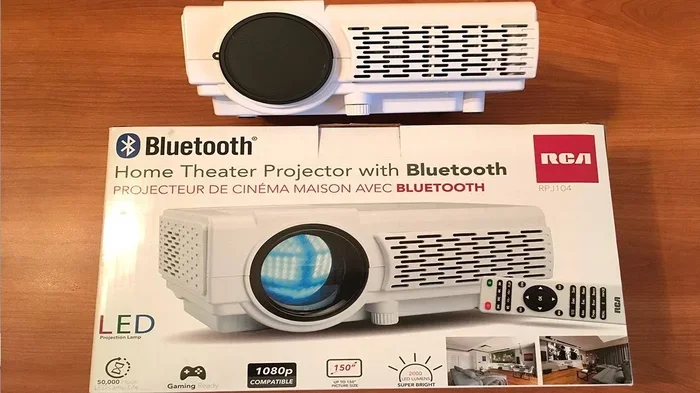
Does an RCA projector have Bluetooth? Some models do, but not all. This guide breaks down which RCA projectors support Bluetooth, how to pair devices, and what to do if your model lacks wireless features. You will learn about setup, troubleshooting, and alternative wired options that work just as well.
So you just got an RCA projector and want to go wireless. Maybe you are trying to stream a movie or connect your phone without fumbling with cables. The big question is simple: does RCA projector have Bluetooth? The answer is not a straight yes or no. It depends on the model you own or are thinking about buying.
Some RCA projectors come packed with wireless connectivity features, including built-in Bluetooth. Others are more basic and rely only on wired connections like HDMI or USB. This guide will walk you through everything you need to know. We will cover which models have Bluetooth, how to pair your devices, and what to do if your projector does not support it.
By the end of this article, you will have a clear answer and practical steps you can use right away. Let us get started.
Key Takeaways
- Not All RCA Projectors Have Bluetooth: Only select RCA projector models include built-in wireless Bluetooth support.
- Check Your Model Number: The easiest way to confirm Bluetooth capability is by checking the spec sheet or user manual.
- Bluetooth Adapters Work As Alternatives: If your projector lacks Bluetooth, a simple adapter can add wireless audio and connectivity.
- Pairing Is Simple: The process typically takes under two minutes once both devices are in range.
- Range and Interference Matter: Keep your Bluetooth source within 30 feet and away from other wireless signals for best results.
- Wired Options Still Work Great: HDMI and USB connections provide reliable alternatives when Bluetooth is not available.
📑 Table of Contents
- What Is Bluetooth on a Projector and Why Does It Matter?
- Does Every RCA Projector Have Bluetooth?
- How to Connect Bluetooth to Your RCA Projector
- What If My RCA Projector Does Not Have Bluetooth?
- Bluetooth Range and Performance Tips for RCA Projectors
- Common Mistakes People Make When Using Bluetooth on Projectors
- RCA Projector Bluetooth vs. Wi-Fi Connectivity
- Final Thoughts on RCA Projector Bluetooth
What Is Bluetooth on a Projector and Why Does It Matter?
Bluetooth is a wireless technology that lets devices talk to each other over short distances. On a projector, Bluetooth usually handles two things. First, it sends audio to wireless speakers or headphones. Second, it can sometimes mirror your screen from a phone or laptop. The RCA projector Bluetooth feature makes this possible without any extra cables.
Why does this matter? Well, not everyone wants to run wires across a room. Whether you are setting up a backyard movie night or giving a presentation in a small office, wireless connectivity saves time and reduces clutter. You can move around freely and connect quickly.
Here are some common things Bluetooth lets you do with a projector:
- Stream audio to wireless speakers or headphones
- Mirror your phone screen to the big screen
- Connect a keyboard or mouse for presentations
- Play music directly from your phone
Keep in mind that not every projector needs Bluetooth. If you only use your projector in one fixed spot, a wired connection might be just fine. But if flexibility matters to you, Bluetooth wireless connectivity is a real game changer.
Does Every RCA Projector Have Bluetooth?
The short answer is no. RCA makes many different projector models, and they do not all come with the same features. Some newer models include built-in Bluetooth, while older or budget-friendly ones do not. It really comes down to the specific model and its price point.
Here are a few things to keep in mind when checking if your RCA projector has Bluetooth:
- Check the model number. Look for the exact model on the back of the projector or in the manual.
- Read the spec sheet. RCA lists connectivity options on the product page or in the box.
- Look for the Bluetooth logo. Some projectors have a small Bluetooth symbol on the body or remote.
- Check the settings menu. If your projector has a menu button, look for a Bluetooth or wireless option.
If you are shopping for a new RCA projector and Bluetooth matters to you, always confirm the feature before buying. Product descriptions usually mention it clearly. Search for terms like “RCA projector wireless connectivity” or “RCA projector Bluetooth model” to find the right one.
Popular RCA Projector Models With Bluetooth
Some RCA projector models are known for including Bluetooth support. These tend to be mid-range and higher-end options. Popular examples include the RCA RPPR06 and RCA RPPR10 series, which often feature wireless audio output and screen mirroring. Always double-check the current model specs on the RCA website or retailer page because product lines update frequently.
Popular RCA Projector Models Without Bluetooth
Budget models and older RCA projectors often skip Bluetooth entirely. These projectors focus on basic performance and rely on HDMI, USB, or VGA inputs. If you own one of these, you can still enjoy wireless audio by using an external adapter, which we will cover later in this guide.
How to Connect Bluetooth to Your RCA Projector
If your RCA projector does have Bluetooth, the setup process is usually straightforward. Follow these steps to get everything connected in just a few minutes.
Step 1: Turn on Bluetooth on Your Device
First, go to the settings on your phone, tablet, or laptop. Find the Bluetooth option and turn it on. Make sure your device is visible and ready to pair. Most modern devices make this very easy with a quick toggle in the control center.
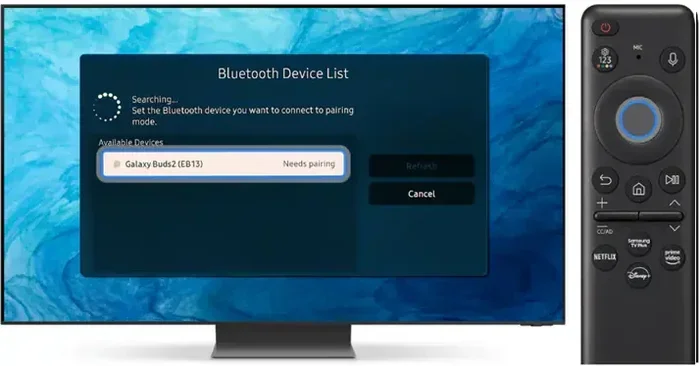
Step 2: Put Your RCA Projector in Pairing Mode
On your projector, go to the settings menu and look for Bluetooth or wireless settings. Select the option to make the projector discoverable. Some models have a dedicated Bluetooth button on the remote. If yours does, just press it and the projector will start searching for nearby devices.
Step 3: Pair the Devices
On your phone or laptop, look for the projector name in the list of available Bluetooth devices. Tap on it to pair. You may need to enter a simple PIN, but many projectors pair automatically. Once connected, you should see a confirmation on both screens.
Step 4: Test the Connection
Play some audio or video from your device. If the sound comes through the projector or connected speakers, you are all set. If not, try moving closer to the projector. Bluetooth range is usually about 30 feet, but walls and other electronics can weaken the signal.
Quick Tip: If you are trying to connect Bluetooth headphones or speakers to a projector for a movie night, you can also check how Can I Use Any Bluetooth Headphones With My Tv for tips that apply to projectors too. The pairing process is very similar across devices.
What If My RCA Projector Does Not Have Bluetooth?
No worries. Even if your RCA projector does not have built-in Bluetooth, you still have options. There are simple and affordable ways to add wireless connectivity to almost any projector.
Option 1: Use a Bluetooth Adapter
A Bluetooth adapter is a small device that plugs into your projector’s audio output or USB port. It acts as a Bluetooth receiver and sends audio wirelessly to your speakers or headphones. These adapters are inexpensive and work with most projectors that have a 3.5mm audio jack or USB port.
If you are considering this route, you might also want to learn how Can I Use A Bluetooth Adapter On My Tv since the setup process is nearly identical for projectors and TVs.
Option 2: Use a Bluetooth Transmitter
Similar to an adapter, a Bluetooth transmitter connects to your projector and sends audio to Bluetooth-enabled speakers. The main difference is the direction of the signal. A transmitter sends audio out, while an adapter receives it. Both work great depending on your setup.
Option 3: Use a Wired Connection
If wireless is not a dealbreaker, a simple HDMI or 3.5mm audio cable works perfectly. You can connect your phone or laptop directly to the projector and enjoy your content without any lag or setup hassle. For tips on connecting your phone with a cable, check out Can I Connect My Phone To Projector With Usb Cable.
Option 4: Upgrade Your Speakers
Some people prefer to upgrade their entire audio setup. If you have older speakers that are not wireless, you can make them Bluetooth-capable with a simple adapter. Learn more about Can I Make My Old Bose Speakers Bluetooth for a helpful walkthrough on converting non-wireless speakers.
| Option | Cost | Ease of Setup | Best For |
|---|---|---|---|
| Bluetooth Adapter | $10-$30 | Easy | Adding wireless audio to any projector |
| Bluetooth Transmitter | $15-$40 | Easy | Sending audio to wireless speakers |
| Wired HDMI/USB | $0 (uses existing cable) | Very Easy | Simple, reliable connections |
| Upgrade to Wireless Speakers | $30-$100+ | Moderate | Better audio quality with wireless freedom |
Bluetooth Range and Performance Tips for RCA Projectors
Once you have your Bluetooth connected, you want it to work smoothly. Here are some practical tips to keep your wireless connection strong and reliable.
- Stay within range. Keep your source device within 30 feet of the projector for the best signal.
- Avoid walls and obstacles. Thick walls and large furniture can weaken Bluetooth signals.
- Keep other wireless devices away. Too many Wi-Fi signals in one area can cause interference.
- Update your firmware. Some RCA projectors receive updates that improve Bluetooth performance.
- Restart devices if needed. A quick restart of both the projector and your source device can fix most connection issues.
Most users find that RCA projector Bluetooth works well for everyday use. Streaming movies, giving presentations, and playing music all work without noticeable delay. If you experience lag, moving closer to the projector usually solves the problem right away.
Common Mistakes People Make When Using Bluetooth on Projectors
Even with a simple setup, people sometimes run into avoidable problems. Here are a few common mistakes and how to fix them.
- Forgetting to put the projector in pairing mode. This is the number one reason connections fail. Always confirm the projector is discoverable before searching from your device.
- Using an outdated Bluetooth version. Older devices may not pair well with newer projectors. Check compatibility if you run into issues.
- Connecting to the wrong device. In a room with multiple Bluetooth devices, make sure you are pairing with the projector and not a nearby speaker or TV.
- Ignoring audio output settings. After pairing, make sure your device is set to output audio through Bluetooth and not its own speakers.
- Leaving Bluetooth on when not in use. This can drain batteries and cause unexpected connections. Turn it off when you are done.
Avoiding these simple mistakes will save you time and frustration. A smooth Bluetooth projector setup is all about paying attention to small details.
RCA Projector Bluetooth vs. Wi-Fi Connectivity
Some RCA projectors offer both Bluetooth and Wi-Fi connectivity. While they sound similar, they serve different purposes. Bluetooth is best for short-range audio connections and simple device pairing. Wi-Fi is better for streaming content directly from the internet or connecting to a home network.
If your projector has Wi-Fi, you can often use apps like Netflix, YouTube, or Spotify directly on the device. Bluetooth is more about connecting your own devices. Both are useful, and having both gives you the most flexibility.
Here is a quick comparison:
- Bluetooth: Connects your personal devices for audio and screen mirroring. Range is about 30 feet.
- Wi-Fi: Connects to the internet for streaming apps and smart features. Range depends on your network.
If you are deciding between projectors, look for one that offers both wireless technologies. This gives you the best of both worlds and makes your setup future-proof.
Final Thoughts on RCA Projector Bluetooth
So, does RCA projector have Bluetooth? The answer is that some models do and some do not. The key is to check your specific model before assuming. If your projector supports RCA projector Bluetooth, you are in for a seamless wireless experience. If it does not, a Bluetooth adapter or transmitter can bridge the gap easily.
Wireless connectivity has become a standard feature in many modern projectors, and RCA is no exception. Whether you are watching movies, playing games, or giving a work presentation, Bluetooth adds a layer of convenience that wired connections simply cannot match. Take a few minutes to check your model, try the pairing steps, and enjoy the freedom of going wireless.
With the right setup, your RCA projector can become the centerpiece of any wireless entertainment setup. Start with the steps in this guide and you will be streaming and sharing in no time.
Frequently Asked Questions
Do All RCA Projectors Have Bluetooth?
No, not all RCA projectors include Bluetooth. Only select models, typically mid-range and higher-end ones, come with built-in Bluetooth support. Always check the product specifications before purchasing to confirm.
How Do I Know if My RCA Projector Has Bluetooth?
You can check by looking at the model number online, reading the user manual, or checking the projector’s settings menu for a Bluetooth option. The product box or retailer page will also list connectivity features clearly.
Can I Add Bluetooth to an RCA Projector That Does Not Have It?
Yes, you can add Bluetooth using a Bluetooth adapter or transmitter. These small devices plug into your projector’s audio output or USB port and enable wireless audio streaming to speakers and headphones.
What Is the Bluetooth Range on an RCA Projector?
The typical Bluetooth range is about 30 feet. Walls, furniture, and other wireless signals can reduce this range. For the best experience, keep your connected device within a clear line of sight to the projector.
Can I Use Bluetooth Headphones With an RCA Projector?
Yes, if your RCA projector has Bluetooth, you can pair wireless headphones directly. If not, a Bluetooth transmitter connected to the audio output will send sound to your headphones wirelessly.
Is Bluetooth or Wi-Fi Better for an RCA Projector?
It depends on what you need. Bluetooth is great for connecting personal devices for audio and screen mirroring. Wi-Fi is better for streaming content directly from the internet. Having both gives you the most flexibility.