Does Samsung Have Type C Earphones Here Is the Answer
Yes, Samsung offers USB-C earphones and accessories for users who want a modern audio experience. Samsung Type C earphones provide seamless connectivity, fast charging capabilities, and high-quality sound. Whether you own a Galaxy phone or tablet, USB-C audio solutions are widely available and easy to use.
Key Takeaways
- Samsung does offer USB-C earphones: Multiple models and options exist for Samsung device users.
- USB-C earphones provide better compatibility: They work across Samsung phones, tablets, and laptops without adapters.
- Samsung Galaxy Buds support USB-C charging: Many Samsung wireless earbuds use USB-C for power.
- You can still use 3.5mm earphones: Samsung devices often include USB-C to 3.5mm adapters.
- USB-C audio is the future: More manufacturers are moving toward USB-C connectors for audio devices.
- Third-party options are plentiful: Many brands make USB-C earphones that work perfectly with Samsung devices.
📑 Table of Contents
- Does Samsung Have Type C Earphones Here Is the Answer
- What Are Type C Earphones and Why Do They Matter
- Does Samsung Make USB-C Earphones
- Samsung USB-C Earphone Options Available
- How to Connect USB-C Earphones to Samsung Devices
- Benefits of USB-C Earphones Over Traditional Options
- Common Mistakes When Buying Samsung USB-C Earphones
- Quick Tips for Getting the Most Out of Your Samsung USB-C Earphones
- Expert Insights on the Future of Samsung USB-C Audio
- Final Thoughts on Samsung Type C Earphones
Does Samsung Have Type C Earphones Here Is the Answer
If you have been searching for Samsung Type C earphones, you are not alone. Many Samsung users want to know if they can find earphones that plug directly into a USB-C port. The short answer is yes. Samsung offers several options for USB-C audio. You can find both wired and wireless solutions that use the USB-C connector. Let us dive deep into everything you need to know.
The shift from the old 3.5mm headphone jack to USB-C audio has been one of the biggest changes in smartphone design. Samsung has embraced this change fully. Most modern Samsung phones no longer include a headphone jack. Instead, they rely on USB-C ports for audio output. This means Samsung USB-C earphones have become essential for many users.
But what exactly are your options? Can you buy Samsung-branded USB-C earphones directly? Are third-party options any good? What about wireless earbuds that charge through USB-C? We will answer all of these questions and more. By the end of this guide, you will know everything about Samsung Type C earphones and how to choose the right pair for your needs.
USB-C has become the standard connector for most modern devices. It is fast, versatile, and reversible. You do not have to flip the cable a certain way. This makes USB-C earphones incredibly convenient. They also carry both audio and power through a single cable. That is a huge advantage over older connection types.
What Are Type C Earphones and Why Do They Matter
Type C earphones are headphones or earbuds that connect to your device using a USB-C port. Unlike traditional earphones that use a 3.5mm jack, USB-C earphones plug directly into the charging port of your phone or tablet. This might sound simple, but it brings several benefits.
How USB-C Audio Works
USB-C earphones use digital audio signals instead of analog ones. Your Samsung device converts the audio file into a digital signal. The USB-C earphone then receives this signal and turns it back into sound. This process gives you cleaner audio with less interference. The sound quality is often better than what you get from a 3.5mm connection.
Another big advantage is that USB-C earphones can draw power from your device. This means some models do not need their own battery. You get a simple plug-and-play experience. No charging required. Just plug them in and listen.
Why Samsung Users Need USB-C Earphones
Samsung has removed the headphone jack from most of its flagship phones. Models like the Galaxy S series and Galaxy Note series no longer include a 3.5mm port. If you want to listen to music or take calls, you need an alternative. Samsung Type C earphones fill that gap perfectly.
Using a USB-C adapter is one option. But adapters can be easy to lose. They also add bulk to your setup. A dedicated pair of USB-C earphones solves all of these problems. You get a cleaner setup and better reliability.
Does Samsung Make USB-C Earphones
Samsung does sell USB-C audio accessories. However, the company has focused more on wireless earbuds than wired USB-C earphones. The Samsung Galaxy Buds series charges through USB-C. But if you are looking for a wired pair, Samsung’s direct lineup is more limited.
Samsung Galaxy Buds and USB-C Charging
The Samsung Galaxy Buds series is one of the most popular wireless earbud lines. Models like the Galaxy Buds2 and Galaxy Buds FE charge via a USB-C connector. The charging case uses USB-C to recharge. You can plug it into any Samsung charger or power bank. This makes USB-C charging earphones from Samsung very convenient.
While the Galaxy Buds themselves do not plug directly into a USB-C port, they rely on USB-C for power. This is a different approach than wired USB-C earphones. But it still falls under the umbrella of Samsung USB-C audio products.
Samsung Wired USB-C Earphones
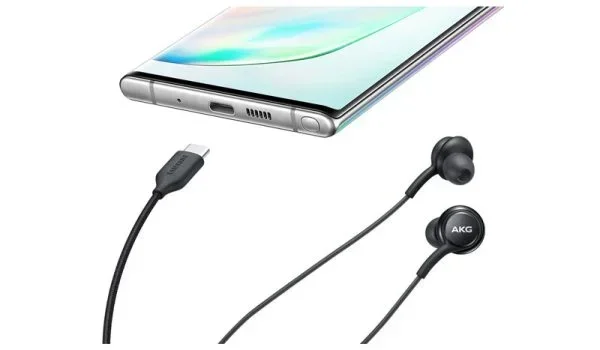
Samsung has offered wired USB-C earphones in the past. Some models came bundled with Samsung phones. These basic earphones plug directly into the USB-C port. They do not need any battery or Bluetooth connection. You simply plug them in and enjoy your music.
Samsung also sells USB-C to 3.5mm adapters separately. These small adapters let you use traditional wired earphones with a USB-C port. While not a USB-C earphone itself, this adapter is a useful accessory for Samsung users who prefer wired headphones.
Samsung USB-C Earphone Options Available
When it comes to Samsung Type C earphones, you have several paths to explore. Let us look at the main categories of USB-C audio options available for Samsung users.
Option 1: Samsung Galaxy Buds Series
The Galaxy Buds series is Samsung’s flagship wireless earbud lineup. These earbuds connect via Bluetooth but charge through a USB-C port. Here are some key details:
- Galaxy Buds2: Compact design, great sound, USB-C charging case.
- Galaxy Buds FE: Budget-friendly option with solid audio quality.
- Galaxy Buds3: Latest model with advanced features and ANC.
- Galaxy Buds Pro: Premium sound with active noise cancellation.
All of these models use a USB-C connector for charging. You can use the same charger you use for your Samsung phone. This makes the ecosystem very seamless.
Option 2: Third-Party USB-C Wired Earphones
Many third-party brands make excellent USB-C earphones that work perfectly with Samsung devices. Brands like JLab, Anker, and Aukey offer affordable options. These wired earphones plug directly into your Samsung phone’s USB-C port.
Some popular choices include:
- JLab Go Air: Budget-friendly wireless earbuds with USB-C charging.
- Anker SoundCore: Reliable brand with USB-C wired and wireless options.
- Samsung Essential USB-C Earphones: Simple and affordable wired option.
When buying third-party USB-C earphones, make sure they are compatible with Android devices. Most modern USB-C earphones work on any device with a USB-C port. But it is always good to double-check before purchasing.
Option 3: USB-C to 3.5mm Adapters
If you already own a good pair of wired earphones, you do not need to buy new ones. A USB-C to 3.5mm adapter lets you use your existing headphones with a Samsung phone. Samsung sells its own adapter, and many other brands offer compatible options.
These adapters are small and portable. You can keep one in your bag or pocket. They are a great backup option for people who prefer traditional wired earphones.
How to Connect USB-C Earphones to Samsung Devices
Connecting Wired USB-C Earphones
Wired USB-C earphones are the easiest to set up. Follow these simple steps:
- Plug the USB-C end of the earphones into your Samsung phone.
- Wait for your phone to recognize the device.
- You should see a notification that audio is connected.
- Open your music app or YouTube and start playing.
- Adjust the volume using your phone’s volume buttons.
That is it. No pairing required. No apps to download. Just plug and play. This is one of the biggest advantages of USB-C earphones over Bluetooth options.
Connecting Wireless Samsung Earbuds with USB-C Charging
Wireless earbuds like the Galaxy Buds need a bit more setup:
- Place the earbuds in their charging case.
- Open the case near your Samsung phone.
- Your phone should detect the earbuds automatically.
- Tap “Connect” on the pop-up notification.
- Put the earbuds in your ears and enjoy.
When the battery runs low, place the earbuds back in the case. Connect the case to a USB-C charger. The earbuds will recharge automatically. This makes the whole experience very hands-free.
Benefits of USB-C Earphones Over Traditional Options
Switching to Samsung Type C earphones comes with several real-world benefits. Let us look at why more people are making the switch.
Better Sound Quality
USB-C earphones deliver digital audio signals directly to the driver. This means less signal degradation compared to analog connections. The result is clearer sound with better detail. Many users notice improved bass and treble when switching to USB-C audio.
One Cable for Everything
One of the best things about USB-C is universal compatibility. You can use the same cable to charge your phone, connect your earphones, and even transfer data. This reduces cable clutter in your bag. You do not need to carry separate cables for different devices.
For example, if you travel, you only need one USB-C cable. You can charge your phone, power your earphones, and even connect to a laptop. This versatility is a huge advantage over older connector types.
Faster and More Reliable
Bluetooth connections can sometimes lag or drop. This is frustrating during calls or when watching videos. Wired USB-C earphones provide a stable, lag-free connection. The audio stays perfectly in sync with the video. This makes them great for gaming and video watching.
No Battery Needed (For Wired Models)
Wired USB-C earphones draw power directly from your Samsung device. You never need to charge them separately. Just plug them in and they work. This is perfect for people who forget to charge their earphones. It is also great for long trips where charging options are limited.
Common Mistakes When Buying Samsung USB-C Earphones
Avoid these common pitfalls when shopping for Samsung Type C earphones:
- Buying USB-C earphones that only work with iPhones: Always check compatibility. Some USB-C earphones are designed specifically for Apple devices.
- Ignoring the USB-C version: Make sure the earphones use a standard USB-C connector. Some cheap models use non-standard connectors that may not fit properly.
- Forgetting about audio quality: Not all USB-C earphones sound the same. Read reviews before buying to ensure you get good audio performance.
- Assuming all wireless earbuds use USB-C: Some Samsung earbuds use wireless charging or micro-USB. Always check the charging method before buying.
Quick Tips for Getting the Most Out of Your Samsung USB-C Earphones
Follow these simple tips to get the best experience:
- Keep your USB-C port clean: Dust and lint can affect connectivity. Use a soft brush to clean your phone’s port regularly.
- Use the right cable: Always use a high-quality USB-C cable. Cheap cables can cause audio dropouts or charging issues.
- Check for firmware updates: Samsung occasionally releases updates for its Galaxy Buds. These updates can improve sound quality and battery life.
- Store your earphones properly: Use a carrying case to protect your USB-C earphones from damage.
- Test before buying: If possible, try the earphones in a store before purchasing. Comfort and fit are very personal.
Expert Insights on the Future of Samsung USB-C Audio
The trend toward USB-C audio is only growing. More smartphone manufacturers are dropping the headphone jack. Samsung is at the forefront of this shift. As USB-C becomes the universal standard, we can expect even better USB-C earphones in the future.
Samsung has already invested heavily in its audio ecosystem. The Galaxy Buds series continues to improve with each generation. We can expect future models to offer even better sound, longer battery life, and smarter features. The integration of USB-C connectivity will only get more seamless.
Third-party manufacturers are also stepping up their game. More brands are creating high-quality USB-C earphones that rival Samsung’s own products. This competition benefits consumers. You now have more choices than ever before at every price point.
One exciting development is the ability to daisy chain USB-C devices. While this is more common with displays, the technology could eventually extend to audio accessories. Imagine connecting multiple USB-C audio devices through a single hub. This kind of innovation is already on the horizon.
Final Thoughts on Samsung Type C Earphones
So, does Samsung have Type C earphones? Absolutely. Samsung offers a range of USB-C audio options for its users. From the Galaxy Buds wireless earbuds to wired USB-C earphones and adapters, you have plenty of choices. Samsung Type C earphones provide a modern, reliable, and high-quality audio experience.
Whether you prefer wireless convenience or the simplicity of wired earphones, there is a USB-C option for you. The key is to understand your needs and choose accordingly. If you want the best sound quality and do not mind charging, the Galaxy Buds series is excellent. If you want simplicity, a wired USB-C pair is hard to beat.
The world of USB-C audio is evolving fast. Samsung is leading the way with innovative products and accessories. By choosing Samsung USB-C earphones, you are investing in a future-proof audio setup. Your devices will stay compatible for years to come.
Do not let the lack of a headphone jack hold you back. Explore the world of Samsung Type C earphones today and enjoy a cleaner, more versatile audio experience on all your Samsung devices.
Frequently Asked Questions
Can I Use Any USB-C Earphones with My Samsung Phone?
Most USB-C earphones work with Samsung phones. However, some models are designed specifically for certain devices. Always check compatibility before buying. Look for earphones that support Android USB-C audio standards. This ensures the best performance with your Samsung device.
Do Samsung USB-C Earphones Need a Special Charger?
No, Samsung USB-C earphones use standard USB-C charging. You can use any USB-C charger or cable you already own. This includes the chargers that come with Samsung phones and tablets. The universal nature of USB-C makes charging incredibly convenient.
Are Wired USB-C Earphones Better Than Wireless Samsung Earbuds?
It depends on your needs. Wired USB-C earphones offer zero latency and no battery concerns. Wireless Samsung earbuds like the Galaxy Buds offer freedom of movement and advanced features like noise cancellation. Both options have their strengths. Choose based on how you plan to use them.
Can I Connect USB-C Earphones to a Samsung Tablet?
Yes, Samsung tablets with USB-C ports support USB-C earphones. You can connect wired USB-C earphones directly. Wireless earbuds like the Galaxy Buds also pair with Samsung tablets via Bluetooth. The experience is very similar to using earphones with a Samsung phone.
Do Samsung USB-C Earphones Support Microphone Functionality?
Most Samsung USB-C earphones come with a built-in microphone. This lets you take calls and use voice assistants. Wired USB-C earphones typically include a microphone in the cable or remote. Wireless Galaxy Buds have multiple microphones for clear call quality. Always check the product details to confirm microphone support.
How Do I Know if My Samsung Phone Supports USB-C Audio?
Most Samsung phones released after 2018 support USB-C audio. Models like the Galaxy S20, S21, S22, S23, and S24 all have USB-C ports. If your Samsung phone has a USB-C charging port, it supports USB-C audio. You can also check Samsung’s official website for your specific model’s specifications.