Do Any Wireless Cameras Work Without Wifi Connection
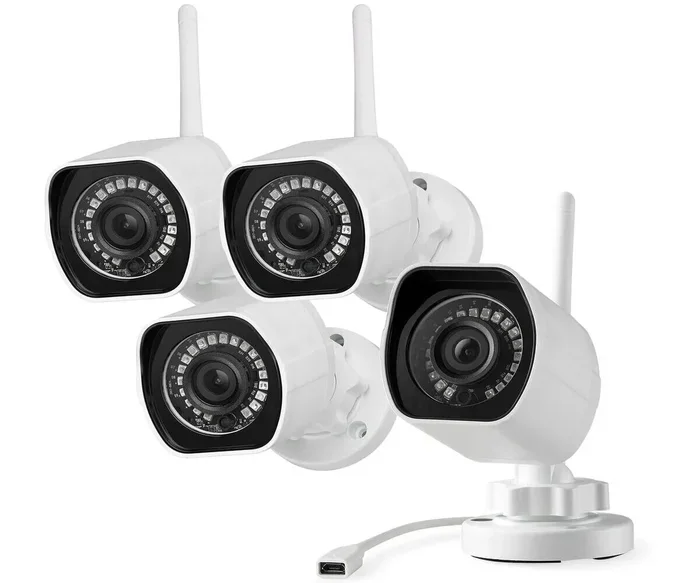
Yes, some wireless cameras can work without WiFi. From cellular and Bluetooth-enabled models to local storage options, you have several alternatives that keep your home or property monitored even when your internet is down. Understanding how these wireless cameras function without an internet connection helps you choose the right security camera without wifi for your needs.
Have you ever wondered if wireless cameras can actually work without WiFi? It is a question more people are asking every day. Maybe your internet goes out often, or you want to monitor a cabin in the woods. Perhaps you just want a simpler setup that does not rely on your home network.
The short answer is yes. Several types of wireless cameras can record and transmit footage without a WiFi connection. But how they do it varies quite a bit. Some use cellular networks. Others store footage locally. And some connect directly to your phone through Bluetooth. Let us dive into how each of these options works and which one might be right for you.
Understanding your options matters because not all wireless cameras are created equal. A camera that works perfectly at your office might fail completely at a remote campsite. Knowing the differences helps you make a smart purchase. It also saves you from the frustration of setting up a camera that does not meet your expectations.
Key Takeaways
- Cellular cameras use mobile data networks to transmit footage without needing WiFi.
- Local storage cameras save video directly to an SD card or hard drive, eliminating the need for cloud uploads.
- Bluetooth-enabled cameras connect to your phone directly for short-range monitoring.
- PoE and wired cameras offer reliable alternatives that don’t depend on wireless internet signals.
- Trail cameras and nanny cameras often work offline with built-in storage and battery power.
- Wi-Fi interference and range issues make offline-capable cameras a smart backup option.
- Checking your internet setup before buying ensures you get a camera that fits your actual needs.
📑 Table of Contents
- How Wireless Cameras Normally Work
- Cellular Wireless Cameras: The Best WiFi-Free Option
- Local Storage Cameras: Recording Without the Internet
- Bluetooth and Direct-Connect Cameras
- PoE and Wired Cameras That Work Without WiFi
- Trail Cameras and Battery-Powered Options
- Can People See Your Camera Feed? Privacy Considerations
- How to Choose the Right Camera for Your Needs
- Common Mistakes People Make
- Final Thoughts
How Wireless Cameras Normally Work
Most wireless cameras connect to your home WiFi network. They send video to a cloud server or a local hub. You then view the footage through a phone app or computer browser. This setup works great when your internet is stable. But it has clear limitations when the connection drops.
Here is what happens during a normal WiFi setup:
- The camera connects to your router.
- Video streams are sent to the cloud or a local base station.
- You access the feed through an app.
- Motion alerts are pushed to your phone in real time.
This entire system breaks down if your WiFi goes offline. The camera may still record locally if it has built-in storage. But remote viewing and alerts stop working. That is where wifi-free camera options come in handy.
Why WiFi Dependency Is a Problem
WiFi signals have a limited range. Walls, distance, and interference can weaken the connection. If your camera is far from the router, you might lose signal. Also, if someone on your network is using heavy bandwidth, your camera feed might lag or drop.
And here is something many people do not think about. If someone can use my Wi-Fi without me knowing, they could potentially access your camera feed too. That is a real security concern. Using cameras that do not depend on WiFi reduces this risk significantly.
Cellular Wireless Cameras: The Best WiFi-Free Option
Cellular cameras are the most reliable option for wireless cameras that work without WiFi. They use a SIM card, just like your phone, to connect to mobile networks. This means they can transmit video anywhere there is cell coverage. No router needed. No WiFi required.
These cameras typically need a data plan from a mobile carrier. Plans usually cost between $5 and $15 per month depending on data usage. The camera sends video over 4G or 5G networks to a cloud server or directly to your phone.
How Cellular Cameras Work
The process is straightforward. You insert a SIM card into the camera. The camera connects to the nearest cell tower. Video footage is compressed and sent over the mobile network. You view it through an app just like you would with a WiFi camera.
Cellular cameras shine in situations where WiFi is unavailable or unreliable. Think about monitoring a remote property, a construction site, or a vacation cabin. They also work well for wireless surveillance in vehicles and boats where WiFi signals are weak or nonexistent.
Top Benefits of Cellular Cameras
- They work anywhere with cell coverage.
- They do not depend on your home internet.
- They offer real-time remote viewing.
- They are harder for others to intercept.
- They often include built-in batteries or solar panels.
Things to Keep in Mind
Cellular cameras do have some drawbacks. The monthly data plan adds to your cost. And in areas with poor cell coverage, the camera may struggle to send footage. You also need to keep the SIM card active and the data plan paid. If you forget, the camera goes offline.
Local Storage Cameras: Recording Without the Internet
Another great option for no internet camera setups is local storage. These cameras record footage directly to an SD card or internal hard drive. They do not need to upload anything to the cloud. This means they work perfectly even with zero internet access.
Local storage cameras are very popular for offline camera recording. They are simple to set up and do not require any monthly subscriptions. You just insert an SD card, point the camera where you need it, and it starts recording.
Types of Local Storage Cameras
There are several types of cameras that use local storage:
- SD card cameras – The most common type. They use removable microSD cards.
- NAS-connected cameras – These connect to a local network storage device.
- USB drive cameras – Less common but useful for certain setups.
- DVR-based systems – Traditional systems that record to a hard drive.
Pros and Cons of Local Storage
Local storage has clear advantages. There are no monthly fees. Your footage stays private and on your property. And the system works even during internet outages. However, there are trade-offs too.
If someone steals the camera, they also get the footage. You cannot view the camera remotely without internet. And you need to physically retrieve the SD card to review recordings. For many people, these downsides are worth the reliability and privacy.
Bluetooth and Direct-Connect Cameras
Some wireless cameras use Bluetooth instead of WiFi. These cameras connect directly to your smartphone or tablet. They work over short distances, typically up to 30 feet. Bluetooth cameras are great for quick, temporary monitoring.
You have probably used Bluetooth in other devices. Think about wireless earbuds or speakers. A Bluetooth camera works on the same principle. It pairs directly with your phone and streams a live feed through the app.
When Bluetooth Cameras Make Sense
Bluetooth cameras work best for short-range monitoring. They are great for checking on a baby room, a pet area, or a small workspace. Because they do not need WiFi, they are also useful in locations where internet access is limited.
However, Bluetooth has limitations. The range is short. You cannot view the camera from far away. And the video quality is often lower than WiFi or cellular options. Still, for simple monitoring tasks, they are a solid choice.
Bluetooth vs WiFi Cameras
Here is a quick comparison of Bluetooth and WiFi cameras:
- Range: Bluetooth reaches about 30 feet. WiFi can reach hundreds of feet depending on your router.
- Setup: Bluetooth is simpler to pair. WiFi requires network configuration.
- Quality: WiFi cameras usually offer better video quality.
- Power: Bluetooth cameras use less battery power.
- Remote access: WiFi cameras win for remote viewing. Bluetooth is limited to close range.
PoE and Wired Cameras That Work Without WiFi
You might think wired cameras are not wireless at all. But PoE cameras (Power over Ethernet) offer a wireless-like experience. They use a single cable for both power and data. They do not need WiFi to transmit video. The cable carries the signal directly to a recorder or monitor.
PoE cameras are extremely reliable. They are not affected by WiFi interference or signal drops. They work 24/7 without any internet connection. Many security professionals prefer PoE systems for this reason.
Why PoE Is a Strong Choice
PoE cameras offer several advantages. The video quality is consistently high. There is no lag or buffering. Setup is straightforward with a single cable run. And the system is very secure since the data does not travel over wireless signals that others could intercept.
If you are worried about whether your Wi-Fi can be bugged, PoE cameras eliminate that concern entirely. The data travels through a physical cable, making it nearly impossible to intercept remotely.
Trail Cameras and Battery-Powered Options
Trail cameras, also called game cameras, are a unique type of wireless camera that often work without WiFi. These rugged cameras are designed for outdoor use. They run on batteries and record motion-triggered footage to an SD card.
Trail cameras do not need any internet connection to function. They sit in the field, detect motion, and save video or photos to the internal storage. Some models do offer Bluetooth or cellular options for remote viewing. But the core recording function works completely offline.
Other Battery-Powered Cameras
Beyond trail cameras, many consumer-grade wireless cameras run on batteries. These wireless camera batteries can last weeks or even months depending on usage. They often include SD card slots for local storage.
Battery-powered cameras are perfect for places where running a power cable is impractical. They work in sheds, garages, RVs, and remote properties. As long as the battery is charged and an SD card is inserted, they record without WiFi.
Can People See Your Camera Feed? Privacy Considerations
Privacy is a big concern with any wireless camera. When your camera uses WiFi, others on the same network could potentially access it. This is not just theoretical. If someone on your network is up to no good, they could see what you are watching through your connected devices.
Cameras that work without WiFi reduce this risk. Cellular cameras use a private data network. Local storage cameras keep everything on the device. Bluetooth cameras pair only with your phone. Each of these options offers better privacy than a standard WiFi setup.
Tips for Keeping Your Camera Secure
- Always change default passwords on your cameras.
- Use cameras with end-to-end encryption.
- Choose local storage over cloud when privacy matters.
- Update firmware regularly to patch security holes.
- Consider cameras that do not depend on WiFi for better isolation.
By choosing a security camera without wifi, you take a big step toward protecting your privacy. You control where the data goes and who can access it.
How to Choose the Right Camera for Your Needs
Choosing the right camera depends on your specific situation. Here are some factors to consider before making a purchase.
Ask Yourself These Questions
- Do I need remote viewing from far away?
- Will the camera be in an area with no WiFi?
- How long do I need the battery to last?
- Do I need real-time alerts or just recorded footage?
- Is privacy a top priority for me?
- What is my budget for both the camera and ongoing costs?
If you answered yes to remote viewing and no WiFi is available, a cellular camera is likely your best bet. If you only need to review footage later, a local storage camera works great. And if you just need short-range monitoring, a Bluetooth camera could be the answer.
Quick Tips for Setup
- Place your camera where it has the best signal for its connection type.
- Use high-quality SD cards for local storage cameras.
- Keep spare batteries on hand for battery-powered models.
- Test your camera before relying on it for security.
- Check for firmware updates regularly.
Setting up a camera that works without WiFi is not complicated. But it does require some planning. Make sure you understand what each camera type offers before you buy. This way, you avoid the disappointment of a camera that does not work where you need it.
Common Mistakes People Make
Many people buy wireless cameras assuming they will work anywhere. But most cameras need WiFi for full functionality. Here are common mistakes to avoid.
First, assuming all wireless cameras work without WiFi. The word wireless refers to the connection between the camera and its receiver, not necessarily internet connectivity. Second, ignoring cellular data costs. A cellular camera is useless if you do not keep the data plan active. Third, not checking the range. Bluetooth cameras may not reach where you need them to.
Finally, forgetting about storage. If you choose a local storage camera, make sure you have enough space and replace the SD card regularly. A full card means no new recordings. That is a mistake that costs you footage when you need it most.
Final Thoughts
The good news is that wireless cameras have evolved far beyond simple WiFi-dependent devices. Today, you have cellular options, local storage solutions, Bluetooth cameras, and PoE systems that all work without WiFi. Each has its strengths and fits different use cases.
If you want the most flexibility, go with a cellular camera. If you want simplicity and privacy, choose a local storage model. If you just need short-range monitoring, Bluetooth cameras are affordable and effective. And for the most reliable setup, PoE cameras deliver consistent performance without any wireless dependency.
The key is understanding what you actually need. Think about where the camera will go, how you will access the footage, and how much you are willing to spend. With the right choice, you can have a fully functional wireless camera system that works even when your WiFi is down or not available at all.
Take the time to research your options. Read reviews. Compare features. And do not be afraid to ask questions before you buy. A well-chosen camera gives you peace of mind. It works when you need it, where you need it, regardless of your internet situation.
Frequently Asked Questions
Can I use a wireless security camera without an internet connection?
Yes, many wireless cameras can work without internet. Cellular cameras use mobile data networks instead of WiFi. Local storage cameras record directly to an SD card. You just cannot access the footage remotely without an internet connection.
Do cellular wireless cameras need a special plan?
Yes, cellular cameras require a data plan from a mobile carrier. The plan is similar to a phone data plan and usually costs between $5 and $15 per month. Some brands offer bundled plans when you buy the camera.
How long do battery-powered wireless cameras last without WiFi?
Battery-powered cameras can last several weeks to a few months without WiFi. The exact time depends on how often the camera records and the battery capacity. Motion-activated cameras use less power than those that record continuously.
Can I view my camera feed remotely if it has no WiFi?
It depends on the camera type. Cellular cameras let you view remotely through the mobile network. Local storage cameras do not allow remote viewing without internet. Bluetooth cameras only work within about 30 feet of your phone.
Are offline wireless cameras less secure than WiFi cameras?
Generally, offline cameras are more secure. They do not transmit data over wireless signals that others could intercept. Cameras that use cellular networks also have a private data connection. Local storage keeps all footage on the device itself.
What is the best wireless camera for a cabin with no WiFi?
A cellular camera is the best choice for a cabin with no WiFi. It uses mobile networks to send footage to your phone. Alternatively, a battery-powered camera with SD card storage works well if you only need to review footage after visiting the cabin.