Does Tcl Soundbar Attach To Tv And Work Without Any Issues
Yes, a TCL soundbar attaches to your TV easily using HDMI ARC, optical cables, or Bluetooth. Most models work plug-and-play with minimal setup. You can enjoy richer, fuller sound without buying extra equipment.
Do you own a TCL soundbar and wonder whether it will attach to your TV without a headache? The short answer is yes. TCL soundbars are designed to work with most modern televisions, and the setup process is surprisingly straightforward. Whether you use an HDMI cable, an optical connection, or Bluetooth, you have multiple ways to get your soundbar up and running.
Many people buy a soundbar because their TV speakers just don’t cut it. The built-in speakers on most TVs are small and flat. They lack depth, bass, and clarity. A TCL soundbar fills that gap instantly. You get richer dialogue, deeper bass, and a more immersive listening experience. In this guide, we walk you through every connection method, common setup steps, and tips to make sure everything works smoothly.
If you have ever struggled with audio settings or wondered whether your TV and soundbar will play nicely together, this article is for you. We cover all the details so you can set up your TCL soundbar with confidence. Let us dive right in.
Key Takeaways
- Multiple Connection Options: TCL soundbars connect via HDMI ARC, optical cable, Bluetooth, or USB, giving you flexibility based on your TV setup.
- Easy Setup Process: Most TCL soundbars work right out of the box with simple plug-and-play installation steps.
- Wide TV Compatibility: TCL soundbars pair well with most major TV brands including Samsung, LG, Sony, and TCL Roku TVs.
- Wireless Features: Many models support Bluetooth pairing, wireless subwoofers, and voice control through smart home ecosystems.
- Troubleshooting Is Simple: Common issues like audio lag or no sound can usually be fixed with basic resets or cable checks.
📑 Table of Contents
How Does A TCL Soundbar Connect To Your TV?
TCL soundbars support several connection types. Each method has its own benefits. The right choice depends on your TV model and what ports are available. Below, we break down every option so you can pick the best one for your setup.
HDMI ARC Connection
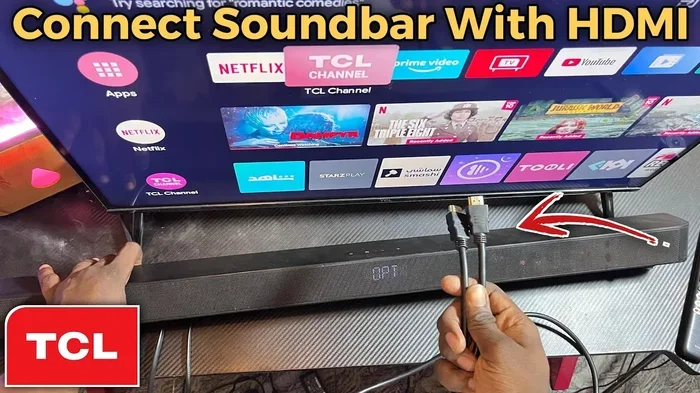
The HDMI ARC (Audio Return Channel) method is the most popular way to connect a TCL soundbar to a TV. It uses a single HDMI cable to send both audio and video signals. This means you only need one cable for high-quality sound and picture.
Here is why HDMI ARC is a great choice:
- Single cable connection keeps your setup clean.
- Audio returns through the same cable, so you do not need a second connection.
- Control your soundbar with your TV remote using CEC (Consumer Electronics Control).
- Supports high-quality audio formats like Dolby Digital and Dolby Atmos on compatible models.
To use HDMI ARC, both your TV and soundbar must have an HDMI ARC port. Look for the port labeled “ARC” on the back of your TV. Plug one end of the HDMI cable into the TV and the other into the soundbar. Then go to your TV audio settings and select HDMI ARC as the output source. It really is that simple.
Optical Audio Cable
If your TV does not have an HDMI ARC port, an optical audio cable is the next best option. This cable uses a square-shaped plug to send digital audio from your TV to the soundbar. It does not carry video, so you will still need a separate HDMI or other cable for your picture.
Here are the key points about optical connections:
- Reliable digital audio with no signal loss.
- Works on almost all TVs manufactured in the last 15 years.
- Easy to plug in — just align the square connector and push gently.
- Limited to Dolby Digital audio, so you will not get Dolby Atmos through this method.
Most TCL soundbars come with an optical cable in the box. Look for the port labeled “OPTICAL” or “DIGITAL AUDIO” on both your TV and soundbar. Connect the cable, switch your soundbar to optical mode, and you are good to go.
Bluetooth Wireless Connection
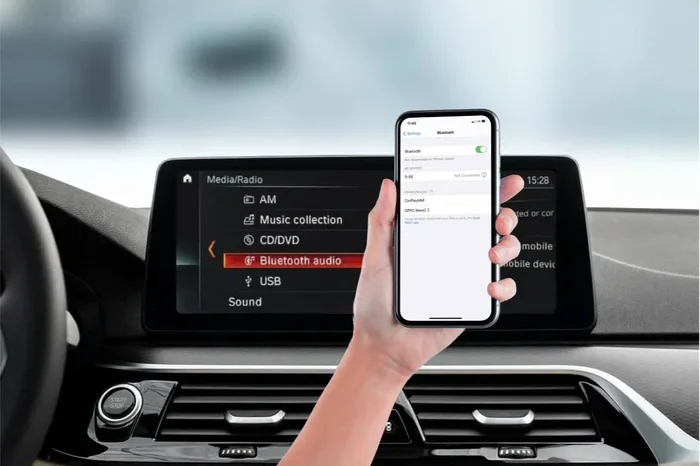
Want to skip cables altogether? Bluetooth connectivity lets you pair your TCL soundbar with your TV wirelessly. This is a great option if your TV supports Bluetooth or if you have already set up a Bluetooth adapter on your TV.
Here is what you need to know about Bluetooth pairing:
- No cables needed, so your living room stays tidy.
- Quick pairing process — usually takes less than a minute.
- Works with most smart TVs that have built-in Bluetooth.
- Slight audio delay is possible on some TV models, which can affect lip sync.
To pair via Bluetooth, put your TCL soundbar in pairing mode. Go to your TV’s Bluetooth settings, search for available devices, and select your soundbar. Once connected, all TV audio routes through the soundbar automatically. If your TV does not have Bluetooth, you can use a Bluetooth transmitter that plugs into a USB or audio port on your TV.
USB and Other Wired Connections
Some TCL soundbar models also support USB connections for playback from USB drives or for firmware updates. If you are looking to connect a device to your TV and need a different cable type, you might also explore options like converting USB to HDMI depending on your setup needs. However, USB is not typically used as the primary audio link between a soundbar and TV.
Setting Up Your TCL Soundbar Step By Step
Now that you know the connection options, let us walk through the actual setup process. Most people can complete the entire setup in under 15 minutes.
Step 1: Unbox and Place Your Soundbar
Start by carefully unboxing your TCL soundbar. Place it directly below your TV on a flat surface or mount it on the wall using the included bracket. The soundbar should sit centered for the best audio spread. If you have a wireless subwoofer, place it nearby on the floor — corners of the room often give the best bass response.
Step 2: Choose Your Connection Method
Decide which connection method works best for you. If your TV has an HDMI ARC port, that is the recommended choice. If not, use the optical cable. If you prefer wireless convenience, go with Bluetooth.
Step 3: Plug In and Power On
Connect the cables or pair via Bluetooth. Plug the power adapter into the soundbar and an electrical outlet. Turn on both your TV and soundbar. You should see a light on the soundbar indicating it is powered.
Step 4: Configure Audio Settings
On your TV, go to the audio or sound settings menu. Change the audio output to match your connection type. For HDMI ARC, select “HDMI ARC” or “Audio Return Channel.” For optical, select “Optical” or “Digital Audio Out.” For Bluetooth, make sure the Bluetooth audio output is set to your soundbar.
Some TCL soundbars also have their own remote control. Use it to adjust volume, bass, treble, and sound modes directly. This gives you more control over your listening experience without reaching for the TV remote every time.
Step 5: Test and Adjust
Play some content on your TV and listen carefully. Check if the dialogue is clear, if the bass feels balanced, and if there is any audio delay. If the sound feels too loud or too quiet, adjust the volume on both the TV and the soundbar. Many users find that setting the TV volume to a fixed level and using the soundbar remote for volume control gives the best results.
Is A TCL Soundbar Compatible With All TVs?
One of the most common questions people ask is whether a TCL soundbar will work with their specific TV brand. The good news is that TCL soundbars are designed to be universally compatible. They work with Samsung TVs, LG TVs, Sony TVs, Vizio TVs, and of course TCL Roku TVs.
Here are some compatibility considerations to keep in mind:
- HDMI ARC support: Nearly all TVs made after 2015 include HDMI ARC ports. Check the back or side of your TV to confirm.
- Optical output: Most TVs have an optical audio output, even older models. This makes optical a reliable fallback option.
- Bluetooth capability: Check if your TV model supports Bluetooth. Some older TVs may need an external Bluetooth adapter.
- Smart TV integration: TCL soundbars pair well with TCL Roku TV systems. You can control the soundbar using your Roku remote in many cases.
If you are unsure about compatibility, check the specifications on your TV model’s manual or the manufacturer’s website. Look specifically for audio output options. As long as your TV has at least one of the supported connection types, your TCL soundbar will work.
Common Issues And How To Fix Them
Even though TCL soundbars are designed for easy setup, you might run into a few hiccups along the way. Here are the most common problems and their solutions.
No Sound From The Soundbar
If you connect everything but hear no sound, start by checking the basics. Make sure the soundbar is powered on and the correct input source is selected. On your TV, confirm that the audio output is set to the soundbar and not the TV speakers. Sometimes simply restarting both devices fixes the issue. Unplug both the TV and soundbar, wait 30 seconds, and plug them back in.
Audio Lag Or Lip Sync Issues
Audio lag happens when the sound does not match the picture. This is more common with Bluetooth connections due to wireless transmission delays. If you experience this, try switching to a wired connection like HDMI ARC or optical. These methods provide near-instant audio with no delay. If you must use Bluetooth, check if your soundbar has a “lip sync” or “audio delay” setting in its menu that you can adjust.
Remote Control Not Working
Sometimes the TCL soundbar remote does not control the TV volume as expected. This usually happens because the CEC (Consumer Electronics Control) feature is not enabled on your TV. Go to your TV settings, find the CEC option (it may be called “SimpLink,” “Anynet+,” or “BRAVIA Sync” depending on your TV brand), and turn it on. This allows your TV remote to control the soundbar seamlessly.
Subwoofer Not Connecting Wirelessly
If your wireless subwoofer does not pair with the soundbar, make sure both devices are powered on and placed close together. Follow the pairing instructions in the user manual — usually, you need to press and hold a pairing button on the back of the subwoofer for a few seconds. Once paired, keep the subwoofer in the same room for the strongest wireless signal.
Benefits Of Using A TCL Soundbar With Your TV
Adding a TCL soundbar to your TV setup brings noticeable improvements to your home entertainment. Here is why so many people make this upgrade.
Better dialogue clarity. TV speakers often mumble or distort voices during fast scenes. A soundbar with dedicated drivers makes every word crisp and easy to understand. This is especially helpful for action movies and fast-paced shows.
Deeper bass without clutter. A wireless subwoofer delivers rich, room-filling bass that small TV speakers simply cannot produce. You feel the explosion in action scenes and the rumble of thunder in dramatic moments.
Simple, clean setup. Unlike traditional surround sound systems with multiple speakers and tangled wires, a soundbar keeps things minimal. One bar, maybe one subwoofer, and you are done.
Affordable upgrade. TCL soundbars offer excellent value for the price. You get premium features like HDMI ARC, Bluetooth, and multiple sound modes without spending a fortune. It is one of the best ways to improve your TV audio without replacing your entire TV.
Smart features. Many TCL soundbars support voice assistants, streaming apps, and multi-room audio. You can pair your soundbar with other smart devices and control everything with your voice or a single app on your phone.
Tips For Getting The Best Sound Quality
Once your TCL soundbar is connected, a few simple adjustments can make a big difference in audio quality.
Place the soundbar at ear level. If your TV is mounted high, consider a soundbar stand to bring it closer to your listening position. Sound projected downward or upward can lose clarity.
Keep the soundbar unobstructed. Do not place objects in front of the speakers. Airflow around the soundbar ensures the best sound dispersion.
Use the right sound mode. TCL soundbars usually have preset modes like “Movie,” “Music,” “News,” and “Sports.” The “Movie” mode enhances surround effects, while the “News” mode boosts dialogue clarity. Try different modes to find what suits your content.
Update your firmware. TCL regularly releases software updates for their soundbars. These updates can improve performance, fix bugs, and add new features. Check the TCL app or your soundbar settings for available updates.
Experiment with equalizer settings. Most TCL soundbars let you adjust bass, treble, and midrange levels. If the dialogue feels too quiet, boost the midrange. If the music sounds thin, increase the bass slightly. Small tweaks can make a big impact.
Final Thoughts
A TCL soundbar attaches to your TV quickly and works without any major issues for the vast majority of users. With multiple connection options including HDMI ARC, optical cable, and Bluetooth, you can find a setup that fits your TV and your preferences. The process is simple, the results are impressive, and the value is hard to beat.
Whether you are watching your favorite show, streaming a movie, or listening to music, a TCL soundbar transforms your audio experience. Dialogue becomes clearer, bass becomes richer, and every scene feels more alive. If you have been thinking about upgrading your TV audio, a TCL soundbar is one of the easiest and most effective ways to do it.
Follow the setup steps in this guide, troubleshoot any minor issues using the tips above, and you will be enjoying theater-quality sound in no time. Your TV and your ears will thank you.
Frequently Asked Questions
Do I Need Any Extra Equipment To Connect A TCL Soundbar To My TV?
In most cases, no. Your TCL soundbar comes with the necessary cables, usually an HDMI cable and an optical cable. If you choose Bluetooth, you do not need any extra equipment at all. Only if your TV lacks Bluetooth and you want a wireless connection would you need a separate Bluetooth transmitter.
Can I Use A TCL Soundbar With Any Smart TV Brand?
Yes, TCL soundbars are designed to work with virtually all smart TV brands including Samsung, LG, Sony, Vizio, and TCL Roku TVs. As long as your TV has an HDMI ARC port, optical output, or Bluetooth, the soundbar will connect and work properly.
Why Is There No Sound After Connecting My TCL Soundbar?
This is usually caused by incorrect audio settings on your TV. Check that the audio output is set to the soundbar rather than the TV speakers. Also make sure the correct input source is selected on the soundbar. Restarting both devices often resolves the issue quickly.
Does A TCL Soundbar Work Without A Subwoofer?
Yes, a TCL soundbar works perfectly well without a subwoofer. The soundbar itself produces full-range audio including dialogue and music. The subwoofer is an optional addition that enhances bass response for movies and music but is not required for the soundbar to function.
Can I Control The TCL Soundbar Volume With My TV Remote?
Yes, if both your TV and soundbar support CEC (Consumer Electronics Control). Enable CEC in your TV settings, and your existing TV remote should control the soundbar volume automatically. This feature varies slightly depending on your TV brand.
Is Bluetooth Audio Quality Good Enough For Watching Movies On A TCL Soundbar?
Bluetooth works well for casual listening and music. However, for movies, a wired connection like HDMI ARC or optical is recommended because Bluetooth can introduce slight audio delay. This delay may cause the sound to be slightly out of sync with the picture during fast scenes.