Does My Car Have Bluetooth Here Is How You Can Check
Not sure if your car has Bluetooth? This guide walks you through every method to check for car bluetooth connectivity, from your dashboard to your owner’s manual. You will learn how to pair devices, what to do if your car lacks wireless capability, and the best bluetooth adapters to add this feature yourself.
You slide into your car, grab your phone, and wonder — does my car have bluetooth? It is a simple question, but the answer can change how you listen to music, take calls, and use your phone while driving. Bluetooth connectivity has become a standard feature in most modern vehicles, but older cars or budget models might not include it.
In this guide, we will show you exactly how to check if your car has bluetooth. We cover every method, from looking at your dashboard to checking your phone settings. By the end, you will know for sure and have clear options if your car needs an upgrade. Let us get started.
Key Takeaways
- Check your dashboard and infotainment screen: Look for the bluetooth symbol or a “phone” or “settings” menu on your car display.
- Consult your owner’s manual: The manual lists all features, including whether your car supports bluetooth pairing and wireless streaming.
- Use the phone method: Go to your phone’s bluetooth settings and scan for available devices to see if your car appears.
- Upgrade with a bluetooth transmitter or adapter: If your car lacks built-in support, a bluetooth receiver can add wireless capability easily.
- Modern cars almost always have bluetooth: Most vehicles made after 2012 include bluetooth compatible car audio systems as standard.
- Hands-free calling and wireless audio: Bluetooth gives you safe, wireless connection for calls and music without cables.
📑 Table of Contents
What Is Bluetooth in Cars?
Bluetooth is a wireless technology that lets devices talk to each other over short distances. In cars, it connects your phone to the car audio system without any wires. This means you can stream music, make hands-free calling, and use navigation apps all through your car speakers.
The technology uses a short-range radio signal. When two bluetooth compatible devices are near each other, they can pair and share data. In a car, this usually means your phone links to the car infotainment system. Once paired, your phone connects automatically when you get in the vehicle.
How Bluetooth Works in Vehicles
Most cars use what is called a bluetooth receiver. This is a small chip built into the car stereo or infotainment unit. It scans for nearby devices and lets you choose which phone to connect. The connection is secure and encrypted, so your data stays private.
There are two main ways cars use bluetooth:
- Audio streaming: You send music from your phone to the car speakers. This is called A2DP, or Advanced Audio Distribution Profile.
- Hands-free calling: You make and receive phone calls through the car microphone and speakers. This uses the HFP, or Hands-Free Profile.
Both features work at the same time on most systems. You can stream a podcast and answer a call without touching your phone. This is why bluetooth in cars is such a big deal for safety and convenience.
How to Check if Your Car Has Bluetooth
Figuring out if your car has bluetooth is easier than you think. There are several quick methods you can try right now. Let us walk through each one.
Method 1: Look at Your Dashboard and Infotainment Screen
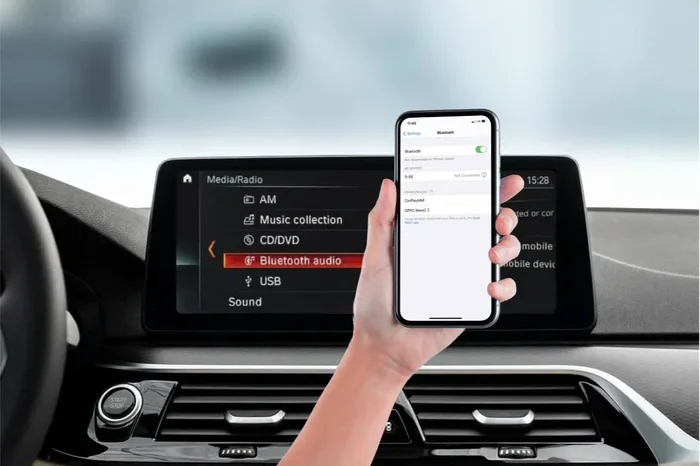
Start by sitting in your car and turning on the ignition. Do not start the engine — just power on the electronics. Look at the infotainment screen or the radio display.
Search for any of these signs:
- A bluetooth symbol that looks like a capital B made of two arrows
- A “Phone” or “Connectivity” menu option
- A “Settings” gear icon that mentions wireless or audio connections
- A “Pair Device” or “Add Device” button
If you see any of these, your car most likely has bluetooth built in. The symbol might appear on the radio face, the steering wheel controls, or the center console. Some cars show a small bluetooth icon near the power button or on the display screen.
Method 2: Check Your Owner’s Manual
Your car’s owner’s manual is a goldmine of information. Flip through it and look for sections titled “Connectivity,” “Audio,” “Phone,” or “Bluetooth.” The manual will clearly state whether your vehicle supports wireless audio and hands-free calling.
If you do not have the physical manual, you can usually find a PDF version online. Search for your car’s make, model, and year plus “owner’s manual PDF.” Most manufacturers keep these available for free.
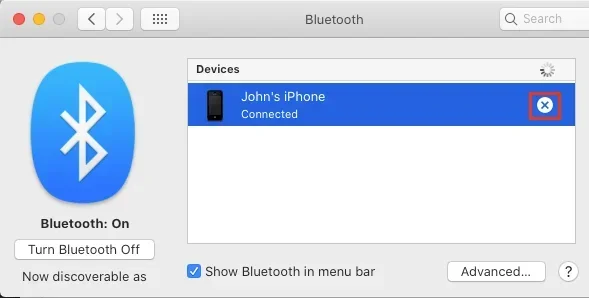
Method 3: Use Your Phone to Scan for Devices
This is the fastest and most reliable method. Follow these steps:
- Turn on your car’s infotainment system.
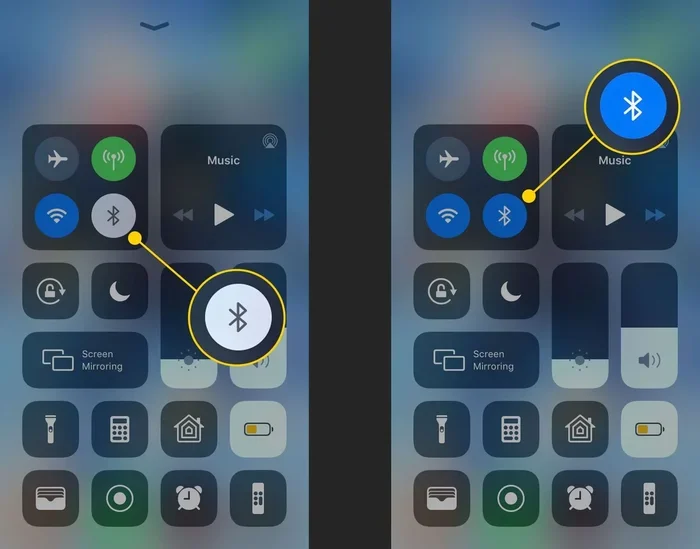
- Open the Settings app on your phone.
- Tap on “Bluetooth” and make sure it is turned on.
- Wait a few seconds while your phone scans for nearby devices.
- Look through the list of available devices.
If your car name appears in the list, congratulations — you have bluetooth! The car might show up as the model name, the brand name, or something like “Audio System” or “Hands-Free.”
Method 4: Look for a Bluetooth Button on the Steering Wheel or Console
Many cars have a dedicated bluetooth button on the steering wheel or center console. It often looks like the bluetooth symbol or has a phone icon. Press it and see if a menu pops up with pairing options.
Some cars also have a voice command button that activates bluetooth calling. If you press it and hear a prompt to connect a phone, your car supports wireless connections.
Common Car Models and Their Bluetooth Features
Not all cars are created equal when it comes to bluetooth connectivity. Here is a quick look at how different types of vehicles handle this feature.
New Cars (2015 and Newer)
Almost every new car on the market today comes with built-in bluetooth as standard. Whether you drive a Toyota, Honda, Ford, Chevrolet, or a luxury brand like BMW or Mercedes, you can expect wireless audio and hands-free calling. Car infotainment systems in newer vehicles make pairing quick and seamless.
Older Cars (2005 to 2014)
Cars from this era are a mixed bag. Higher-end trims and luxury models often included bluetooth as an option or standard feature. But base models in budget cars sometimes skipped it. If you drive a car from this period, you will need to check using the methods above.
Classic and Vintage Cars (Before 2005)
Cars made before 2005 rarely have factory bluetooth. Bluetooth became common in vehicles around 2006 to 2008. If you drive a classic car, you will almost certainly need an aftermarket solution to add wireless connectivity.
| Car Era | Bluetooth Likely? | What to Do |
|---|---|---|
| 2015 and newer | Yes, standard | Check the infotainment menu to pair |
| 2005 to 2014 | Maybe, depends on trim | Use phone scan or check manual |
| Before 2005 | Very unlikely | Add a bluetooth adapter or transmitter |
What to Do If Your Car Does Not Have Bluetooth
Do not worry if your car does not have bluetooth built in. You have several great options to add wireless connectivity. These solutions are affordable and easy to install.
Option 1: Use a Bluetooth Transmitter
A bluetooth transmitter plugs into your car’s audio output — usually the AUX port or the cigarette lighter. It receives audio from your phone over wireless connection and sends it to your car speakers. This is one of the simplest and cheapest ways to add bluetooth capability to any car.
You can learn more about how bluetooth transmitters work for cars in our detailed guide on that topic.
Option 2: Install a Bluetooth Adapter
A bluetooth adapter works similarly to a transmitter but often offers better sound quality. Some adapters connect directly to the car’s USB port or auxiliary input. They create a bluetooth receiver that your phone can pair with, just like a built-in system.
These adapters usually cost between $20 and $80, depending on the brand and features. They are a worthwhile investment if you use your car regularly and want reliable wireless streaming.
Option 3: Replace the Car Radio
If you want a more permanent solution, consider replacing your car radio with a bluetooth-enabled unit. Modern aftermarket radios come with bluetooth pairing, touchscreen displays, and even smartphone integration like Apple CarPlay and Android Auto.
This option costs more but transforms your entire car audio experience. You get better sound quality, more features, and a cleaner setup without visible wires.
Option 4: Use a Bluetooth Speaker
As a quick and easy workaround, you can place a portable bluetooth speaker in your car. It connects to your phone wirelessly and fills the cabin with sound. This is not as integrated as a built-in system, but it works well for short trips or budget setups.
You can find more about this approach in our article on playing your car radio on a bluetooth speaker.
Benefits of Having Bluetooth in Your Car
Once you have bluetooth connectivity in your car, a whole world of convenience opens up. Here are the biggest benefits you will enjoy.
Hands-Free Calling for Safety
The most important benefit of bluetooth in cars is safety. Hands-free calling lets you answer phone calls without taking your hands off the wheel or your eyes off the road. Your voice goes through the car microphone, and the other person hears you clearly through the car speakers.
Many regions have laws against holding your phone while driving. Bluetooth calling keeps you legal and focused on the road. It is one of the simplest ways to reduce distractions behind the wheel.
Wireless Music Streaming
Imagine this: you get in your car, and your favorite playlist starts playing automatically through the speakers. No cables, no fumbling with aux cords. That is what wireless streaming feels like with bluetooth. You can use Spotify, Apple Music, YouTube Music, or any app on your phone.
Wireless audio also means you are not limited by cable length or aux port locations. Your phone can sit in your pocket, on the dashboard, or in a cup holder — it all works.
Easy Device Switching
Most car bluetooth systems remember multiple paired devices. This means you and your spouse or partner can both connect your phones to the same car. You just switch between devices in the infotainment menu or on your phone. It is a small feature that makes a big difference in households with more than one driver.
Voice Control Integration
Many modern bluetooth compatible car systems work with voice assistants. You can use Siri, Google Assistant, or Alexa to make calls, send texts, or change music — all through your car speakers. This adds another layer of safety and convenience to your daily drive.
Expert Tips for Getting the Most from Car Bluetooth
Even if your car has bluetooth, there are tips and tricks that make the experience better. Here is what the pros recommend.
Keep Your Phone Close to the Car Receiver
Bluetooth works best within about 30 feet. Keep your phone in a holder on the dashboard or in a console compartment close to the car’s antenna. This ensures a strong, stable wireless connection with no dropouts.
Update Your Car’s Software
Just like your phone, your car’s infotainment system gets software updates. These updates can improve bluetooth pairing speed, audio quality, and fix connection bugs. Check your dealer or manufacturer’s website for updates.
Clear Old Paired Devices
If your car has trouble connecting, try removing old paired devices from the list. Too many saved devices can slow down the bluetooth pairing process. Keep only the devices you use regularly.
Use a Bluetooth FM Transmitter for Older Cars
For cars without an AUX port or USB input, an FM bluetooth transmitter is a great fix. It broadcasts your phone’s audio over an empty FM radio frequency. The car radio picks it up and plays it through the speakers. It is not the highest quality, but it works well in a pinch.
Turn Off Bluetooth When Not in Use
This is a good habit for battery life. When your phone is constantly scanning for bluetooth devices, it uses more power. Turn off bluetooth on your phone when you leave the car to conserve battery.
Conclusion
So, does my car have bluetooth? Now you know exactly how to find out. Whether you check the dashboard, scan with your phone, or read the owner’s manual, the process is quick and straightforward. Most cars made in the last decade have bluetooth connectivity built right in.
If your car does not have it, you have plenty of options. A bluetooth transmitter, adapter, or new car radio can bring wireless audio and hands-free calling to any vehicle. The benefits are clear — safer calls, wireless streaming, and a more modern driving experience.
Take a few minutes today to check your car. Once you have bluetooth working, you will wonder how you ever drove without it. The wireless freedom is worth it, and the setup is easier than you might think.
Frequently Asked Questions
How do I know if my car has Bluetooth built in?
Look for the bluetooth symbol on your dashboard or infotainment screen. You can also go to your phone’s Bluetooth settings and scan for devices. If your car name appears in the list, your car has bluetooth built in.
Can I add Bluetooth to an older car that does not have it?
Yes, absolutely. You can use a bluetooth transmitter that plugs into your car’s AUX port or cigarette lighter. You can also install a bluetooth adapter or replace the car radio with a modern unit that includes wireless connectivity.
Is Bluetooth in cars safe to use while driving?
Yes, hands-free calling through bluetooth is designed to be safe. It lets you answer calls without holding your phone, keeping your hands on the wheel and your eyes on the road. Most regions now require hands-free devices for phone calls while driving.
What is the difference between a Bluetooth transmitter and a Bluetooth receiver?
A bluetooth transmitter sends audio from your phone to the car. A bluetooth receiver pulls audio from your phone into the car system. For most cars, a transmitter is the easiest solution, while a receiver works best for cars with USB or AUX inputs.
How far can Bluetooth reach in a car?
Bluetooth typically works within about 30 feet. In a car, this means your phone can be in your pocket, on the dashboard, or in a holder nearby and still maintain a strong wireless connection. The signal easily passes through the car interior.
Does Bluetooth use a lot of my phone’s battery?
Not really. Bluetooth is designed to be energy efficient. Modern phones and car systems use low-energy bluetooth protocols that have minimal impact on battery life. Turning off bluetooth when you leave the car is still a good habit to preserve charge.