How Can You Tell If You Have A Short Throw Projector
Figuring out if you own a short throw projector is simpler than most people think. You can check the throw ratio, measure your projection distance, and look up your model number to get clear answers. This guide walks you through every method step by step so you never have to guess again.
You bought or were given a projector and someone called it a short throw model. But how can you really tell? Maybe you are setting up a home theater and need to know exactly how close the projector needs to sit. Or perhaps you are trying to figure out if your current setup is optimized.
The good news is that identifying a short throw projector does not require a degree in engineering. A few simple checks, a quick look at the numbers, and some basic measurements will tell you everything you need to know. Let us walk through it together.
Key Takeaways
- Throw ratio is the key identifier: A short throw projector typically has a ratio between 0.4 and 1.0, meaning it produces a large image from a short distance.
- Measure your setup: If your projector sits close to the wall and still produces a big picture, you likely have a short throw or ultra short throw model.
- Check the manual or specs online: The manufacturer always lists the throw ratio and recommended projection distance in the product specifications.
- Ultra short throw is different: These projectors sit even closer, often just a few inches from the wall, and are a subset of short throw models.
- Placement matters a lot: Mounting your projector off center can affect image quality, especially with short throw lenses.
- Brightness and image size go hand in hand: Short throw projectors are designed to deliver large, bright images without requiring a deep room.
📑 Table of Contents
- What Exactly Is a Short Throw Projector
- How to Check the Throw Ratio
- Measure Your Actual Setup
- Look Up Your Projector Model
- Compare Short Throw vs Standard Throw
- Common Signs You Have a Short Throw Projector
- Tips for Getting the Best Results with a Short Throw Projector
- When to Upgrade or Replace Your Projector
- Final Thoughts
What Exactly Is a Short Throw Projector
A short throw projector is a device designed to produce a large image from a relatively short distance. Instead of mounting the projector far back in a room like a traditional model, a short throw unit sits much closer to the screen or wall. This makes it perfect for smaller rooms, apartments, and classrooms where space is limited.
The magic happens in the lens. Short throw projectors use a specially designed short throw lens that bends light in a way that spreads the image wider over a shorter distance. Think of it like a magnifying glass that can create a big picture even when held close to the surface below it.
Most standard projectors need about 6 to 10 feet of distance to project a 100-inch image. A short throw projector can do the same thing from just 3 to 5 feet away. And an ultra short throw projector can accomplish it from less than 2 feet. These numbers vary by model, but the core idea stays the same.
Why Does Throw Distance Matter
Throw distance directly affects where you can place the projector. If you have a long throw projector in a small room, you might end up with the projector sitting on a table right in front of the audience. That creates shadows and blocks the view. Short throw models solve this problem by keeping the device close to the wall or screen, freeing up floor space and reducing shadows.
Another big reason is image quality. When a projector sits too close with the wrong lens, the image can look distorted, blurry, or unevenly lit. Short throw lenses are specifically engineered to maintain sharpness and brightness even at close range. This is why checking your throw ratio matters so much.
How to Check the Throw Ratio
The throw ratio is the single most reliable way to identify a short throw projector. It is a simple number that compares the distance from the projector to the screen against the width of the projected image.
Understanding the Numbers
Here is how throw ratio works in plain terms. The formula is distance divided by image width. So if your projector sits 4 feet from the wall and produces a 40-inch wide image, the throw ratio is 1.0. A ratio below 1.0 means short throw. A ratio below 0.4 means ultra short throw.
Most manufacturers list the throw ratio right on the product box or in the specifications sheet. You can also find it on the brand website. Simply search for your model number and look for the term “throw ratio” or “projection distance.”
Quick Reference Table
- Ultra Short Throw: Ratio of 0.2 to 0.4. Sits just inches from the wall.
- Short Throw: Ratio of 0.4 to 1.0. Sits a few feet from the wall.
- Standard Throw: Ratio of 1.0 to 2.0. Needs several feet of distance.
- Long Throw: Ratio above 2.0. Requires a large room or ceiling mount.
If your projector falls in the first two categories, you have a short throw or ultra short throw model. This is the fastest and most accurate way to tell.
Measure Your Actual Setup
Not everyone has the manual handy. Sometimes you just want a quick answer right now. You can figure out if your projector is a short throw by measuring the actual setup in your room.
Step by Step Measurement Process
First, measure the distance from the front lens of the projector to the wall or screen. Use a tape measure and be as precise as possible. Write this number down. Next, measure the width of the projected image on the wall. If you do not have a tape measure long enough, you can measure the height and double it for a rough estimate of a 16:9 image.
Now divide the distance by the image width. If the result is below 1.0, you have a short throw projector. If it is below 0.4, you are dealing with an ultra short throw model.
For example, if your projector sits 3 feet from the wall and the image is 50 inches wide, divide 3 feet by 4.17 feet (converting 50 inches). That gives you roughly 0.72, which falls squarely in the short throw range.
What If the Image Looks Distorted
Sometimes a projector that is too close to the wall produces a blurry or oddly shaped image. This does not necessarily mean it is not a short throw model. It might mean the projector is sitting too close for that specific lens. Check the minimum projection distance listed in the specs. Every short throw projector has a closest recommended distance.
Also consider the surface you are projecting onto. Using black cloth or a non-specialized wall can reduce image quality and make it harder to judge whether the projector is performing as expected.
Look Up Your Projector Model
The fastest way to confirm what you have is to look up the model number. Every projector has a model number printed on the back or bottom of the unit. It usually looks something like “EPSON HC2350” or “BenQ TH585.”
Where to Find the Model Number
Check the sticker on the bottom or back of the projector. You can also look on the original box if you kept it. The remote control sometimes has the model number printed on it as well. If none of those work, turn on the projector and navigate to the settings menu. Most projectors display the model name on the about or system information page.
Once you have the model number, go to the manufacturer website and search for it. Look for the specifications page. The throw ratio, projection distance, and lens type will all be listed there. This is the most definitive method because it comes straight from the source.
Using Online Databases and Retailer Pages
If you cannot find the manufacturer page, try searching the model number on Amazon, B and H Photo, or other electronics retailers. Product listing pages almost always include the throw ratio and projection distance in the specifications section. This works even if you do not have the original packaging.
Looking up a product by serial number can also help if you only have the serial and not the model number. Serial numbers often map back to the exact product page on the manufacturer site.
Compare Short Throw vs Standard Throw
Understanding the difference between short throw and standard throw projectors helps you confirm what you own. The differences go beyond just distance and affect everything from placement flexibility to image quality.
Key Differences at a Glance
Short throw projectors need less space and work well in small rooms. They reduce shadow interference because the projector sits close to the screen. However, they often cost more than standard throw models because of the specialized lens technology.
Standard throw projectors are more affordable and widely available. They work great in large rooms, home theaters, and auditoriums. But they require more depth and careful placement to avoid shadows and eye strain.
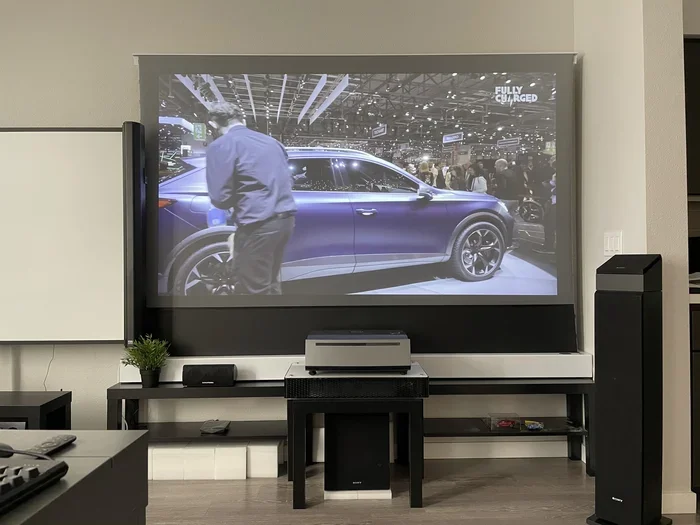
Ultra short throw projectors take the short throw concept even further. They sit right against the wall or on a short table just inches from the projection surface. This makes them ideal for interactive whiteboards and compact living rooms.
When comparing models, always look at the throw ratio first. Two projectors with the same resolution and brightness can have very different throw distances, and that single number tells you which one is a short throw model.
Common Signs You Have a Short Throw Projector
Sometimes you do not need to check any numbers at all. There are physical and practical clues that point to a short throw projector.
Clue 1: It Sits Very Close to the Wall
If your projector is sitting on a small table or shelf just a few feet from the wall and still produces a large image, chances are very high that it is a short throw model. Standard projectors in the same position would produce a tiny image or no image at all.
Clue 2: It Came with a Short Throw Lens
Some projectors come with interchangeable lenses. If your unit arrived with a short throw lens already attached, the manufacturer designed it for close-range projection. Check the lens markings for any “ST” or “short throw” label.
Clue 3: It Was Marketed as a Short Throw or Home Theater Projector
Many projectors designed for small apartments, bedrooms, or classrooms are specifically marketed as short throw. Look at the original box, the product listing, or the manual for phrases like “short throw,” “compact throw,” or “close range projection.”
You can also use a projector instead of a TV with a short throw setup to save space and create a cinematic experience in a small room.
Clue 4: The Image Quality Stays Sharp at Close Range
Short throw projectors are engineered to maintain sharpness, color accuracy, and brightness even when the device is inches from the wall. If your projector produces a clean, bright image from a very short distance, the lens is likely optimized for short throw use.
Tips for Getting the Best Results with a Short Throw Projector
Once you confirm that you have a short throw projector, a few setup tips can make a huge difference in image quality and daily use.
Use the Right Surface
Short throw projectors work best on a dedicated projection screen or a smooth, light-colored wall. Textured walls can create uneven brightness and hotspots. If you are using a wall, paint it with matte white projector paint for the best results.
Mind the Placement Distance
Even though short throw projectors are designed for close placement, there is still an optimal distance range. Going too close can cause the image to go out of focus or lose brightness. Going too far can defeat the purpose of having a short throw lens. Stick to the manufacturer recommended range.
Keep the Lens Clean
Because the lens sits so close to the wall and the audience, dust and fingerprints are more noticeable. Clean the lens regularly with a soft microfiber cloth. Even small smudges can reduce sharpness and contrast significantly.
Consider Room Lighting
Short throw projectors work best in dim or controlled lighting environments. Ambient light washes out the image and reduces the perceived contrast. If you cannot control the lighting, look for a projector with higher brightness measured in lumens.
Replacing the projector lamp with an LED can also boost brightness and reduce maintenance, especially if you use the projector frequently.
Connect Your Devices Easily
Modern short throw projectors support multiple connection options. You can connect your phone to the projector with a USB cable for quick presentations or media playback. Many models also support wireless casting and Bluetooth connections for even more flexibility.
When to Upgrade or Replace Your Projector
Knowing what kind of projector you have helps you make smarter buying decisions. If you discover that your current model is a standard throw and you need a short throw setup, it might be time to upgrade. The same applies if your projector is aging and its brightness or resolution no longer meets your needs.
Short throw projectors have become more affordable in recent years. Models in the $300 to $700 range now offer excellent image quality, built-in smart features, and reliable short throw performance. If you find yourself wishing your projector could sit closer to the wall, a short throw upgrade might be the perfect solution.
Before buying, always double-check the throw ratio and projection distance specs. Compare them to your room size and setup. This simple step saves money and prevents the frustration of buying the wrong type of projector for your space.
Final Thoughts
Telling if you have a short throw projector comes down to three simple methods. Check the throw ratio, measure your actual setup, or look up the model number online. Each method is reliable and takes only a few minutes. Once you know what you have, you can optimize your placement, improve image quality, and get the most out of your equipment.
Short throw projectors are fantastic tools for small spaces, home theaters, classrooms, and offices. They offer flexibility, convenience, and impressive image quality without demanding a large room. Whether you are a casual movie watcher or a dedicated home theater enthusiast, understanding your projector type is the first step toward a better viewing experience.
Take a few minutes right now to check your throw ratio or measure your setup. You might be surprised at how easy it is to confirm what you have. And once you know, you can make smarter decisions about placement, accessories, and future upgrades. Your short throw projector is ready to deliver a great show, and now you know exactly how to get the most from it.
Frequently Asked Questions
Can I use a standard projector as a short throw projector?
No, standard projectors cannot function as short throw models without a compatible short throw lens. The lens design determines the throw ratio, and a standard lens will not produce a properly sized image at close range. Attempting to place a standard projector too close can result in a distorted or very small image.
What is the ideal throw ratio for a short throw projector?
A throw ratio between 0.4 and 1.0 is considered short throw. Anything below 0.4 falls into the ultra short throw category. The ideal ratio depends on your room size and desired image width. Most users find a ratio around 0.6 to 0.8 to be the sweet spot for home setups.
Do I need a special screen for a short throw projector?
You do not need a special screen, but a dedicated projection screen will improve image quality significantly. Short throw projectors work well on smooth white walls too. If you want the best results, look for a screen with a short throw gain rating designed to handle close-range projection without hotspots.
Can I connect my phone to a short throw projector?
Yes, most modern short throw projectors support wireless casting and wired connections. You can mirror your phone screen or connect via USB cable for direct media playback. The setup process is similar to connecting any projector to a mobile device.
Are short throw projectors more expensive than standard models?
They can be slightly more expensive because of the specialized lens technology. However, prices have dropped significantly in recent years. Many affordable short throw projectors are now available in the $300 to $700 range, making them accessible for most budgets.
How do I know if my projector lens is replaceable
Check your projector manual or the manufacturer website for lens specifications. Some models have fixed lenses while others support interchangeable lenses. If your projector has a lens release mechanism or mounting screws around the lens housing, it likely supports replacement. Always confirm compatibility before purchasing a replacement lens.
=== CONCLUSION ===
Now you know exactly how to tell if you have a short throw projector. Whether you checked the throw ratio, measured your setup, or looked up your model number, the answer is clear. Short throw projectors offer incredible convenience for small spaces and deliver impressive image quality from just a few feet away.
Use this knowledge to get the best performance from your setup. Adjust your placement, keep the lens clean, and choose the right surface for your projections. And if you ever decide to upgrade, you now have the information you need to pick the perfect short throw projector for your space. Your viewing experience is about to get a whole lot better.