How Do I Connect My Bluetooth To My Shower Head Guide
Connecting Bluetooth to your shower head is easier than you think. This guide walks you through every step, from choosing the right waterproof speaker to pairing it with your phone. You will learn setup tips, common fixes, and expert recommendations for the best shower Bluetooth experience.
Imagine stepping into your shower and filling the bathroom with your favorite playlist. A bluetooth shower head makes that dream a reality. These handy devices combine a regular shower head with a built-in wireless speaker. You get music, podcasts, and even phone calls while you wash up. But getting everything connected can feel confusing if you have never done it before. This guide breaks it all down in simple steps.
Whether you are tech-savvy or barely know how to pair earbuds, this article has you covered. We will walk you through choosing the right waterproof bluetooth speaker, pairing it with your phone, and troubleshooting common issues. By the end, you will be streaming music in the shower like a pro. Let us dive in.
Key Takeaways
- Choose a waterproof Bluetooth shower head: Not all speakers survive water exposure. Look for IPX7 or higher ratings.
- Pairing is simple: Most Bluetooth shower head speakers follow the same basic pairing steps as any Bluetooth device.
- Placement matters: Mount your shower head speaker at the right height for the best sound and water protection.
- Battery life varies: Some shower Bluetooth speakers last 8+ hours on a single charge, while others drain faster.
- Common issues are fixable: Connection drops and pairing failures often have quick and easy solutions.
- You do not need special apps: Most Bluetooth shower head speakers work with your phone’s built-in Bluetooth settings.
📑 Table of Contents
- What Is a Bluetooth Shower Head Speaker?
- How to Choose the Right Bluetooth Shower Head Speaker
- Step-by-Step Guide to Connecting Bluetooth to Your Shower Head
- Common Bluetooth Shower Head Connection Issues and Fixes
- Best Practices for Using Bluetooth in the Shower
- Bluetooth Shower Head vs. Portable Shower Speaker
- Expert Tips for the Best Bluetooth Shower Experience
- Final Thoughts
What Is a Bluetooth Shower Head Speaker?
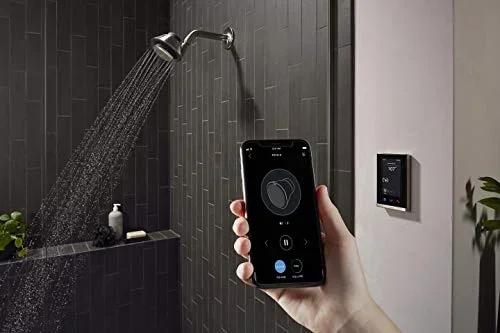
A bluetooth shower head is a shower head that has a built-in wireless speaker. It connects to your phone or tablet using Bluetooth technology. You stream audio directly from your device to the shower head. Some models look like regular shower heads with a small speaker built into the base. Others are separate speakers designed to attach to your shower arm or wall.
The key feature of any shower head speaker is waterproofing. These devices are built to withstand direct water contact and steam. They use special sealing and materials to prevent water damage. Most quality models carry an IPX7 or IPX8 rating. This means they can survive full immersion in water for a set period.
How Does Bluetooth Work in a Wet Environment?
Bluetooth uses radio waves to transmit data between devices. Water does not block these radio waves completely. However, steam and heavy moisture can sometimes interfere with the signal. This is why choosing a waterproof bluetooth speaker with a strong signal is important. Premium shower Bluetooth speakers use advanced chips that maintain a stable connection even in humid conditions.
Think of it like this. Your phone sends a signal to the shower head speaker. That signal travels through the air, even through steam. The speaker receives the signal and turns it into sound. Simple as that. The waterproof design keeps the electronics safe while the Bluetooth connection handles the audio transmission.
How to Choose the Right Bluetooth Shower Head Speaker
Not all shower Bluetooth speakers are created equal. Before you buy, consider a few key factors. The right choice makes a huge difference in your experience.
Waterproof Rating
The waterproof rating tells you how much water exposure a device can handle. Here is a quick breakdown:
- IPX4: Splash-proof. Survives light water splashes but not direct shower streams.
- IPX5: Water jets. Can handle water sprayed from any direction.
- IPX7: Submersible. Can survive full immersion in water up to 1 meter for 30 minutes.
- IPX8: Deep submersible. Handles prolonged water exposure beyond 1 meter.
For a shower head speaker, you want at least IPX7. This ensures it survives direct water spray and steam. Anything lower is a risk.
Sound Quality
Sound quality varies a lot between models. Some bluetooth shower head speakers produce surprisingly rich audio. Others sound thin and tinny. Look for speakers with good bass response and clear mids. Reviews on retailer sites can help you compare sound quality across brands. If you already use bluetooth headphones with PS4 or a TV setup, you know what good audio sounds like. Apply that same standard to your shower speaker.
Battery Life
Battery life matters more than you might think. Some wireless shower speakers last only 3 to 4 hours. Others push 8 to 10 hours on a single charge. If you take long showers or want to use the speaker outside the bathroom too, go for a longer battery life. Most quality waterproof bluetooth speakers fall in the 6-to-8-hour range.
Ease of Pairing
The best shower Bluetooth speakers pair quickly and easily. Look for models with simple Bluetooth setup. Avoid anything that requires a complicated app or firmware update right out of the box. The easier the bluetooth shower head setup, the more you will actually use it.
Step-by-Step Guide to Connecting Bluetooth to Your Shower Head
Now for the fun part. Here is exactly how to connect your bluetooth shower head to your phone or tablet. Follow these steps and you will be listening to music in minutes.
Step 1: Charge Your Speaker Fully
Before you do anything, charge your shower head speaker completely. Most models come with a USB charging cable. Plug it in and wait for the light to turn solid green or blue. A full charge ensures the best performance during your first pairing. Some speakers also come with a wall adapter. If yours did not, use any standard USB charger.
Step 2: Turn on Bluetooth on Your Phone
Open your phone settings and turn on Bluetooth. On iPhone, swipe down from the top right and tap the Bluetooth icon. On Android, swipe down from the top and look for the Bluetooth quick toggle. Make sure Bluetooth is switched on. Your phone will start scanning for nearby devices automatically.
Step 3: Put Your Shower Speaker in Pairing Mode
Most waterproof bluetooth speakers enter pairing mode when you first turn them on. Some require you to hold down a button for a few seconds. Check your user manual for the specific method. You will usually see a flashing LED light or hear a voice prompt saying “Pairing mode.” This tells you the speaker is ready to connect.
Step 4: Select the Speaker from Your Phone
Go back to your phone’s Bluetooth settings. Under “Available Devices” or “Other Devices,” you should see your shower speaker listed. Tap on it. The connection usually takes just a few seconds. You may hear a confirmation tone from the speaker once paired.
Step 5: Test the Connection
Play some music or a podcast on your phone. If you hear sound coming from the shower head speaker, you are all set. If not, do not worry. Move on to the troubleshooting section below. Most connection issues resolve quickly with a few simple steps.
Common Bluetooth Shower Head Connection Issues and Fixes
Sometimes things do not go smoothly. Here are the most common problems and how to fix them fast.
Speaker Does Not Show Up on Your Phone
If your shower Bluetooth speaker does not appear in the Bluetooth list, try these fixes. First, make sure the speaker is in pairing mode. Turn it off and on again. Second, restart your phone’s Bluetooth. Turn it off, wait 10 seconds, and turn it back on. Third, move closer to the speaker. Bluetooth range is typically 30 feet, but water and steam can reduce that distance.
Connection Drops During Use
A dropping connection is frustrating but common. Steam is often the culprit. Heavy steam can weaken the Bluetooth signal between your phone and the speaker. To fix this, move your phone closer to the shower area. You can also leave your phone on the bathroom counter instead of in the shower with you. Another fix is to reduce interference. Other Bluetooth devices nearby can sometimes cause conflicts. Turn off unused Bluetooth devices in the room.
Paired But No Sound
If your phone connects to the speaker but you hear no sound, check a few things. First, make sure the volume is turned up on both your phone and the speaker. Second, check that your phone is not connected to another audio output like a smartwatch or earbuds. Third, try pausing and resuming the audio. This often refreshes the audio stream.
Speaker Will Not Turn On
If your bluetooth shower head speaker will not power on, the battery is likely dead. Plug it in and charge it for at least 30 minutes before trying again. If it still does not turn on, try a different USB cable or charger. Sometimes the cable is the problem, not the speaker.
Best Practices for Using Bluetooth in the Shower
Getting your shower head speaker connected is only half the battle. Using it correctly makes a big difference in longevity and sound quality.
Placement Tips
Where you place your speaker affects both sound and safety. Mount the speaker at a height where it is not directly in the water stream. This extends its lifespan. If your speaker attaches to the shower arm, position it so it faces toward you. This gives the best sound projection. Avoid placing it on the floor of the shower where water pools.
Cleaning and Maintenance
Regular cleaning keeps your waterproof bluetooth speaker performing well. Wipe it down after each shower to remove soap residue and water spots. Once a week, give it a deeper clean with a soft cloth and mild soap. Never use harsh chemicals or abrasive cleaners. These can damage the waterproof seal and expose the electronics inside.
Storage When Not in Use
Even waterproof speakers benefit from proper storage. If you are not using the speaker daily, store it in a dry place. This helps preserve the battery and internal components. If you use it every day, the shower environment is fine. Just make sure it dries out between uses. Leaving it wet all the time can cause mold or corrosion over time.
Extending Battery Life
To get the most out of your wireless shower speakers, follow these battery tips. Do not let the battery drain completely before recharging. Charge it after every few uses. Store the speaker at room temperature. Extreme heat from a hot shower can slowly degrade battery performance over time. If you will not use the speaker for weeks, charge it to about 50 percent before storing.
Bluetooth Shower Head vs. Portable Shower Speaker
You have probably seen both types of products. Let us compare them side by side so you can decide which is right for you.
| Feature | Bluetooth Shower Head | Portable Shower Speaker |
|---|---|---|
| Design | Replaces your existing shower head | Separate device that attaches to shower arm or hooks |
| Installation | Screws onto shower arm directly | Clips, hooks, or suctions to shower wall |
| Waterproof Rating | Usually IPX7 or higher | Varies widely by model |
| Sound Quality | Good but compact | Often better due to larger speaker drivers |
| Battery Life | 6 to 10 hours typical | 4 to 12 hours depending on model |
| Price Range | $25 to $80 | $10 to $50 |
| Portability | Stays mounted in shower | Easy to move to pool, beach, or gym |
A bluetooth shower head is great if you want a clean, all-in-one setup. A portable shower speaker works well if you want flexibility and better sound. Some people even use both. They switch between a portable speaker for travel and a built-in shower head speaker for daily use.
Expert Tips for the Best Bluetooth Shower Experience
Here are some insider tips that make a real difference. These come from people who have tested dozens of shower head speakers over the years.
- Use a Bluetooth transmitter for older devices: If your phone or tablet does not have Bluetooth, you can add one. A bluetooth adapter on my tv works in similar ways to add wireless capability to devices. You can find small USB Bluetooth adapters that work with phones too.
- Turn down the shower volume: It sounds obvious, but many people play music too loud in the shower. This can damage the speaker over time and also hurt your ears. Keep the volume at a comfortable level.
- Check for firmware updates: Some smart shower speakers have firmware that can be updated. Check the manufacturer’s website or app for updates. These can improve connectivity and sound quality.
- Consider how you make your stereo bluetooth capable: The same principles that apply when you turn my stereo into bluetooth also apply here. Bluetooth adapters and transmitters open up wireless audio to almost any device.
- Pair only one device at a time: Most shower speakers can only connect to one device at a time. If you have trouble pairing, disconnect other paired devices temporarily.
These small adjustments add up to a much better experience. You will get clearer sound, longer battery life, and fewer connection headaches.
Final Thoughts
Connecting Bluetooth to your shower head is a simple upgrade that transforms your daily routine. You get to enjoy music, podcasts, or audiobooks while you relax in the shower. The process is straightforward once you know the steps. Choose a quality waterproof speaker, follow the pairing guide, and troubleshoot any issues that come up. With the right setup, your shower becomes your personal spa with built-in audio.
Remember to take care of your speaker. Keep it clean, charge it regularly, and store it properly. These habits will keep your bluetooth shower head working beautifully for years. Now go ahead, turn on your favorite playlist, and enjoy the shower experience you deserve.
Frequently Asked Questions
Can I connect any Bluetooth speaker to my shower head?
Most Bluetooth speakers can connect to a shower head setup, but you need a waterproof speaker for safety. Regular Bluetooth speakers can get damaged by water and steam. Look for a speaker with an IPX7 or higher rating. This ensures it can handle direct water exposure in the shower.
How do I put my Bluetooth shower speaker in pairing mode?
Most speakers enter pairing mode when you first turn them on. Some require you to hold down the power button or a dedicated Bluetooth button for 3 to 5 seconds. Check the LED light. A flashing light usually means the speaker is ready to pair. Refer to your speaker’s manual for the exact method.
Why does my Bluetooth shower speaker keep disconnecting?
Steam and moisture are the most common causes of disconnections. They can weaken the Bluetooth signal between your phone and the speaker. Move your phone closer to the speaker or reduce steam by improving bathroom ventilation. Also check that no other Bluetooth devices are interfering with the connection.
Can I use a Bluetooth shower head speaker outside the shower?
Yes, most waterproof Bluetooth shower speakers work anywhere. You can use them at the pool, gym, or even outdoors. The waterproof rating means they can handle splashes and rain. Just remember that they are not designed for full submersion outside of shower use. Keep them away from deep water when not in the shower.
Do I need an app to connect my Bluetooth shower head speaker?
No, most shower Bluetooth speakers work with your phone’s built-in Bluetooth settings. You do not need to download a special app. Simply turn on Bluetooth on your phone, put the speaker in pairing mode, and select it from the available devices list. Some smart speakers may have companion apps for extra features, but basic pairing does not require one.
How long does a Bluetooth shower head speaker battery last?
Battery life depends on the model and volume level. Most waterproof bluetooth speakers last between 6 and 10 hours on a full charge. Playing music at lower volumes extends battery life. Charging typically takes 1 to 2 hours. For the best battery health, recharge after every few uses and avoid letting the battery fully drain.