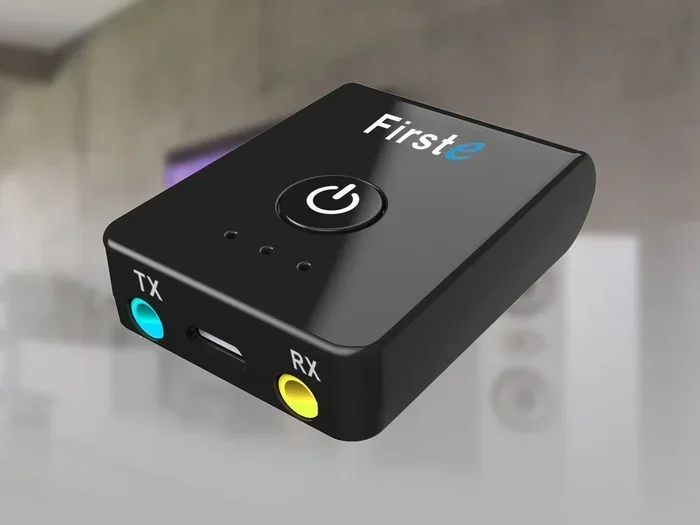
Can I Make My Tv Bluetooth With An Adapter Made Simple
Yes, you can absolutely make your TV Bluetooth with an adapter. A Bluetooth adapter for TV lets you stream audio wirelessly to headphones, speakers, and soundbars. This simple device transforms any TV with an audio output into a wireless audio streaming powerhouse. You will learn how adapters work, which type to buy, and how to set everything up in minutes.
Key Takeaways
- A Bluetooth adapter is the easiest way to add wireless audio to any TV: No need to buy a new TV or expensive sound system.
- There are two main types of adapters: Bluetooth transmitters send audio out, while Bluetooth receivers pull audio in to your TV.
- Setup takes less than 10 minutes: Plug it in, pair your device, and you are ready to go.
- Look for Bluetooth 5.0 adapters: They offer better range, lower latency, and stronger connections.
- Common issues like audio delay are fixable: Simple tweaks can eliminate lag and sync problems.
- Budget-friendly options exist: You do not need to spend a fortune to get great wireless sound.
- Check your TV’s audio outputs first: Knowing your ports helps you choose the right adapter.
📑 Table of Contents
- Can I Make My TV Bluetooth With an Adapter Made Simple
- How Bluetooth TV Adapters Work
- Why Make Your TV Bluetooth With an Adapter
- Types of Bluetooth Adapters for TV
- How to Choose the Right Bluetooth Adapter for Your TV
- Step-by-Step Setup Guide
- Common Problems and How to Fix Them
- Quick Tips for the Best Experience
- Expert Insights on TV Bluetooth Adapters
- Key Takeaways
- Conclusion
Can I Make My TV Bluetooth With an Adapter Made Simple
So your TV does not have Bluetooth built in. Maybe you love your wireless headphones but cannot connect them. Or perhaps you want to stream music to a Bluetooth speaker without any fuss. Whatever the reason, you are not alone. Many people ask the same question every day: can I make my TV Bluetooth with an adapter?
The short answer is yes. A Bluetooth adapter for TV is a small, affordable device that adds wireless capability to almost any television. You do not need technical skills. You do not need a new TV. You just need the right adapter and a few minutes of your time. This guide walks you through everything you need to know.
Bluetooth technology has come a long way. Older versions had lag and connection drops. But modern Bluetooth 5.0 adapters deliver smooth, reliable wireless audio. Whether you want to watch movies late at night with headphones or fill your room with music from a wireless speaker, an adapter makes it happen.
Let us dive into how these adapters work, which ones to buy, and how to set them up. By the end, you will feel confident making your TV Bluetooth ready.
How Bluetooth TV Adapters Work
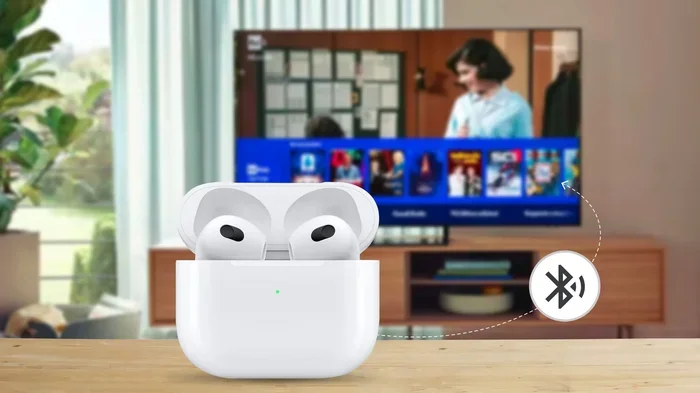
A Bluetooth TV adapter acts as a bridge between your TV and wireless devices. Your TV sends audio through a cable or port. The adapter receives that audio signal and converts it into a Bluetooth signal. Then your headphones, speakers, or soundbar pick up that signal wirelessly.
Think of it like a translator. Your TV speaks one language, and your Bluetooth device speaks another. The adapter helps them understand each other. Simple, right?
Transmitter vs Receiver: What Is the Difference?
Not all adapters work the same way. There are two main types you should know about.
Bluetooth transmitters send audio from your TV to a wireless device. You plug the transmitter into your TV’s audio output. Then your Bluetooth headphones or speakers connect to the transmitter. This is the most common setup for people who want to go wireless.
Bluetooth receivers do the opposite. They pull in a Bluetooth signal and send it to your TV. This is useful if you want to play music from your phone on your TV’s speakers. But for most people looking to go wireless, a transmitter is what you need.
Here is a quick comparison to help you understand:
- Transmitter: Sends audio from TV to wireless devices. Best for wireless headphones and speakers.
- Receiver: Receives Bluetooth audio and sends it to TV speakers. Best for playing phone music on your TV.
- Combo units: Some adapters do both. They transmit and receive. These give you the most flexibility.
Why Make Your TV Bluetooth With an Adapter
There are so many good reasons to add wireless audio streaming to your TV. Let us look at the biggest benefits.
Watch Late-Night Movies Without Disturbing Anyone
Do you love watching movies after everyone else has gone to bed? A Bluetooth adapter for TV lets you connect wireless headphones directly. You get immersive sound without waking up the whole house. This is a game-changer for light sleepers and late-night movie fans.
Use Any Wireless Headphones or Speakers
Many modern wireless headphones for TV use Bluetooth. But your TV might not support them. An adapter solves this problem completely. You can use any Bluetooth headphones, earbuds, or speakers you already own. No need to buy special equipment.
Improve Your TV Audio Setup
Some TVs have weak built-in speakers. A wireless speaker connection through a Bluetooth adapter can dramatically improve your listening experience. You can place your speaker anywhere in the room. No cables running across the floor. Just clean, clutter-free sound.
Save Money Instead of Buying a New TV
Smart TVs with Bluetooth can cost a lot more. A Bluetooth audio adapter costs a fraction of the price. For twenty to fifty dollars, you get the same wireless functionality. Why spend hundreds on a new TV when a small adapter does the job?
Types of Bluetooth Adapters for TV
Not all adapters are created equal. Different types work with different TVs and setups. Let us break them down so you can pick the right one.
USB Bluetooth Adapters
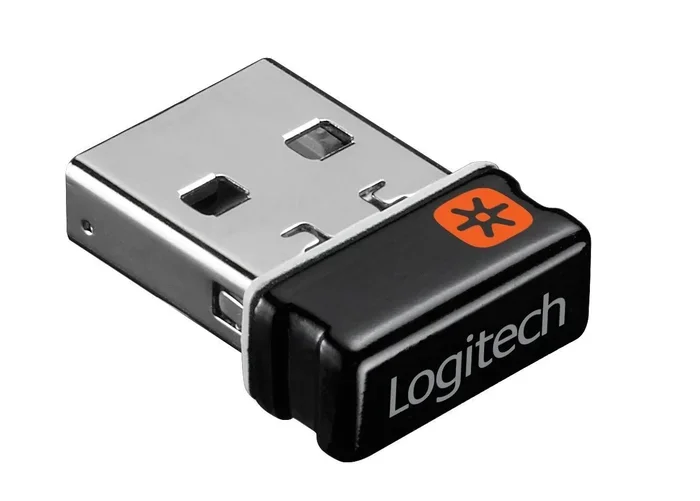
Some Smart TVs have USB ports. A USB Bluetooth adapter plugs right into the USB port. These are compact and easy to use. However, not all TVs support USB audio output. Check your TV manual first to see if this option works for you.
3.5mm Audio Jack Adapters
The most common type uses a 3.5mm audio jack. You plug the adapter into your TV’s headphone port. Then pair your Bluetooth device. These adapters work with almost any TV made in the last twenty years. They are reliable and affordable.
Optical Audio Adapters
If your TV has an optical audio output, you need a special adapter. Optical connections deliver digital audio with better quality. Bluetooth adapters with optical input preserve this quality while adding wireless capability. These are great for audiophiles who want the best sound.
RCA Adapter Options
Older TVs often have RCA audio output ports. These are the red and white circular plugs. You can find Bluetooth adapters with RCA cables that connect directly. This is a great option for vintage or older TV models.
How to Choose the Right Bluetooth Adapter for Your TV
With so many options out there, picking the right one can feel overwhelming. Here is what to look for.
Check Your TV’s Audio Outputs
Before buying anything, look at the back of your TV. What audio ports do you see? Do you have a 3.5mm headphone jack? An optical output? RCA ports? Maybe a USB port? Knowing what your TV has tells you exactly which adapter to buy.
Take a photo of the back of your TV before you go shopping. This simple step saves time and prevents buying the wrong adapter.
Look for Bluetooth 5.0 or Higher
Bluetooth 5.0 is the current standard for good reason. It offers a longer Bluetooth range of up to 30 feet. It has lower audio latency, meaning less delay between video and sound. And the connection is more stable. Avoid older Bluetooth 4.0 adapters if possible. They tend to have more lag and weaker signals.
Consider Your Use Case
Think about how you will use the adapter. Are you connecting wireless headphones for personal listening? A Bluetooth transmitter for TV works perfectly. Do you want to connect a wireless speaker for group listening? Make sure the adapter supports audio sharing or multipoint connection if needed.
Check for Lip Sync Features
One of the biggest complaints with wireless audio is audio delay. The sound does not match the video. Some adapters have built-in lip sync technology to fix this. Look for adapters that mention low latency or lip sync correction. This feature makes a huge difference for watching videos.
Read Reviews Before You Buy
Always check customer reviews before purchasing a Bluetooth adapter for TV. Look for feedback on connection stability, range, and audio quality. Real user experiences tell you more than any product description. Pay attention to reviews that mention your specific TV model.
Step-by-Step Setup Guide
Setting up your TV Bluetooth setup is easier than you think. Follow these simple steps and you will be streaming wirelessly in no time.
Step 1: Plug in the Adapter
Connect your adapter to the appropriate port on your TV. If you have a 3.5mm jack, plug it into the headphone output. If you have an optical output, use the optical cable that came with your adapter. For USB adapters, simply insert the USB stick into the port.
Make sure the adapter is powered on. Some models need a separate power cable. Others draw power directly from the TV. Check the instructions that came with your adapter.
Step 2: Put Your Adapter in Pairing Mode
Most adapters have a button or switch for pairing mode. Press and hold it until the LED light starts blinking. A blinking light usually means the adapter is ready to connect. Refer to your adapter’s manual if you are unsure about the pairing process.
Step 3: Pair Your Bluetooth Device
Go to the Bluetooth settings on your headphones, speaker, or soundbar. Turn on Bluetooth and search for available devices. Your adapter should appear in the list. Tap on it to connect. Some adapters have a default pairing code like 0000 or 1234. Enter this if prompted.
Step 4: Adjust Audio Settings
Once connected, go to your TV’s audio settings. Change the audio output to the adapter or external speaker option. Some TVs call this “audio out” or “external speaker.” This step ensures the sound goes through the Bluetooth adapter instead of the TV’s built-in speakers.
Step 5: Test and Enjoy
Play a video or some music. Check if the sound is clear and in sync with the video. If you notice any delay, check the adapter’s settings for latency adjustment. Many modern adapters have a switch or button for this purpose.
Common Problems and How to Fix Them
Even with the best Bluetooth adapter for TV, you might run into some issues. Here are the most common problems and easy fixes.
Audio Delay or Lag
Audio latency is the most common complaint with wireless audio. The sound comes a split second after the video action. This happens because Bluetooth takes a tiny bit of time to transmit data.
To fix this, look for adapters with low-latency codecs. Some adapters support aptX or aptX Low Latency. These codecs reduce delay significantly. You can also try adjusting the audio delay settings on your TV if available.
Connection Drops or Interference
If your connection keeps dropping, distance might be the issue. Bluetooth range is typically 30 feet for Bluetooth 5.0. Walls, furniture, and other electronics can weaken the signal. Try moving your adapter closer to your Bluetooth device. Also, keep the adapter away from microwaves and Wi-Fi routers, as these can cause interference.
No Sound at All
Check that the adapter is properly plugged in. Make sure the audio output on your TV is set to the correct port. Try unplugging and replugging the adapter. Sometimes a simple restart of both the adapter and your Bluetooth device fixes the problem.
Paired but No Audio
If your device connects but you hear nothing, check the volume on both the adapter and your Bluetooth device. Some adapters have their own volume control. Also make sure your Bluetooth device is not muted. Try unpairing and reconnecting the devices.
Quick Tips for the Best Experience
Here are some practical tips to get the most out of your wireless audio streaming setup.
- Keep your adapter close: Place it near your TV and within range of your Bluetooth device for the strongest signal.
- Update your adapter firmware: Some adapters have software updates that improve performance. Check the manufacturer’s website.
- Charge your Bluetooth device fully: Wireless headphones and speakers work best when fully charged. Low battery can cause connection issues.
- Use high-quality audio cables: The cable between your TV and adapter matters. A good cable ensures clean audio signal transmission.
- Restart regularly: Just like any tech device, restarting your adapter and Bluetooth devices can fix minor glitches.
- Avoid too many connected devices: Most adapters connect to one or two devices at a time. Too many connections can slow things down.
Expert Insights on TV Bluetooth Adapters
Audio engineers and tech reviewers agree on a few key points about Bluetooth audio adapters. First, the adapter you choose matters more than you might think. Cheap, no-name adapters often have poor range, high latency, and weak connections. Spending a little more on a reputable brand pays off in the long run.
Second, placement is everything. Keep your adapter in a clear, open space. Do not hide it behind your TV or inside a cabinet. Bluetooth signals travel best when they have a clear path to your device.
Third, patience during setup pays off. Take your time pairing devices correctly. Rushing through setup often leads to connection problems later. Follow each step carefully and you will have a smooth, reliable wireless setup.
Key Takeaways
- A Bluetooth adapter is the easiest way to add wireless audio to any TV: No need to buy a new TV or expensive sound system.
- There are two main types of adapters: Bluetooth transmitters send audio out, while Bluetooth receivers pull audio in to your TV.
- Setup takes less than 10 minutes: Plug it in, pair your device, and you are ready to go.
- Look for Bluetooth 5.0 adapters: They offer better range, lower latency, and stronger connections.
- Common issues like audio delay are fixable: Simple tweaks can eliminate lag and sync problems.
- Budget-friendly options exist: You do not need to spend a fortune to get great wireless sound.
- Check your TV’s audio outputs first: Knowing your ports helps you choose the right adapter.
Conclusion
The answer to the question can I make my TV Bluetooth with an adapter is a resounding yes. A Bluetooth adapter for TV is one of the simplest and most affordable upgrades you can make to your home entertainment setup. Whether you want to watch movies with wireless headphones at night, connect a wireless speaker for better sound, or just enjoy the freedom of wireless audio streaming, an adapter delivers.
You now know how these adapters work, which type to choose, and how to set everything up. You also know how to troubleshoot common issues. The technology is straightforward and reliable, especially with modern Bluetooth 5.0 adapters that offer great range and minimal delay.
Do not let a TV without built-in Bluetooth hold you back. A small investment in a Bluetooth audio adapter opens up a world of wireless listening possibilities. Your TV does not need to be new or expensive to enjoy the benefits of Bluetooth. With the right adapter, any TV can go wireless.
So go ahead and make the switch. You will wonder how you ever watched TV without wireless audio. The setup takes minutes, and the improvement in your viewing experience is immediate and noticeable.
Can I make any TV Bluetooth with an adapter?
Yes, almost any TV can become Bluetooth with the right adapter. You need a TV with an audio output port, which nearly all TVs have. Whether your TV has a 3.5mm jack, optical output, RCA ports, or USB, there is a compatible adapter available. The adapter handles the Bluetooth connection so your TV can communicate wirelessly with headphones, speakers, and other devices.
How much does a Bluetooth adapter for TV cost?
Most Bluetooth TV adapters cost between $15 and $60. Budget options under $20 work well for basic listening. Mid-range adapters around $30 to $40 offer better range and lower latency. Premium adapters with advanced features like aptX codecs or multipoint connection cost more but deliver superior performance. You do not need to spend a lot to get great results.
Will a Bluetooth adapter affect my TV picture quality?
No, a Bluetooth adapter only affects audio. It takes the audio signal from your TV and sends it wirelessly to your headphones or speakers. Your video quality stays exactly the same. The adapter does not touch or alter the video signal in any way. You get the same sharp picture with the added benefit of wireless sound.
What is audio latency and how can I reduce it?
Audio latency is the delay between the video action and the sound you hear. This is common with wireless Bluetooth connections. To reduce latency, choose an adapter that supports low-latency codecs like aptX Low Latency. You can also adjust audio delay settings on your TV if available. Placing the adapter closer to your Bluetooth device helps too.
Can I connect multiple Bluetooth devices to one adapter?
Some adapters support multipoint connection, which allows you to pair two devices at once. However, most standard adapters connect to only one device at a time. If you want to switch between devices, you can usually unpair one and pair another quickly. Check your adapter’s specifications to see if it supports multiple connections.
Is Bluetooth 5.0 really better than older versions?
Yes, Bluetooth 5.0 offers significant improvements over older versions. It provides a longer range of up to 30 feet compared to about 10 feet for Bluetooth 4.0. It has lower power consumption, meaning your adapter stays cooler and uses less energy. Most importantly, it has much lower latency, which reduces audio delay and keeps your sound in sync with the video. For any new purchase, Bluetooth 5.0 is the clear choice.
Frequently Asked Questions
What is Can I Make My Tv Bluetooth With An Adapter?
Can I Make My Tv Bluetooth With An Adapter is an important topic with many practical applications.