Can Smart Lock Be Hacked Everything You Need to Know
Yes, smart locks can be hacked, but the risk is lower than you might think. Understanding how hackers target keyless entry systems helps you take simple steps to boost your home’s security. This guide covers every vulnerability, real-world risk, and proven protection method you need to know.
Key Takeaways
- Smart locks can be hacked: No system is 100% immune, but most hacks require specific conditions and advanced techniques.
- Bluetooth and Wi-Fi vulnerabilities are the main attack vectors: These wireless protocols can be exploited if not properly secured.
- Strong passwords and two-factor authentication make a huge difference: Simple habits drastically reduce your risk of unauthorized access.
- Regular firmware updates patch known security flaws: Keeping your lock updated is one of the easiest and most effective defenses.
- Relay attacks are a real threat: Hackers can intercept signals between your phone and lock if you don’t take precautions.
- Choosing a reputable brand matters enormously: Established brands invest heavily in encryption and security testing.
- Layering security works best: Combine smart locks with cameras, alarms, and good physical security for maximum protection.
📑 Table of Contents
- Can Smart Lock Be Hacked? The Truth About Keyless Entry Security
- How Smart Locks Work
- Common Ways Smart Locks Get Hacked
- Which Smart Locks Are Most Vulnerable?
- How to Protect Your Smart Lock from Hackers
- Real-World Smart Lock Hacks: What Actually Happened
- Are Smart Locks Still Worth It?
- Expert Tips for Maximum Smart Lock Security
- Common Mistakes That Leave Smart Locks Vulnerable
- Final Thoughts on Smart Lock Hacking Risks
Can Smart Lock Be Hacked? The Truth About Keyless Entry Security
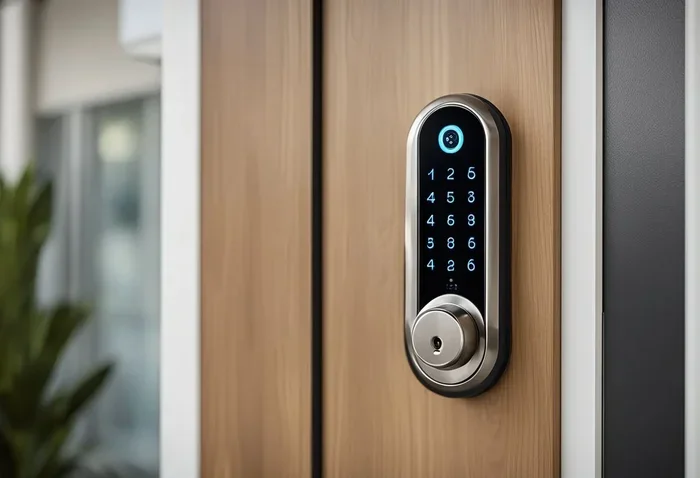
Smart locks have changed the way we think about home security. You can unlock your door with a phone, a fingerprint, or even a voice command. But here is the big question many homeowners ask: can smart lock be hacked? The short answer is yes. But the full answer is much more interesting than a simple yes or no.
Most people worry about someone picking their lock with a bobby pin. That is an old-school concern. Today, the real risks involve digital vulnerabilities, wireless signals, and software exploits. Understanding these risks does not mean you should avoid smart locks. It means you should use them wisely.
This guide breaks down everything you need to know. We will cover how hackers actually get in, which locks are most vulnerable, and what you can do to stay safe. By the end, you will feel confident about your smart lock security choices.
How Smart Locks Work
Before we dive into hacking risks, let us understand how smart locks function. Most smart locks replace or work alongside your existing deadbolt. They connect to your phone or a central hub using wireless technology. The most common connection types are Bluetooth, Wi-Fi, Z-Wave, and Zigbee.
Each connection type has its own strengths and weaknesses. Bluetooth locks are popular because they are easy to set up. Wi-Fi locks let you control your door from anywhere. Z-Wave and Zigbee locks work well with home automation systems. But every wireless connection creates a potential entry point for someone with bad intentions.
The lock itself uses an electronic mechanism to turn the deadbolt. You authorize access through an app, a code, a fingerprint, or a key fob. The system checks your credentials against a stored list of approved users. If everything matches, the lock turns. Simple, right? But that simplicity hides some serious security challenges.
Types of Smart Lock Connections
Let us look at the main connection types more closely. Bluetooth locks have a short range, usually about 30 feet. They work well for everyday use but can be vulnerable to relay attacks. Wi-Fi locks connect directly to your home network. This gives you remote access but also exposes the lock to internet-based threats.
Z-Wave and Zigbee locks use a mesh network. They communicate through a hub, which adds a layer of separation from the internet. This can be safer, but the hub itself becomes a target. Each connection type has its own hacking risks that you should understand before buying.
Common Ways Smart Locks Get Hacked
Now let us get to the heart of the matter. How do attackers actually compromise a smart lock? There are several methods, and they range from simple to highly technical. Knowing about them helps you defend against each one.
Relay Attacks
Relay attacks are one of the most common ways hackers target Bluetooth smart locks. Here is how it works. A hacker uses a device to capture the signal between your phone and the lock. They then relay that signal to the lock from a nearby location. The lock thinks your phone is right there, and it opens.
This attack does not require the hacker to be inside your house. They can stand near your front door while you are inside. The signal passes through walls easily. Relay attacks have been demonstrated on popular brands like August and Schlage. They are fast, silent, and effective if the lock uses weak encryption.
Brute Force Attacks
A brute force attack is exactly what it sounds like. The hacker tries every possible combination until they find the right one. This works on locks with weak numeric codes. If your code is “1234” or your birth year, a hacker can guess it in seconds.
Good smart locks have protections against brute force attempts. They lock you out after several failed tries. But cheaper models may not have this feature. Always choose a lock that limits login attempts. This simple feature can block brute force attacks completely.
Wi-Fi Network Exploits
Wi-Fi connected smart locks depend on your home network security. If your Wi-Fi is weak or unprotected, a hacker can access your lock through the network. They do not even need to be near your door. They can attack from anywhere in the world if your network is exposed.
This is why your home cybersecurity habits matter so much. Use a strong Wi-Fi password. Enable WPA3 encryption if your router supports it. Keep your router firmware updated. A smart lock is only as secure as the network it connects to.
Firmware Vulnerabilities
Every smart lock runs on software called firmware. This software controls how the lock communicates and processes commands. If the firmware has a bug or weakness, a hacker can exploit it. This is how large-scale vulnerabilities get discovered in consumer products.
Reputable brands fix these issues through firmware updates. But many people never update their locks. They set it up once and forget about it. This creates a window of opportunity for attackers who know about the vulnerability. Keeping your firmware current is one of the simplest and most important things you can do.
Physical Tampering
Some hacking methods do not involve technology at all. A skilled attacker can physically open a smart lock using specialized tools. They might remove the lock from the door and attack the internal electronics. Or they might use a shim or pick tool to bypass the mechanism entirely.
Most smart locks are harder to physically tamper with than traditional locks. But it is not impossible. High-quality locks use tamper-resistant designs. They have anti-drill plates and reinforced housings. When shopping for a smart lock, look for these physical security features.
Which Smart Locks Are Most Vulnerable?
Not all smart locks are created equal. Some have strong security built in from the start. Others cut corners to keep costs low. Understanding the differences helps you make a smarter purchase decision.
Cheaper smart locks often use basic Bluetooth without encryption. They may not support firmware updates. They might lack brute force protection. These locks are convenient and affordable, but they leave you exposed. A determined attacker can compromise them with minimal effort.
Mid-range locks from well-known brands offer better security. They use stronger encryption protocols. They receive regular firmware updates. They may support two-factor authentication. High-end locks go even further. They include biometric scanners, auto-lock features, and advanced alert systems.
Brand Comparison
Let us compare some popular smart lock brands and their security features. This gives you a practical sense of what to look for when shopping.
- August: Uses Bluetooth and Wi-Fi. Has good app integration but has been shown vulnerable to relay attacks. Firmware updates are available but not always automatic.
- Schlage: Offers a wide range of smart locks with strong build quality. Many models support Z-Wave and Wi-Fi. Schlage invests heavily in security testing and encryption.
- Yale: Known for traditional lock expertise. Their smart locks use advanced encryption and support multiple access methods. Yale has a solid reputation for smart lock security.
- Kwikset: Offers Halo series smart locks with fingerprint and keypad access. They include auto-lock features and tamper alarms. Kwikset provides regular firmware updates.
- Ultraloq: A budget-friendly option with fingerprint, code, and app access. Security features are decent for the price but may lack advanced encryption.
As you can see, the brand you choose matters a lot. Established brands with a history in physical security tend to offer better protection. Always research a brand’s security track record before buying.
How to Protect Your Smart Lock from Hackers
The good news is that you can take many steps to protect your smart lock. Most of these steps are simple and free. You do not need to be a tech expert to implement them. A little effort goes a long way toward keeping your home secure.
Use Strong, Unique Passwords
This sounds basic, but it is the most important step. Many people use simple codes for their smart locks. “1234” or “0000” are shockingly common. A hacker can guess these codes in seconds. Use a long, random numeric code instead. Better yet, use a combination of letters, numbers, and symbols if your lock supports it.
Do not reuse passwords from other accounts. If one service gets breached, hackers try those same passwords on everything else. Use a password manager to generate and store complex codes safely. This takes the guesswork out of password creation.
Enable Two-Factor Authentication
Two-factor authentication adds a second layer of protection. Even if someone gets your password, they still cannot access your lock without the second factor. This might be a code sent to your phone or a confirmation in your app.
Not all smart locks support two-factor authentication. Check before you buy. If your lock does support it, turn it on immediately. It is one of the most effective ways to prevent unauthorized access control breaches.
Keep Firmware Updated
Firmware updates fix known security flaws. When a manufacturer discovers a vulnerability, they release a patch. If you do not install the update, your lock remains exposed. Make it a habit to check for updates every few months.
Some smart locks update automatically. Others require you to do it manually through the app. Either way, stay on top of it. Set a reminder on your phone if you need to. This small habit can save you from a major security breach.
Secure Your Home Network
Your Wi-Fi network is the gateway to your smart lock. If your network is not secure, neither is your lock. Start by changing your router’s default password. Use WPA3 encryption if available. Disable WPS, which is an easy target for attackers.
Consider creating a separate network for your smart home devices. This keeps your locks isolated from your personal computers and phones. If one device gets compromised, the attacker cannot easily reach your lock through the network. This is called network segmentation, and it is a powerful security strategy.
Turn Off Features You Do Not Use
Every active feature on your smart lock is a potential attack surface. If you do not use Bluetooth, turn it off. If you rarely use remote access, disable it. Fewer active features mean fewer opportunities for hackers.
This is especially important if you travel often. When you are away from home, disable remote access features. You can turn them back on when you return. This reduces your exposure window significantly.
Use a Smart Lock with Auto-Lock
Auto-lock features ensure your door locks itself after a set time. This prevents the common mistake of leaving your door unlocked. Many smart locks auto-lock after 30 seconds to a few minutes. This is a simple but powerful security feature.
Some locks also send alerts if the door is left unlocked for too long. These notifications help you stay aware of your home’s security status. It is a small feature that can make a big difference in your overall home automation safety.
Add Physical Security Layers
Smart locks work best when combined with other security measures. Add a security camera near your front door. Install a door sensor that alerts you when the door opens. Use a door reinforcement kit to make the door harder to kick in.
These layers work together to create a comprehensive security system. A smart lock alone is good. A smart lock backed by cameras, sensors, and reinforced doors is excellent. Think of security as layers, not a single product.
Real-World Smart Lock Hacks: What Actually Happened
Theoretical risks are one thing. Real-world incidents are another. Let us look at some actual cases where smart locks were compromised. These examples show that the risks are not just hypothetical.
In 2019, researchers demonstrated a relay attack on a popular Bluetooth smart lock. They were able to unlock the door from 30 feet away without the owner knowing. The attack took less than 30 seconds. The lock manufacturer quickly released a firmware patch, but many users had not updated yet.
In another case, a homeowner found that someone had gained access to their smart lock through a weak Wi-Fi password. The hacker did not even live nearby. They accessed the lock through the internet and unlocked the door remotely. This incident highlighted the importance of strong network security.
These real-world examples show why smart lock security deserves your attention. The hacks are not always sophisticated. Often, they exploit simple mistakes like weak passwords or outdated firmware. You can protect yourself by avoiding these common errors.
Are Smart Locks Still Worth It?
After reading about all these risks, you might wonder if smart locks are still a good idea. The answer is yes. Smart locks offer convenience and features that traditional locks simply cannot match. You can grant temporary access to guests. You can monitor who comes and goes. You can lock your door from anywhere in the world.
The key is to use smart locks responsibly. Choose a reputable brand. Follow the security practices outlined in this guide. Keep your firmware updated. Use strong passwords and two-factor authentication. When you do these things, your smart lock is far more secure than a traditional lock.
Think about it this way. A traditional lock can be picked with a paperclip. A smart lock cannot be picked that way. The risks are different, not necessarily greater. With proper precautions, a smart lock can be a valuable addition to your home security setup.
Expert Tips for Maximum Smart Lock Security
We asked security professionals for their top tips on keeping smart locks safe. Here is what they recommend.
- Buy from a reputable brand: Established brands invest heavily in security research and testing. They respond quickly to vulnerabilities. Avoid no-name brands with unclear security practices.
- Use a dedicated smart home hub: A hub adds an extra layer of separation between your lock and the internet. This makes relay attacks much harder to execute.
- Monitor your lock activity regularly: Check your lock’s activity log frequently. Look for any unusual access events. Most smart lock apps make this easy to do.
- Set up alerts for every access event: Get notified every time someone unlocks your door. This gives you immediate awareness of any unauthorized access attempts.
- Replace batteries on schedule: Low battery levels can cause erratic lock behavior. Some locks also have a weak battery security mode that makes them more vulnerable. Keep batteries fresh.
- Consider a lock with built-in alarm: Some smart locks include tamper alarms. These sound loudly if someone tries to force or tamper with the lock. This deters attackers and alerts you immediately.
Common Mistakes That Leave Smart Locks Vulnerable
Even security-conscious homeowners make mistakes that put their smart locks at risk. Here are the most common ones to avoid.
- Using default passwords: Many smart locks ship with default codes. If you do not change them, anyone who knows the brand can access your lock. Always change default settings during setup.
- Ignoring firmware updates: Updates fix security flaws. Ignoring them leaves known vulnerabilities open. Check for updates at least once a month.
- Using weak Wi-Fi passwords: A weak Wi-Fi password undermines your entire smart home security. Use a long, complex password for your router.
- Granting access to too many people: Every person you share access with is a potential weak point. Only grant access to people you trust completely. Revoke access when they no longer need it.
- Not enabling auto-lock: Forgetting to lock your door manually is easy. Auto-lock removes this human error from the equation. Always enable it.
- Using public Wi-Fi to control your lock: Public Wi-Fi networks are not secure. Avoid accessing your smart lock through a coffee shop or airport network. Use your mobile data instead.
Final Thoughts on Smart Lock Hacking Risks
The question “can smart lock be hacked” has a clear answer: yes, it can. But that does not mean you should avoid smart locks. Every security product has vulnerabilities. The goal is to understand the risks and take steps to minimize them.
Smart locks offer incredible convenience and peace of mind. When you choose a strong brand, use good passwords, enable two-factor authentication, and keep your firmware updated, your lock becomes very hard to hack. Combine that with a secure home network and additional physical security measures, and you have a robust system that protects your home effectively.
Stay informed about new security developments. Follow your lock manufacturer’s updates and security advisories. The world of home automation is always evolving, and so are the threats. But with the right knowledge and habits, you can enjoy all the benefits of a smart lock without unnecessary worry.
Take action today. Review your smart lock settings. Update your firmware. Change your passwords. These small steps make a huge difference. Your home deserves the best protection you can give it, and a well-secured smart lock is a big part of that protection.
Frequently Asked Questions
Can someone hack my smart lock from far away?
It depends on your lock’s connection type. Wi-Fi connected locks can potentially be accessed remotely if your network is not secure. Bluetooth locks are harder to hack from far away but are vulnerable to relay attacks within a short range. Always use strong Wi-Fi passwords and enable two-factor authentication to reduce this risk.
Are fingerprint smart locks safer than code-based locks?
Fingerprint locks add a layer of biometric security that codes cannot match. It is much harder to fake a fingerprint than to guess a numeric code. However, fingerprint scanners can sometimes be fooled with high-quality replicas. The safest approach is to use multiple access methods and enable two-factor authentication whenever possible.
How often should I update my smart lock firmware?
Check for firmware updates at least once a month. Many smart locks send notifications when updates are available. Install updates as soon as possible because they often patch critical security vulnerabilities. Some locks update automatically, but it is still good practice to verify the update went through.
What is a relay attack on a smart lock?
A relay attack happens when a hacker captures the wireless signal between your phone and your lock. They use a device to amplify and relay that signal to the lock from a nearby location. The lock thinks your phone is right next to it and opens. This is why some experts recommend keeping your phone in a signal-blocking pouch when you are at home.
Do smart locks work during a power outage?
Most smart locks run on batteries, not household power. So a power outage does not affect the lock itself. However, if your Wi-Fi goes down, you may lose remote access features. You can still unlock your door using a code, fingerprint, or physical key backup. Always keep spare batteries on hand to avoid lockouts.
Can a smart lock be hacked if it is not connected to Wi-Fi?
Yes, but it is much harder. Bluetooth-only locks are not directly exposed to the internet. The main risk is relay attacks within short range. These locks are generally more secure than Wi-Fi models because they have a smaller attack surface. However, no wireless lock is completely immune, so always follow best security practices regardless of connection type.
=== CONCLUSION ===
Can smart lock be hacked? Yes, but the risk is manageable with the right precautions. Understanding the vulnerabilities, choosing a reputable brand, and following strong security practices can dramatically reduce your chances of being hacked. Smart locks are a valuable tool for modern home security. Use them wisely, stay informed, and enjoy the peace of mind that comes with a well-protected home.