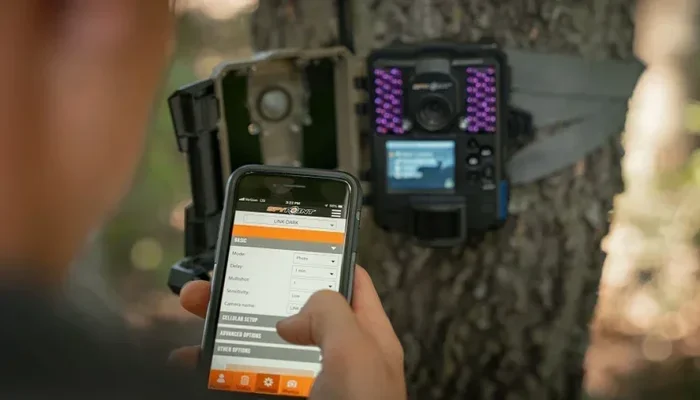
Can You Connect A Trail Camera To Your Phone Wirelessly
Yes, you can connect a trail camera to your phone wirelessly using Bluetooth, WiFi, or cellular technology. Modern trail cameras now offer wireless photo transmission straight to your smartphone, making wildlife monitoring easier than ever. Whether you use a Bluetooth trail camera, a WiFi game camera, or a cellular trail camera, each method has its own benefits. This guide walks you through every option, step by step. You will learn which connection type fits your needs best.
This is a comprehensive guide about Can You Connect A Trail Camera To Your Phone.
Key Takeaways
- Multiple wireless options exist: Bluetooth, WiFi, and cellular are the main ways to connect a trail camera to your phone.
- Bluetooth is the simplest: It works within short range and is great for quick photo transfers.
- WiFi trail cameras offer live views: You can see real-time images through a dedicated app.
- Cellular trail cameras send photos anywhere: They use a SIM card and mobile network to transmit images remotely.
- Setup is easy for most models: Most brands provide step-by-step instructions in their companion apps.
- Battery life matters: Wireless features drain power faster, so plan your charging schedule accordingly.
- Check compatibility first: Not all phones and cameras work together, so verify before you buy.
[FEATURED_IMAGE_PLACEHOLDER]
Can You Connect A Trail Camera To Your Phone Wirelessly?
It is a great question, and the answer is a clear yes. You can absolutely connect a trail camera to your phone wirelessly. In the past, you had to walk up to the camera, pull out the SD card, and plug it into your computer. That process wasted time and sometimes scared away the wildlife you were trying to study. Today, technology has changed all of that.
Modern trail cameras now come with wireless features built right in. You can pair them with your smartphone using Bluetooth or WiFi. Some models even use cellular networks to send photos directly to your phone, no matter where you are. This means you can check your wildlife camera images from your couch, your office, or even while on vacation. The convenience is hard to beat.
In this article, we will walk you through every wireless connection method. We will cover how each one works, what you need to get started, and which option is best for your situation. By the end, you will know exactly how to connect your game camera to your phone and start viewing your photos remotely.
Why Connect Your Trail Camera To Your Phone?
There are many reasons why people want to connect their trail camera to phone setups wirelessly. Let us look at the biggest benefits first.
Instant Access To Photos
With a wireless trail camera, you do not need to hike back to the device every time. You can pull up recent images on your phone within seconds. This is especially helpful for hunters who want to scout game trails without disturbing the area. Wildlife photographers also love this feature because it lets them check their shots without spending hours in the field.
Real-Time Monitoring
Some WiFi game cameras and cellular trail cameras offer live view features. You can watch animals as they move past your camera in real time. This is a game-changer for security purposes too. You can monitor your property and receive instant alerts when motion is detected.
Save Time And Effort
Think about how much time you save. Instead of driving to a remote location, pulling out an SD card, and transferring files, you simply open an app on your phone. All the photos are there, organized by date and time. Some smart trail camera models even use AI to identify animals, so you only see the shots that matter.
Better Wildlife Data
When you can check your wildlife monitoring camera more often, you gather better data. You learn animal patterns faster. You know which trails are most active and at what times. This information helps hunters plan their trips and helps researchers track species behavior over time.
Understanding The Three Main Wireless Connection Types
Not all wireless connections work the same way. There are three main types you will encounter when shopping for a trail camera with phone connection. Each has its own strengths and weaknesses. Let us break them down.
Bluetooth Connection
Bluetooth trail cameras use short-range wireless signals to connect to your phone. The range is typically between 16 and 33 feet. You need to be within that distance to transfer photos. This makes Bluetooth ideal for quick check-ins when you are already near the camera.
Setting up a Bluetooth connection is usually simple. You turn on Bluetooth on your phone, open the camera brand’s app, and pair the devices. Most trail camera apps guide you through the process step by step. The transfer speed is fast for a small batch of photos. However, Bluetooth is not great for sending large batches or viewing images from far away.
Quick Tips:
- Keep your phone close to the camera during pairing.
- Turn off other Bluetooth devices nearby to avoid interference.
- Make sure your camera firmware is updated for the best performance.
WiFi Connection
WiFi trail cameras create their own local network. Your phone connects directly to the camera’s WiFi signal. This gives you a much wider range than Bluetooth, often up to 100 feet or more. You can also view images in real time through the camera’s live view feature.
The setup process involves connecting your phone to the camera’s WiFi network through your phone’s settings. Once connected, you open the companion app and start browsing photos. Some WiFi game cameras even allow you to change settings remotely, adjust the motion sensor sensitivity, or switch between photo and video modes.
The main limitation of WiFi is that it only works within the local network range. You cannot view your photos from across town. For remote access, you need a cellular connection instead.
Quick Tips:
- Place the camera in a spot with clear line of sight to your phone.
- Use the app to check signal strength before walking away.
- Remember that WiFi drains the camera battery faster than non-wireless modes.
Cellular Connection
Cellular trail cameras are the most advanced option. They use a SIM card and a mobile network (like AT&T or Verizon) to send photos directly to your phone or email. You can check your images from anywhere in the world, as long as you have cell service at the camera location.
These cameras require a data plan, just like a smartphone. Most brands offer monthly plans that range from $5 to $15 per month, depending on how many images you want to send. The cellular game camera market has grown a lot in recent years, and prices have come down significantly.
Setup involves inserting a SIM card, activating the plan through the brand’s app, and connecting your phone to the cloud service. Once set up, every photo the camera triggers gets uploaded to your phone within seconds. This is the gold standard for remote wildlife camera monitoring.
Quick Tips:
- Check cell coverage at your camera location before purchasing.
- Choose a data plan that matches your photo volume needs.
- Use a solar panel charger to keep the camera powered in remote areas.
Step-by-Step Guide To Connecting Your Trail Camera
Now that you understand the three main types, let us walk through the actual setup process. While every brand is slightly different, the general steps are very similar across most wireless trail cameras.
Step One: Download The Companion App
Go to the App Store or Google Play Store and search for your camera brand. Most major brands like Browning, Bushnell, Reconyx, and Spypoint have free apps. Download the app and create an account if required. The app is your main hub for managing the camera and viewing photos.
Step Two: Power On The Camera And Enable Wireless
Turn on your game camera and navigate to the wireless settings menu. Use the camera’s LCD screen or buttons to select Bluetooth, WiFi, or Cellular mode, depending on your model. Some cameras auto-enable wireless when you first power them on.
Step Three: Pair Your Phone
Open the app on your phone and select “Add Camera” or “Pair New Device.” Follow the on-screen prompts. For Bluetooth, you will need to be within 33 feet. For WiFi, your phone will detect the camera’s network name. For cellular, the app will sync through the cloud once the camera is activated.
Step Four: Test The Connection
Take a test photo or trigger the camera with your hand. Check your phone to see if the image appears. If it does, your connection is working. If not, go back and check that both devices are within range and that the camera’s wireless mode is enabled.
Step Five: Adjust Settings Remotely
Once connected, you can change most camera settings from your phone. Adjust the motion detection sensitivity, switch between photo and video mode, set the burst count, and change the recovery time between triggers. This saves you from having to visit the camera every time you want to tweak a setting.
Common Mistakes To Avoid:
- Forgetting to turn on Bluetooth or WiFi on your phone.
- Not updating the camera firmware before first setup.
- Placing the camera too far from your phone during initial pairing.
- Ignoring battery warnings, which can cause connection drops.
Comparing Wireless Trail Camera Options
Not sure which type of wireless trail camera is right for you? Here is a quick comparison to help you decide.
| Feature | Bluetooth | WiFi | Cellular |
|---|---|---|---|
| Range | 16-33 feet | Up to 100 feet | Anywhere with cell service |
| Real-Time Viewing | No | Yes (local only) | Yes (anywhere) |
| Monthly Cost | None | None | $5-$15 |
| Battery Impact | Low | Medium | High |
| Setup Difficulty | Easy | Easy | Moderate |
| Best For | Quick local checks | Mid-range monitoring | Remote and permanent setups |
Your choice depends on how you plan to use the camera. If you just want a quick check during a hunting trip, Bluetooth works great. For backyard wildlife watching, WiFi is a solid pick. For serious remote monitoring, a cellular trail camera is the way to go.
Best Practices For Maintaining A Wireless Connection
Once your trail camera to phone connection is set up, you want to keep it working reliably. Here are some best practices that experienced users swear by.
Keep The Camera Battery Charged
Wireless features use extra power. A Bluetooth trail camera will last longer on battery than a cellular model. If you use a cellular camera, consider investing in an external battery pack or a solar panel. A dead camera means no photos, no matter how good your connection is.
Update Firmware Regularly
Camera manufacturers release firmware updates that fix bugs and improve wireless performance. Check the app or the brand’s website for updates every few months. An outdated firmware can cause connection drops and slow photo transfers.
Place The Camera Strategically
For WiFi cameras, placement matters a lot. Keep the camera away from thick walls, dense trees, and other obstructions that can block the signal. For cellular cameras, make sure the location has decent cell reception. You can check cell coverage maps online before setting up your wildlife monitoring camera.
Use Quality SD Cards
Even with wireless transmission, your camera still stores photos on an SD card. Use a high-speed, high-capacity card from a reputable brand. Cheap SD cards can corrupt files and cause connection errors. Format the card in the camera regularly to keep it running smoothly.
Protect The Camera From Weather
Wireless components can be sensitive to moisture and extreme temperatures. Use a weatherproof trail camera housing if you live in a rainy or snowy area. Check the seals and gaskets periodically to make sure they are intact.
Expert Insight: According to wildlife photographers, the biggest mistake people make is not testing the connection before leaving the camera in the field for weeks. Always do a full test run at home first. Transfer a few photos, change a setting remotely, and make sure everything works before you trust it with your wildlife data.
How Wireless Trail Cameras Work For Security
Trail cameras are not just for hunting and wildlife watching. Many homeowners use them for security purposes too. A wireless security camera connected to your phone gives you peace of mind whether you are at home or away.
When motion is detected, the camera sends an alert to your phone instantly. You can view the image or video right from your phone. Some people place these cameras near their driveway, backyard, or front gate. The motion-activated camera acts as an extra set of eyes on your property.
Cellular models are especially popular for security because they do not rely on a home WiFi network. If your internet goes down, the camera still works. The images are sent through the mobile network directly to your phone. This makes cellular trail cameras a reliable choice for property monitoring in rural areas.
For the best security setup, choose a camera with night vision, fast trigger speed, and a strong wireless signal. Pair it with a good data plan and a reliable power source. You will have a robust remote camera system that keeps you informed about everything happening on your property.
Frequently Asked Questions
Can any trail camera connect to a phone?
No, not all trail cameras have wireless connectivity. You need to specifically look for models that advertise Bluetooth, WiFi, or cellular features. Check the product specifications before buying. Most modern game cameras from major brands now include at least Bluetooth or WiFi capability.
Is it hard to set up a wireless trail camera?
Not at all. Most brands design their setup process to be simple and user-friendly. You download the app, turn on the camera’s wireless mode, and follow the pairing instructions. The app walks you through every step. If you can connect a Bluetooth speaker to your phone, you can set up a trail camera phone connection.
Does wireless connection drain the camera battery faster?
Yes, wireless features do use more battery than a standard non-wireless camera. Bluetooth has the least impact, WiFi uses more, and cellular uses the most. To extend battery life, turn off wireless features when you do not need them. Using a solar panel charger is also a great way to keep your wireless trail camera powered for weeks.
Can I view my trail camera photos from far away?
Yes, but only with a cellular trail camera. Bluetooth and WiFi both have limited range. A cellular game camera sends photos through the mobile network, so you can view them from anywhere with internet access. This makes cellular models the best choice for remote monitoring.
Do I need a special phone to connect to a trail camera?
Most trail camera apps work with both iPhones and Android phones. You do not need a special or expensive device. Just make sure your phone has Bluetooth and WiFi capabilities, which almost all modern phones do. Check the app requirements on the brand’s website before purchasing.
Are wireless trail cameras more expensive than regular ones?
They can be, but the price gap is closing. A basic Bluetooth trail camera costs only slightly more than a standard model. Cellular cameras tend to be pricier upfront, but the convenience they offer is worth it for many users. Factor in the monthly data plan cost when comparing prices.
Final Thoughts
Connecting a trail camera to your phone wirelessly is one of the best upgrades you can make to your wildlife monitoring setup. Whether you choose Bluetooth, WiFi, or cellular, the convenience and real-time access are unbeatable. You no longer need to make unnecessary trips to your camera or wait days to see what animals have been visiting your property.
The key is choosing the right connection type for your needs. If you want simple, quick transfers, go with Bluetooth. For local live viewing, pick a WiFi model. For true remote access from anywhere, invest in a cellular trail camera with a data plan.
Follow the setup steps we outlined, avoid the common mistakes, and keep your camera well-maintained. You will enjoy a seamless wireless photo transmission experience every time. The technology has made wildlife monitoring easier, smarter, and more accessible than ever before.
Now that you know how it all works, go ahead and set up your trail camera phone connection today. You will wonder how you ever managed without it. Happy monitoring!
Frequently Asked Questions
What is Can You Connect A Trail Camera To Your Phone?
Can You Connect A Trail Camera To Your Phone is an important topic with many practical applications.