Can Public Wifi Track Your Websites Without You Knowing
Yes, public wifi can track your websites, and it happens more often than most people realize. Network administrators, hackers, and even internet service providers can monitor your browsing activity when you connect to shared networks. Using a VPN service and checking for https encryption are two of the simplest ways to protect your online privacy on any public network.
This is a comprehensive guide about Can Public Wifi Track Your Websites.
Key Takeaways
- Public wifi can track your websites: Network admins and hackers can see which sites you visit, even if you use private browsing mode.
- HTTPS encryption matters: Sites with SSL certificates hide your page activity, but the domain name is still visible to anyone monitoring the network.
- DNS queries reveal your browsing habits: Every time you type a URL, your device sends a request that can be logged by the network owner.
- A VPN is your best defense: A reliable VPN service encrypts all your traffic, making it unreadable to anyone on the same network.
- Incognito mode does not protect you: Many users mistakenly think private browsing hides their activity from network monitors, but it does not.
- Man in the middle attacks are a real threat: Hackers on public networks can intercept your data if the site lacks proper encryption.
- Router logs store your digital footprint: Many public wifi hotspots keep records of your connection history, including timestamps and visited domains.
[FEATURED_IMAGE_PLACEHOLDER]
You walk into a coffee shop, airport lounge, or hotel lobby. You pull out your phone or laptop. You connect to the free wifi. Within seconds, you are scrolling through social media, checking emails, or shopping online. It feels harmless. It feels normal. But here is the question that should make you pause: can public wifi track your websites without you ever knowing?
The short answer is yes. The longer answer is more complicated, and honestly, more concerning. When you join a public network, you are sharing that connection with dozens, sometimes hundreds, of other people. And somewhere on that same network, someone might be watching everything you do online. This is not about being paranoid. It is about understanding how public wifi security actually works and what you can do to protect yourself.
In this article, we will break down exactly how network administrators and malicious actors can monitor your web traffic. We will explore what they can see, what they cannot see, and most importantly, how you can browse safely on any public network. Whether you travel often, work remotely, or just enjoy a free wifi hotspot at your local café, this guide will help you stay safe.
How Public Wifi Networks Actually Work
Before we dive into tracking, it helps to understand the basics of how public wifi networks function. When you connect to a wifi hotspot at a hotel, airport, or restaurant, your device sends and receives data through a central router. That router connects to the internet through an internet service provider. Every website you visit, every message you send, and every file you download travels through that router.
Think of it like a highway. All the cars on that road pass through the same toll booth. The toll booth operator can see every car that passes, even if they cannot see what is inside the trunk. In this analogy, the toll booth is the router, and the cars are your network traffic. Now, most network operators are not actively spying on you. But technically, they have the ability to see a great deal of what you are doing.
Who Controls the Network?
The person or business that owns the router controls the network. In a coffee shop, that is the shop owner or their IT service provider. In an airport, it is the airport authority. In a hotel, it is the hotel chain. These entities often have router logs that record which devices connected, when they connected, and which domains were accessed. This data collection is often done for network management, not for spying. But the capability exists, and that is what matters for your online privacy.
What Happens When You Connect
The moment your device connects to a public network, several things happen behind the scenes. Your device sends a DNS query to resolve website names into IP addresses. It exchanges network traffic with various servers. It negotiates connections with websites using SSL certificates. All of this happens in milliseconds, and you never notice. But each of these interactions leaves a trace on the network.
Can Public Wifi Track Your Websites Without You Knowing
This is the core question, and the answer is a definitive yes. Public wifi can track your websites without your knowledge in several different ways. The level of tracking depends on the sophistication of the monitoring tools and the intentions of whoever controls the network.
DNS Tracking
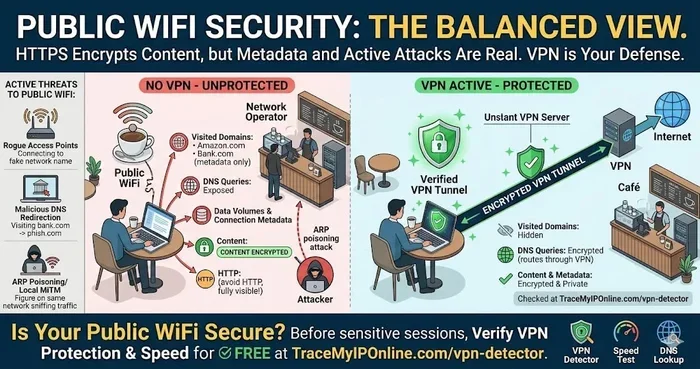
Every time you type a web address into your browser, your device sends a DNS query. This query tells the network which website you are trying to reach. Even if the website uses https encryption, the DNS query itself is often unencrypted on public networks. This means the network administrator can see every domain you visit. They may not see which specific page you viewed, but they know you visited amazon.com, or healthline.com, or any other site.
Packet Sniffing
Packet sniffing is a technique where someone captures data packets traveling across the network. Think of it like intercepting letters in the mail. If a website does not use https encryption, the entire contents of your web traffic are visible in plain text. A person using simple packet sniffing tools can see everything: the pages you visit, the forms you fill out, and even your passwords. This is one of the oldest and most common cybersecurity threats on public networks.
Man in the Middle Attacks
A man in the middle attack is one of the most dangerous threats on public wifi. In this scenario, a hacker positions themselves between your device and the router. Your traffic flows through their device before reaching the internet. They can read, modify, or record everything you do. This type of data interception can happen without you ever realizing it. Your browser shows the normal website, and you would never know someone is eavesdropping on your connection.
Router Logs and Captive Portals
Many public networks use a captive portal, which is the page that pops up asking you to agree to terms or enter a password before accessing the internet. Behind that simple page, the network is logging your device information. Router logs can record your MAC address, IP address, connection times, and the domains you access. Some networks retain this data for weeks or even months. This creates a detailed record of your digital footprint that you did not knowingly agree to share.
What Can Network Admins Actually See?
Understanding what network administrators can and cannot see is crucial for protecting your online privacy. The answer depends heavily on whether the websites you visit use encryption and what tools you have on your device.
What They Can See
Even on encrypted connections, network admins can see quite a bit. Here is a breakdown of what web traffic monitoring can reveal:
- Domain names: Every website you visit leaves a trace in the DNS logs. The admin can see you visited wikipedia.org, but not which specific article you read.
- Connection times: They can see when you connected and for how long.
- Device information: Your device name, MAC address, and IP address are visible.
- Data volume: How much data you uploaded and downloaded.
- Unencrypted traffic: Any site without https encryption exposes all your activity in plain text.
What They Cannot See
Websites that use https encryption and proper SSL certificates protect much of your browsing activity. Here is what stays hidden:
- Specific page URLs: The admin cannot see which exact page you visited on a site, only the domain.
- Form data: Anything you type into forms, including passwords and credit card numbers, is encrypted.
- Search queries: Your searches on encrypted sites are hidden from network observers.
- Content you view: The actual text, images, and videos you consume are protected by encryption.
The key takeaway is that https encryption is not perfect, but it does provide significant protection. The domain-level visibility still gives network admins a clear picture of your browsing habits, even if they cannot see the details.
Does Private Browsing or Incognito Mode Help?
Many people believe that using incognito mode or private browsing protects them on public networks. This is a common misconception. Incognito mode only prevents your browser from saving your history, cookies, and form data locally on your device. It does absolutely nothing to hide your traffic from the network administrator or anyone else monitoring the wifi hotspot. If you visit a site in incognito mode on public wifi, the network admin can still see you visited that site.
How to Protect Yourself on Public Wifi
The good news is that you have real, effective tools to protect your online privacy on any public network. These methods range from simple habits to more advanced tools. You do not need to be a tech expert to use them.
Use a VPN Service
A VPN service is the single most effective tool for protecting yourself on public wifi. A VPN creates an encrypted tunnel between your device and a remote server. All your network traffic passes through this tunnel, making it unreadable to anyone monitoring the network. Even if a hacker attempts a man in the middle attack, they will only see encrypted gibberish.
When choosing a VPN, look for one with a strict no-logs policy, strong encryption standards, and a kill switch feature. Popular options include NordVPN, ExpressVPN, and Mullvad. A good VPN costs just a few dollars per month, and the peace of mind is well worth it.
Check for HTTPS on Every Site
Always look for the padlock icon in your browser address bar. This indicates that the site uses https encryption and has a valid SSL certificate. If a site does not show HTTPS, avoid entering any personal information. Modern browsers also warn you when you are about to visit an unencrypted site. Pay attention to these warnings.
Turn Off Auto-Connect
Many devices have a feature that automatically connects to known wifi hotspots. This is convenient, but it is also risky. Your phone might quietly connect to a malicious network without you realizing it. Go into your device settings and disable auto-connect for public networks. This gives you control over when and where you connect.
Enable Firewall Protection
Your device likely has a built-in firewall that you may not have enabled. A firewall blocks unauthorized connections to your device, adding an extra layer of public wifi security. On Windows, go to your security settings and make sure the firewall is turned on. On macOS, check System Preferences under Security and Privacy. On mobile devices, firewalls are less common, but keeping your OS updated provides similar protection.
Avoid Sensitive Activities
The simplest rule of thumb is to avoid banking, shopping, or entering sensitive information on public networks. If you must do these things, use a VPN service or wait until you are on a trusted, private network. Your digital footprint is shaped by every action you take online, and public networks amplify the risks.
Use DNS Over HTTPS
DNS over HTTPS is a newer protocol that encrypts your DNS queries. This prevents network admins from seeing which domains you are trying to reach. Many modern browsers support this feature, including Firefox and Chrome. You can also use DNS services like Cloudflare (1.1.1.1) or NextDNS that offer encrypted DNS resolution. This is a small but powerful step toward better online privacy.
Common Mistakes People Make on Public Networks
Even aware users make mistakes that leave them vulnerable. Understanding these common pitfalls can save you from a serious cybersecurity threat.
Assuming All Networks Are Equally Safe
Not all wifi hotspots are created equal. A network at a major airport with professional IT staff is generally safer than a random network set up by someone in a parking lot. That fake network, often called an evil twin, mimics a legitimate network to trick you into connecting. Once you do, the attacker can monitor everything you do. Always verify the exact network name before connecting.
Trusting Free VPNs
Free VPNs are tempting, but many of them come with serious risks. Some free VPN services log your data and sell it to third parties. Others contain malware or serve invasive ads. A free VPN that monitors your traffic defeats the entire purpose of using one in the first place. Invest in a reputable paid service, or use a trusted provider that offers a limited free tier with a clear privacy policy.
Ignoring Software Updates
Software updates patch security vulnerabilities that hackers can exploit. When you use public wifi, these vulnerabilities are more exposed. Keeping your operating system, browser, and apps up to date is one of the easiest ways to maintain secure connections. Enable automatic updates whenever possible.
Leaving File Sharing Enabled
File sharing features on your laptop or phone can be a goldmine for attackers on the same network. They could access your files, install malware, or even take control of your device. Always turn off file sharing and network discovery when connecting to public wifi hotspots.
Expert Insights on Public Wifi Security
Cybersecurity professionals emphasize that the threat is real but manageable. According to the Electronic Frontier Foundation, most web traffic monitoring on public networks targets metadata rather than content. This means your browsing habits are tracked more often than your actual data is intercepted. However, the metadata alone can reveal a surprising amount about your behavior, preferences, and routines.
Experts also highlight the growing adoption of DNS over HTTPS and encrypted DNS as major steps forward for public wifi security. As more websites adopt HTTPS by default, the window for data interception narrows. But the fundamental risk remains: on any shared network, someone with the right tools and knowledge can observe your connection patterns.
The best approach is a layered defense. Use a VPN, verify HTTPS, keep your software updated, and stay informed about new cybersecurity threats. No single tool makes you invincible, but together they create a strong shield for your online privacy.
Conclusion
The truth about can public wifi track your websites is both simple and sobering. Yes, public networks can and do monitor your browsing activity. The tracking happens through DNS queries, router logs, packet sniffing, and sometimes through sophisticated attacks like man in the middle exploits. You may not always know it is happening, which is exactly what makes it so concerning.
But you are not helpless. By using a VPN service, checking for https encryption, enabling DNS over HTTPS, and avoiding sensitive activities on shared networks, you dramatically reduce your risk. These steps are simple, affordable, and effective. Your online privacy is worth the small effort it takes to protect it.
Next time you connect to a free wifi hotspot, take a moment to think about what you are sharing. A few minutes of preparation can save you from hours of trouble. Stay safe, stay informed, and never assume that a free network comes without a cost to your privacy.
Can Public Wifi Track Your Websites Without You Knowing?
Yes, public wifi networks can track which websites you visit through DNS queries, router logs, and network monitoring tools. Even if a site uses HTTPS encryption, the domain name is typically visible to the network administrator. This tracking can happen without your knowledge or explicit consent.
Can a Network Admin See My Browsing History on Public Wifi?
A network admin can see the domains you visit through DNS logs, but they cannot see the specific pages or content if the site uses HTTPS encryption. However, they can see how long you spent on each site and how frequently you visited them, which still reveals significant information about your browsing habits.
Does Incognito Mode Protect Me on Public Wifi?
No, incognito mode only prevents your browser from saving history, cookies, and form data on your device. It does not hide your traffic from the network administrator, your internet service provider, or anyone else monitoring the public wifi network. Your browsing activity remains fully visible to network observers.
How Can I Tell if a Public Wifi Network Is Safe?
You cannot fully trust any public wifi network. Look for well-known networks from reputable businesses, verify the exact network name to avoid evil twin attacks, and always use a VPN service. The safest approach is to treat every public network as potentially monitored and take protective measures accordingly.
What Is the Best VPN for Public Wifi Security?
The best VPN services for public wifi include NordVPN, ExpressVPN, Mullvad, and ProtonVPN. Look for providers with a strict no-logs policy, strong encryption, a kill switch feature, and a proven track record of protecting user privacy. Avoid free VPNs that may log and sell your data.
Can Hackers Steal My Passwords on Public Wifi?
Yes, hackers can steal passwords on public wifi if the website does not use HTTPS encryption. On unencrypted sites, passwords travel in plain text and can be captured through packet sniffing. Even on encrypted sites, a man in the middle attack could potentially intercept your credentials if the SSL certificate is compromised or if you ignore browser security warnings.
Frequently Asked Questions
What is Can Public Wifi Track Your Websites?
Can Public Wifi Track Your Websites is an important topic with many practical applications.