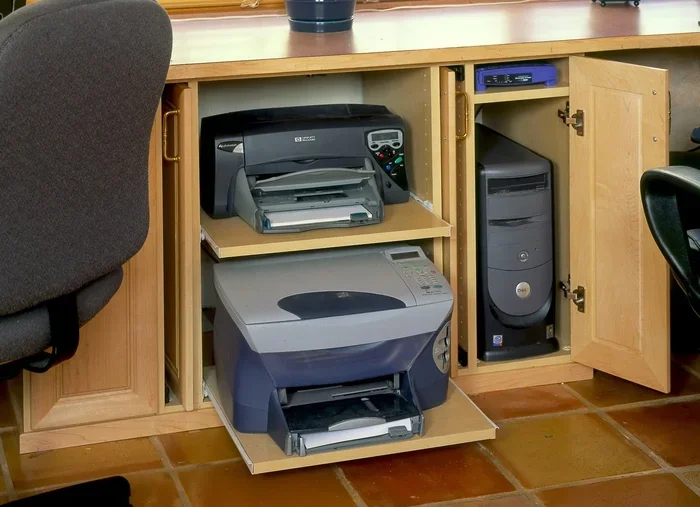
Can A Printer Be In A Cabinet Without Ruining Your Setup
Yes, you can place a printer in a cabinet, but it requires smart planning. Proper ventilation, cable management, and choosing the right furniture make all the difference. A well-designed printer cabinet keeps your workspace clean and your printing equipment safe.
You love your home office. It looks clean, organized, and professional. But there is one thing ruining the vibe. Your printer sits right out in the open, taking up space and looking bulky. So you start wondering. Can a printer be in a cabinet? The short answer is yes. The longer answer is that it depends on how you do it. Putting a printer inside a cabinet can transform your workspace design and keep things looking sharp. But do it wrong, and you risk overheating, paper jams, and poor print quality. In this guide, we walk you through everything you need to know about printer placement in enclosed spaces.
Whether you have a small home office or a busy workspace, hiding your printer makes a lot of sense. It frees up desk space. It reduces visual clutter. And it keeps curious kids and pets away from hot parts. But there are real risks involved with enclosed printer setups. Heat builds up. Dust gets trapped. Cables get tangled. The good news is that with the right approach, you can enjoy the best of both worlds. A clean look and a happy printer. Let us dive into how to make that happen.
Key Takeaways
- Printers can go in cabinets: With the right setup, you can hide your printer and keep your office looking tidy.
- Ventilation is critical: Printers need airflow to prevent overheating and damage to your printing equipment.
- Noise reduction is a bonus: An enclosed space can significantly quiet down your printer during busy print jobs.
- Dust protection helps longevity: Keeping your printer inside a cabinet reduces dust buildup and extends its life.
- Choose the right cabinet: Not all furniture works. Look for open shelves, mesh panels, or proper printer storage designs.
- Cable management matters: Plan how cords and paper feed through the cabinet to avoid frustration.
📑 Table of Contents
- Why People Put Printers in Cabinets
- Potential Risks of Putting a Printer in a Cabinet
- How to Safely Place a Printer in a Cabinet
- Best Cabinets and Furniture for Printer Storage
- Comparing Open vs. Enclosed Printer Setups
- How Computers Help Optimize Printer Placement
- Common Mistakes to Avoid
- Quick Tips for a Perfect Printer Cabinet Setup
- Final Thoughts on Printer Cabinet Setup
Why People Put Printers in Cabinets
More and more people are looking for ways to hide their printers. It is not just about looks. There are real practical reasons behind this trend. Let us explore why printer storage inside a cabinet has become so popular.
A Cleaner, More Professional Look
Your office says a lot about you. A printer sitting in the middle of your desk can make even the neatest space look chaotic. When you tuck that printing equipment away, the room instantly feels more put together. Clients visiting your home office will not see tangled cords or a dusty machine. They will see a clean, organized workspace. This matters whether you work from home full time or just need a tidy spot for occasional printing.
Protecting Your Printer from Dust and Damage
Dust is the enemy of any computer accessory. It gets into vents, clogs print heads, and causes long-term damage. When your printer sits out in the open, it collects dust every single day. A cabinet acts as a shield. It keeps dust, pet hair, and crumbs away from the delicate parts inside your machine. Over time, this simple protection can add years to your printer’s lifespan. Less maintenance. Fewer replacements. More savings.
Reducing Noise and Distractions
Let us be honest. Printers can be loud. The grinding, the clicking, the whirring. If you work from home, those sounds can break your focus. Placing your printer in a cabinet can significantly reduce the noise that reaches your ears. The walls of the cabinet absorb sound waves and keep them from bouncing around the room. This is especially helpful if your workspace is near a living area or a bedroom. You get your printing done without interrupting everyone else in the house.
Freeing Up Valuable Desk Space
Desk space is precious. Every inch counts when you are juggling a laptop, monitor, keyboard, and other office accessories. A printer takes up a surprising amount of room. By moving it into a cabinet, you reclaim that space for things that matter. A cup of coffee. A notepad. Or just more room to think. Small changes like this can make a big difference in how productive and comfortable you feel at your desk.
Potential Risks of Putting a Printer in a Cabinet
Before you rush out and buy a cabinet, you need to know the risks. Hiding your printer is not without its challenges. Understanding these dangers helps you avoid costly mistakes.
Overheating and Poor Airflow
Printers generate heat. That is just how they work. Inside a closed cabinet, that heat has nowhere to go. Without proper airflow, temperatures can rise quickly. This leads to thermal management problems. Your printer may shut down mid-job. Or worse, internal parts may get damaged over time. Ink cartridges can dry out faster in hot environments too. This is the number one mistake people make when they hide their printer. They forget that machines need to breathe.
Dust and Humidity Trapped Inside
While a cabinet protects from outside dust, it can also trap moisture and humidity inside. Poor air circulation means stale air stays put. Over time, this creates the perfect environment for mold and mildew. Your printer’s internal components can corrode. Paper can absorb moisture and jam. If you live in a humid climate, this risk becomes even more serious. You need to plan for airflow even when your printer is hidden away.
Limited Accessibility
When your printer is out in the open, you can reach it anytime. You clear a paper jam in seconds. You refill ink without thinking. But put that same printer in a cabinet, and every small task becomes a hassle. You have to open doors, pull out drawers, and reach around cords. If you print often, this adds up to frustration fast. Make sure your printer accessibility is not compromised by the cabinet design.
Fire Safety Concerns
This might sound extreme, but it is worth mentioning. Printers use electricity and generate heat. Enclosed spaces with poor ventilation increase fire risk. This is especially true for older printers or machines that run hot. Never place a printer in a cabinet made of flammable materials. Avoid sealing it completely. Always leave room for heat to escape. A simple printer cooling fan can make a huge difference here.
How to Safely Place a Printer in a Cabinet
Now that you know the risks, let us talk solutions. You can absolutely hide your printer and keep it running perfectly. The key is in the setup. Follow these steps for a safe and effective printer cabinet arrangement.
Step One: Choose the Right Cabinet Type
Not all cabinets work for printers. You need furniture that allows airflow while still hiding the machine. Here are the best options:
- Open-shelf cabinets: These have no doors or mesh fronts. Air flows freely, and the printer stays mostly hidden.
- Ventilated cabinets: Look for designs with built-in holes or slats. These promote constant air circulation.
- Pull-out drawer cabinets: The printer slides out when you need it and tucks away when you do not.
- Rolling carts: Not technically a cabinet, but they offer the same benefit with added mobility.
Avoid solid, sealed cabinets at all costs. They trap heat and moisture. Your printer will overheat, and you will face constant problems.
Step Two: Prioritize Ventilation
Airflow is the most important factor in any enclosed printer setup. Without it, heat builds up fast. Here is how to keep air moving:
- Leave the cabinet doors open when the printer is not in use.
- Install small USB-powered fans inside the cabinet.
- Use a cabinet with mesh or slatted sides.
- Place the cabinet away from walls and other furniture that block airflow.
- Leave at least 4 to 6 inches of space on all sides of the printer.
These simple steps prevent overheating and keep your machine running smoothly. Think of it like giving your printer its own little room with windows.
Step Three: Manage Cables Properly
Loose cords look messy and create a safety hazard inside a cabinet. Good cable management keeps everything neat and safe. Use cable ties or Velcro straps to bundle cords together. Run power and USB cables through pre-drilled holes or the back of the cabinet. Avoid letting cords bunch up near the printer’s heat vents. A clean setup also makes it easier to access the printer when you need to clear a jam or replace ink.
Step Four: Plan for Paper Supply
Where does the paper go inside a cabinet? This is a question many people overlook. If your cabinet is deep, you can store a ream of paper on a lower shelf. For shallower cabinets, keep paper nearby and feed it through the slot as needed. Some people add a small paper tray that slides out with the printer. Whatever you do, make sure the paper path is clear and easy to access. Paper jams happen when the feed is blocked or awkward.
Step Five: Keep the Area Clean
Even inside a cabinet, dust settles. Make a habit of cleaning the printer and the cabinet interior every few weeks. Use a soft brush or compressed air to remove dust from vents and rollers. Wipe down the inside of the cabinet to prevent moisture buildup. This small effort goes a long way in keeping your printer maintenance routine simple and effective.
Best Cabinets and Furniture for Printer Storage
Ready to shop? Here are some ideas for furniture that works well for hiding your printer. These options balance style, function, and airflow.
Open-Back Bookshelves
These are affordable and easy to find. A standard bookshelf with open back panels lets air circulate freely. You can place your printer on any shelf and hide it from view. Add baskets or bins on the shelves around it for a polished look. This is one of the simplest and most budget-friendly printer storage solutions.
Wall-Mounted Desks with Shelves
Wall-mounted desks are perfect for small spaces. Many come with open shelves underneath where you can tuck a printer away. The desk surface stays clear, and the printer is still easy to reach. This setup works great in tiny home offices or studio apartments. It is a smart use of vertical space.
Furniture Risers and Stands
If you do not want to buy a whole new cabinet, try a furniture riser. These elevate your printer off the desk and hide it behind a monitor or shelf. Some risers come with built-in drawers for paper and supplies. They are lightweight, portable, and inexpensive. A great option if you are not ready to commit to a permanent setup.
Custom-Built Cabinets
For the best results, consider a custom-built cabinet. You can design it with exactly the right ventilation, size, and access points. A carpenter can build shelves with mesh panels or cutouts for airflow. This option costs more, but it gives you full control over the design. It is the ideal solution for a dedicated home office.
Comparing Open vs. Enclosed Printer Setups
Not sure whether to keep your printer out in the open or hide it away? Here is a quick comparison to help you decide.
| Feature | Open Setup | Enclosed Cabinet |
|---|---|---|
| Ventilation | Excellent | Fair to Good (with design) |
| Dust Protection | Poor | Excellent |
| Noise Reduction | None | Good |
| Accessibility | Excellent | Moderate |
| Aesthetics | Average | Excellent |
| Heat Buildup Risk | Low | Moderate to High |
| Cost | Free | Varies |
As you can see, both setups have pros and cons. The best choice depends on your priorities. If you print often and need quick access, an open setup works well. If you value a clean look and print less frequently, an enclosed cabinet is a great option. You can also try a hybrid approach. Keep the printer in a cabinet with the doors open most of the time, and close them only when needed.
How Computers Help Optimize Printer Placement
Technology has changed the way we think about workspace organization. Computers and smart devices help us plan better setups. For example, you can use design software to visualize your office layout before moving furniture. Some smart printers connect to apps that monitor print jobs and usage patterns. This data helps you decide the best location for your machine. You can also find inspiration and ideas by exploring how technology is used in different fields. For instance, 10 Ways Computers Are Used In Medicine shows how technology optimizes spaces and workflows in hospitals. The same principles apply to your home office. Smart planning leads to better results.
Computers also help with cable management planning. You can map out where cords need to go and what length they should be. Some smart home systems even let you monitor your printer’s temperature remotely. This is especially useful if your printer is hidden inside a cabinet. You can check on it from your phone and make adjustments without opening the doors. This level of control makes enclosed printer placement much safer and more convenient than it used to be.
Common Mistakes to Avoid
Even with the best intentions, people make mistakes when hiding their printers. Here are the most common ones and how to avoid them.
- Sealing the cabinet completely: Never block all airflow. Your printer needs at least some ventilation at all times.
- Choosing a cabinet that is too small: Give your printer room. Crowding it leads to heat buildup and paper jams.
- Forgetting about weight limits: Printers can be heavy. Make sure the shelf or cabinet can support the weight safely.
- Placing the cabinet near a heat source: Keep it away from radiators, heaters, or direct sunlight. Extra heat is the last thing your printer needs.
- Ignoring paper path clearance: Make sure paper can feed in and out of the printer without hitting the cabinet walls.
Avoiding these mistakes saves you time, money, and headaches. A little planning goes a long way toward a successful hidden printer setup.
Quick Tips for a Perfect Printer Cabinet Setup
Here are some fast, actionable tips you can use right away:
- Paint the inside of the cabinet white to reflect heat and keep the interior cooler.
- Add a small power strip inside the cabinet to keep cords organized.
- Use a pull-out tray for easy access to paper and supplies.
- Place a small thermometer inside the cabinet to monitor temperature.
- Keep the cabinet doors propped open with a stopper when the printer is running.
- Use a dehumidifier nearby if you live in a humid area.
- Label the cabinet clearly so others in your home know what is inside.
These tips take minutes to implement but pay off big time. Your printer stays cool, your office stays clean, and your workflow stays smooth.
Final Thoughts on Printer Cabinet Setup
So, can a printer be in a cabinet? Absolutely. With the right planning and a little care, hiding your printer is one of the best moves you can make for your home office. You get a cleaner space, less noise, and better protection for your printing equipment. The key is to never sacrifice ventilation for looks. Keep airflow in mind with every design choice. Choose the right cabinet. Manage your cables. Plan for paper. And clean regularly.
Your workspace should work for you. Not the other way around. A hidden printer setup gives you the best of both worlds. A tidy, professional-looking room and a printer that runs just as well as it would on your open desk. Start with one of the tips in this article today. You will be amazed at how much better your office feels. A small change like hiding your printer can completely transform the way you work and think about your space.
Remember, the goal is not just to hide the printer. It is to create a workspace that feels calm, organized, and inspiring. Take your time. Plan carefully. And enjoy the process of building a setup that truly works for you.
Frequently Asked Questions
Can I put a laser printer in a cabinet?
Yes, but laser printers get hotter than inkjet models. Make sure the cabinet has excellent ventilation and never seal it completely. Leave the doors open during and after printing to let heat escape safely.
What size cabinet do I need for my printer?
Measure your printer carefully, including the paper tray and any open flaps. Add at least 4 to 6 inches of space on every side for airflow. The cabinet should also support the printer’s weight, especially for larger models.
Will hiding my printer in a cabinet affect print quality?
Not if you set it up correctly. The main risks are heat and dust, which you can manage with proper ventilation and regular cleaning. A well-designed cabinet setup has no negative impact on print quality.
Can I use a regular bookshelf as a printer cabinet?
Yes, open-back booksbookshelves work great. They provide easy access and good airflow. Just make sure the shelf is sturdy enough to hold the printer and that cords are managed neatly.
How do I reduce noise from a printer inside a cabinet?
Use a cabinet with thick walls or add soft padding inside. Leave the doors slightly open during printing to prevent sound from echoing. Some people also place a small rug or mat under the cabinet to absorb vibrations.
Is it safe to run a printer inside a closed room or closet?
Running a printer in a fully closed room or closet is risky due to poor ventilation and dust buildup. If you must do it, install a small fan, leave the door cracked open, and monitor the temperature regularly to prevent overheating.