Can I Go From Hdmi To Rca And Make It Work Perfectly
Yes, you can go from HDMI to RCA and make it work perfectly with the right active converter. This guide covers everything you need to know about HDMI to RCA conversion, including the types of adapters, setup steps, and common mistakes to avoid. Whether you have an older TV or a legacy device, you will find practical tips to get your audio and video running smoothly.
Have you ever looked at your shiny new device and wondered if you can go from HDMI to RCA and make it work perfectly? Maybe you have an older TV, a vintage game console, or a legacy audio system that only has those classic red, white, and yellow ports. The good news is that making this connection work is totally doable. You just need the right knowledge and the right gear. In this guide, we will walk you through everything you need to know about HDMI to RCA conversion. We will cover how the conversion works, which adapters to buy, and how to set things up without any headaches. By the end, you will feel confident about making this connection yourself.
Many people face this challenge every single day. You buy a new streaming box, a modern Blu-ray player, or a game console, and then you realize your display or receiver only has RCA inputs. It can feel frustrating and confusing. But here is the thing. The technology world has been transitioning from analog to digital for years now. That means there are plenty of solutions out there to bridge the gap. An HDMI to RCA converter is your best friend in this situation. It takes the digital signal from your HDMI device and turns it into an analog signal that your older equipment can understand. Let us dive into how this all works and how you can make it happen.
Key Takeaways
- HDMI to RCA conversion is possible and straightforward: You can connect modern HDMI devices to older RCA-equipped displays with the right active converter.
- Active converters are essential: A passive adapter alone will not work because it cannot convert the digital signal to analog.
- Choose the right RCA type for your display: Composite (yellow/red/white) and component (green/blue/red) RCA connections require different converters.
- Setup is simple and plug-and-play: Most converters require no software or drivers and work right out of the box.
- Watch your resolution settings: Older RCA displays may not support high-definition signals, so always match your output to the display capability.
- Avoid common mistakes: Using the wrong cable type, skipping the power supply, or mixing up cable colors can cause failure.
- Quality loss is minimal with good gear: A well-built converter preserves picture and sound quality remarkably well for analog output.
📑 Table of Contents
What Is HDMI to RCA Conversion?
Before you buy anything, it helps to understand what is actually happening when you convert from HDMI to RCA. HDMI to RCA conversion is the process of changing a digital audio and video signal into an analog one. HDMI carries both high-definition video and multi-channel audio in a single cable. RCA cables, on the other hand, carry separate analog video and audio signals. The two are fundamentally different in how they work, and that is exactly why you need a converter to bridge the gap.
An HDMI to RCA converter acts as a translator between these two worlds. It receives the digital HDMI signal, processes it through internal circuitry, and outputs separate analog signals through RCA connectors. This means your modern device can talk to your older equipment without any compatibility issues. The converter handles the heavy lifting so you do not have to worry about signal mismatches or connection problems.
How the Signal Conversion Works
The process starts when your HDMI device sends out a digital signal. This signal contains video and audio data in a compressed digital format. The converter chip inside the adapter decodes this digital data and reconstructs it as analog signals. The video part goes out through the yellow RCA connector. The audio part splits into two channels, going out through the red and white connectors. This is why you see three RCA cables coming out of most converters. Each one carries a different part of the original signal, and together they recreate the full audio video connection your display needs.
It is important to understand that this conversion involves some loss of quality. Digital signals are clean and precise. Analog signals are more susceptible to interference and degradation over distance. This is why the quality of your converter matters a lot. A cheap, low-quality adapter might introduce noise, static, or reduce the resolution of your picture. A good converter preserves as much of the original signal quality as possible. We will talk more about choosing the right one later in this guide.
Composite vs. Component RCA Connections
Not all RCA connections are the same. There are two main types you should know about before buying a converter. The first is composite video. This uses a single yellow RCA connector for video and red and white connectors for audio. Composite video carries standard definition signals. It has been around for decades and is the most common type of RCA connection you will find on older TVs, VCRs, and retro gaming consoles.
The second type is component video. This uses three RCA connectors for video, usually color-coded green, blue, and red. It also uses red and white connectors for audio. Component video can carry higher-quality signals than composite. It supports up to 480p or 576p resolution in most cases. If your older display has component inputs, you can get a noticeably better picture than with composite. When shopping for a converter, make sure you know which type of RCA input your display has. This will determine which converter you need to buy.
| Feature | Composite RCA | Component RCA |
|---|---|---|
| Video Connectors | 1 (yellow) | 3 (green, blue, red) |
| Audio Connectors | 2 (red and white) | 2 (red and white) |
| Max Resolution | 480i or 576i | 480p or 576p |
| Signal Quality | Standard definition | Enhanced definition |
| Common Devices | Old TVs, VCRs, retro consoles | Older projectors, DVD players |
| Cable Count | 3 total (video + audio) | 5 total (3 video + 2 audio) |
As you can see from the comparison table above, component RCA gives you a better picture than composite. But both are analog and both need a converter to work with HDMI. Keep this in mind when you are shopping for your HDMI to RCA adapter. Matching the right converter to your display type is the first step toward a successful setup.
Why Do You Need an HDMI to RCA Converter?
You might be wondering why you cannot just use a simple cable to go from HDMI to RCA. The answer is simple. HDMI is digital. RCA is analog. You cannot just plug one into the other and expect it to work. A digital signal and an analog signal are like two different languages. They need a translator. That translator is the converter. Without it, you will get no picture and no sound, no matter how carefully you connect the cables.
There are many situations where you might need this conversion in your home setup. Maybe you have a retro gaming console that only outputs HDMI, but your old CRT television only has RCA inputs. Or perhaps you have a modern media player but want to connect it to a vintage AV receiver that only supports analog audio. In these cases, an HDMI to RCA converter is the solution that makes everything work together. It opens up a world of possibilities for using your older equipment with modern content sources.
Another common reason is home theater setups. Many people love the warm, nostalgic feel of older equipment. You might have a classic stereo system with RCA inputs that you want to pair with a modern streaming device. The converter lets you do this without replacing your beloved older gear. It is a cost-effective way to bridge the gap between old and new technology. Instead of spending hundreds of dollars on a whole new display or audio system, a simple converter solves the problem for a fraction of the cost.
Devices That Benefit from HDMI to RCA Conversion
Lots of different devices can benefit from this conversion. Here are some of the most common examples you might encounter:
- Streaming sticks and boxes: Devices like Roku, Amazon Fire Stick, or Chromecast output HDMI. If your display only has RCA, you need a converter to make them work.
- Blu-ray players: Many modern Blu-ray players have HDMI output but no RCA option built in. A converter lets you connect them to older displays.
- Gaming consoles: Retro mini consoles and modern consoles alike use HDMI. Older displays need the conversion to show the picture.
- PCs and laptops: If your computer has only HDMI output and your monitor or TV has RCA inputs, a converter solves this problem easily.
- Cable boxes and satellite receivers: Some older cable equipment has HDMI output but your setup might only support RCA connections.
- Camcorders and video players: Some devices can output HDMI but your recording or playback equipment might only accept RCA input.
As you can see, the need for HDMI to RCA conversion comes up more often than you might think. It is not just for retro tech enthusiasts. Anyone with a mix of old and new equipment can benefit from having a converter on hand. It is one of those simple accessories that solves a big problem and saves you from expensive upgrades.
Types of HDMI to RCA Converters
Not all converters are created equal. There are different types available on the market, and each one serves a slightly different purpose. Understanding the options helps you pick the right one for your setup without wasting money on something that will not work. Let us break down the main types you will encounter when shopping for an HDMI to RCA adapter.
Active HDMI to RCA Converters
An active converter is the most common and reliable type you will find. It has built-in circuitry that actually converts the digital HDMI signal to analog RCA output. Active converters need external power, usually through a USB cable or an AC adapter. This power is what allows the chip inside the converter to do the signal conversion work properly. Without power, the converter simply cannot function.
Active converters generally produce much better results than passive options. They support higher resolutions, have less signal noise, and often come with extra features like audio extraction. If you want a reliable connection and good picture quality, an active converter is the way to go. Most quality HDMI to RCA adapters on the market today are active converters. They are affordable and widely available from many brands.
Passive HDMI to RCA Adapters
A passive adapter is a simpler device. It does not have any active electronics inside. It simply changes the physical connector shape from HDMI to RCA. Here is the problem. A passive adapter cannot convert a digital signal to an analog one. It just reshapes the connection physically. In most cases, a passive adapter will not work at all for HDMI to RCA conversion. You might see them sold online for very low prices, but they are usually not what you need. Save your money and go with an active converter instead. The extra cost is worth it for a working setup.
HDMI to RCA Converters with Audio Extraction
Some converters come with a handy extra feature. They can split the audio from the HDMI signal and send it to a separate output. This is great if you want to connect your video to an RCA display but send the audio to a separate speaker system or soundbar. These combo units often have multiple output options, including RCA audio out, optical audio out, or even a 3.5mm headphone jack. They give you more flexibility in how you set up your equipment. If you have a separate audio system you want to use, look for a converter with audio extraction capability.
HDMI to Component RCA Converters
If your display has component RCA inputs, which are the green, blue, and red video connectors, you will need a converter that supports component output. These converters send the video signal through three separate RCA cables instead of just one. The result is a sharper, better-quality picture compared to composite RCA. Many of these converters also support standard composite output through a yellow RCA connector. This gives you the flexibility to use either type of connection depending on what your display has. Always check the converter specifications to confirm it supports the RCA type you need.
How to Choose the Right Converter for Your Setup
With so many options on the market, picking the right HDMI to RCA converter can feel overwhelming. But it does not have to be. Here are the key factors to consider when making your choice and finding the best converter for your specific needs.
Check Your Display’s Input Type
First, figure out what type of RCA input your display has. Look at the back or side of your TV, monitor, or projector. Do you see a single yellow RCA port? That is composite. Do you see three RCA ports colored green, blue, and red? That is component. Some displays have both options available. Knowing this tells you exactly what kind of converter you need to buy. Take a photo of the back of your display if you are not sure. It makes shopping much easier when you know exactly what you are working with.
Consider Resolution Support
Not all converters support the same input resolutions. Some only handle 1080p HDMI input, while others can handle 4K. If your HDMI source outputs at a high resolution, make sure your converter can accept it. The converter will then downscale the signal to match what your RCA display can handle. Most older RCA displays can only show standard definition or enhanced definition signals. So even if your converter supports 4K input, your display will still show a lower resolution picture. Always check the supported input and output resolutions before you buy.
Look for Easy Plug-and-Play Setup
The best converters are simple to use right out of the box. You plug in the HDMI cable from your source device, connect the RCA cables to your display, and power on the converter. No software installation. No driver updates. No complicated configuration steps. If a converter requires you to install drivers or software, it is probably meant for a PC setup and might not work well with a simple TV or monitor setup. Look for plug-and-play models for the easiest and most hassle-free experience.
Build Quality and Brand Reputation
Cheap converters can cause all kinds of problems over time. You might get a flickering picture, static in the audio, or a converter that overheats and stops working after just a few weeks of use. Spending a little more on a reputable brand pays off in the long run. Look for converters with good customer reviews, solid build quality, and a warranty from the manufacturer. Brands that specialize in AV accessories usually make the most reliable products. Reading real user feedback before you buy can save you from a lot of frustration later on.
Power Supply Requirements
Some active converters need their own power source to work properly. This usually comes in the form of a USB cable that you plug into a USB port on your TV or a wall adapter. Before you buy a converter, check if it needs external power. Make sure your setup has a USB port or power outlet nearby to keep the converter running. Without power, an active converter will not work, even if everything else is connected correctly. This is a small detail that can cause big problems if you overlook it.
Step-by-Step Setup Guide for HDMI to RCA Conversion
Setting up your HDMI to RCA converter is easier than you might think. Follow these steps carefully and you will have your older display working with your modern device in no time at all. The process is straightforward and does not require any technical expertise.
- Unbox your converter and check the contents. You should have the converter unit, an HDMI cable, RCA cables (usually red, white, and yellow), and a power adapter or USB cable. If anything is missing, contact the seller right away.
- Connect the RCA cables to your display. Plug the yellow RCA connector into the video input on your TV or monitor. Plug the red and white connectors into the audio inputs. Always match the colors to the correct ports on your display.
- Connect the HDMI cable to your source device. Plug one end of the HDMI cable into your streaming box, game console, or Blu-ray player. Plug the other end into the HDMI input on the converter.
- Connect the power supply to the converter. If your converter needs external power, plug in the USB cable or AC adapter now. Make sure the converter receives power before you move to the next step.
- Turn on your display and source device. Power on your TV or monitor and switch it to the correct RCA input channel. Also power on your HDMI source device at the same time.
- Adjust the output settings on your source device. Go into the display settings of your HDMI device and set the output resolution to match what your RCA display supports. For composite RCA, try 480p or 576p. For component RCA, you might be able to go up to 480p or 576p as well.
- Test the connection thoroughly. You should see a clear picture on your screen and hear audio through your speakers. If the picture looks wrong, double-check your cable connections and resolution settings carefully.
Quick Tips for a Smooth Setup
- Always start with the RCA cables connected to the display before powering anything on.
- If you get no picture at all, try a different HDMI cable or a different HDMI port on your source device.
- Keep the converter in a well-ventilated area during use. Some models get warm, which is completely normal.
- If the audio and video are out of sync, try lowering the resolution on your source device to match the display capability.
- Label your cables after setup so you always know which cable goes where, especially if you have multiple devices connected.
- Keep your converter away from other electronic devices that might cause signal interference.
Common Mistakes and Expert Tips
Even with the right converter, people make mistakes that cause frustration and confusion. Knowing what to avoid saves you time, money, and a lot of headache. Here are the most common mistakes and some expert tips to help you get the best results from your HDMI to RCA setup.
Common Mistakes to Avoid
- Using a passive adapter instead of an active converter: This is the number one mistake people make. A passive adapter cannot convert a digital signal to an analog one. You will get no picture or no sound. Always buy an active converter for HDMI to RCA connections. It is the only way to get a working setup.
- Ignoring resolution settings on your source device: If your HDMI source is outputting at 1080p or 4K but your RCA display only supports standard definition, you might get a black screen or a distorted picture. Always adjust the output resolution on your source device to match what your display can handle.
- Using low-quality RCA cables: Cheap RCA cables can introduce noise, static, or a weak signal that ruins your viewing experience. Invest in decent quality cables with good shielding. It makes a noticeable difference in both picture and sound quality.
- Forgetting to power the converter: Many active converters need external power to function. If you plug everything in but forget the power cable, the converter will not work. Always double-check that your converter is receiving power before troubleshooting other issues.
- Mixing up the RCA cable colors: The color coding on RCA cables is not just for decoration. Red is right audio, white is left audio, and yellow is video. Plugging them into the wrong ports can result in no sound, a black-and-white picture, or no picture at all.
- Buying the wrong converter type for your display: Make sure you know whether your display uses composite or component RCA inputs. Buying a composite converter when you need component will not give you the best picture quality. Check your display specifications before you buy.
Expert Insights for Better Performance
Here are some practical tips from AV professionals that can help you get the best results from your HDMI to RCA setup. These small adjustments can make a big difference in your viewing experience.
- Keep your RCA cables short: Longer RCA cables can pick up more electromagnetic interference and lose signal strength over distance. Try to keep your RCA cable runs under 6 feet for the best possible picture and sound quality.
- Use a signal booster if needed: If you have a long cable run or are experiencing a weak signal, a small signal amplifier can help boost the analog output and improve the overall picture quality on your display.
- Update your source device firmware: Some HDMI devices have firmware updates that improve compatibility with external converters and adapters. Check the manufacturer’s website for updates before you set up your system for the first time.
- Test with multiple source devices: If you are having trouble getting a picture, try connecting a different HDMI source to the converter. This helps you figure out if the problem is with the converter itself or with the source device you are using.
- Store your converter properly when not in use: Keep your converter in a cool, dry place. Heat and moisture can damage the internal electronics over time and shorten the lifespan of your adapter.
- Clean your RCA ports regularly: Dust and dirt can build up in RCA ports and cause poor connections. A quick wipe with a dry cloth can keep your connections clean and reliable.
The world of HDMI to RCA conversion is not as complicated as it might seem at first glance. With the right active converter, the correct cables for your display type, and a little patience during setup, you can connect your modern devices to your older display equipment without any hassle at all. The key is to understand what you need, choose the right product for your situation, and follow the setup steps carefully. Avoid the common mistakes we covered above, and you will be enjoying your favorite content on that classic display in no time.
Remember that some quality loss is natural when converting from digital to analog. This is simply the nature of the technology. But with a good converter and decent quality cables, the difference is minimal and totally worth it. You get to keep your favorite old equipment while still enjoying modern content sources. That is a win-win situation for anyone who loves both new technology and classic gear. Your vintage TV or stereo system does not have to be left behind in the digital age.
Now that you have all the information you need, you are fully ready to make your HDMI to RCA connection work perfectly. Pick the right converter for your setup, follow the setup guide step by step, and enjoy your favorite shows, games, and movies on any screen you own, no matter how old it is. The technology gap between old and new does not have to be a barrier that stops you from enjoying your content. With the right tools and a little know-how, it is just a simple conversion away. Start your setup today and experience the difference for yourself.
Frequently Asked Questions
Can I use a passive HDMI to RCA adapter instead of an active converter?
A passive adapter cannot convert a digital HDMI signal to an analog RCA signal. It only changes the physical connector shape without doing any actual signal conversion. You will not get any picture or sound from a passive adapter alone. Always choose an active converter that has built-in circuitry to perform the digital-to-analog conversion properly and reliably.
What resolution should I set my HDMI device to when using an RCA converter?
For composite RCA connections, set your HDMI source to 480p or 576p. For component RCA connections, you can try 480p or 576p as well. Setting the resolution too high for your RCA display can cause a black screen or a distorted picture. Always match your output settings to what your display actually supports for the best results.
Will I lose picture quality when converting from HDMI to RCA?
Yes, some quality loss is expected when you go from digital to analog. HDMI carries a clean digital signal, while RCA carries an analog signal that is more prone to interference. However, a good quality converter minimizes this loss significantly. You will still get a clear and watchable picture, especially on older displays that were designed for standard definition content in the first place.
Can I use an HDMI to RCA converter with a soundbar or AV receiver?
Yes, you can absolutely use a converter with a soundbar or AV receiver. Many converters have RCA audio outputs that you can connect directly to a soundbar, AV receiver, or stereo system. This lets you send the audio to your speakers while sending the video to your display. Just make sure you connect the red and white RCA audio cables to the correct audio inputs on your speaker system.
Do HDMI to RCA converters need drivers or software to work?
Most plug-and-play converters do not need any drivers or software at all. You simply connect the cables, power on the converter, and it works right away. Some converters designed specifically for PC use may require driver installation. For TV and display setups, always choose a driver-free plug-and-play model for the easiest and most reliable experience every time.
Can I go from RCA to HDMI as well?
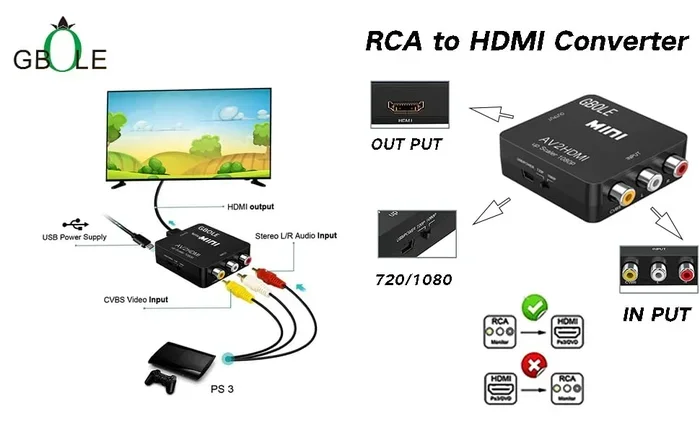
Yes, you can go in the opposite direction too. An RCA to HDMI converter takes an analog RCA signal and converts it to a digital HDMI output. This is useful if you want to connect an older device, like a VCR or retro game console, to a modern HDMI display. The process works similarly but in reverse, and you will need a dedicated RCA to HDMI converter for this type of setup to work correctly.
=== CONCLUSION ===
Going from HDMI to RCA and making it work perfectly is absolutely achievable for anyone. The key is using the right active converter, choosing the correct cable type for your display, and following a proper setup process step by step. We have covered how the conversion works, the different types of converters available, and how to choose the best one for your specific setup. We also walked through a detailed setup guide and highlighted the common mistakes you should avoid at all costs. With this knowledge in hand, you are fully equipped to connect your modern HDMI devices to any older RCA-equipped display without any frustration.
Do not let compatibility issues hold you back from enjoying your favorite content. Pick up the right converter today, follow the steps we outlined, and you will be watching your shows and playing your games on any screen you own. The technology gap between old and new does not have to be a problem. With the right tools and a little confidence, it is just a simple conversion away. Start your HDMI to RCA setup now and enjoy the best of both worlds.