Can I Use A Hdmi 2 1 Cable On A 2 0 Port And Will It Work
Yes, you can use an HDMI 2.1 cable on an HDMI 2.0 port, and it will physically work. However, the connection will only operate at HDMI 2.0 speeds and features. You will not get the full 48 Gbps bandwidth or 8K support that HDMI 2.1 offers. The cable is backward compatible, but the port limits the performance. Understanding this difference helps you make smart buying decisions.
Have you ever plugged in a brand-new HDMI 2.1 cable and wondered if it would actually work with your older HDMI 2.0 port? Maybe you just bought a fancy new cable for your gaming setup or home theater, and now you are not sure if it is worth the effort. The good news is that yes, you can use an HDMI 2.1 cable on an HDMI 2.0 port, and it will physically connect just fine. But the story does not end there. There are some important things you need to know about performance, features, and what you can actually expect from this combination.
In this guide, we will walk you through everything you need to know about HDMI cable versions, port compatibility, and how to get the best experience from your setup. Whether you are a gamer, a movie lover, or just someone who wants a better connection, this article has you covered. We will break down the technical details in simple terms so you do not need to be a tech expert to understand them.
Key Takeaways
- HDMI 2.1 cables are backward compatible: They work fine on HDMI 2.0 ports without any issues.
- You will not get HDMI 2.1 features: The port caps the speed, resolution, and refresh rate at HDMI 2.0 levels.
- HDMI 2.0 supports up to 4K at 60Hz: This is sufficient for most casual gaming and home entertainment setups.
- HDMI 2.1 supports 4K at 120Hz and 8K: These higher specs only work when both the cable and port support them.
- You do not need to buy a new cable: If you already have an HDMI 2.1 cable, it works on older ports.
- Check your devices carefully: The slowest component in the chain determines the overall performance.
[FEATURED_IMAGE_PLACEHOLDER]
📑 Table of Contents
- What Is HDMI 2.1?
- What Is HDMI 2.0?
- Can You Use HDMI 2.1 Cable On HDMI 2.0 Port?
- What Happens When You Plug HDMI 2.1 Into HDMI 2.0?
- Benefits Of Using HDMI 2.1 Cables
- How To Know Which HDMI Cable You Need
- Common HDMI Cable Mistakes To Avoid
- Expert Insights On HDMI Compatibility
- Comparison: HDMI 2.0 vs HDMI 2.1
- Should You Upgrade To HDMI 2.1 Now?
- Final Thoughts
What Is HDMI 2.1?
HDMI 2.1 is the latest version of the High-Definition Multimedia Interface standard. It was released in 2017 and brought a big leap in performance compared to earlier versions. The main upgrade is the massive increase in bandwidth, which is the amount of data the cable can carry at one time.
Key Features Of HDMI 2.1
HDMI 2.1 comes packed with features that make it a game-changer for modern entertainment. Here are some of the highlights:
- Higher bandwidth: HDMI 2.1 supports up to 48 Gbps, which is a huge jump from the 18 Gbps offered by HDMI 2.0.
- 8K resolution support: You can transmit 8K video at 60Hz, which delivers incredibly sharp and detailed images.
- 4K at 120Hz: This is a dream for gamers who want smooth, fast-moving visuals on their screens.
- Dynamic HDR: This feature adjusts the contrast and color on a scene-by-scene or frame-by-frame basis.
- eARC support: Enhanced Audio Return Channel allows for higher-quality audio formats to be sent back to your sound system.
- VRR (Variable Refresh Rate): This reduces screen tearing and stuttering during fast-paced gaming.
- ALLM (Auto Low Latency Mode): This automatically switches your display to low-latency mode for gaming.
These features make HDMI 2.1 the go-to choice for next-generation gaming consoles, high-end TVs, and professional display setups. The cable uses a newer connector design and thicker wiring to handle the increased data throughput. If you want to learn more about the components inside your devices, check out 5 components that are found on the motherboard to understand how video output connects at the hardware level.
What Is HDMI 2.0?
HDMI 2.0 was released back in 2013 and served as the standard for many years. It brought significant improvements over HDMI 1.4 and became the default port on most TVs, monitors, and projectors during the mid-2010s.
What HDMI 2.0 Can Do
HDMI 2.0 is still a capable standard for everyday use. Here is what it supports:
- 4K resolution at 60Hz: This is perfect for most 4K TVs and monitors. You get smooth playback for movies and casual gaming.
- 18 Gbps bandwidth: This is enough for most current content, including 4K Blu-ray and streaming services.
- HDR support: HDMI 2.0 can handle HDR10 and other basic high dynamic range formats.
- 7.1 surround sound: You get good audio quality through standard channels.
- 3D support: HDMI 2.0 can transmit 3D video signals, though this is less common now.
For most people watching streaming content or playing games at 4K, HDMI 2.0 is more than enough. It has been the workhorse of home entertainment for nearly a decade. Many devices still ship with HDMI 2.0 ports, and there is no urgent need to replace them unless you want the cutting-edge features of HDMI 2.1.
Can You Use HDMI 2.1 Cable On HDMI 2.0 Port?
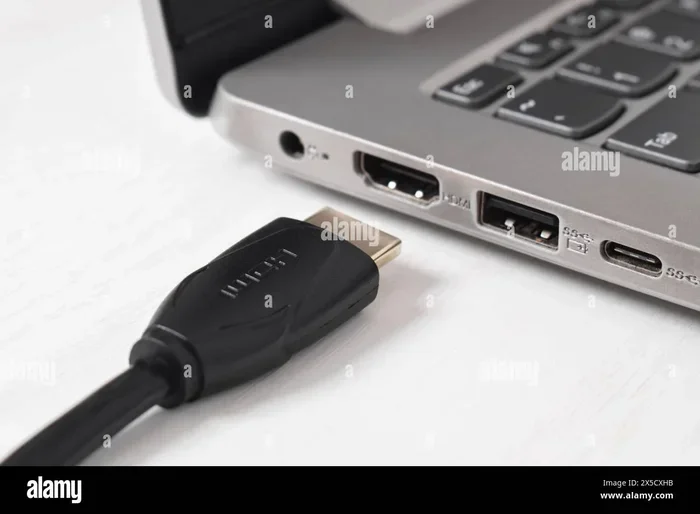
This is the big question, and the answer is straightforward. Yes, you can physically plug an HDMI 2.1 cable into an HDMI 2.0 port. The connector shape is the same, so there is no compatibility issue at the hardware level. The cable will fit, and the connection will work.
However, the connection will only operate at HDMI 2.0 speeds and capabilities. This means the port acts as a bottleneck. Even though the cable is capable of handling 48 Gbps of data, the port will limit the transfer to 18 Gbps. Think of it like putting a high-performance engine in a car that has a speed limit. The engine is ready for more, but the car cannot go faster.
What This Means In Practice
When you use an HDMI 2.1 cable on an HDMI 2.0 port, here is what happens:
- The cable works normally: You will get a picture and sound, just like any other HDMI connection.
- Resolution is capped at 4K: You cannot push 8K content through an HDMI 2.0 port, even with an HDMI 2.1 cable.
- Refresh rate is limited: You will get 4K at 60Hz, not 4K at 120Hz or higher.
- Bandwidth is reduced: The data transfer speed drops to 18 Gbps, matching the HDMI 2.0 specification.
- Advanced features are disabled: VRR, ALLM, eARC enhancements, and dynamic HDR may not work fully or at all.
The bottom line is that the cable will not break anything, and your setup will function perfectly well for most uses. You just will not unlock the premium features that make HDMI 2.1 special. This is actually one of the best things about HDMI standards. They are designed to be backward compatible, which means newer cables work with older ports without any problems.
If you are curious about how ports and connections work inside your computer or TV, understanding the components on your motherboard can give you a deeper appreciation of how video signals travel through your system.
What Happens When You Plug HDMI 2.1 Into HDMI 2.0?
Let us walk through the actual experience of using an HDMI 2.1 cable with an HDMI 2.0 port. This is important because many people worry that using the wrong combination might damage their equipment or cause problems.
Will It Damage Your Devices?
No, it will not damage anything. HDMI connections are designed with safety in mind. The cable and port negotiate the best possible connection automatically. When you plug in an HDMI 2.1 cable to an HDMI 2.0 port, the devices communicate and agree to use the HDMI 2.0 standard. There is no risk of overheating, electrical damage, or data loss.
Will You Notice Any Difference?
If you are currently using an HDMI 2.0 cable on an HDMI 2.0 port and switch to an HDMI 2.1 cable on the same port, you will likely notice zero difference in performance. The image quality, refresh rate, and audio quality will remain exactly the same. The HDMI 2.1 cable simply sits there and waits for a port that can use its full capabilities.
Does The Cable Quality Matter?
Even though the port limits the performance, using a high-quality HDMI 2.1 cable can still offer benefits. Premium cables tend to have better shielding, which reduces signal interference. They also tend to be more durable and have better connectors. So while you will not get faster speeds, you may get a more reliable and longer-lasting connection. Look for cables that are certified as Ultra High Speed HDMI cables, which ensures they meet the HDMI 2.1 specification.
Benefits Of Using HDMI 2.1 Cables
Even if you are currently using HDMI 2.0 ports, there are good reasons to invest in HDMI 2.1 cables. Let us look at the benefits that come with having them in your setup.
Future-Proofing Your Setup
The biggest advantage of buying HDMI 2.1 cables now is future-proofing. HDMI 2.1 is becoming the new standard for TVs, monitors, and gaming consoles. By using HDMI 2.1 cables today, you are ready for the next time you upgrade your TV or add a new device. You will not need to buy new cables every time you get new hardware.
One Cable For All Devices
HDMI 2.1 cables are versatile. They work on HDMI 2.0 ports, HDMI 2.1 ports, and even older HDMI versions. This means you can use the same cable across all your devices without worrying about compatibility. It simplifies your setup and reduces cable clutter.
Better Build Quality
HDMI 2.1 cables are generally built to a higher standard. They often feature:
- Thicker gauge wiring for better signal integrity
- Improved shielding against electromagnetic interference
- More durable connectors that resist wear and tear
- Longer lifespan compared to older cable versions
These build quality improvements mean your HDMI 2.1 cables will last longer and perform more reliably, even if you are only using them at HDMI 2.0 speeds.
For those interested in how cables and ports connect to the broader system, understanding the internal components of your devices can be fascinating. Learn more about the components found on the motherboard to see how video output ports are integrated into your hardware.
How To Know Which HDMI Cable You Need
Choosing the right HDMI cable does not have to be confusing. Here is a simple guide to help you decide which cable version is right for your setup.
For Casual Viewing And Streaming
If you mainly watch Netflix, YouTube, or other streaming services, an HDMI 2.0 cable is perfectly fine. Most streaming content is delivered in 4K at 30Hz or 4K at 60Hz, which HDMI 2.0 handles without any issues. You do not need to spend extra money on an HDMI 2.1 cable for this use case.
For Gaming At 4K 60Hz
If you play games on a 4K TV or monitor at 60Hz, HDMI 2.0 will serve you well. Most current-generation games look great at this resolution and refresh rate. An HDMI 2.0 cable will deliver a smooth and colorful experience without any extra cost.
For High-Refresh-Rate Gaming
If you are a serious gamer who wants to play at 4K 120Hz or 1440p at high refresh rates, you need HDMI 2.1. This is especially true for players using PS5, Xbox Series X, or high-end gaming PCs. The extra bandwidth of HDMI 2.1 makes a noticeable difference in motion clarity and responsiveness.
For 8K Content
If you own or plan to buy an 8K TV, you absolutely need HDMI 2.1 cables. No earlier HDMI standard can transmit 8K video signals. Make sure all your cables are rated as Ultra High Speed HDMI to handle the demanding bandwidth requirements.
Common HDMI Cable Mistakes To Avoid
There are several common mistakes people make when buying and using HDMI cables. Avoiding these can save you money and frustration.
Buying Expensive Cables You Do Not Need
Many stores try to sell you premium-priced HDMI cables that offer little to no real benefit over affordable options. If you have an HDMI 2.0 setup, a budget-friendly certified cable will work just as well as an expensive one. Do not fall for marketing hype that promises “better picture quality” from a pricier cable.
Assuming All HDMI Cables Are The Same
Not all HDMI cables are created equal. There are standard cables, high-speed cables, premium high-speed cables, and Ultra High Speed cables. Each version supports different bandwidth levels and features. Always check the specifications before you buy.
Ignoring Cable Length
Longer HDMI cables can experience signal degradation, especially at higher resolutions and refresh rates. If you need a cable longer than 10 feet, consider investing in an active HDMI cable or a signal booster to maintain a strong connection.
Not Checking Port Versions
Before buying a new cable, always check what HDMI version your port supports. Look at the device manual or check the port label. This simple step can prevent you from buying a cable that offers features your port cannot use.
Expert Insights On HDMI Compatibility
Industry experts agree that HDMI 2.1 cables are safe to use on HDMI 2.0 ports. The HDMI Licensing Administrator, which oversees the HDMI standard, has always emphasized backward compatibility as a core design principle. This means you can mix and match cable versions and port versions without worrying about damage or incompatibility.
Here is what the experts say: The version of the connection is always determined by the lowest-rated component in the chain. If your cable supports HDMI 2.1 but your port only supports HDMI 2.0, the connection will default to HDMI 2.0. This is by design and ensures a seamless user experience across all devices.
When building or upgrading your home entertainment or gaming setup, it is wise to think about the entire signal chain. Your source device, cable, and display all play a role in determining the final picture and sound quality. Using an HDMI 2.1 cable on an HDMI 2.0 port is perfectly fine, but if you want to unlock the full power of HDMI 2.1, you need all three components to support it.
Comparison: HDMI 2.0 vs HDMI 2.1
Understanding the differences between HDMI 2.0 and HDMI 2.1 can help you make informed decisions. Here is a side-by-side comparison of the two standards.
| Feature | HDMI 2.0 | HDMI 2.1 |
|---|---|---|
| Maximum Bandwidth | 18 Gbps | 48 Gbps |
| Max Resolution | 4K at 60Hz | 8K at 60Hz / 4K at 120Hz |
| HDR Support | HDR10, HDR10+, HLG | Dynamic HDR, HDR10, HDR10+, HLG |
| Audio Return Channel | ARC | eARC |
| VRR Support | No | Yes |
| ALLM Support | No | Yes |
| Backward Compatible | Yes (with older versions) | Yes (with HDMI 2.0 and older) |
| Connector Type | Standard Type A | Standard Type A (same connector) |
As you can see from the table, HDMI 2.1 offers significant upgrades over HDMI 2.0. But when you use an HDMI 2.1 cable on an HDMI 2.0 port, you get HDMI 2.0 performance. The cable does not magically upgrade the port. Both the cable and the port need to support HDMI 2.1 for you to access its full feature set.
Should You Upgrade To HDMI 2.1 Now?
This is a common question, and the answer depends on your current setup and what you plan to do in the future. Here are some factors to consider:
- If you have an HDMI 2.0 TV or monitor: You can use an HDMI 2.1 cable, but you will not see any improvement in picture quality or features. Save your money for now.
- If you plan to upgrade soon: Buying an HDMI 2.1 cable now makes sense. It is a small investment that will be ready when you get your new display.
- If you are a hardcore gamer: HDMI 2.1 features like VRR and 4K 120Hz make a real difference. Consider upgrading your entire setup to HDMI 2.1 if your budget allows.
- If you have mixed devices: Using HDMI 2.1 cables across all your devices simplifies things. You do not need to keep track of which cable goes with which port.
The decision ultimately comes down to your needs and budget. For most people, an HDMI 2.1 cable is a smart investment that provides peace of mind and future compatibility. It costs only slightly more than an HDMI 2.0 cable these days, and the benefits of having it ready for future devices are well worth it.
Remember that the cable is just one part of the equation. Your TV, monitor, gaming console, and source device all need to support the features you want. If any one of these components is limited to HDMI 2.0, the entire chain will operate at HDMI 2.0 speeds. This is why it is important to check all your devices before making any upgrades.
Final Thoughts
Using an HDMI 2.1 cable on an HDMI 2.0 port is perfectly safe and fully supported. The connection will work, and you will get a reliable video and audio signal. You simply will not access the advanced features that HDMI 2.1 offers, because the port limits the performance to HDMI 2.0 levels.
The key takeaway is that HDMI standards are designed to be backward compatible. Newer cables work with older ports, and older cables can still work on newer ports (though they will be limited by their own capabilities). This design philosophy makes the HDMI ecosystem flexible and user-friendly.
So if you have an HDMI 2.1 cable lying around and an HDMI 2.0 port on your TV or monitor, go ahead and plug it in. You will not break anything, and you will get a solid connection. When you eventually upgrade to an HDMI 2.1-compatible display, that same cable will unlock its full potential without you needing to buy a new one.
Making informed decisions about your cables and ports ensures you get the best experience from your setup. Whether you are streaming movies, gaming, or just connecting your devices, understanding HDMI compatibility helps you avoid confusion and wasted money. Keep this guide handy for reference, and you will always know exactly what to expect from your HDMI connections.
Frequently Asked Questions
Can an HDMI 2.1 cable damage an HDMI 2.0 port?
No, an HDMI 2.1 cable cannot damage an HDMI 2.0 port. The two standards use the same physical connector, and the devices automatically negotiate the best compatible connection. There is no risk of damage when using a newer cable with an older port.
Will I get 4K 120Hz if I use an HDMI 2.1 cable on an HDMI 2.0 port?
No, you will not get 4K 120Hz with this combination. The HDMI 2.0 port limits the connection to 4K at 60Hz maximum. You need both an HDMI 2.1 cable and an HDMI 2.1 port to achieve 4K 120Hz.
Is there any benefit to using an HDMI 2.1 cable on an HDMI 2.0 port?
The main benefit is future-proofing. If you buy an HDMI 2.1 cable now, it is ready to use when you upgrade to an HDMI 2.1-compatible TV or monitor. The build quality of HDMI 2.1 cables is also generally better than older versions.
Do I need a special HDMI 2.1 cable for PS5 or Xbox Series X?
Yes, if you want to take advantage of features like 4K 120Hz, VRR, and HDR gaming, you need an HDMI 2.1 cable connected to an HDMI 2.1 port on your TV or monitor. The console itself outputs HDMI 2.1 signals, but the port and cable must support it too.
Can I use an HDMI 2.0 cable on an HDMI 2.1 port?
Yes, you can use an HDMI 2.0 cable on an HDMI 2.1 port. The connection will work, but it will be limited to HDMI 2.0 speeds and features. The port will automatically adjust to match the cable’s capabilities.
How can I tell if my HDMI cable is version 2.1?
Look for the “Ultra High Speed HDMI” certification label on the cable packaging. This label guarantees the cable meets the HDMI 2.1 specification and can handle 48 Gbps of bandwidth. The cable itself may also have “2.1” printed on the connector or body.
=== CONCLUSION ===
The answer to whether you can use an HDMI 2.1 cable on an HDMI 2.0 port is a clear yes. The cable will work, your devices will be safe, and you will get a reliable connection. You simply will not unlock the premium features that HDMI 2.1 offers, because the port caps the performance at HDMI 2.0 levels.
Understanding this simple fact can save you money, prevent confusion, and help you make smarter buying decisions. Whether you are a casual viewer or a hardcore gamer, knowing how HDMI versions and ports interact gives you confidence in your setup. Use the guide above to determine what you need, and do not hesitate to grab an HDMI 2.1 cable even if your current port is HDMI 2.0. It is a small investment that pays off when you are ready to upgrade your display or devices.
Keep your setup simple, stay informed, and enjoy the best picture and sound your equipment can deliver. The world of HDMI connectivity is easier to navigate than it might seem at first glance.