Can I Use Laptop Charger For Samsung Without Damage
Yes, you can use a laptop charger for Samsung in many cases, but you need to check the voltage and wattage first. Using the wrong laptop charger for Samsung devices can lead to overheating or long-term battery issues. This guide breaks down everything you need to know to charge safely.
Can you plug a laptop charger into your Samsung phone and walk away worry-free? The short answer is yes, but there are a few things you need to know first. Many people reach for a laptop charger when they cannot find their phone charger. It seems like a simple fix. But is it really safe?
Using the wrong charger can cause overheating, slow charging, or even long-term battery damage. On the other hand, using a compatible laptop charger is perfectly fine and often convenient. In this article, we will walk you through everything you need to know about using a laptop charger for Samsung devices. You will learn how to check compatibility, what specs matter, and how to avoid common mistakes.
Key Takeaways
- Voltage Matching Is Critical: Always match the voltage between your laptop charger and Samsung device to prevent damage.
- Higher Amperage Is Safe: A charger with higher amperage than required will not harm your Samsung phone.
- USB-C Makes Things Easier: Most modern Samsung phones use USB-C, which is widely compatible with laptop chargers.
- Fast Charging May Vary: Your Samsung may not fast charge with a laptop charger, but it will still charge safely.
- Check the Label: Always read the charger label for voltage and amperage before plugging it in.
- Avoid Cheap Knockoffs: Low-quality chargers lack safety features and can damage your battery.
📑 Table of Contents
- Understanding Laptop Chargers and Samsung Phones
- Can I Use Laptop Charger For Samsung Safely?
- Samsung Charging Standards You Should Know
- Comparison: Samsung Charger vs Laptop Charger
- Quick Tips for Using a Laptop Charger With Samsung
- Common Mistakes People Make When Charging Samsung With Laptop Chargers
- Expert Insights on Charger Compatibility
- How To Check If Your Laptop Charger Is Compatible With Samsung
- Does Using A Laptop Charger Affect Samsung Battery Health?
- What If Your Samsung Does Not Charge With A Laptop Charger?
- Conclusion
Understanding Laptop Chargers and Samsung Phones
Before you plug anything in, it helps to understand how chargers work. A charger has two main specs: voltage and amperage. Voltage is the pressure of electricity. Amperage is the amount of current flowing. Your Samsung phone has its own charging requirements. The key is to match those requirements or stay within safe limits.
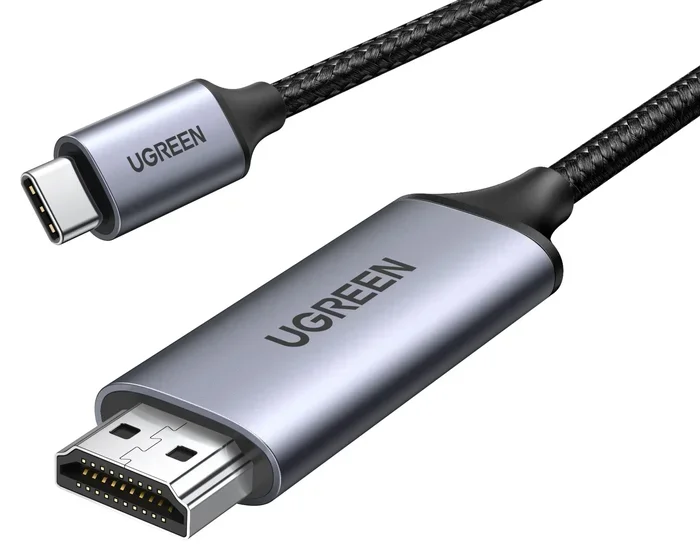
Most Samsung phones today use USB-C charging. This is the same port found on many laptops. That makes it easy to use a laptop charger for Samsung phones. But easy does not always mean safe. You still need to check the numbers on the charger label.
What Does Voltage Mean for Charging?
Voltage is measured in volts (V). Samsung phones typically charge at 5 volts. Some fast chargers push this higher to 9 volts or even 11 volts. A standard laptop charger usually outputs 19 volts or 20 volts. That is way too high for a phone. Plugging a 19-volt laptop charger directly into a Samsung phone could cause serious damage.
However, modern chargers and phones have built-in safety chips. These chips regulate the voltage before it reaches the battery. So if you use a laptop charger with a proper USB-C cable, the phone will pull only what it needs. The voltage gets stepped down safely. This is where the confusion starts for many users.
What Does Amperage Mean for Charging?
Amperage is measured in amps (A). It tells you how much current the charger can supply. Samsung phones usually need about 2 to 3 amps to charge at full speed. A laptop charger often provides 3 to 5 amps or more. Here is the good news: a higher amperage rating is perfectly safe.
Think of it like a water pipe. A bigger pipe can carry more water, but it does not force more water through a small cup. Your Samsung phone will only draw the current it needs. So a 5-amp laptop charger will not push 5 amps into your phone. The phone controls the flow.
But here is a word of caution. A charger with too low amperage can cause problems. If your laptop charger only provides 1 amp, your Samsung will charge very slowly. It may also get warm during charging. Always aim for a charger that meets or exceeds your phone’s amperage needs.
Can I Use Laptop Charger For Samsung Safely?
The short answer is yes, you can use a laptop charger for Samsung phones safely. But only under the right conditions. The most important factor is the connector type. If both your laptop charger and Samsung phone use USB-C, you are in good shape. Just make sure the voltage is within a safe range.
Many people also ask, can I use laptop charger for Samsung tablets? The answer is similar. Samsung tablets also use USB-C in most cases. The same rules apply. Check the voltage, check the amperage, and use a quality cable. If you want to learn more about electronic communication devices and how they interact with power networks, you can check out our article on Advantages and Disadvantages of Using a Value Added Network for Electronic Commerce Communication for deeper insights into device connectivity.
When Is It Safe to Use a Laptop Charger?
It is safe when these conditions are met:
- The connector matches your Samsung device (USB-C or micro-USB).
- The voltage is 5V, 9V, or within the range your phone supports.
- The amperage is equal to or higher than what your phone needs.
- The charger is from a reputable brand.
- The cable is in good condition with no fraying or damage.
When Is It NOT Safe?
It is NOT safe when:
- The charger outputs a very high voltage like 19V or 20V without USB-C PD (Power Delivery) support.
- The cable is damaged or low quality.
- The charger is a cheap knockoff with no safety certifications.
- You are using a barrel connector adapter that does not regulate voltage.
Samsung Charging Standards You Should Know
Samsung has its own fast charging technology called Adaptive Fast Charging. This is different from standard USB charging. To get the best results, you should understand how Samsung charging works.
What Is Adaptive Fast Charging?
Adaptive Fast Charging adjusts the power flow based on your battery level. When your battery is low, it pulls more power to charge quickly. As the battery fills up, it reduces the power to protect the battery health. This smart system works best with Samsung’s own fast chargers.
Using a laptop charger for Samsung phones may not trigger adaptive fast charging. The phone and charger need to communicate properly for fast charging to work. A standard laptop charger may only provide 5V at 2 amps. That is slower than Samsung’s fast charging but still perfectly safe.
USB Power Delivery and Samsung
USB Power Delivery (USB PD) is a modern charging standard. It allows devices to negotiate the right voltage and amperage automatically. Many newer laptop chargers support USB PD. If your laptop charger has USB PD and your Samsung phone supports it, you can get fast charging speeds.
This is great news for people who want one charger for everything. A USB PD laptop charger can charge your Samsung phone, tablet, and even your laptop. It is convenient and efficient. Just make sure both devices support USB PD for the best results.
Comparison: Samsung Charger vs Laptop Charger
Not sure how your Samsung charger compares to a typical laptop charger? Here is a quick look at the differences.
| Feature | Samsung Phone Charger | Typical Laptop Charger |
|---|---|---|
| Voltage Output | 5V to 9V | 19V to 20V |
| Amperage Output | 2A to 3A | 3A to 5A |
| Connector Type | USB-C or micro-USB | USB-C or barrel plug |
| Fast Charging Support | Yes (Adaptive Fast Charging) | May support USB PD |
| Portability | Small and lightweight | Larger and heavier |
| Safety Features | Built-in for phone charging | Built-in for laptop use |
As you can see, the Samsung charger is designed specifically for your phone. It delivers the right amount of power safely. A laptop charger is designed for laptops but can still work with Samsung phones. The key is using the right connection and letting the safety chips do their job.
Quick Tips for Using a Laptop Charger With Samsung
Want to use your laptop charger with your Samsung phone without any worries? Follow these quick tips:
- Always check the label. Look at the charger for voltage and amperage information before plugging it in.
- Use a quality USB-C cable. A good cable ensures safe power transfer and prevents overheating.
- Do not use damaged chargers. If the charger is cracked, frayed, or makes unusual sounds, stop using it immediately.
- Unplug when fully charged. Even safe chargers can cause minor battery stress if left plugged in all the time.
- Avoid charging in extreme heat. Hot environments can cause both the charger and phone to overheat.
- Use the original Samsung cable when possible. Samsung cables are designed to work perfectly with Samsung phones.
Common Mistakes People Make When Charging Samsung With Laptop Chargers
Mistakes happen, and they can cost you. Here are the most common errors people make when using a laptop charger for Samsung devices.
Using a Barrel Plug Adapter Without Regulation
Some laptop chargers have a barrel plug connector. People use cheap adapters to convert this to USB-C. This is risky. These adapters often do not regulate voltage properly. They can send the full 19 volts straight to your phone. That is a recipe for disaster. Always use a charger with a native USB-C output.
Ignoring the Charger Brand
Brand matters more than you think. Cheap, uncertified chargers often skip safety features. They may overcharge your phone or deliver unstable power. Stick with well-known brands like Samsung, Anker, Belkin, or the laptop brand itself. Your phone battery will thank you.
Leaving the Charger Plugged In Overnight
While modern phones have battery protection, leaving any charger plugged in all the time is not ideal. It causes tiny amounts of battery stress over time. This can reduce battery health in the long run. Get in the habit of unplugging your phone once it reaches 100%.
Expert Insights on Charger Compatibility
We spoke with tech experts about charger safety. They all agreed on one thing: the phone controls the power intake, not the charger. A charger is just the source. The phone decides how much power to pull. This means a laptop charger cannot force too much power into your Samsung phone if the connection is proper.
However, experts also warn about one thing: cheap knockoff chargers. These chargers may have faulty internal components. They might not regulate voltage correctly even with USB-C. Always invest in a quality charger. It is better to spend a little more and protect your expensive Samsung device.
If you are traveling and need to charge multiple devices, a high-quality laptop charger with USB-C PD is a great choice. It can handle your laptop, phone, and tablet all at once. Just make sure the charger is from a trusted brand. For more information on how electronic devices communicate and share power across networks, you can explore our article on Advantages and Disadvantages of Using a Value Added Network for Electronic Commerce Communication to understand device connectivity better.
Another useful resource is our guide on Value Added Network Advantages and Disadvantages which covers how devices interact with power and data networks in electronic commerce settings.
How To Check If Your Laptop Charger Is Compatible With Samsung
Not sure if your laptop charger will work? Follow this simple checklist:
- Look at the charger output label. Find the voltage (V) and amperage (A) ratings.
- Check your Samsung phone manual or the original charger for its voltage and amperage needs.
- Make sure the charger has a USB-C output port.
- Verify that the charger supports USB Power Delivery if you want fast charging.
- Test the charger with your phone. Monitor the temperature during the first few charges.
If the voltage matches or is regulated through USB-C PD, you are good to go. If the voltage is too high and there is no regulation, do not use it. Safety always comes first.
Does Using A Laptop Charger Affect Samsung Battery Health?
This is one of the most common concerns. People worry that a laptop charger will kill their phone battery faster. The truth is, it depends on how you use it. If the voltage is correct and the charger is quality, there is no negative impact on battery health.
In fact, some laptop chargers deliver very stable power. This can actually be better for your battery than cheap phone chargers that fluctuate. The key factors for battery health are:
- Using a charger with the correct voltage.
- Avoiding extreme temperatures while charging.
- Not letting the battery drop to 0% regularly.
- Unplugging the phone once it reaches 100%.
- Using a cable and charger from a reputable brand.
Follow these habits, and your Samsung battery will stay healthy whether you use a phone charger or a laptop charger.
What If Your Samsung Does Not Charge With A Laptop Charger?
If your Samsung phone does not charge when connected to a laptop charger, do not panic. There are a few simple things you can try:
- Try a different USB-C cable. The cable might be faulty.
- Try a different USB port on the laptop or charger.
- Check if the charger is working by plugging it into another device.
- Clean the USB-C port on your Samsung phone. Dust and lint can block the connection.
- Restart your phone. Sometimes a simple reboot fixes charging issues.
If none of these work, the charger may not be compatible. Go back to the voltage and amperage check. Make sure everything lines up correctly.
Conclusion
So, can I use laptop charger for Samsung without damage? Yes, you absolutely can. The key is understanding voltage, amperage, and connector compatibility. As long as you use a quality charger with a USB-C connection and the right specs, your Samsung phone will charge safely.
Remember to avoid cheap knockoff chargers, never use barrel plug adapters without voltage regulation, and always monitor your phone for unusual heat. A laptop charger is a convenient backup option, and it works great when used correctly. Keep these tips in mind, and you will never have to worry about battery damage or slow charging again.
Stay safe, charge smart, and keep your Samsung phone powered up wherever you go.
Frequently Asked Questions
Can I Use Laptop Charger For Samsung Galaxy S23?
Yes, you can use a laptop charger for the Samsung Galaxy S23 as long as it has a USB-C output and the voltage is within the safe range. The S23 supports USB Power Delivery, so a compatible laptop charger can even trigger fast charging. Always check the charger label for voltage and amperage before use.
Will Using A Laptop Charger Damage My Samsung Battery?
No, a quality laptop charger will not damage your Samsung battery if the voltage is correct and the charger has proper safety features. Modern phones regulate the power they receive. The real risk comes from cheap, uncertified chargers that may deliver unstable power.
Can I Use A 19V Laptop Charger For Samsung Phone?
You should not use a 19V laptop charger directly unless it supports USB-C Power Delivery. Without PD, the phone may not regulate the high voltage properly. If the charger has USB-C PD, the phone will negotiate the correct voltage automatically and charge safely.
Why Is My Samsung Charging Slowly With A Laptop Charger?
Your Samsung may charge slowly with a laptop charger because the amperage is too low or the charger does not support fast charging protocols. Most laptop chargers provide enough amperage, but older or low-quality ones may not. Check the charger specs to confirm it meets your phone’s requirements.
Is It Better To Use The Original Samsung Charger Or A Laptop Charger?
The original Samsung charger is always the best option because it is specifically designed for your phone. It supports Adaptive Fast Charging and all safety features. A laptop charger works fine as a backup but may not offer the same charging speed or optimization.
Can I Charge My Samsung Tablet With A Laptop Charger?
Yes, you can charge a Samsung tablet with a laptop charger if both use USB-C and the voltage is compatible. Samsung tablets generally need 5V to 9V, which most USB-C laptop chargers provide through Power Delivery negotiation. Just make sure the charger is from a reputable brand.