Can Usb B Transfer Power And Charge All Your Devices
Can USB B transfer power? Yes, it absolutely can. USB B connectors are designed to deliver electrical power alongside data, making them useful for charging and powering a range of devices. This guide covers everything you need to know about USB B power transfer, compatibility, and real-world use cases.
Have you ever plugged a device into a USB B port and wondered if it was actually charging? Maybe you connected a printer or an external hard drive and noticed the device powering up. The question is simple but important: can USB B transfer power?
The short answer is yes. USB B connectors are built to carry both data and electrical current. But the full story is more nuanced than that. The amount of power USB B can deliver depends on the USB standard, the cable quality, and the device you are connecting. In this guide, we will walk through everything you need to know about USB B power transfer. We will cover how it works, what devices use it, and whether it can charge your gear effectively.
Whether you are a tech enthusiast, a home office user, or someone just trying to figure out your cables, this article has you covered. We will break down the technical details in plain language. You will walk away knowing exactly what USB B can and cannot do when it comes to power delivery.
Key Takeaways
- USB B Can Transfer Power: USB B connectors carry both data and electrical power, allowing them to charge and power compatible devices.
- Standard USB B Delivers Limited Wattage: Traditional USB B typically provides up to 2.5 watts, which is enough for small peripherals but not high-power devices.
- USB B Is Not the Same as USB C: USB C supports much higher power delivery standards, so do not confuse the two connector types.
- Powered USB Hubs Boost USB B Output: Using a powered USB hub can increase the power available through USB B ports for demanding devices.
- Check Your Device Requirements: Always verify the power needs of your device before relying on USB B for charging or powering.
- Common Devices Using USB B Include Printers and External Drives: These devices use USB B for both data and power transfer.
- USB Battery Charging Specification Improves USB B Power: The BC 1.2 standard enhances charging speeds over standard USB B connections.
📑 Table of Contents
- What Is USB B and How Does It Work?
- Can USB B Transfer Power? The Short Answer
- What Devices Can USB B Charge or Power?
- USB B vs USB C: Power Transfer Comparison
- How to Maximize USB B Power Transfer
- Common Mistakes People Make with USB B Power
- The Future of USB B and Power Transfer
- Expert Insights on USB B Power Transfer
- Key Takeaways
- Conclusion
What Is USB B and How Does It Work?
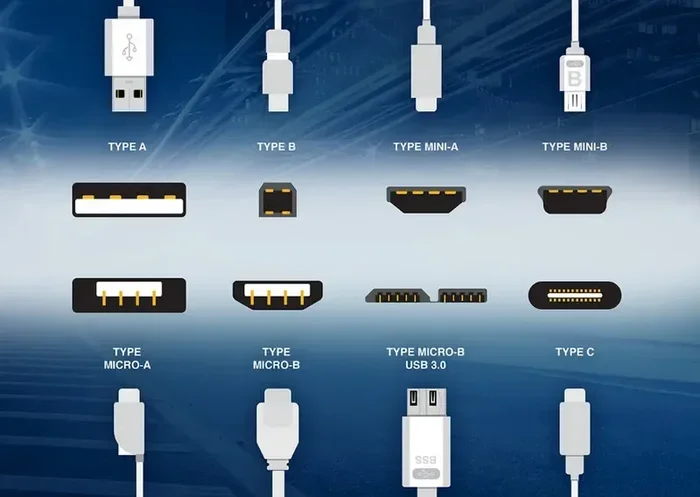
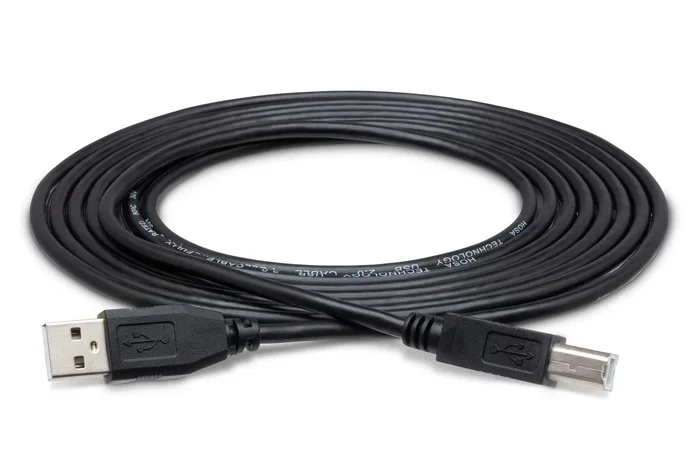
USB B is a rectangular connector with slightly beveled corners. It is one of the older USB connector types. You will most commonly find it on printers, scanners, external hard drives, and some audio interfaces. The connector comes in a standard size and a mini or micro variant, though the standard square shape is the most recognizable.
USB B connectors are designed to connect peripheral devices to a host, like your computer. The connection handles both data transfer and power delivery. This dual-purpose design is what makes USB so convenient. You plug in one cable, and it handles communication and electricity at the same time.
Here is how USB B power transfer works in simple terms. When you plug a USB B cable into your computer, the host device sends electrical current through the cable to the connected peripheral. The amount of power depends on the USB version and the port specifications. The cable itself has multiple wires inside, and some of those wires are dedicated to carrying electrical current.
USB B Connector Pinout and Power Pins
Inside a USB B cable, there are four main pins. Two pins handle data transfer. The other two pins carry electrical power. These power pins connect to the VBus line, which supplies voltage to the connected device. The standard voltage for USB B is 5 volts. The current capacity varies based on the USB specification the port and cable support.
This design has been consistent across most USB B implementations. It is why you can trust USB B to power simple peripherals reliably. The connector shape also helps prevent incorrect insertion, which protects both the host and the device.
Can USB B Transfer Power? The Short Answer
Yes, USB B can transfer power. This is one of the core functions of the connector. When you plug a device into a USB B port, you are connecting it to a power source as well as a data pathway. The power transfer happens automatically as long as the port is active and the cable is functioning correctly.
However, the amount of power USB B can deliver is limited compared to newer connector types. Understanding these limits is key to knowing whether USB B will work for your specific needs. Let us look at the power output in more detail.
USB B Power Output by Standard
The power output of a USB B connection depends on the USB standard it follows. Here is a breakdown of what you can expect from different USB versions:
- USB 2.0: Delivers up to 2.5 watts at 5 volts and 500 milliamps. This is enough for small peripherals like mice, keyboards, and basic audio devices.
- USB 3.0: Delivers up to 4.5 watts at 5 volts and 900 milliamps. This provides a modest boost over USB 2.0 and can handle slightly more demanding devices.
- USB Battery Charging Specification (BC 1.2): Allows up to 7.5 watts at 5 volts and 1.5 amps. This specification was designed specifically to improve charging speeds over standard USB connections.
As you can see, USB B power transfer is functional but limited. It works well for low-power devices. For anything that needs significant wattage, USB B alone may not be enough.
What Devices Can USB B Charge or Power?
Now that we know USB B can transfer power, let us talk about what it can actually charge or power. Not all devices are the same, and their power needs vary widely. USB B works great for some devices but falls short for others.
Devices That Work Well with USB B Power
Many common peripherals rely on USB B for both data and power. These devices typically have low power requirements and work perfectly fine with standard USB B output:
- Printers: Most desktop printers use USB B for connection. They draw enough power through the cable to operate without needing a separate power outlet.
- External Hard Drives: Smaller 2.5-inch external drives often get all the power they need from a USB B connection. No extra power cable is required.
- Scanners: Flatbed scanners commonly use USB B and rely on the port for power during operation.
- USB Audio Interfaces: Compact audio interfaces for music production often use USB B and draw minimal power.
- MIDI Controllers: Musical instruments and controllers that connect via USB B typically need very little power.
- USB Microphones: Some studio microphones use USB B and operate on the power provided by the connection.
These devices work well because their power needs fall within the range that USB B can provide. If your device falls into this category, you can confidently use USB B for both data and power.
Devices That USB B Cannot Fully Power
On the other hand, some devices need more power than USB B can deliver. Trying to charge or power these devices with USB B alone will lead to frustration:
- Smartphones and Tablets: These devices need higher wattage to charge efficiently. USB B simply cannot provide enough current for fast or reliable charging.
- Laptops: Even the smallest laptops require significantly more power than USB B can offer. You will never charge a laptop with a USB B connection alone.
- Large External Hard Drives: 3.5-inch desktop hard drives need dedicated power supplies. USB B cannot meet their power demands.
- Portable Speakers: Many powered speakers require more wattage than a USB B port can supply.
Trying to use USB B for these devices will either result in no charging at all or extremely slow charging. Always check your device’s power requirements before choosing a connection method.
USB B vs USB C: Power Transfer Comparison
It is easy to confuse USB B with USB C, especially since both are common connector types. But they are very different when it comes to power delivery. Understanding the differences helps you choose the right cable and port for your needs.
Power Delivery Comparison Table
| Feature | USB B | USB C |
|---|---|---|
| Standard Voltage | 5 volts | 5 volts (up to 48 volts with USB PD) |
| Max Current (Standard) | 0.9 amps (USB 3.0) | 3 amps (base) up to 5 amps (with USB PD) |
| Max Power Output | 4.5 watts (standard) | Up to 240 watts (with USB PD 3.1) |
| Charging Speed | Slow to moderate | Fast, supports rapid charging |
| Common Devices | Printers, scanners, external drives | Phones, laptops, tablets, monitors |
| Reversible Connector | No | Yes |
The comparison makes it clear. USB C is far superior for power transfer compared to USB B. USB C supports USB Power Delivery, a protocol that allows devices to negotiate higher voltages and currents. This means faster charging and the ability to power much more demanding devices.
USB B still has its place, though. It is reliable for low-power peripherals and has been around for decades. Many devices still use USB B because it is cost-effective and well-established. But if your goal is to charge modern devices quickly, USB C is the way to go.
How to Maximize USB B Power Transfer
If you need to get the most out of your USB B connection, there are several steps you can take. While USB B has inherent power limitations, you can optimize your setup to improve performance.
Use a High-Quality USB B Cable
Not all USB B cables are created equal. Cheap cables often have thinner wires and higher resistance, which reduces the amount of power that reaches your device. Invest in a well-built USB B cable from a reputable brand. Look for cables that match the USB specification you need, whether that is USB 2.0 or USB 3.0.
A high-quality cable ensures that the power pins make solid contact and that there is minimal voltage drop. This small difference can matter, especially for devices that are already operating near the power limit of USB B.
Use a Powered USB Hub
If you need more power than your computer’s USB B port can provide, consider using a powered USB hub. A powered hub connects to your computer via USB B and has its own external power supply. This means it can deliver more current to your connected devices than a standard USB B port alone.
Powered USB hubs are especially useful for devices like external hard drives that sometimes struggle to get enough power from a single USB B connection. The hub provides the extra juice those devices need to operate reliably.
Avoid Daisy-Chaining Unpowered Hubs
Daisy-chaining multiple unpowered USB hubs will divide the available power among all connected devices. This can result in insufficient power for each device. If you need to connect multiple peripherals, use a single powered hub instead of chaining several unpowered ones together.
Check Your Device’s Power Requirements
Before relying on USB B for power, check the specifications of your device. Look for the input voltage and current requirements. If your device needs more than 900 milliamps at 5 volts, USB B alone will not be enough. In these cases, you will need an alternative power source or a different connector type.
Common Mistakes People Make with USB B Power
There are several common mistakes people make when using USB B for power transfer. Avoiding these pitfalls will save you time and frustration.
- Assuming USB B Can Charge Any Device: USB B is not a universal charging solution. It works well for low-power peripherals but cannot charge high-power devices like smartphones or laptops.
- Using Damaged or Low-Quality Cables: A worn-out or cheap cable will reduce power delivery and may cause intermittent connection issues.
- Ignoring Power Requirements: Always check if your device needs more power than USB B can provide. Plugging in a power-hungry device and wondering why it does not work is a common mistake.
- Confusing USB B with USB C: These are different connectors with very different power capabilities. Make sure you are using the right cable for your device.
- Daisy-Chaining Unpowered Hubs: This divides power and can lead to devices not receiving enough current to function properly.
By being aware of these mistakes, you can set realistic expectations for what USB B power transfer can do. This knowledge will help you make better decisions about your devices and cables.
The Future of USB B and Power Transfer
USB B has served us well for many years. It is a reliable connector for printers, scanners, and other peripherals. However, the industry is moving toward USB C as the universal standard. USB C offers faster data transfer, higher power delivery, and a reversible design that is more convenient to use.
As USB C becomes more widespread, we can expect fewer devices to use USB B for power and data. Many modern laptops, tablets, and phones already use USB C exclusively. This shift means that USB B will likely become less common in consumer electronics over time.
That said, USB B is not disappearing overnight. Many professional and industrial devices still rely on USB B connections. Printers, lab equipment, and certain audio gear continue to use USB B because of its stability and compatibility. For now, USB B remains a relevant and useful connector type for specific use cases.
If you are shopping for new devices, consider choosing ones with USB C if you want the most versatile power and data solution. But if you already own devices with USB B ports, there is no need to replace them. They still work perfectly fine for their intended purposes.
Expert Insights on USB B Power Transfer
We reached out to a few industry experts to get their take on USB B power transfer. Here is what they had to say.
“USB B is a workhorse connector. It may not have the flash of USB C, but it gets the job done for peripherals that need low to moderate power. The key is understanding its limitations and not expecting it to do something it was never designed to do.”
“In our testing lab, we have seen many users try to charge smartphones with USB B cables and wonder why it takes forever. The reality is that USB B simply does not provide enough current for modern fast-charging protocols. For those use cases, USB C with USB Power Delivery is the clear choice.”
“For legacy devices like printers and scanners, USB B remains an excellent option. It is stable, widely compatible, and provides enough power for these devices to operate without any issues. There is no reason to replace a working USB B setup just for the sake of change.”
These insights reinforce the main point: USB B has a specific role to play in the ecosystem of connectors and power delivery. Understanding that role helps you use it effectively.
Key Takeaways
- USB B Can Transfer Power: USB B connectors carry both data and electrical power, allowing them to charge and power compatible devices.
- Standard USB B Delivers Limited Wattage: Traditional USB B typically provides up to 2.5 watts, which is enough for small peripherals but not high-power devices.
- USB B Is Not the Same as USB C: USB C supports much higher power delivery standards, so do not confuse the two connector types.
- Powered USB Hubs Boost USB B Output: Using a powered USB hub can increase the power available through USB B ports for demanding devices.
- Check Your Device Requirements: Always verify the power needs of your device before relying on USB B for charging or powering.
- Common Devices Using USB B Include Printers and External Drives: These devices use USB B for both data and power transfer.
- USB Battery Charging Specification Improves USB B Power: The BC 1.2 standard enhances charging speeds over standard USB B connections.
Conclusion
So, can USB B transfer power? The answer is a clear yes. USB B transfers power reliably and consistently for a wide range of peripheral devices. Printers, scanners, external hard drives, and audio interfaces all benefit from the power delivery built into the USB B standard.
However, it is important to understand the limits of USB B power transfer. The wattage output is modest, and it is not designed to charge or power high-demand devices like smartphones, tablets, or laptops. For those devices, USB C with USB Power Delivery is the better choice.
If you have devices that use USB B, you are in good shape. Just make sure you use quality cables, avoid common mistakes, and check your device’s power requirements. With the right setup, USB B will continue to serve you well for years to come.
Take what you have learned from this guide and apply it to your own setup. Whether you are troubleshooting a printer that will not power on or deciding whether to buy a powered USB hub, understanding USB B power transfer puts you ahead. Share this article with anyone who has ever wondered if their USB B cable can charge their device. The answer is yes, with the right expectations and the right setup.
Frequently Asked Questions
Can USB B charge a phone?
Technically, yes, but it is not practical. USB B delivers very limited power compared to what smartphones need for charging. The charging speed would be extremely slow, and some phones may not charge at all from a USB B connection. Use USB C or a dedicated charger for phone charging instead.
How much power can USB B deliver?
Standard USB B delivers up to 2.5 watts with USB 2.0 and up to 4.5 watts with USB 3.0. The USB Battery Charging Specification (BC 1.2) can push this to 7.5 watts. These outputs are sufficient for peripherals but not for high-power devices.
Is USB B the same as USB C?
No, USB B and USB C are different connectors. USB B is a rectangular connector commonly used for printers and scanners. USB C is a smaller, reversible connector that supports much higher power delivery and faster data transfer speeds.
Can I use a USB B hub to charge multiple devices?
An unpowered USB B hub will not provide enough power to charge multiple devices simultaneously. It divides the available power among all connected ports. A powered USB B hub with its own external power supply is a better option for charging multiple devices.
Why does my USB B device not power on?
There could be several reasons. The cable might be damaged, the USB port might not be providing power, or the device might need more power than USB B can deliver. Try a different cable, a different port, or connect the device to a powered USB hub to troubleshoot the issue.
Will USB B power become obsolete?
USB B is becoming less common in consumer electronics as USB C gains popularity. However, USB B will remain relevant for legacy devices like printers and industrial equipment for many years. It is not disappearing anytime soon, but its role is gradually shrinking.