Can You Do Rca To Hdmi Here Is Everything You Need To Know
Yes, you can connect RCA to HDMI using a converter box or adapter. This simple solution lets you use older devices like VCRs, retro consoles, and DVD players on modern TVs with HDMI inputs. We will walk you through every option, tip, and mistake to avoid so your setup works flawlessly.
If you have an older device with those chunky red, white, and yellow cables and a shiny new TV with only HDMI ports, you have probably wondered about this. The good news is that RCA to HDMI conversion is absolutely doable. You just need the right gear and a little know-how.
Maybe you want to hook up a classic VCR, an old DVD player, or a retro gaming console to your modern flat-screen TV. Or perhaps you found a vintage piece of gear at a garage sale and want to give it new life. Whatever your reason, this guide covers everything you need to know about making RCA to HDMI connections work. We will look at the different types of converters, how to set them up, common pitfalls, and tips to get the best picture and sound quality.
By the end of this article, you will feel confident picking the right RCA to HDMI converter for your setup. You will know exactly what to buy, how to connect it, and how to troubleshoot if something goes wrong. Let us dive in.
Key Takeaways
- RCA to HDMI conversion is possible: You need a converter box or adapter to bridge the analog and digital gap.
- Multiple options exist: From basic adapters to full converter boxes with upscaling, there is a solution for every budget.
- Signal quality matters: Cheap converters can degrade your picture. Investing in a quality unit makes a big difference.
- Audio and video both convert: Most converters handle both RCA audio and composite video in one device.
- Common mistakes cause problems: Wrong cable order, missing power, and incompatible resolutions trip up many users.
- Retro gaming and vintage gear work great: This is a popular use case for RCA to HDMI setups.
- Setup is simple: With the right gear and our step-by-step guide, anyone can do it in minutes.
📑 Table of Contents
- What Is RCA to HDMI and Why Do You Need It
- Types of RCA to HDMI Converters and Adapters
- How to Set Up Your RCA to HDMI Connection
- Common Mistakes When Using RCA to HDMI Converters
- Best Uses for RCA to HDMI Converters
- How to Choose the Right RCA to HDMI Converter
- Expert Tips for Getting the Best Picture Quality
- Frequently Asked Questions
- Final Thoughts
What Is RCA to HDMI and Why Do You Need It
RCA and HDMI are two completely different types of audio and video connections. RCA cables carry analog signals. They have been around for decades and you will find them on older devices like VCRs, camcorders, and classic game consoles. HDMI cables carry digital signals. They are the standard on modern TVs, monitors, and projectors.
Here is the problem. Your old device speaks analog. Your new TV only understands digital. You cannot just plug an RCA cable into an HDMI port and expect it to work. That is where a converter box or HDMI adapter comes in. It translates the analog signal from your RCA cables into a digital signal that your TV can display through HDMI.
This process is called signal conversion or audio video conversion. The converter takes the composite or component video signal and the stereo audio signal from RCA, then encodes them into a clean HDMI output. Some converters also upscale the signal, which means they improve the resolution from the original format to something closer to modern standards like 720p or 1080p.
Understanding Analog vs Digital Signals
Analog signals send continuous electrical waves that represent audio and video. They are older technology and more prone to interference and signal loss over distance. Digital signals send discrete packets of data. They are cleaner, sharper, and less affected by interference. When you use a composite to HDMI converter, you are essentially moving from the analog world to the digital world.
Think of it like translating a handwritten letter into a typed email. The message is the same, but the format is different. The converter does this translation in real time so your TV can display the content properly.
Types of RCA to HDMI Converters and Adapters
Not all RCA to HDMI solutions are the same. There are several types available, and they serve different needs. Let us break them down so you can pick the right one.
Basic RCA to HDMI Adapters
A basic HDMI adapter is a simple plug-and-play device. It has RCA input jacks on one end and an HDMI output on the other. These adapters are usually very affordable, often under fifteen dollars. They do not require any external power source because they draw power from the HDMI port itself.
However, basic adapters have limitations. They typically do not upscale the signal. The output resolution matches the input, which means you may see a lower-quality image on a large modern TV. They also tend to have fewer features and less reliable build quality.
Full RCA to HDMI Converter Boxes
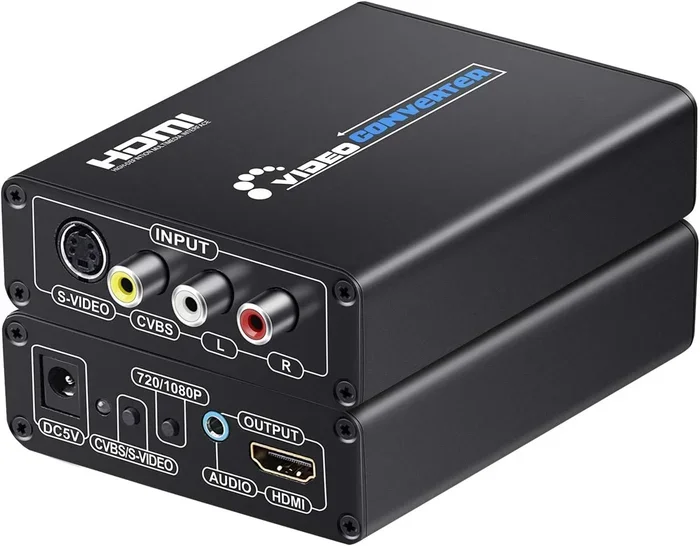
A converter box is a more robust solution. These devices have their own power supply, which gives them more processing power. Most RCA to HDMI converter boxes offer upscaling capabilities, meaning they can take a standard definition signal and boost it to 720p or even 1080p.
Many converter boxes also include additional features like:
- Audio extraction: You can pull audio out through a separate output.
- Scan line filters: These add a retro look to retro games, which many gamers love.
- Format support: Some boxes handle both NTSC and PAL video formats.
- Multiple input options: Some boxes accept both RCA and component video inputs.
Component Video to HDMI Converters
If your older device has component video outputs (the red, green, and blue RCA cables plus separate audio), you need a component video to HDMI converter specifically. Component video offers better quality than composite video because it separates the color channels. A dedicated component-to-HDMI converter can preserve that extra quality during conversion.
How to Set Up Your RCA to HDMI Connection
Setting up a RCA to HDMI connection is straightforward. Here is a step-by-step guide that works for most converter boxes and adapters.
Step by Step Setup Guide
Step 1: Gather your cables. You will need RCA cables (the red, white, and yellow ones) and an HDMI cable. Make sure your HDMI cable is in good condition and long enough to reach from the converter to your TV.
Step 2: Connect the RCA cables to your source device. Plug the yellow cable into the video output, the white cable into the left audio output, and the red cable into the right audio output. Match the colors carefully.
Step 3: Connect the other end of the RCA cables to the converter. The converter box will have clearly labeled RCA input jacks. Again, match the colors.
Step 4: Plug in the HDMI cable. Connect one end to the HDMI output on the converter box and the other end to an available HDMI port on your TV.
Step 5: Power on the converter. If your converter box requires external power, plug it in now. Some basic adapters draw power from the HDMI port and do not need a separate power cable.
Step 6: Switch your TV to the correct HDMI input. Use your TV remote to select the HDMI port you plugged the cable into.
Step 7: Adjust settings if needed. Some converter boxes let you choose the output resolution. Set it to match your TV’s native resolution for the best picture.
Quick Tips for a Smooth Setup
Here are some quick tips that will save you headaches:
- Always use the power supply that comes with your converter box. Using a different power adapter can cause issues.
- Test with a known working HDMI cable first to rule out cable problems.
- Check your TV’s aspect ratio settings if the image looks stretched or has black bars.
- Keep RCA cables short to reduce signal loss and interference.
- Label your cables so you always know which is video and which is audio.
Common Mistakes When Using RCA to HDMI Converters
Even with the right gear, people run into problems all the time. Here are the most common mistakes and how to avoid them.
Using the Wrong Cable Order
This is the number one mistake. RCA cables have a specific order and color code. If you mix up the red and white cables or plug the yellow cable into the wrong jack, you will get no picture or poor sound. Always double-check that yellow goes to video, white goes to left audio, and red goes to right audio.
Skipping the Power Supply
Some people try to use a converter box without plugging it in, especially if they bought a model that has a power adapter but forgets to use it. Without proper power, the converter cannot process the signal correctly. You may get a flickering screen, no signal, or poor image quality.
Expecting Perfect Upscaling
A converter box can improve the resolution, but it cannot magically turn a 240p retro game into a 4K masterpiece. The upscaling quality depends on the converter’s processing chip. Budget converters will produce decent results, but premium converters offer noticeably better image quality.
Ignoring Audio Sync Issues
Sometimes the audio and video get out of sync when using a converter. This is more common with cheaper models. If you notice lip sync issues, try adjusting the audio delay settings on your TV if available. You can also try a different converter model.
Not Checking TV Compatibility
Some older TVs have HDMI ports that do not support certain resolutions or formats. Before buying a converter, check what input formats your TV supports. Most modern TVs handle standard HDMI formats without any issues.
Best Uses for RCA to HDMI Converters
RCA to HDMI conversion opens up a world of possibilities. Here are some of the most popular and practical use cases.
Retro Gaming
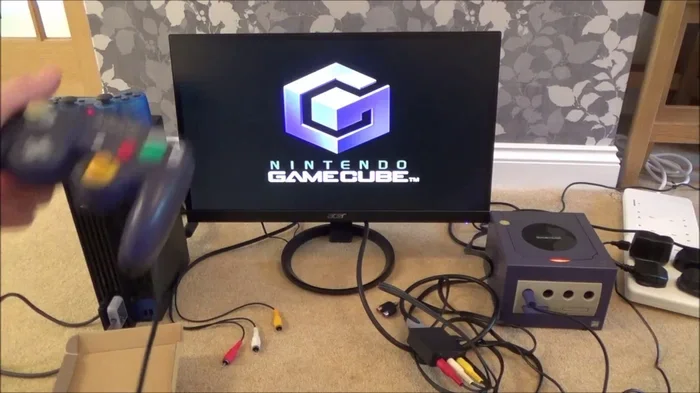
This is arguably the most popular reason people buy RCA to HDMI converters. Classic consoles like the NES, SNES, Sega Genesis, and PlayStation 1 all use RCA or composite outputs. A good converter lets you play these games on a modern TV with a much clearer picture than you would get on an old CRT screen.
Many retro gamers specifically seek out converters with scan line filters. These filters recreate the look of CRT displays, which many players find more authentic and visually appealing. The RetroTINK and RetroAV brands are popular choices in the retro gaming community.
Vintage Home Theater Equipment
If you still have a VCR, LaserDisc player, or an old DVD player, a converter box lets you keep using them. You do not need to replace perfectly good equipment just because your TV lacks RCA inputs. A simple converter bridges the gap and keeps your old gear in service.
Security Cameras and Surveillance Systems
Some older security camera systems use RCA outputs. If you want to view the feed on a modern monitor or TV, a composite to HDMI converter is an easy and affordable solution. This is especially useful for home surveillance setups where you want a larger, clearer display.
Home Video Preservation
If you have old home videos recorded on VHS tapes, you likely have a VCR with RCA outputs. A converter box lets you capture that footage on a modern setup. Some people use this setup to digitize old family videos before they degrade further.
How to Choose the Right RCA to HDMI Converter
With so many options on the market, picking the right one can feel overwhelming. Here are the key factors to consider.
Budget vs Quality
You can find basic RCA to HDMI adapters for under twenty dollars. These work fine for simple setups where you just need a picture. But if you care about image quality, especially for gaming or watching movies, spending more on a dedicated converter box is worth it.
Mid-range converter boxes between thirty and sixty dollars offer decent upscaling and reliable performance. Premium options above sixty dollars provide the best image processing, additional features, and build quality.
Does It Upscale?
If you want the best picture on your modern TV, look for a converter that supports upscaling. This feature takes the original signal resolution and boosts it to match your TV’s capabilities. Without upscaling, your content will display at its original resolution, which may look blurry or small on a large screen.
Audio Support
Make sure the converter you choose handles both video and audio. Most do, but some budget options focus only on video and require a separate audio connection. Check the product specifications before you buy.
Build Quality and Brand Reputation
Look for converters from reputable brands with good customer reviews. A well-built converter will last longer and produce more consistent results. Cheap no-name brands may work initially but can develop issues over time or produce subpar image quality.
Additional Features
Some converters offer extra features that can be very useful:
- HDMI output pass-through: Lets you connect multiple devices to the converter and switch between them.
- USB power option: Some converters can be powered by a USB port, which adds flexibility.
- Format compatibility: Support for both NTSC and PAL formats is helpful if you use imported or region-specific devices.
Expert Tips for Getting the Best Picture Quality
Want to squeeze every bit of quality out of your RCA to HDMI setup? Here are some expert tips that make a real difference.
Use the shortest RCA cables you can. Longer cables mean more signal degradation. Keep your RCA runs under six feet if possible for the cleanest signal.
Check your TV’s sharpness and noise reduction settings. Sometimes TVs apply processing that makes converted signals look worse. Turning off noise reduction and adjusting sharpness can improve the picture significantly.
Update your TV’s firmware. Some TV manufacturers release updates that improve compatibility with external devices, including converter boxes.
Consider a scan line filter for gaming. If you are using a retro console, a converter with built-in scan line filters adds a layer of visual authenticity that makes old games look and feel right.
Test with multiple source devices. If you are unsure whether the problem is with your converter or your source device, test with another device that has RCA outputs. This helps you isolate the issue quickly.
Keep your converter ventilated. Some converter boxes generate heat during use. Make sure they are not buried under other equipment or placed in enclosed spaces. Good airflow keeps them running smoothly.
Frequently Asked Questions
Can I connect RCA directly to HDMI without a converter?
No, you cannot connect RCA directly to HDMI without a converter. RCA carries analog signals while HDMI carries digital signals. A converter box or adapter is required to translate the signal from analog to digital. Without it, your TV will not recognize the input.
Do RCA to HDMI converters work with all TVs?
Most modern TVs with HDMI ports work perfectly with RCA to HDMI converters. However, very old TVs that only have RCA inputs will not benefit from the conversion since they do not have HDMI inputs. Make sure your TV has at least one available HDMI port before purchasing a converter.
Will a cheap RCA to HDMI adapter give me good picture quality?
Budget adapters work for basic use, but they may not deliver the best picture quality. Cheap models often lack upscaling and can introduce signal noise or lag. If image quality matters to you, invest in a mid-range or premium converter box with positive reviews and reliable build quality.
Can I use an RCA to HDMI converter for retro gaming?
Absolutely. Retro gaming is one of the most popular uses for RCA to HDMI converters. Classic consoles from the 1980s and 1990s output RCA signals, and a converter lets you play them on modern displays with much better clarity than old CRT TVs. Look for converters with scan line filters for the best retro gaming experience.
Do RCA to HDMI converters need external power?
It depends on the type of converter. Basic HDMI adapters usually draw power from the HDMI port and do not need external power. Full converter boxes typically require a power adapter or USB cable to function. Always check the product specifications before purchasing.
What is the difference between composite and component RCA to HDMI conversion?
Composite video uses a single yellow RCA cable for video along with red and white cables for audio. Component video uses three separate cables (red, green, and blue) for video, which provides better image quality. You need a converter that matches your source device’s output type. Using a composite converter with a component output, or vice versa, will not work properly.
Final Thoughts
RCA to HDMI conversion is one of the easiest and most affordable ways to bring your older devices into the modern era. Whether you want to play retro games, watch old VHS tapes, or use vintage home theater equipment, a converter box or adapter makes it all possible.
The key is choosing the right converter for your needs. If you just need basic functionality, a simple HDMI adapter will do the job. If you want better picture quality and extra features, invest in a dedicated converter box with upscaling and audio support.
Avoid the common mistakes we covered, follow the setup steps carefully, and you will have your old gear working on your new TV in no time. The process is simple, the gear is affordable, and the results are well worth the effort. So go ahead, dig out those old devices, grab a RCA to HDMI converter, and enjoy your favorite classics on a big modern screen.