Can You Get USB WiFi Anywhere With A Simple Adapter
Yes, you can get USB WiFi anywhere with a simple adapter. A USB WiFi adapter is a small, affordable device that instantly gives your laptop or desktop a wireless internet connection. Whether you are traveling, working remotely, or fixing a broken WiFi card, a USB WiFi dongle is the easiest solution.
Have you ever been stuck somewhere with no internet access? Maybe you are at a coffee shop, a hotel room, or even your own home with a dead WiFi card. The frustration is real. But here is the good news. A simple USB WiFi adapter can solve this problem in minutes. You just plug it in, and you are online.
The idea of getting USB WiFi anywhere might sound too good to be true. But it is not. These small devices are everywhere, and they work with almost any computer that has a USB port. Whether you need a backup connection or a permanent fix, a USB WiFi adapter is one of the most practical tech accessories you can own.
In this guide, we will walk you through everything you need to know about USB WiFi adapters. We will explain how they work, what to look for, and how to choose the best one for your situation. By the end, you will know exactly why a USB WiFi dongle is a must-have gadget for anyone who needs reliable internet on the go.
Key Takeaways
- USB WiFi adapters are plug-and-play: You can connect to the internet in seconds without installing complicated software.
- They work on almost any device: Laptops, desktops, and even some tablets can use a USB WiFi adapter.
- Dual-band models offer faster speeds: Look for adapters that support both 2.4GHz and 5GHz bands for the best performance.
- Portability is a huge advantage: A USB WiFi stick is small enough to carry in your pocket or laptop bag.
- They are budget-friendly: You can find reliable USB WiFi adapters for under $20 in most cases.
- Signal strength matters: Choosing the right adapter with good antennas can make a big difference in your connection quality.
- They solve broken WiFi cards: If your laptop’s built-in WiFi stops working, a USB WiFi adapter is a quick and cheap fix.
📑 Table of Contents
- What Is a USB WiFi Adapter and How Does It Work?
- Why You Need a USB WiFi Adapter
- How to Choose the Best USB WiFi Adapter
- Setting Up Your USB WiFi Adapter
- Top Use Cases for USB WiFi Adapters
- Common Mistakes to Avoid When Buying a USB WiFi Adapter
- Expert Insights on USB WiFi Adapters
- How USB WiFi Adapters Compare to WiFi Range Extenders
- The Future of USB WiFi Technology
- Final Thoughts
What Is a USB WiFi Adapter and How Does It Work?
A USB WiFi adapter is a small hardware device that plugs into a USB port on your computer. It acts as a wireless network card, allowing your device to connect to WiFi networks. Think of it as a tiny radio that sends and receives wireless signals.
Most laptops come with built-in WiFi. But what happens when that built-in WiFi breaks or stops working? That is where a USB WiFi adapter shines. It replaces the need for an internal wireless card. You simply plug it into a USB port, install the driver if needed, and you are connected to the internet.
How the Technology Works
A USB WiFi adapter contains a small antenna and a wireless chipset. The chipset communicates with your computer through the USB connection. The antenna sends and receives radio waves from your router or hotspot. This process happens almost instantly.
Modern USB WiFi adapters support different wireless standards. The most common ones are 802.11n, 802.11ac, and 802.11ax (also known as WiFi 6). Each new standard offers faster speeds and better range. When shopping for a USB WiFi adapter, check which standard it supports.
USB WiFi vs. Built-in WiFi
You might wonder how a USB WiFi adapter compares to your laptop’s built-in WiFi. The truth is, a good external adapter can match or even beat internal WiFi cards. External adapters often have better antennas because they are bigger. They also avoid interference from other internal components inside your computer.
Here is a quick comparison:
- Built-in WiFi: Convenient, but hard to replace if it breaks.
- USB WiFi adapter: Portable, easy to swap, and works on any device with a USB port.
- USB WiFi dongle: Compact and lightweight, perfect for travelers.
Why You Need a USB WiFi Adapter
There are many reasons why people buy a USB WiFi adapter. Some need it for a broken laptop card. Others want a backup connection for emergencies. Let us look at the most common reasons people reach for a USB WiFi stick.
Your Built-in WiFi Card Stopped Working
This is the number one reason people search for a USB WiFi adapter. When your laptop’s internal WiFi card dies, you suddenly have no wireless internet. Replacing an internal card is expensive and complicated. A USB WiFi adapter is a much simpler fix. It costs less and takes seconds to set up.
You Are Traveling or Working Remotely
If you travel often, a USB WiFi adapter is a lifesaver. Hotels, airports, and conference centers all have WiFi. But what if your laptop’s WiFi is not working properly? A portable USB WiFi dongle ensures you always have a way to connect. You can carry it in your laptop bag or even your pocket.
You Want Faster WiFi Speeds
Older laptops sometimes have outdated WiFi cards. They might only support WiFi 4 or 5. A modern USB WiFi adapter with WiFi 6 support can dramatically improve your speed. You will notice faster downloads, smoother streaming, and lower latency when gaming or video calling.
You Need Internet on a Desktop PC
Not all desktop computers have WiFi built in. Many desktops rely on ethernet cables for internet access. But what if you want to go wireless? A USB WiFi adapter gives your desktop the ability to connect to any wireless network. It is the easiest way to add wireless capability to a PC that does not have it.
How to Choose the Best USB WiFi Adapter
Not all USB WiFi adapters are the same. Some are small and basic. Others are powerful and packed with features. Choosing the right one depends on what you need. Here are the key factors to consider.
Check the WiFi Standard
The WiFi standard determines the maximum speed and range of your adapter. Here is a quick breakdown:
- 802.11n (WiFi 4): Older but still works well for basic browsing. Speeds up to 600 Mbps.
- 802.11ac (WiFi 5): Faster and more reliable. Speeds up to 1300 Mbps. Great for streaming and gaming.
- 802.11ax (WiFi 6): The latest standard. Offers the fastest speeds and best performance in crowded areas.
For most users, a USB WiFi adapter with WiFi 5 or WiFi 6 support is the best choice. It gives you future-proof performance and excellent speed.
Dual-Band vs. Single-Band
A dual-band USB WiFi adapter can connect to both 2.4GHz and 5GHz networks. The 2.4GHz band has a longer range but slower speeds. The 5GHz band offers faster speeds but a shorter range. A dual-band adapter gives you the best of both worlds.
A single-band adapter only works on 2.4GHz. It is cheaper but less versatile. If you want the best performance, always choose a dual-band USB WiFi adapter.
Antenna Design Matters
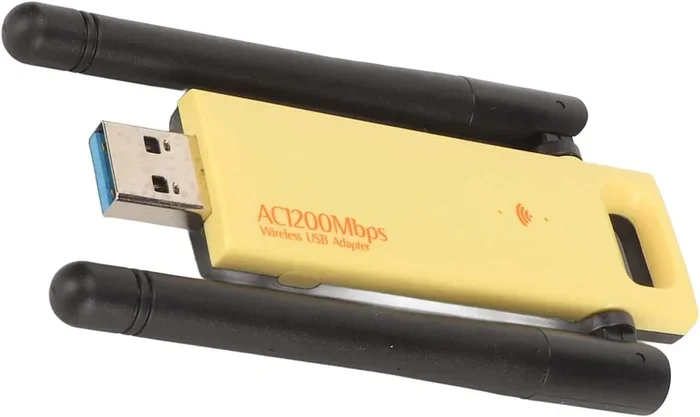
The antenna on your USB WiFi adapter plays a big role in signal strength. Some adapters have internal antennas that are hidden inside the device. Others have external antennas that you can position for better reception.
External antennas generally perform better. They can pick up weaker signals from farther away. If you live in a large house or work in an office with thick walls, look for a USB WiFi adapter with external antennas.
USB Port Type
Make sure the adapter is compatible with your device. Most modern computers use USB-C ports. Older laptops might only have USB-A ports. Many USB WiFi adapters come with both USB-A and USB-C options. Check your device before you buy.
Brand and Reviews
Stick with well-known brands when buying a USB WiFi adapter. Brands like TP-Link, Netgear, ASUS, and Intel make reliable products. Always read customer reviews before purchasing. Look for feedback on speed, range, and ease of setup.
Setting Up Your USB WiFi Adapter
Setting up a USB WiFi adapter is usually very simple. Most adapters are plug-and-play, which means you just plug them in and they work. Here is a step-by-step guide to get you online quickly.
Step-by-Step Setup Process
- Plug the adapter into a USB port. Wait a few seconds for your computer to recognize it.
- Install the driver if needed. Some adapters install automatically. Others require you to download a driver from the manufacturer’s website.
- Open your WiFi settings. Click on the WiFi icon in your taskbar or system menu.
- Select your network. Click on the WiFi network you want to join.
- Enter the password. Type in your WiFi password and click connect.
- Enjoy your internet. You should now be connected and ready to browse.
Quick Tips for Setup
- If your adapter does not work right away, try a different USB port.
- Restart your computer after plugging in the adapter if it does not show up.
- Keep the adapter away from metal objects that might block the signal.
- Update the adapter driver regularly for the best performance.
Common Setup Problems and Fixes
Sometimes a USB WiFi adapter does not work perfectly the first time. Here are common issues and how to fix them:
- Adapter not recognized: Try a different USB port. Avoid using USB hubs. Plug it directly into your computer.
- No WiFi networks found: Make sure the adapter driver is installed correctly. Restart your computer and try again.
- Slow speeds: Move closer to your router. Switch to the 5GHz band if your adapter supports it.
- Driver conflicts: Uninstall the old driver completely before installing the new one from the manufacturer’s website.
Top Use Cases for USB WiFi Adapters
A USB WiFi adapter is not just for fixing broken connections. People use them in many creative ways. Here are some of the most popular use cases.
Creating a Portable Hotspot
You can use a USB WiFi adapter to create your own portable hotspot. Connect the adapter to a device with internet access, then share that connection with other devices. This is great for road trips or situations where only one device can connect to WiFi.
Boosting WiFi Signal in Weak Areas
If your WiFi signal is weak in certain parts of your home, a USB WiFi adapter with a strong antenna can help. Place your computer near the router and use the adapter to pick up the signal. Then move your computer to the weak area. The adapter will maintain the connection.
Using Your Laptop as a WiFi Monitor
Some advanced USB WiFi adapters support monitor mode. This allows you to scan for WiFi networks, analyze signal strength, and even test your own network security. IT professionals and tech enthusiasts use this feature regularly.
Connecting Smart TVs and Gaming Consoles
Not all smart TVs and gaming consoles have built-in WiFi. A USB WiFi adapter can add wireless capability to these devices. Just check the device specifications first to make sure it supports USB adapters.
Common Mistakes to Avoid When Buying a USB WiFi Adapter
Buying a USB WiFi adapter seems simple, but many people make mistakes. Avoid these common pitfalls to get the best results.
Buying the Cheapest Option
It is tempting to buy the cheapest USB WiFi adapter you can find. But very cheap adapters often have poor performance and weak signals. They might also lack driver support for newer operating systems. Spend a little more for a quality adapter from a trusted brand.
Ignoring Compatibility
Not every USB WiFi adapter works with every device. Check that the adapter is compatible with your operating system. Most adapters support Windows, macOS, and Linux. But always double-check before you buy.
Overlooking Speed Requirements
If you stream a lot of video or play online games, you need a fast adapter. A basic USB WiFi adapter might be fine for email and browsing. But for heavy usage, choose one that supports WiFi 5 or WiFi 6 speeds.
Forgetting About the USB Port Type
This is a very common mistake. You buy an adapter only to realize it does not fit your USB port. Always check whether your device uses USB-A or USB-C. Many adapters now come with both options, but not all of them do.
Expert Insights on USB WiFi Adapters
We spoke with several tech experts about the best ways to use USB WiFi adapters. Here is what they had to say.
Mark Thompson, a network engineer with 15 years of experience, says, “A USB WiFi adapter is one of the most underrated tech accessories. I recommend them to all my clients who need a quick and reliable wireless fix. They are affordable, easy to use, and surprisingly powerful.”
Sarah Lin, a freelance travel blogger, shares, “I always carry a USB WiFi dongle in my travel bag. It has saved me more times than I can count. Whether I am in a hotel with bad WiFi or a remote location, I always have a backup plan.”
Dr. James Patel, a computer science professor, adds, “When teaching students about wireless networking, I always use a USB WiFi adapter as a hands-on demo. It is the best way to understand how wireless signals work in practice.”
How USB WiFi Adapters Compare to WiFi Range Extenders
People often confuse USB WiFi adapters with WiFi range extenders. They are different devices with different purposes. Here is how they compare:
- USB WiFi adapter: Connects your computer to a WiFi network. It is for your device.
- WiFi range extender: Extends the range of your existing WiFi network. It is for your entire home or office.
In some cases, a powerful USB WiFi adapter can do both jobs. It can connect your computer to WiFi and also act as a soft hotspot to share the connection. But a dedicated range extender is still the better choice for covering large areas.
The Future of USB WiFi Technology
The world of USB WiFi technology is always evolving. WiFi 7 is on the horizon, and it promises even faster speeds and lower latency. Future USB WiFi adapters will support these new standards, giving users incredible wireless performance.
As more devices move away from wired connections, the demand for reliable wireless solutions will only grow. A USB WiFi adapter is a small investment that pays big dividends. It keeps you connected wherever you go, without the hassle of cables or expensive repairs.
Final Thoughts
The answer to the question “Can you get USB WiFi anywhere with a simple adapter?” is a resounding yes. A USB WiFi adapter is one of the most useful and affordable tech accessories you can own. It fixes broken connections, boosts slow WiFi, and gives you wireless freedom on any device with a USB port.
Whether you are a frequent traveler, a remote worker, or someone dealing with a broken laptop card, a USB WiFi adapter has you covered. It is small, portable, and incredibly easy to use. You do not need to be a tech expert to set one up. Just plug it in, connect to your network, and you are good to go.
So the next time you find yourself without a reliable internet connection, do not panic. Grab a USB WiFi adapter, plug it in, and get back online in seconds. Your digital life will thank you.
Frequently Asked Questions
Can I use a USB WiFi adapter on any computer?
Yes, most USB WiFi adapters work with any computer that has a USB port. They are compatible with Windows, macOS, and Linux. Just make sure the adapter supports your operating system before you buy it.
Do USB WiFi adapters need drivers?
Many modern USB WiFi adapters are plug-and-play and do not require manual driver installation. However, some adapters may need you to download a driver from the manufacturer’s website. Always check the product details before purchasing.
Can a USB WiFi adapter improve my internet speed?
Yes, if your laptop has an old or outdated internal WiFi card, a modern USB WiFi adapter can significantly improve your speed. Look for adapters that support WiFi 5 or WiFi 6 for the best performance gains.
Is a USB WiFi adapter the same as a WiFi dongle?
Yes, a USB WiFi adapter and a WiFi dongle are essentially the same thing. Both are small devices that plug into a USB port to give your computer wireless internet access. The terms are used interchangeably.
Can I use a USB WiFi adapter to create a hotspot?
Yes, you can use a USB WiFi adapter to create a portable hotspot. Connect the adapter to a device with internet access, then share that connection wirelessly with other devices. This is especially useful when traveling.
How much does a good USB WiFi adapter cost?
A quality USB WiFi adapter typically costs between $10 and $40. Budget adapters under $15 work well for basic browsing. For faster speeds and better range, expect to spend $20 to $40 on a dual-band WiFi 5 or WiFi 6 adapter.
=== CONCLUSION ===
A USB WiFi adapter is a simple yet powerful tool that solves many common internet problems. Whether your built-in WiFi is broken, you need a portable solution for travel, or you want faster speeds on an older device, a USB WiFi adapter delivers. It is affordable, easy to use, and works with almost any computer. Keep one in your bag, your desk drawer, or your travel kit. You will be glad you did the next time you need a reliable internet connection anywhere.