Do Wifi Extenders Actually Help Improve Your Signal
Do wifi extenders actually help? The short answer is yes — but with important caveats. A WiFi extender can significantly improve your signal in dead zones and expand your wireless coverage, but it won’t magically fix a bad router or slow internet plan. Understanding how these devices work, when to use them, and what alternatives exist will save you money and frustration.
Do wifi extenders actually help? It’s a question many homeowners ask when they can’t get a solid connection in the bedroom or the backyard. You’ve probably experienced it — you’re streaming a show in the living room, and it buffers perfectly. But walk two rooms over, and the screen freezes instantly.
The frustration is real. And it’s tempting to grab a cheap WiFi extender off Amazon and hope for the best. But do these devices actually deliver what they promise? Let’s break it all down in plain language so you can make a smart decision for your home network.
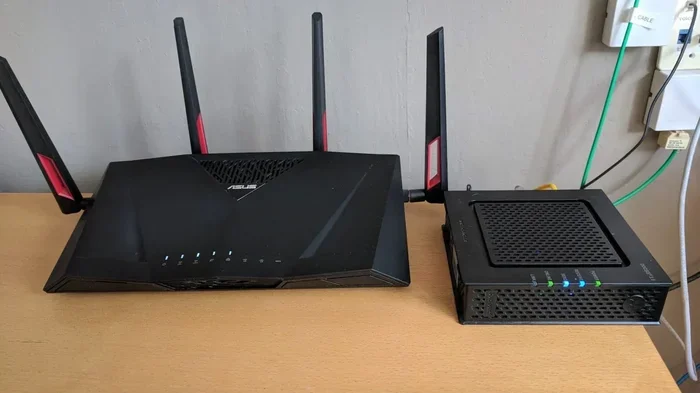
WiFi extenders, also called wireless repeaters or signal boosters, sit between your router and the areas with weak signal. They receive your existing WiFi signal, amplify it, and rebroadcast it to reach farther corners of your home. Sounds simple, right? Well, the reality is a bit more complicated. And that’s exactly what we’re going to explore today.
Key Takeaways
- WiFi extenders do work: They can boost your signal and reduce dead spots in your home or office.
- Placement matters hugely: Putting your extender in the wrong spot can actually make things worse.
- They often cut speed in half: Most budget extenders reduce your bandwidth because they use the same radio to receive and send data.
- Mesh systems are a better alternative: For larger homes, a mesh WiFi setup often outperforms traditional extenders.
- Check your router first: Upgrading your router may solve coverage issues without needing an extender at all.
- Dual-band extenders perform better: They offer less speed loss compared to single-band models.
📑 Table of Contents
How WiFi Extenders Actually Work
A WiFi extender connects to your existing wireless network and creates a second broadcast zone. Think of it like a relay runner passing a baton. The extender receives the signal from your router and then passes it along to areas your router can’t reach well on its own.
Most extenders plug directly into a wall outlet. They don’t need a computer or complicated setup. Many models today come with a simple push-button pairing process. You press a button on your router, then press a button on the extender, and they connect automatically.
The Two Types of WiFi Extenders
Not all extenders are the same. There are two main types you should know about.
Single-band extenders work on the 2.4 GHz frequency only. They’re cheaper but slower because they share the same radio for both receiving and sending data. This creates a bottleneck that can cut your speed significantly.
Dual-band extenders use two frequencies — 2.4 GHz and 5 GHz. They receive data on one band and send it on the other. This means less speed loss and better overall performance. If you can afford it, a dual-band extender is the smarter choice.
When you’re setting up any extender, you might also want to check if your phone supports the frequency bands your extender uses. For example, learning how to force your phone to use 2.4 GHz WiFi can help you troubleshoot connection issues with older extenders that only broadcast on that frequency.
When Do WiFi Extenders Actually Help?
Do wifi extenders actually help in every situation? No. They work best in specific scenarios. Let’s look at when they shine and when they fall short.
They’re Great for Eliminating Dead Zones
Dead zones are areas in your home where the WiFi signal drops to zero. These often happen in rooms far from the router, basements, garages, and upstairs bedrooms. An extender placed halfway between your router and the dead zone can bring back coverage in those spots.
For example, if your router sits in the living room and your home office is at the far end of the house, a mid-range extender in the hallway can bridge the gap. You’ll get a usable signal where you had none before.
They Help with Large Homes
Houses over 2,000 square feet often struggle with full coverage. Walls, floors, and furniture all weaken WiFi signals. An extender can fill in the gaps and give you consistent coverage throughout the house.
Many families also find that their WiFi calling works better after adding an extender. If you’ve ever wondered whether any phone can do WiFi calling, the answer is yes — but only if the signal is strong enough. An extender helps make that happen in hard-to-reach areas.
They’re Affordable Compared to New Routers
A good WiFi extender costs between $30 and $100. Compare that to buying a whole new router or a mesh system that could cost $200 or more. For a quick fix, an extender is hard to beat on price.
When WiFi Extenders Don’t Help (And What Goes Wrong)
Here’s the part most product reviews skip. WiFi extenders don’t always work as well as ads suggest. There are real limitations you need to know about.
The Speed Loss Problem
Most extenders cut your speed in half. Why? Because they use the same radio to talk to your router and to your devices. They have to listen, then transmit — back and forth. This doubles the delay and halves the throughput.
Imagine a hallway where people can only walk one direction at a time. That’s what happens with a single-band extender. The data has to wait its turn, and your speed drops.
Bad Placement Makes Everything Worse
Putting your extender too close to the router does nothing. Putting it too far away means it can’t get a strong enough signal to rebroadcast. The sweet spot is usually halfway between your router and the area with weak signal.
A common mistake is placing the extender in a closet or behind furniture. Walls and obstacles weaken the signal before it even reaches the extender. Always place your extender in an open, central location.
They Add Another Network Name
Many extenders create a second network name (SSID). Your phone might not switch to it automatically. You could end up manually toggling between networks as you move around the house. This is annoying and defeats the purpose of seamless coverage.
Some modern extenders solve this with a feature called “band steering” or a unified network name. But cheaper models still require manual switching.
WiFi Extender vs Mesh WiFi: Which Is Better?
This is the big question in home networking today. Let’s compare the two approaches side by side.
| Feature | WiFi Extender | Mesh WiFi System |
|---|---|---|
| Price | $30 – $100 | $100 – $400+ |
| Speed Loss | Up to 50% | Minimal (10-15%) |
| Setup Difficulty | Easy | Easy to Moderate |
| Coverage | One extra zone | Whole-home coverage |
| Seamless Roaming | Usually no | Yes |
| Number of Devices | Limited | High capacity |
| Best For | Small dead zones | Large homes (2,000+ sq ft) |
A mesh system uses multiple nodes that work together as one unified network. Your phone automatically connects to the strongest node as you walk around the house. No manual switching. No speed penalty. It’s the better solution for most homes — but it costs more.
If you’re considering a mesh system, you might also want to explore whether your current router can act as an access point. Some people ask whether Google WiFi can be an access point, and the answer is yes — Google WiFi nodes can work in access point mode, giving you flexible network design options.
How to Get the Most Out of Your WiFi Extender
If you decide to go with an extender, here are some practical tips to make sure it actually helps instead of hurting your network.
1. Place It in the Right Spot
Put the extender about halfway between your router and the weak area. Make sure it still gets a strong signal from the router. A good rule of thumb: if the extender’s LED lights show a strong connection to the router, you’ve placed it well.
2. Use the 5 GHz Band When Possible
If your extender supports dual-band, connect your devices to the 5 GHz network for faster speeds. The 2.4 GHz band travels farther but is slower and more prone to interference from microwaves, baby monitors, and other devices.
3. Keep Your Extender Updated
Firmware updates fix bugs and improve performance. Check the manufacturer’s app regularly for updates. An outdated extender can cause more problems than it solves.
4. Don’t Daisy-Chain Extenders
Connecting one extender to another creates a chain that slashes your speed even further. Each hop cuts bandwidth. If you need more coverage, consider a mesh system instead of chaining multiple extenders.
5. Secure Your Extender
Some people forget that an extender is part of their network. Set a strong password on it just like you do for your router. Also, avoid using default admin credentials. If you’re concerned about network security, check out this guide on whether someone can do anything with your WiFi password to understand the risks better.
Do You Really Need a WiFi Extender?
Before you buy anything, ask yourself a few questions. What exactly is the problem? Is it slow speeds, dead zones, or both? Sometimes the answer isn’t an extender at all.
If your router is old, upgrading it might solve everything. Modern routers with better antennas and MU-MIMO technology handle multiple devices much better than older models. You might also check whether your internet plan is actually delivering the speeds you pay for.
Another option is repositioning your router. Moving it to a central, elevated location can dramatically improve coverage. Walls, metal objects, and large appliances all block WiFi signals. Even a small change in router placement can make a big difference.
If you’re dealing with a specific room that has weak signal, a WiFi extender is a simple, affordable fix. But for whole-home coverage in a large house, a mesh system is the better long-term investment.
Also worth noting: if you travel and need reliable WiFi on the go, a portable hotspot might be a better investment than a home extender. Many people ask whether they can buy their own portable WiFi, and the answer is absolutely yes — portable hotspots work great for travel and backup internet at home.
Final Thoughts
So do wifi extenders actually help? Yes, they do — when used correctly and in the right situation. They’re affordable, easy to set up, and effective at eliminating dead zones in your home. But they’re not magic. They won’t fix a slow internet plan, and they can cut your speed if you buy the wrong type or place it poorly.
The best approach is to understand your home’s coverage needs first. Identify the dead zones. Check your router’s capabilities. Then decide whether a simple extender or a full mesh system makes more sense for your budget and your space.
For most people with small to medium homes and one or two weak spots, a dual-band WiFi extender is a smart, cost-effective solution. For larger homes with multiple dead zones, investing in a mesh WiFi system will give you better performance and a smoother experience overall.
The bottom line: do wifi extenders actually help improve your signal? They absolutely can. Just go in with realistic expectations, place your extender wisely, and you’ll enjoy stronger, more reliable WiFi throughout your home.
Frequently Asked Questions
Can a WiFi extender slow down my internet?
Yes, it can. Most extenders cut your speed in half because they use the same radio to receive and send data. Dual-band extenders reduce this problem significantly, but some speed loss is still normal. The farther the extender is from your router, the more speed you’ll lose.
Where should I place my WiFi extender for the best results?
Place it halfway between your router and the area with weak signal. Make sure it still gets a strong connection from the router. Avoid putting it in closets, behind furniture, or in rooms with thick walls. An open, elevated spot works best.
Is a WiFi extender the same as a mesh WiFi system?
No, they work differently. An extender repeats your existing signal and usually creates a second network. A mesh system uses multiple nodes that work together as one unified network with seamless roaming. Mesh systems are more expensive but offer better performance and coverage.
Do I need a WiFi extender if I have a strong router?
Not necessarily. If your router is modern and placed centrally, it might cover your entire home without an extender. Try repositioning your router first before buying additional hardware. If you still have dead zones, then an extender or mesh node makes sense.
Can I use a WiFi extender with any router?
Most WiFi extenders work with any standard router, regardless of brand. They connect to your existing wireless network and rebroadcast the signal. However, for the best performance, look for an extender that supports the same WiFi standard (like WiFi 5 or WiFi 6) as your router.
Will a WiFi extender help with WiFi calling?
Yes, if your phone has weak signal in certain areas, an extender can strengthen it enough for reliable WiFi calling. Strong signal is essential for clear calls. If you want to learn more about which devices support this feature, you can explore whether any phone can do WiFi calling for more details.