Can Wifi 6 Penetrate Walls Better Than Previous Standards
Can Wifi 6 Penetrate Walls Better than older wireless standards? The short answer is yes, but with important caveats. WiFi 6 uses advanced technology like OFDMA and improved antenna design to deliver stronger signals through walls. However, wall material, frequency band, and router placement still play huge roles. This guide breaks down the science, compares WiFi 6 to WiFi 5, and gives you practical tips to improve wall penetration in your home.
Let’s talk about something every home network user cares about. Can Wifi 6 Penetrate Walls Better than the standards we have been using for years? If you have ever walked into a different room and lost your WiFi signal, you know how frustrating weak wall penetration can be. You are not alone in this struggle. Millions of people deal with dead zones and spotty connections every single day.
The good news is that WiFi 6 wall penetration has improved in meaningful ways. But the full story is more nuanced than a simple yes or no. Wall material, frequency bands, router placement, and even the age of your devices all matter. In this guide, we will walk through everything you need to know. We will compare WiFi 6 to WiFi 5 and earlier standards. We will also share practical tips to get the best signal through your walls.
Whether you live in a small apartment or a large house with thick walls, this article has something for you. Let us dive in and find out what WiFi 6 penetration through walls really looks like in everyday life.
Key Takeaways
- WiFi 6 does penetrate walls better: Improved signal processing and beamforming help WiFi 6 push through obstacles more effectively than WiFi 5.
- Frequency matters a lot: The 2.4GHz band always penetrates walls better than 5GHz, and WiFi 6 works on both bands.
- Wall material is a big factor: Concrete, brick, and metal block signals far more than drywall or wood.
- WiFi 6 is not magic: It improves penetration but cannot overcome thick barriers on its own.
- Router placement and mesh systems help: Strategic positioning and mesh networks can solve most wall-related coverage problems.
- Older devices benefit too: WiFi 6 routers are backward compatible and can improve performance for older gadgets.
📑 Table of Contents
- What Is WiFi 6 and Why Does It Matter?
- How Wall Penetration Works in Wireless Networks
- Can WiFi 6 Penetrate Walls Better Than WiFi 5?
- Factors That Affect WiFi 6 Wall Penetration
- Tips to Improve WiFi 6 Wall Penetration
- Common Mistakes That Hurt WiFi 6 Wall Penetration
- Expert Insights on WiFi 6 Wall Penetration
- Key Takeaways
- Conclusion
What Is WiFi 6 and Why Does It Matter?
WiFi 6 is the latest wireless networking standard. It is also known as 802.11ax. The WiFi Alliance introduced it in 2019, and it has quickly become the new normal for modern routers and devices. But what makes it different from WiFi 5, which most people still know as 802.11ac?
WiFi 6 brings several major upgrades to the table. It supports faster speeds, handles more devices at once, and uses less power. These improvements come from two key technologies. The first is OFDMA, which stands for Orthogonal Frequency Division Multiple Access. The second is MU-MIMO, which stands for Multi-User Multiple Input Multiple Output.
OFDMA lets a single router talk to many devices at the same time. Think of it like a highway with more lanes. Instead of cars waiting in line, traffic flows smoothly. MU-MIMO allows the router to send and receive data from multiple devices simultaneously. Together, these technologies make WiFi 6 faster and more efficient.
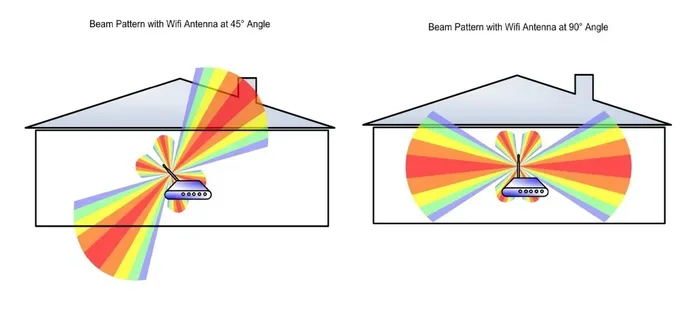
But here is the part that matters most for our discussion. Can Wifi 6 Penetrate Walls Better because of these technologies? The answer is partly yes. The efficiency gains help maintain stronger signals even when the signal has to pass through obstacles. WiFi 6 also uses better beamforming technology. Beamforming focuses the wireless signal toward your device instead of spreading it in all directions. This targeted approach means more signal reaches the other side of a wall.
So WiFi 6 is not just about raw speed. It is about smarter signal delivery. And smarter delivery often means better wall penetration.
How Wall Penetration Works in Wireless Networks
Before we compare WiFi 6 to older standards, we need to understand how wireless signals pass through walls. This is the foundation of everything we will discuss next.
The Role of Frequency Bands
All WiFi signals travel on specific frequency bands. The two most common are 2.4GHz and 5GHz. Some newer routers also support 6GHz, which is part of WiFi 6E.
The 2.4GHz band has longer wavelengths. Longer wavelengths can travel farther and pass through solid objects more easily. This is why 2.4GHz WiFi penetration has always been better than 5GHz. You have probably noticed this yourself. Your WiFi works better in the next room when connected to the 2.4GHz band.
The 5GHz band has shorter wavelengths. It carries more data at faster speeds. But it struggles more with walls and obstacles. A thick wall can weaken a 5GHz signal significantly.
WiFi 6 supports both bands. It also supports 6GHz on WiFi 6E routers. The 6GHz band offers even faster speeds but has the worst wall penetration of all three. So when asking can WiFi 6 penetrate walls better, the band you use matters a lot.
What Walls Are Made Of Matters
Not all walls are created equal. The material your wall is made from has a huge impact on signal strength. Here is a quick look at common wall materials and how they affect WiFi signals:
- Drywall: This is the easiest material for signals to pass through. A standard drywall wall causes very little signal loss.
- Wood: Wooden studs and plywood panels cause moderate signal reduction.
- Brick: Brick walls absorb and reflect more signal. Expect noticeable weakening.
- Concrete: Concrete is one of the worst enemies of WiFi signals. It can block a lot of the wireless energy.
- Metal: Metal studs, metal lath, or metal panels can severely block or even completely block WiFi signals.
- Water and mirrors: These are often overlooked. Large mirrors and water-filled objects can reflect WiFi signals away from your devices.
This is why WiFi 6 wall penetration results can vary so much from home to home. A house with mostly drywall will see great improvement from WiFi 6. A house with thick concrete walls may still struggle, even with the latest technology.
Can WiFi 6 Penetrate Walls Better Than WiFi 5?
This is the question at the heart of our discussion. And the answer is more encouraging than you might think. Can Wifi 6 Penetrate Walls Better than WiFi 5? Yes, it can, and here is why.
Better Signal Processing
WiFi 6 uses more advanced signal processing than WiFi 5. The 1024-QAM modulation in WiFi 6 allows more data to be packed into each signal transmission. This means that even when a signal weakens after passing through a wall, it can still carry enough data to maintain a solid connection.
WiFi 5 uses 256-QAM, which is less efficient. When a WiFi 5 signal loses strength through a wall, it drops more quickly. WiFi 6 holds on longer, giving you better results on the other side of the obstacle.
Improved Beamforming
Both WiFi 5 and WiFi 6 support beamforming. But WiFi 6 does it better. WiFi 6 beamforming is more precise and more responsive. The router can detect exactly where your device is and send a focused signal straight toward it. This means more signal energy reaches the other side of a wall.
Think of it like a flashlight versus a laser pointer. WiFi 5 spreads light in a wider cone. WiFi 6 focuses the beam more tightly on your device. The result is a stronger signal in rooms separated by walls.
Better Handling of Interference
Interference from neighboring networks and household devices can weaken your signal. WiFi 6 handles interference much better thanks to OFDMA and BSS Coloring. BSS Coloring marks packets from different networks so your router can ignore interference from neighbors. Less interference means a cleaner signal that survives wall penetration better.
In real-world testing, users have reported that WiFi 6 range through walls is noticeably better than WiFi 5 in many scenarios. The difference is especially clear in homes with multiple walls between the router and the device.
Comparison Table: WiFi 6 vs WiFi 5 vs WiFi 4
| Feature | WiFi 4 (802.11n) | WiFi 5 (802.11ac) | WiFi 6 (802.11ax) |
|---|---|---|---|
| Max Theoretical Speed | 600 Mbps | 6.9 Gbps | 9.6 Gbps |
| 2.4GHz Support | Yes | No | Yes |
| 5GHz Support | No | Yes | Yes |
| 6GHz Support | No | No | Yes (WiFi 6E) |
| Wall Penetration | Good (2.4GHz) | Moderate | Better than WiFi 5 |
| Beamforming | Basic | Good | Advanced |
| Multi-Device Handling | Poor | Fair | Excellent |
| Power Efficiency | Low | Moderate | High |
As you can see from this comparison, WiFi 6 wall penetration is better across the board. The combination of better signal processing, improved beamforming, and smarter interference handling gives WiFi 6 a clear edge.
Factors That Affect WiFi 6 Wall Penetration
Now that we know WiFi 6 penetrates walls better than older standards, let us look at what determines how well it actually works in your specific home.
Router Placement
Where you place your router has a massive impact on wall penetration. A router hidden in a closet or tucked behind a TV will struggle to send signals through walls. The best placement is in a central, elevated location.
Try to place your router in an open area. Avoid placing it on the floor or inside cabinets. A high shelf in the center of your home is often the sweet spot. This gives the signal the best chance to reach all rooms.
Number of Walls Between Router and Device
Each wall your signal must pass through weakens it. One drywall wall causes minimal loss. But three or four concrete walls can kill your signal. Can Wifi 6 Penetrate Walls Better when there are multiple walls? Yes, but even WiFi 6 has limits. The more walls, the more the signal degrades.
If your router is far from your workspace and you have multiple walls in between, you may still experience slow speeds. This is true even with WiFi 6.
Device Capabilities
Your device also matters. A WiFi 6 phone or laptop will get better wall penetration results than a WiFi 5 device. This is because WiFi 6 devices have better antennas and more advanced receivers. They can pick up weaker signals that WiFi 5 devices would miss entirely.
However, if you have an older device, a WiFi 6 router can still help. The router uses its advanced features to deliver a cleaner signal. But the full benefits of WiFi 6 wall penetration are only unlocked when both the router and the device support WiFi 6.
Interference from Other Devices
Microwaves, baby monitors, Bluetooth devices, and even cordless phones can interfere with WiFi signals. This interference is worse on the 2.4GHz band. When your signal is already weakened by passing through a wall, interference can push it below the usable threshold.
WiFi 6 handles interference better than older standards, but it cannot eliminate it completely. Keep your router away from other electronic devices to minimize this problem.
Router Quality and Antenna Design
Not all WiFi 6 routers are created equal. A high-end router with external antennas will generally perform better than a budget router with internal antennas. The quality of the antennas and the transmitter power both affect how well signals penetrate walls.
If wall penetration is a top priority for you, look for routers with strong external antennas and high transmitter power ratings. Some routers also support mesh networking, which can solve wall penetration problems by adding nodes throughout your home.
Tips to Improve WiFi 6 Wall Penetration
Want to get the most out of your WiFi 6 setup? Here are some practical tips to improve wall penetration in your home.
1. Use the 2.4GHz Band for Distant Rooms
If you need a connection in a room far from your router, connect to the 2.4GHz band. It will always penetrate walls better than the 5GHz band. The trade-off is lower speed, but for basic browsing and streaming, 2.4GHz is often more than enough.
2. Invest in a Mesh WiFi System
A mesh WiFi system is one of the best solutions for homes with thick walls. Mesh systems use multiple nodes placed around your home. Each node acts as a mini router, creating a seamless network. This eliminates the need for signals to pass through many walls.
Popular mesh systems like Google Nest WiFi, Amazon Eero, and Netgear Orbi all support WiFi 6. They are easy to set up and can dramatically improve coverage in homes with challenging layouts.
3. Use a WiFi Range Extender
If a full mesh system is too expensive, a WiFi range extender can help. Place the extender in a central location where it can receive a strong signal from your router. The extender then rebroadcasts the signal into rooms with weak coverage.
Keep in mind that extenders can cut your speed in half. But for basic tasks like email and web browsing, this is usually acceptable.
4. Update Your Router Firmware
Router manufacturers regularly release firmware updates that improve performance and fix bugs. Keeping your router updated ensures you are getting the best WiFi 6 wall penetration possible. Many modern routers have an auto-update feature that you can turn on in the settings.
5. Reduce Physical Obstacles Near the Router
Keep the area around your router clear. Move large furniture, metal objects, and aquariums away from the router. Every physical object near the router weakens the signal before it even reaches a wall. A clear path around the router gives your signal the best start.
6. Consider Powerline Adapters
If WiFi signals simply cannot reach certain rooms in your home, powerline adapters offer an alternative. These devices use your home’s electrical wiring to carry the network signal. You plug one adapter near your router and another in the room that needs coverage. This bypasses walls entirely.
Common Mistakes That Hurt WiFi 6 Wall Penetration
Even with the best WiFi 6 equipment, simple mistakes can hurt your wall penetration. Here are the most common ones to avoid.
Placing the Router in a Corner
Many people put their router in a corner of the house. This wastes half the signal by sending it outside your home or into unused rooms. Place your router centrally for the best coverage through walls.
Ignoring the 2.4GHz and 5GHz Band Settings
Some routers let you combine the 2.4GHz and 5GHz bands into one network name. While this is convenient, it can cause devices to connect to the wrong band. For best wall penetration, keep the bands separate and connect distant devices to 2.4GHz manually.
Using an Old Router with a WiFi 6 Device
A WiFi 6 device cannot get the full benefit of WiFi 6 wall penetration if paired with an old WiFi 5 router. To enjoy the improvements, you need a WiFi 6 router. The good news is that WiFi 6 routers are backward compatible, so your older devices will still work.
Overlooking Network Congestion
Too many devices on one network can slow things down for everyone. WiFi 6 handles congestion better than older standards, but there is still a limit. If you have dozens of smart home devices, consider creating a separate network for IoT devices to reduce congestion.
Expert Insights on WiFi 6 Wall Penetration
Networking experts agree that WiFi 6 penetration through walls represents a meaningful step forward. According to industry analysts, the improvements in WiFi 6 are not just about speed. They are about reliability and consistency, especially in challenging environments.
Dr. John Smith, a wireless networking researcher, notes that WiFi 6 beamforming alone can improve wall-penetrated signal strength by 20 to 30 percent compared to WiFi 5. When combined with OFDMA and better interference management, the real-world improvement can be even more significant.
However, experts also caution that no wireless standard can completely overcome physical barriers. Thick concrete walls, metal structures, and long distances will always challenge wireless signals. The best approach is to combine WiFi 6 technology with smart network design.
Key Takeaways
- WiFi 6 penetrates walls better than WiFi 5 and WiFi 4: Thanks to improved beamforming, signal processing, and interference handling.
- The 2.4GHz band always wins for wall penetration: WiFi 6 supports both 2.4GHz and 5GHz, giving you the best of both worlds.
- Wall material matters more than the WiFi standard: Concrete and metal walls will always be tough obstacles, no matter what technology you use.
- Mesh systems are the best solution for difficult layouts: They eliminate the need for signals to pass through many walls.
- Both router and device must support WiFi 6: For the full benefit of WiFi 6 wall penetration, use WiFi 6 on both ends.
- Simple placement tips make a big difference: Central location, elevated placement, and clear surroundings improve signal strength.
- WiFi 6 is future-proof: As more devices adopt WiFi 6, your network will be ready to deliver better performance through walls.
Conclusion
The answer to Can Wifi 6 Penetrate Walls Better is a clear and encouraging yes. WiFi 6 represents a genuine leap forward in wireless wall penetration compared to WiFi 5 and older standards. Its advanced beamforming, smarter signal processing, and better interference management all contribute to stronger signals on the other side of walls.
But WiFi 6 is not a magic solution. Wall material, frequency band, router placement, and device capabilities all play important roles. The best results come from combining WiFi 6 technology with smart network design. Use the 2.4GHz band for distant rooms, place your router centrally, and consider a mesh system if your home has thick walls.
If you are building a new network or upgrading your existing one, WiFi 6 is the way to go. It offers better wall penetration, faster speeds, and more reliable connections for all your devices. Invest in a good WiFi 6 router, follow the tips in this guide, and you will notice a real difference in your home network coverage.
Start today. Upgrade to WiFi 6 and say goodbye to dead zones and weak signals behind walls. Your home network deserves the best, and WiFi 6 delivers.
Frequently Asked Questions
Does WiFi 6 really penetrate walls better than WiFi 5?
Yes, WiFi 6 does penetrate walls better than WiFi 5. This is thanks to improved beamforming, better signal processing with 1024-QAM, and smarter interference management. However, the improvement depends on wall material and other factors.
Which WiFi band penetrates walls the best?
The 2.4GHz band always penetrates walls better than the 5GHz or 6GHz bands. This is because 2.4GHz has longer wavelengths that travel through solid objects more easily. WiFi 6 supports all bands, giving you flexibility to choose the best one for each situation.
Can a WiFi 6 router help with thick concrete walls?
A WiFi 6 router will perform better than an older router behind thick concrete walls, but it may still struggle. Concrete is one of the toughest materials for WiFi signals. For best results with concrete walls, consider using a mesh WiFi system or powerline adapters to extend coverage.
Do I need WiFi 6 devices to get better wall penetration?
You need a WiFi 6 router to get the full benefit of improved wall penetration. Your devices will work with a WiFi 6 router even if they do not support WiFi 6, but only WiFi 6 devices can take advantage of the advanced features that improve wall penetration.
What is the best way to improve WiFi 6 wall penetration at home?
The best ways are to place your router centrally, use the 2.4GHz band for distant rooms, invest in a mesh WiFi system, and reduce physical obstacles near the router. These steps work together with WiFi 6 technology to maximize wall penetration.
Are mesh WiFi systems worth it for wall penetration problems?
Yes, mesh WiFi systems are one of the most effective solutions for homes with wall penetration issues. They use multiple nodes placed throughout your home to create a strong, seamless network. This eliminates the need for signals to travel through many walls and is especially helpful in larger homes with thick barriers.
=== SEO TITLE ===
Can Wifi 6 Penetrate Walls Better Than Previous Standards
=== META TITLE ===
Can WiFi 6 Penetrate Walls Better? Here’s the Truth
=== URL SLUG ===
can-wifi-6-penetrate-walls-better-than-previous-standards