Does A Wifi Booster Stop Lagging On Your Home Network
A wifi booster can reduce lagging caused by weak signals and dead zones, but it won’t fix every type of network lag. Understanding what causes slow WiFi and choosing the right wifi range extender makes all the difference. This guide covers how boosters work, when they help, and what else you can do to stop lagging for good.
Does a wifi booster stop lagging on your home network? If you have ever experienced buffering during a movie or frozen video calls, you know how frustrating slow internet can be. A wifi booster might be the fix you need, but it depends on what is causing the lag in the first place.
This guide breaks down everything you need to know about wifi boosters and network lag. You will learn how boosters work, when they help, and what else you can do to get a faster, smoother connection. Let us dive in.
Key Takeaways
- A wifi booster helps with signal-related lag: It strengthens weak wireless signals that cause buffering and slow speeds.
- Not all lag comes from weak WiFi: ISP issues, old hardware, and bandwidth limits also cause network problems.
- Placement matters hugely: A poorly placed booster can make lagging worse instead of better.
- Mesh systems often outperform traditional boosters: They provide smoother coverage with fewer connection drops.
- You can test your network speed: Simple speed tests help you identify whether a booster will actually solve your lag.
- Other fixes work alongside a booster: Router placement, channel changes, and firmware updates all improve performance.
📑 Table of Contents
- What Causes Lagging on a Home Network
- How Does a Wifi Booster Work
- When a Wifi Booster Helps Stop Lag
- When a Wifi Booster Will NOT Stop Lag
- How to Choose the Right Wifi Booster for Less Lag
- Best Placement Tips for Your Wifi Booster
- Alternative Solutions to Stop Network Lag
- Quick Tips to Reduce Lag Without Buying Anything
- Conclusion
What Causes Lagging on a Home Network
Before you buy any device, it helps to understand why your network lags in the first place. Lagging happens when data takes too long to travel between your device and the internet. Several things can cause this delay.
Weak WiFi Signals
The most common reason for lag is a weak wireless signal. When your device sits far from your router, the signal weakens. This leads to slower speeds, packet loss, and frustrating delays. Walls, floors, and furniture all block WiFi signals and make the problem worse.
If you notice lag only in certain rooms, weak signal strength is likely the culprit. This is where a wifi booster can really help. It picks up the existing signal and rebroadcasts it to areas that need better coverage.
WiFi Dead Zones
A WiFi dead zone is an area in your home where the signal barely reaches or does not reach at all. These zones often appear in basements, garages, and rooms on the far side of the house. When your device enters a dead zone, your connection drops or becomes extremely slow.
A wifi range extender targets these dead zones directly. It fills in the gaps so every room gets a usable signal. However, dead zones caused by thick walls or long distances may need a stronger solution than a basic booster.
Network Congestion
Too many devices on the same network can cause network congestion. When multiple phones, laptops, and smart TVs all stream or download at the same time, your bandwidth gets split thin. This type of lag is not about signal strength. It is about how much data your connection can handle at once.
A wifi booster does not fix congestion. It only spreads the existing signal further. To solve congestion, you may need to limit connected devices or upgrade your internet plan.
Interference from Other Devices
Microwaves, baby monitors, cordless phones, and even neighboring WiFi networks can all interfere with your wireless signal. This interference causes packet loss, which shows up as lag. Your router might be working fine, but outside forces are disrupting the connection.
Changing your router channel or moving the router away from interfering devices can help. A booster placed in a clear spot can also reduce the impact of interference on your extended network.
How Does a Wifi Booster Work
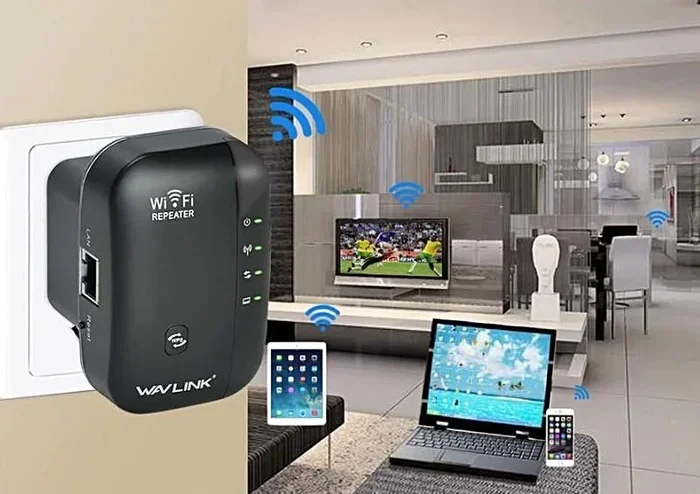
A wifi booster captures your existing WiFi signal and amplifies it. Then it rebroadcasts the strengthened signal to areas that need better coverage. Think of it like a megaphone for your router. It does not create a new internet connection. It just makes the existing one reach further.
Types of Wifi Boosters
Not all boosters are the same. Here are the main types you will come across:
- WiFi Extenders: These sit between your router and the weak area. They repeat the signal to extend coverage. They are affordable and easy to set up.
- WiFi Repeaters: These work similarly to extenders but often cut your bandwidth in half because they use the same radio to receive and send data.
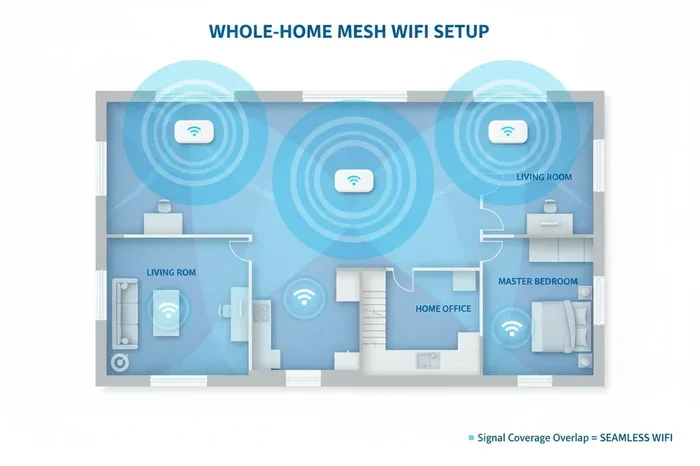
- Mesh WiFi Systems: These use multiple nodes placed around your home. They create one seamless network with strong signal strength everywhere. Mesh systems cost more but perform much better than traditional boosters.
- Powerline Adapters: These use your home’s electrical wiring to carry internet. They are great for thick-walled homes where wireless signals struggle.
Each type has pros and cons. If you want a simple fix for a small area, an extender works well. For whole-home coverage, a mesh network is the better choice. You can also check out our article on Can I Buy A Wi Fi Booster for more buying guidance.
Do Wifi Boosters Actually Reduce Lag
The short answer is yes, but only for signal-related lag. If your lag comes from weak signal strength or dead zones, a booster will make a noticeable difference. Your speeds will improve in areas that previously had poor coverage.
However, if your lag comes from ISP issues or network congestion, a booster alone will not solve the problem. It is important to diagnose the real cause first. A simple internet speed test can tell you whether your speeds are slow because of signal issues or something else.
When a Wifi Booster Helps Stop Lag
A wifi booster works best in specific situations. Here are the times it makes the biggest difference:
- Large homes with multiple floors: Signal weakens as it travels through walls and across distances. A booster restores strength in far rooms.
- Streaming in weak signal areas: If your TV buffers in the bedroom but plays fine in the living room, a booster targets that exact problem.
- Video calls dropping: Weak signals cause video calls to freeze. A booster stabilizes the connection for clearer calls.
- Gaming latency in distant rooms: Online gamers need a strong, stable connection. A booster can reduce ping and gaming latency in rooms far from the router.
- Smart home devices losing connection: Many smart devices need a strong signal to work properly. Boosters keep them connected.
In all these cases, the root cause is a weak or inconsistent signal. A wifi booster addresses this directly. It gives your devices the signal strength they need to perform well.
When a Wifi Booster Will NOT Stop Lag
Understanding when a booster will not help saves you money and frustration. Here are situations where a wifi booster will not fix your lag:
- Slow internet plan: If your ISP plan provides slow speeds, no booster will make it faster. A booster only distributes the signal you already have.
- Overloaded network: Too many devices sharing limited bandwidth causes lag. A booster does not create more bandwidth.
- Old or outdated router: An old router may not handle modern speeds well. Replacing the router might be the better investment.
- ISP throttling or outages: If your internet service provider is the problem, a booster cannot help. Contact your ISP to check for outages or throttling.
- Faulty cabling or modem issues: Problems with your modem or the cables running to your home affect all wireless devices, regardless of boosters.
Before buying a booster, run a speed test near your router and in the laggy area. If speeds are fine near the router but drop far away, a booster will likely help. If speeds are slow everywhere, the problem lies elsewhere. You can also read about Can I Get A Extension On My Wi Fi to learn more about extending your network effectively.
How to Choose the Right Wifi Booster for Less Lag
Not all boosters are created equal. Choosing the right one for your home makes a big difference in reducing lag.
Check Your WiFi Standard
Look for boosters that support the latest WiFi standards. WiFi 6 and WiFi 6E offer faster speeds and better performance with multiple devices. Older boosters using WiFi 5 or earlier may not deliver the network performance you need.
Consider Dual-Band or Tri-Band
Dual-band boosters use both 2.4 GHz and 5 GHz frequencies. The 5 GHz band offers faster speeds but shorter range. The 2.4 GHz band travels further but is slower. Tri-band boosters add an extra 5 GHz band, which reduces congestion and keeps signal strength high.
If you want to learn more about WiFi frequency bands, check out our guide on Can I Force My Phone To Use 2 4 Ghz Wifi for helpful tips on managing your WiFi bands.
Look for Easy Setup
Most modern boosters plug directly into a wall outlet. They set up through a simple app on your phone. Look for models that offer one-touch setup and a companion app for easy management.
Check Reviews and Brand Reputation
Stick with trusted brands that have solid customer reviews. Look for models with good range coverage, stable connections, and minimal speed loss. Reading real user experiences helps you avoid buying a booster that underperforms.
Best Placement Tips for Your Wifi Booster
Where you place your booster matters just as much as which one you buy. A poorly placed booster can actually make lag worse.
- Place it halfway between your router and the weak area: The booster needs a strong signal from the router to repeat effectively.
- Avoid placing it inside closets or behind furniture: Obstacles block the signal and reduce performance.
- Keep it away from interfering devices: Microwaves and cordless phones disrupt wireless signals.
- Do not place it too far from the router: If the booster cannot get a clear signal from the router, it has nothing to boost.
- Elevate it off the floor: Signals travel better when the booster is at mid-height on a shelf or table.
For more tips on improving your router setup, you can also read our article on Can I Add An Antenna To My Wifi Router for additional signal-boosting strategies.
Alternative Solutions to Stop Network Lag
A wifi booster is not the only way to fix lag. Here are other solutions that work well:
Upgrade Your Router
A modern router with WiFi 6 support delivers better speeds and handles more devices. If your router is more than five years old, upgrading might solve your lag problem entirely.
Use a Mesh WiFi System
Mesh systems replace your router and use multiple nodes to cover your entire home. They create a single, seamless network with strong signal strength everywhere. Unlike traditional boosters, mesh systems do not cut your bandwidth in half.
If you are considering a mesh setup, you might also want to check out Can I Connect A Mesh Router To An Existing Router for advice on integrating mesh with your current setup.
Use an Ethernet Cable
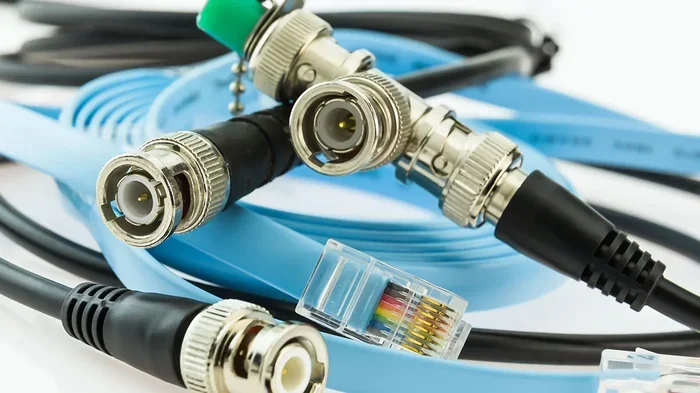
For devices that need the most stable connection, nothing beats a wired Ethernet cable. Gaming consoles, desktop PCs, and smart TVs benefit from direct wired connections. Ethernet eliminates wireless interference and provides the lowest possible latency.
Optimize Your Router Settings
Simple router adjustments can reduce lag significantly. Try these steps:
- Change your WiFi channel to avoid interference from neighbors.
- Update your router firmware to the latest version.
- Enable Quality of Service (QoS) to prioritize important traffic.
- Restart your router regularly to clear its memory.
- Switch to the 5 GHz band for faster speeds in close range.
Quick Tips to Reduce Lag Without Buying Anything
Before spending money, try these free fixes first:
- Restart your router: A simple reboot clears temporary glitches and refreshes your connection.
- Move your router to a central location: Central placement gives all rooms better signal access.
- Disconnect unused devices: Fewer devices means more bandwidth for the ones you use.
- Close background apps: Apps running in the background use bandwidth and slow things down.
- Check for router overheating: Overheating routers perform poorly. Keep yours in a ventilated area.
- Run a speed test: This tells you whether the problem is your network or your internet plan.
Conclusion
So, does a wifi booster stop lagging on your home network? The answer is yes, but with an important caveat. A booster works best when your lag stems from weak signals, dead zones, or poor coverage. It strengthens the wireless connection and gives your devices the signal strength they need to perform well.
However, a booster cannot fix every type of lag. ISP speed limits, network congestion, and outdated hardware all contribute to slow performance. Diagnosing the real cause of your lag helps you choose the right solution.
If weak signal is your main issue, a wifi booster is a worthwhile investment. Choose the right type, place it correctly, and pair it with good router habits. You will notice smoother streaming, faster downloads, and fewer connection drops. Take action today and enjoy a lag-free home network.
Frequently Asked Questions
Can a wifi booster improve gaming performance?
Yes, if your gaming lag is caused by weak WiFi signals. A wifi booster strengthens the connection to your router, which can reduce ping and improve online gaming performance. For the best results, use a wired connection or a tri-band mesh system.
Will a wifi booster slow down my internet speed?
Some budget boosters can cut your speed in half because they use the same radio to receive and rebroadcast data. However, modern dual-band and tri-band boosters minimize this speed loss. Choosing a quality booster with the latest WiFi standard keeps your speeds high.
How many boosters do I need for my home?
It depends on your home size and layout. A small apartment usually needs just one booster. Larger homes with multiple floors may need two or more. A mesh WiFi system is often a better choice for larger homes because it provides seamless coverage without signal loss.
Do wifi boosters work with all routers?
Most modern boosters work with any standard router. However, for the best performance, look for a booster that supports the same WiFi standard as your router. Mixing old and new WiFi standards can limit the booster’s effectiveness and reduce your network performance.
Can I use multiple wifi boosters in my home?
Yes, you can use multiple boosters to cover different weak areas. However, each booster should connect to your main router, not to another booster. Daisy-chaining boosters can cause speed drops and increase lag. For whole-home coverage, consider a mesh system instead.
What is the difference between a wifi booster and a wifi extender?
The terms are often used interchangeably, but there is a subtle difference. A wifi booster generally amplifies the existing signal, while a wifi extender rebroadcasts it to extend coverage. In practice, both aim to improve WiFi coverage and reduce lag in weak signal areas.