Does Att Allow WiFi Calling Everything You Need to Know
Yes, AT does allow WiFi Calling on most of its plans and devices. AT&T supports WiFi Calling on compatible smartphones, giving you the ability to make and receive calls over a Wi-Fi network instead of using cellular towers. This feature is especially useful in areas with weak cellular coverage or when you want to keep your call quality high without using mobile data.
Key Takeaways
- AT Supports WiFi Calling: AT&T offers WiFi Calling on most postpaid and prepaid plans with compatible devices.
- Easy to Set Up: You can turn on WiFi Calling directly in your phone settings in just a few steps.
- No Extra Cost: WiFi Calling on AT is included at no additional charge on most plans.
- Works Without Cellular Service: You can still make calls over Wi-Fi even when you have no cellular signal, as long as you have a data connection.
- Not All Phones Are Compatible: You need a supported device to use this feature on AT.
- Great for Rural Areas: WiFi Calling helps bridge gaps in cellular coverage where AT signal is weak.
📑 Table of Contents
What Is WiFi Calling and Why Should You Care?
WiFi Calling is a feature that lets you make and receive phone calls over a Wi-Fi network instead of relying on cellular towers. Instead of using your mobile carrier’s signal, your phone routes calls through your home or office internet connection. This can be a real lifesaver in many situations.
Many people wonder whether their carrier supports this feature. If you are an AT customer, you might be asking, does AT allow WiFi calling? The short answer is yes. AT supports WiFi Calling on a wide range of devices and plans. But there is more to know before you turn it on.
WiFi Calling has grown in popularity over the years. More carriers are supporting it, and more phones are coming with it built in. It is one of those features that you do not realize you need until you actually use it. Once you experience a clear call in a spot where your signal used to drop, you will wonder how you lived without it.
How WiFi Calling Works
When you make a regular call, your phone connects to the nearest AT cell tower. The call travels through the cellular network to reach the other person. With WiFi Calling, your phone uses your internet connection instead. It sends your voice data over the Wi-Fi network, which then reaches AT’s network and connects to the other caller.
Think of it like this. You are at home and your cell signal is weak. But your Wi-Fi is strong. Your phone can use that Wi-Fi signal to place a call. The person on the other end will not even know you are using Wi-Fi instead of a cell tower. It all happens behind the scenes.
The technology behind this is called VoIP, or Voice over Internet Protocol. It converts your voice into data packets and sends them over the internet. When the other person answers, the data packets are converted back into voice. The whole process takes less than a second, so the delay is barely noticeable.
Who Benefits From WiFi Calling?
WiFi Calling helps many different types of users. Here are some examples:
- People living in rural areas with poor cellular coverage
- Commuters who spend time in underground tunnels or parking garages
- Travelers inside large buildings where signals struggle to reach
- Families who want better call quality at home
- Anyone who has experienced dropped calls in their neighborhood
- People who work from home and need reliable business calls
If any of these sound familiar, WiFi Calling might be a great fit for you. It does not cost extra in most cases and takes just a few minutes to set up.
Does AT Support WiFi Calling?
Yes, AT does support WiFi Calling. AT&T has offered this feature for several years now. It works on both postpaid and prepaid plans. However, there are a few things you need to check before you can use it.
AT has been a strong supporter of WiFi Calling among major US carriers. They were one of the first to roll it out widely. Today, most AT customers can access the feature as long as they have a compatible device and an eligible plan.
AT WiFi Calling Requirements
Not every phone or plan can use WiFi Calling with AT. Here is what you need to make sure of:
- Your phone must be WiFi Calling compatible
- Your AT plan must support the feature
- You need a stable Wi-Fi connection
- Your device software should be up to date
- WiFi Calling must be enabled in your phone settings
If you are not sure whether your device supports this feature, you can check AT’s official website or contact their support team. You can also look at whether any phone can do WiFi Calling to understand device compatibility better.
One thing to keep in mind is that your phone needs to support HD Voice for the best WiFi Calling experience. HD Voice gives you wider audio bandwidth, making conversations sound more natural and clear. Most modern smartphones support this, but older models might not.
Which AT Plans Include WiFi Calling?
Most AT plans include WiFi Calling at no extra cost. This includes both postpaid and prepaid options. Here is a quick look at the plan types:
- AT Unlimited Plans: WiFi Calling is included on all unlimited plans
- AT Prepaid Plans: Most prepaid plans support WiFi Calling
- AT Prepaid Unlimited: This plan also includes the feature
- Older or Limited Plans: Some older plans may not support it
If you are on an older plan, it is worth checking with AT customer service. They can confirm whether your specific plan supports WiFi Calling. You can also visit an AT store or call their helpline for a quick answer.
How to Set Up WiFi Calling on AT
Setting up WiFi Calling is simple. The process is slightly different depending on whether you use an iPhone or an Android device. Here is how to do it on both.
Setting Up WiFi Calling on iPhone
Follow these steps on your iPhone:
- Open the Settings app
- Tap on Phone
- Select Wi-Fi Calling
- Toggle on Wi-Fi Calling on This iPhone
- Follow the on-screen prompts to confirm your address
Once enabled, your iPhone will automatically use Wi-Fi for calls when the cellular signal is weak. You will see a Wi-Fi icon next to your carrier name in the status bar when a call is active over Wi-Fi. This is a helpful visual cue that lets you know exactly when the feature is working.
Make sure your location services are turned on as well. AT uses your registered address to route emergency calls properly. This is an important safety feature that ensures 911 operators can find you if you call for help over Wi-Fi.
Setting Up WiFi Calling on Android
Here is how to set it up on most Android phones:
- Open the Settings app
- Go to Network and Internet or Connections
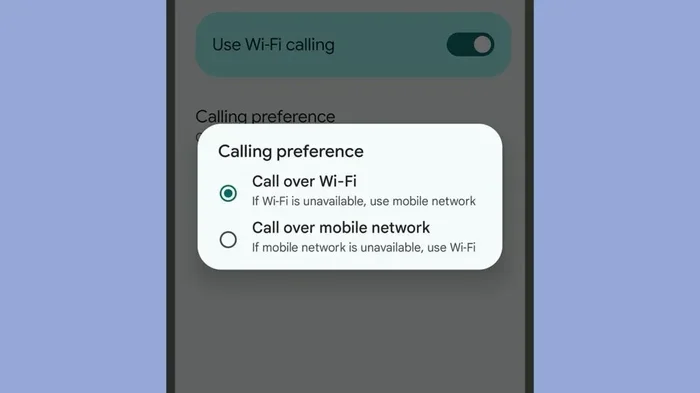
- Tap on Wi-Fi Calling
- Toggle the switch to turn it on
- You may need to agree to terms and conditions
Some Android phones may have slightly different menu names. Look for Wi-Fi Calling or Calls settings. If you cannot find it, check your phone manufacturer’s support page for model-specific instructions.
On some Android devices, you might also need to enable VoWiFi or VoLTE settings. These are related features that work hand in hand with WiFi Calling. VoLTE stands for Voice over LTE and helps improve call quality when you are on the cellular network. Together, these features make your calls sound better in all situations.
Benefits of Using WiFi Calling with AT
WiFi Calling offers several real advantages for AT customers. Let us look at why this feature is worth turning on.
Better Call Quality
One of the biggest benefits of WiFi Calling is improved call quality. When you use a strong Wi-Fi connection, your calls can sound clearer than traditional cellular calls. This is especially true with AT’s HD Voice technology. HD Voice gives you wider audio bandwidth, making conversations sound more natural.
Have you ever been on a call where the other person sounded robotic or choppy? WiFi Calling can fix that. It uses your internet connection to deliver a cleaner, more reliable audio stream. You will notice the difference right away, especially if you have been dealing with poor call quality for a while.
Another factor that improves call quality is the stability of your Wi-Fi connection. A wired Wi-Fi connection or a strong wireless signal makes a big difference. If your Wi-Fi signal is weak, your call quality may suffer. This is why placing your router in a central location in your home can help a lot.
Stay Connected in Dead Zones
We have all been there. You walk into a certain part of your house and your signal drops to zero. With WiFi Calling, this does not have to be a problem anymore. As long as you have a working Wi-Fi connection, you can make and receive calls even in areas with no cellular signal.
This is especially helpful if you live in a building with thick walls or in a rural area where AT towers are far away. You might also want to check if you can call using Wi-Fi and no service to understand how this works when you have zero cellular signal.
Think about all the spots in your home where you normally cannot get a signal. Your basement, your bedroom at the far end of the house, or your backyard. WiFi Calling can turn all of these spots into places where you can make clear calls. It is like extending your phone’s reach far beyond what the cell towers alone can provide.
Save on International Calls
If you call people in other countries, WiFi Calling can save you money. AT offers WiFi Calling to international numbers on many of its plans. Instead of paying high international calling rates, you can use your Wi-Fi connection to reach friends and family abroad.
This is a huge benefit for people with family or business contacts overseas. You get the convenience of making calls as if you were in the United States, even when you are traveling. International calling rates can add up fast, so this feature alone can justify keeping WiFi Calling turned on at all times.
Seamless Handoff Between Networks
Another great feature is the seamless handoff. When you start a call on Wi-Fi and then leave your house, your phone can switch to the cellular network without dropping the call. This smooth transition means you do not have to worry about losing your conversation.
This is especially useful when you are walking from your home to your car or from your office to a nearby coffee shop. Your phone handles the switch automatically. You just keep talking without any interruption.
Common WiFi Calling Problems and How to Fix Them
While WiFi Calling is generally reliable, you may run into issues from time to time. Here are the most common problems and their solutions.
WiFi Calling Not Turning On
If you cannot turn on WiFi Calling, try these steps:
- Make sure your phone is connected to Wi-Fi
- Check that your AT plan supports the feature
- Restart your phone and try again
- Update your phone software to the latest version
- Make sure your location services are turned on
Sometimes a simple restart fixes the issue. If not, updating your phone software often resolves compatibility problems. Also, make sure your Wi-Fi connection is stable. A weak or intermittent Wi-Fi signal can prevent WiFi Calling from working properly.
Calls Dropping During a Network Switch
Occasionally, calls may drop when your phone switches between Wi-Fi and cellular networks. This usually happens when the Wi-Fi signal is weak. To fix this:
- Move closer to your Wi-Fi router
- Check your router’s signal strength
- Try using a Wi-Fi extender to boost coverage
- Turn off WiFi Calling temporarily if the issue persists
If you find that your home Wi-Fi signal is not strong enough, you might want to look into a signal booster. Check out whether you can buy a Wi-Fi booster to improve your network coverage and keep your calls stable.
A Wi-Fi extender is another affordable option. It picks up your existing Wi-Fi signal and rebroadcasts it to areas of your home that are farther away. This can make a big difference in call quality and reliability.
Can You Use WiFi Calling Abroad?
Yes, you can use WiFi Calling when traveling internationally in many cases. AT supports WiFi Calling to international numbers on most of its plans. However, there are some things to keep in mind.
- Make sure WiFi Calling is turned on before you leave the country
- Connect to a Wi-Fi network at your destination
- Your contacts will see your US number when you call
- Data roaming settings may need to be adjusted
Keep in mind that WiFi Calling abroad works best when you have a stable Wi-Fi connection. If the Wi-Fi at your hotel or cafe is weak, you may still experience call issues. Always check your Wi-Fi signal strength before making important calls while traveling.
WiFi Calling vs Regular Cellular Calls: Which Is Better?
You might be wondering whether you should use WiFi Calling all the time or just when you need it. Let us compare the two.
WiFi Calling vs Regular Calls
Here is a quick comparison of WiFi Calling and regular cellular calls:
WiFi Calling: Uses your internet connection. Works well indoors. Great for areas with weak cell signal. No extra cost on most AT plans. May switch to cellular automatically.
Regular Cellular Calls: Uses AT cell towers. Works anywhere with coverage. Best for outdoor use. No internet needed. Standard call quality.
Both options have their place. WiFi Calling shines indoors and in areas with weak signals. Regular cellular calls are better outdoors where the cell signal is strong. The good news is that your phone handles the switch between the two automatically in most cases.
When to Stick with Regular Calls
WiFi Calling is not always the best choice. Here are times when regular cellular calls work better:
- When you are outdoors with strong cell signal
- When your Wi-Fi connection is slow or unstable
- When you need the lowest possible latency for real-time conversations
- When you are in an area with crowded Wi-Fi networks
The good news is that your phone handles the switch automatically in most cases. You do not need to think about it. Your phone will use Wi-Fi when it makes sense and fall back to cellular when needed. This automatic switching is one of the best things about WiFi Calling.
Final Thoughts on AT WiFi Calling
So, does AT allow WiFi Calling? Absolutely. AT&T offers WiFi Calling as a free and convenient feature on most of its plans. Whether you are dealing with weak signals at home, want better call quality, or need to stay connected while traveling, WiFi Calling has you covered.
Setting it up takes just a few minutes. The benefits are immediate. You get clearer calls, fewer dropped connections, and peace of mind knowing you can reach people even in dead zones. If you have a compatible device and a good Wi-Fi connection, there is no reason not to turn this feature on.
Take a few minutes today to check your phone settings. Turn on WiFi Calling and see the difference it makes. You might be surprised at how much better your calls sound. And if you ever run into issues, the fixes are usually simple and quick.
Stay connected with AT WiFi Calling. It is one of those features that you do not realize you need until you have it. Give it a try and make your phone calls better starting today.
Frequently Asked Questions
Is WiFi Calling free on AT?
Yes, WiFi Calling is included at no extra cost on most AT plans. Both postpaid and prepaid customers can use the feature without paying any additional fees. However, the calls still use your data allowance if you are not connected to Wi-Fi.
Can I use WiFi Calling without a cellular plan?
Generally, you need an active AT plan to use WiFi Calling. The feature works as an extension of your cellular service, not as a standalone replacement. You can check with AT to see if any standalone VoIP options are available for your needs.
Will my phone number show when I WiFi Call?
Yes, your AT phone number will display when you make a WiFi Call. The person you are calling will see your regular number, not a different one. This works the same way as a regular cellular call.
Does WiFi Calling use data?
WiFi Calling uses very little data. A typical voice call uses about 1 MB of data per minute. This is a tiny amount compared to streaming video or browsing the web. If you are connected to an unlimited Wi-Fi network, data usage is not a concern at all.
Can I WiFi Call internationally with AT?
Yes, AT supports WiFi Calling to international numbers on many of its plans. This lets you call friends and family abroad using Wi-Fi instead of expensive international rates. Just make sure WiFi Calling is turned on before you travel.
Why does my WiFi Calling keep turning off?
WiFi Calling may turn off automatically if your Wi-Fi signal becomes weak or unstable. Your phone may also disable it during a software update or if you travel to a location where AT does not support the feature. Check your settings and Wi-Fi connection to resolve this issue.