Do You Need A Router For Verizon 5g Home Internet Now
Verizon 5G Home Internet does include a built-in router called the 5G Home Gateway, but many users still need a separate router for better coverage, faster speeds, and more devices. Whether you need an extra router depends on your home size, the number of connected devices, and your internet usage habits. This guide breaks down everything you need to know about Verizon 5G Home setup and router requirements.
So you just signed up for Verizon 5G Home Internet, or you are thinking about doing it. Either way, one question is probably bouncing around in your head right now. Do you actually need a router for this service? The short answer is maybe. Verizon sends you a device called the 5G Home Gateway, and it kind of does it all. But there are situations where adding a separate router makes a lot of sense.
Let us walk through this together. We will cover what comes in the box, when you need extra gear, and how to set things up the right way. By the end, you will know exactly what you need for your home wireless network.
Key Takeaways
- Verizon 5G Home includes a gateway device: The 5G Home Gateway acts as both a modem and router, so you may not need a separate unit.
- Separate routers help with large homes: If you have a big house or dead zones, adding your own router can boost Wi-Fi coverage significantly.
- You can rent or buy your own equipment: Verizon offers equipment rental, but purchasing a third-party router can save money over time.
- Placement matters a lot: Where you put your router affects 5G signal strength and overall home network performance.
- Mesh systems are a great option: For homes with multiple floors or thick walls, a mesh network setup can solve coverage issues.
- Check your internet plan first: Not all Verizon 5G Home Internet plans require extra equipment, so verify before buying anything.
📑 Table of Contents
- What Is Verizon 5G Home Internet?
- Does Verizon 5G Home Come With a Router?
- When Do You Need a Separate Router?
- Verizon 5G Home Gateway vs. Third-Party Routers
- How to Set Up Your Router for Verizon 5G Home
- Common Mistakes to Avoid
- Can You Use a Wi-Fi Extender or Booster Instead?
- Is It Cheaper to Buy or Rent Equipment?
- Final Thoughts
What Is Verizon 5G Home Internet?
Verizon 5G Home Internet is a fixed wireless internet service. It uses 5G cellular towers to deliver internet to your home. You do not need a phone line, cable line, or fiber connection. A small device gets mounted outside your house, and it connects to Verizon’s 5G network. Inside your home, the 5G Home Gateway converts that signal into Wi-Fi you can use.
This service is part of Verizon’s broader push into fixed wireless internet. It is designed to compete with cable and fiber providers. The big selling point is simplicity. You get a single device that handles both the connection to Verizon’s network and the Wi-Fi inside your home.
How the 5G Home Gateway Works
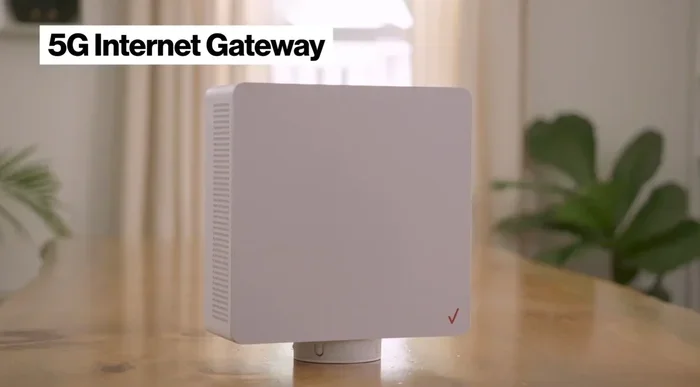
The 5G Home Gateway is the device Verizon sends you. It is a small box that sits inside your home. It connects to the outdoor antenna that Verizon installs on your property. The gateway then creates a Wi-Fi network inside your house.
Think of it as a combo unit. It works as a modem and a router at the same time. You plug it in, and it starts broadcasting a Wi-Fi signal. Most users can connect their phones, laptops, smart TVs, and other devices right away. No extra setup is needed for basic use.
Does Verizon 5G Home Come With a Router?
Yes and no. Verizon includes the 5G Home Gateway, which functions as a router. So technically, you do not need to buy a separate router to get online. The gateway handles the broadband connection and distributes Wi-Fi throughout your home.
But here is the catch. The gateway that Verizon provides is a basic device. It is designed to work well for small to medium homes with a moderate number of devices. If you live in a larger house or have many smart devices, the built-in router might not be enough.
What the Gateway Includes
The Verizon 5G Home Gateway comes with several features built in:
- Wi-Fi 6 support for faster wireless speeds
- Built-in firewall for basic security
- Ethernet ports for wired connections
- Dual-band connectivity on both 2.4 GHz and 5 GHz bands
- Parental controls and basic network management
For most casual users, these features are more than enough. You can stream videos, browse the web, work from home, and even game without any issues. But power users and large households may find the gateway lacking in certain areas.
When Do You Need a Separate Router?
Not everyone needs a second router. But certain situations make adding one a smart move. Here are the most common reasons you might want to buy your own router for Verizon 5G Home.
You Live in a Large Home
The Verizon gateway is designed for average-sized homes. If your house is over 2,000 square feet or has multiple floors, the Wi-Fi signal might not reach every room. Dead zones in the hallway, basement, or upstairs bedroom are common complaints.
Adding a separate router or a mesh system can fill in those gaps. You place the extra router in a central location or use multiple nodes to cover the entire house. This ensures every room gets a strong Wi-Fi signal.
You Have Many Connected Devices
Modern homes are full of smart devices. Smart TVs, phones, tablets, smart speakers, security cameras, and IoT gadgets all compete for bandwidth. The Verizon gateway can handle a reasonable number of devices, but it starts to struggle when you push it.
A dedicated home router with better processing power and more memory can manage heavy device loads without slowing down. If your household has 15 or more connected devices, an upgrade is worth considering.
You Want Faster Speeds
The gateway that Verizon provides is good, but it is not the fastest router on the market. If you are paying for a high-speed Verizon 5G Home Internet plan, you want equipment that can keep up. Third-party routers often offer better throughput, lower latency, and more advanced features.
For example, if you are into online gaming or 4K streaming, a quality router makes a noticeable difference. The gateway works fine for casual use, but serious users will benefit from a dedicated 5G home router.
You Need Advanced Features
Verizon’s gateway keeps things simple. That is a plus for many users. But if you want advanced controls like custom DNS settings, VPN support, advanced QoS (Quality of Service), or guest networks, the gateway falls short.
A third-party router gives you full control over your home network setup. You can customize every setting to match your needs. This is especially useful for tech-savvy users who want to squeeze every bit of performance out of their connection.
Verizon 5G Home Gateway vs. Third-Party Routers
Let us compare the two options side by side. This will help you decide whether to stick with Verizon’s equipment or invest in your own.
| Feature | Verizon 5G Home Gateway | Third-Party Router |
|---|---|---|
| Price | Included with service (rental fee may apply) | $100 to $300+ one-time purchase |
| Wi-Fi Standard | Wi-Fi 6 | Wi-Fi 6 or Wi-Fi 6E (higher-end models) |
| Coverage Area | Small to medium homes | Medium to large homes (especially with mesh) |
| Device Limit | Up to 15-20 devices | 30+ devices on quality models |
| Advanced Features | Basic | Extensive (VPN, QoS, custom DNS, etc.) |
| Setup Complexity | Very easy | Moderate to easy |
| Monthly Cost | Rental fee of around $10-$15 | No recurring fee after purchase |
Over time, buying your own router can save you money. The rental fee from Verizon adds up. Within a year or two, a purchased router pays for itself. Plus, you own the equipment, so you are not stuck with outdated hardware when Verizon updates its offerings.
Just keep in mind that you should check compatibility before buying. Not every router works perfectly with Verizon 5G Home. Look for routers that support bridge mode or IP passthrough, as these work best with Verizon’s gateway setup.
How to Set Up Your Router for Verizon 5G Home
If you decide to add a router, the setup process is straightforward. Here is a step-by-step guide to get your home wireless network running smoothly.
Step 1: Connect the Gateway
First, make sure your Verizon 5G Home Gateway is set up and working. It should be connected to the outdoor antenna and plugged into a power outlet. The gateway will broadcast a default Wi-Fi network. Connect to it and verify that you have internet access.
Step 2: Place Your Router in the Right Spot
Router placement is one of the most important factors in Wi-Fi performance. Place your router in a central location in your home. Avoid putting it in closets, behind TVs, or near thick walls. The higher up it is, the better the signal spreads.
If you have a multi-story home, try placing the router on the middle floor. This helps the signal reach both upstairs and downstairs rooms effectively.
Step 3: Connect the Router to the Gateway
Use an Ethernet cable to connect the gateway to your new router. Plug one end into the gateway’s LAN port and the other into the router’s WAN or Internet port. This creates a wired backhaul connection, which is faster and more stable than wireless linking.
Step 4: Configure Your Router
Access your router’s admin panel through a web browser or the companion app. Set up your Wi-Fi name and password, and adjust any advanced settings you want. If you are not sure what to change, the default settings work fine for most users.
One important setting to check is the IP address. You may need to set your router to bridge mode so it does not conflict with the gateway’s built-in router. This prevents double NAT issues that can cause connection problems.
Step 5: Test Your Connection
Once everything is connected, run an internet speed test from different rooms in your home. Check the speeds near the gateway, in the middle of the house, and in the farthest room. If speeds are strong everywhere, you are all set.
If you still see weak spots, consider adding a Wi-Fi extender or switching to a mesh system. These tools help extend coverage to hard-to-reach areas of your home.
Common Mistakes to Avoid
Setting up a router for Verizon 5G Home Internet is not hard, but people do make mistakes. Here are a few to watch out for.
- Placing the router too far from the gateway. A long Ethernet cable is fine, but wireless backhaul between two routers can cut your speeds in half.
- Ignoring double NAT. When two routers both do network address translation, it can block certain apps and services from working properly.
- Buying an incompatible router. Not all routers play nice with Verizon’s gateway. Check for bridge mode support before you buy.
- Skipping firmware updates. Keeping your router updated ensures you have the latest security patches and performance improvements.
- Not testing coverage. A quick speed test in every room saves you from surprise dead zones later on.
Can You Use a Wi-Fi Extender or Booster Instead?
If you do not want to buy a whole new router, a Wi-Fi extender or booster is a cheaper alternative. These devices pick up the existing Wi-Fi signal from the gateway and rebroadcast it to areas with weak coverage.
Extenders work well for small coverage gaps. For example, if your backyard or garage has a weak signal, a simple extender can help. However, extenders often reduce speeds because they use the same radio to receive and transmit data.
If you want a more seamless experience, consider a mesh Wi-Fi system. Mesh systems use multiple nodes that work together to create one unified network. They are more expensive than extenders but deliver much better performance throughout the home.
Before you buy any extra equipment, think about what you really need. For many Verizon 5G Home users, the gateway alone is enough. Only add extra gear if you are experiencing real coverage or speed problems.
Is It Cheaper to Buy or Rent Equipment?
This is a question that comes up a lot. Verizon charges a rental fee for the 5G Home Gateway, typically around $10 to $15 per month. Over a year, that adds up to $120 to $180.
If you buy a quality third-party router, you pay once and own it forever. A good router costs between $100 and $300, depending on the brand and features. Over two to three years, buying your own equipment saves you money.
But there is a trade-off. Verizon provides technical support for their equipment. If something goes wrong, you can call them and they will help. With a third-party router, you are on your own for troubleshooting. That said, most modern routers are very user-friendly and easy to manage.
If you are unsure whether to buy or rent, start with the Verizon gateway. If you find it limiting after a few weeks, then consider investing in your own home router. This approach lets you test the service before committing to extra equipment.
Final Thoughts
So, do you need a router for Verizon 5G Home Internet? For many users, the answer is no. The 5G Home Gateway that Verizon provides does the job well for small to medium homes with typical internet usage. It is simple, reliable, and easy to set up.
However, if you live in a larger home, have many connected devices, or need advanced features, adding a separate router is a smart move. It improves Wi-Fi coverage, boosts speeds, and gives you more control over your home network.
The bottom line is this. Evaluate your needs honestly. Consider your home size, device count, and internet habits. Then decide whether the Verizon gateway alone is enough or if you need to invest in additional equipment. Either way, you will be set up to enjoy fast, reliable 5G wireless internet at home.
And if you ever wonder about getting internet without a traditional landline or exploring other internet options, there are plenty of resources out there to help you make the best choice for your household.
Frequently Asked Questions
Can I use my own router with Verizon 5G Home Internet?
Yes, you can use your own router with Verizon 5G Home Internet. You will need to connect it to the Verizon 5G Home Gateway using an Ethernet cable. Make sure your router supports bridge mode or IP passthrough to avoid double NAT issues. Check Verizon’s compatibility list before purchasing to ensure your router works with their service.
Does Verizon charge extra for the 5G Home Gateway?
Verizon includes the 5G Home Gateway with your service plan. However, there may be a monthly rental fee of around $10 to $15. This fee is usually included in your bill. If you prefer to own your equipment, you can purchase a compatible router and connect it to the gateway instead.
What is the difference between the Verizon gateway and a regular router?
The Verizon 5G Home Gateway is a combo device that works as both a modem and a router. A regular router only creates the Wi-Fi network and distributes internet to your devices. The gateway handles the 5G connection from Verizon’s network and then shares it via Wi-Fi and Ethernet ports.
Will adding a second router improve my internet speed?
Adding a second router can improve your speeds in areas where the gateway’s signal is weak. It does not increase your overall internet plan speed, but it can deliver faster and more stable connections in rooms that are far from the gateway. A wired connection between the gateway and the new router works best for maximum performance.
Can I use a mesh Wi-Fi system with Verizon 5G Home?
Yes, you can use a mesh Wi-Fi system with Verizon 5G Home Internet. Connect the mesh router to the Verizon gateway using an Ethernet cable. The mesh nodes will then extend your Wi-Fi coverage throughout your home. This is an excellent option for larger homes or houses with thick walls that block the signal.
How many devices can the Verizon 5G Home Gateway handle?
The Verizon 5G Home Gateway can typically handle 15 to 20 connected devices at once. This is enough for most households. If you have more devices, such as smart home gadgets, security cameras, and multiple phones and laptops, adding a separate router with better device management can help keep everything running smoothly.