Does Xfinity Use Coax Or Ethernet For Home Internet
Xfinity uses both coaxial cable and Ethernet to deliver home internet, depending on your plan and setup. Most Xfinity connections rely on coax for the main line into your home, but Ethernet plays a key role in wired speed and stability. Understanding which cable does what helps you get the most from your Xfinity service.
Key Takeaways
- Xfinity primarily uses coaxial cable for the main internet connection into your home, especially for cable-based plans.
- Ethernet provides a direct wired connection from your modem or router to your device for maximum speed and stability.
- Coax and Ethernet serve different purposes in your Xfinity home network setup.
- Xfinity xFi gateways support both connection types, giving you flexibility in how you connect.
- Using Ethernet over coax can boost speeds significantly for gaming, streaming, and work-from-home needs.
- Your specific Xfinity plan determines which cables and equipment you receive.
📑 Table of Contents
- What Type of Connection Does Xfinity Use?
- Coax vs Ethernet: Understanding the Difference
- Ethernet vs Coax: Speed and Performance Comparison
- Setting Up Your Xfinity Home Network
- Tips for Getting the Best Xfinity Internet Speeds
- Common Mistakes People Make with Xfinity Connections
- Expert Insights on Xfinity Connection Types
- Key Takeaways
- Conclusion
What Type of Connection Does Xfinity Use?
If you are wondering does Xfinity use coax or Ethernet, the answer is both. But they do very different jobs inside your home network. Xfinity delivers internet to your house mainly through coaxial cable. Then, inside your home, you can use Ethernet to connect devices directly for better performance.
Most people think of one cable type when they hear “Xfinity internet.” But the truth is that Xfinity uses a mix of technologies. The outside line into your home is almost always coax. The inside line to your devices can be coax, Ethernet, or even Wi-Fi through a gateway device.
Coaxial cable has been the backbone of cable internet for decades. It carries data from Xfinity’s network to your modem. Ethernet cable then takes that data from your modem or router to your computer, TV, or gaming console. Knowing this difference helps you troubleshoot slow speeds and setup issues.
Xfinity offers several internet speed tiers. Each tier may use different equipment. Some plans come with a standard modem. Others include a gateway device that handles both Wi-Fi and wired connections. Your Xfinity home network setup depends heavily on the plan you choose and the equipment you have.
How Xfinity Delivers Internet to Your Home
The journey of your internet signal starts outside your home. Xfinity sends data through their network using fiber and coaxial lines. The final leg, called the “last mile,” usually uses coaxial cable to reach your house. This is true for most cable internet plans.
Here is how the signal travels:
- Xfinity network hub sends data through fiber or coax lines across their infrastructure.
- The coaxial line enters your home, usually through a wall outlet or utility box.
- Your Xfinity modem or gateway receives the signal and converts it for your devices.
- Ethernet or Wi-Fi then distributes the internet inside your home to your devices.
Some newer Xfinity plans use fiber optic technology. But even in those cases, the connection inside your home may still rely on coax or Ethernet depending on your setup. The key point is that coax brings the internet to your door, and Ethernet sends it to your devices.
Coax vs Ethernet: Understanding the Difference
Many people confuse coax and Ethernet cables. They look different and serve different roles in your network. Let us break down each one so you understand exactly what you are dealing with.
What Is Coaxial Cable?
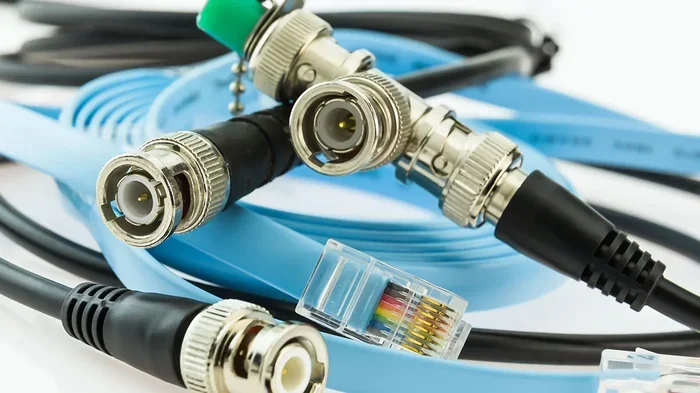
Coaxial cable is the thick cable with a copper center and a metal shield around it. It has been used for cable TV and cable internet for a long time. Xfinity uses coax to bring internet from their network to your modem.
Coax cables have a coax connector on each end. This is the round plug with a small pin in the center. You will see this plug on the back of your Xfinity modem and on the wall outlet in your home.
Coax can handle decent internet speeds. But it is not the fastest option available today. Signal quality can degrade over long distances. This is why Ethernet is often preferred for the final connection to your device.
What Is Ethernet Cable?
Ethernet cable is the flat or round cable you plug directly into your computer or router. It uses a different connector called an RJ45 plug. Ethernet cables come in different categories, like Cat5e, Cat6, and Cat6a.
Ethernet provides a direct, wired connection between your modem or router and your device. This means no Wi-Fi interference. No signal loss from walls. Just a clean, fast data path.
For anyone asking does Xfinity use coax or Ethernet for the best speed, Ethernet wins for the final connection to your device. It is more stable and often faster than wireless options.
Ethernet vs Coax: Speed and Performance Comparison
Now let us compare the two connection types head to head. This table shows the key differences between coax and Ethernet for Xfinity internet users.
| Feature | Coaxial Cable | Ethernet Cable |
|---|---|---|
| Typical Max Speed | Up to 1 Gbps (varies) | Up to 10 Gbps (Cat6a) |
| Latency | Moderate | Very Low |
| Interference Risk | Higher (shared medium) | Lower (dedicated line) |
| Use in Xfinity Setup | Main line to home | Device to modem/router |
| Setup Difficulty | Easy (plug and play) | Easy (plug and play) |
| Best For | Main home connection | Gaming, streaming, work |
As you can see, Ethernet offers better speed and lower latency than coax. This is especially true for heavy internet users. Gamers and remote workers benefit the most from a direct Ethernet connection.
Coax is still important. It brings the internet into your home. But for the best experience, use Ethernet whenever possible. This is especially true if you are doing online gaming or video conferencing for work.
One thing to keep in mind: your actual speeds depend on your Xfinity plan. Even the best Ethernet cable cannot give you speeds faster than your plan allows. Check your Xfinity speed tiers to know what your plan supports.
Setting Up Your Xfinity Home Network
Setting up your Xfinity network is easier than most people think. You can use coax, Ethernet, or both depending on what you need. Here is a simple guide to get you started.
Step 1: Connect the Coax Cable
Start by connecting the coaxial cable from your wall outlet to your Xfinity modem or gateway. This is the main line that brings internet into your home. Make sure the connection is tight and secure.
If you are doing a Xfinity self-install, the coax cable usually comes in the box with your modem. Just plug one end into the wall and the other into the modem. Wait for the lights on your modem to stabilize.
Step 2: Connect Ethernet to Your Devices
Once your modem is online, use an Ethernet cable to connect your devices. Plug one end into the modem or router and the other into your computer, smart TV, or gaming console.
For the best results, use a Cat6 or Cat6a Ethernet cable. These support speeds up to 10 Gbps over short distances. They are perfect for wired connections that need maximum performance.
You can also connect your Wi-Fi router to the modem using Ethernet. This gives you a strong wired backhaul for your wireless network. All your Wi-Fi devices will then benefit from the stable wired connection.
Step 3: Test Your Connection
After setup, run an internet speed test. This tells you if you are getting the speeds you pay for. You can use the Xfinity speed test tool or any reliable third-party test site.
If your speeds are lower than expected, try these quick fixes:
- Check that all cable connections are tight.
- Restart your modem and router.
- Move your router to a central location in your home.
- Switch from Wi-Fi to Ethernet for a direct test.
Tips for Getting the Best Xfinity Internet Speeds
Want to squeeze every bit of speed out of your Xfinity connection? Here are some practical tips that make a real difference.
Use Ethernet for Critical Devices
Any device that needs fast and reliable internet should use Ethernet. This includes desktop computers, gaming consoles, and smart TVs that stream 4K content. Wired connections eliminate Wi-Fi lag and interference.
If you work from home, plug your work computer directly into your router with Ethernet. You will notice fewer dropped calls and smoother video conferences.
Upgrade Your Cables
Old cables can limit your speeds. If you are still using Cat5 cables, upgrade to Cat5e or Cat6. These newer cables support higher speeds and better signal quality.
Similarly, check your coax cables. Damaged or old coax cables can cause signal loss. Replace them if you notice any physical wear or damage.
Position Your Gateway Correctly
Where you place your Xfinity gateway matters. Keep it in a central, open area of your home. Avoid hiding it in closets or behind furniture. Good placement improves both wired and wireless performance.
Consider the Xfinity xFi Gateway
The Xfinity xFi gateway is a powerful device that combines a modem and router. It supports both coax input and Ethernet output. It also comes with advanced Wi-Fi features like xFi Complete and xFi Advanced Security.
If you have the option, the xFi gateway is a great choice for a complete home network setup. It handles everything from the coax line to your Wi-Fi devices.
Common Mistakes People Make with Xfinity Connections
Even with the best equipment, people make mistakes that slow down their network. Here are the most common ones to avoid.
- Using cheap Ethernet cables. Not all cables are created equal. A $3 cable may not support gigabit speeds. Invest in a quality Cat6 or Cat6a cable.
- Ignoring coax connections. A loose coax connection can cause intermittent internet problems. Always check that your coax cables are firmly connected.
- Relying only on Wi-Fi. Wi-Fi is convenient, but it is not as fast or stable as Ethernet. For critical tasks, always use a wired connection.
- Not restarting equipment regularly. Modems and gateways benefit from regular restarts. A simple reboot can fix many connection issues.
- Using the wrong coax splitter. If you split your coax connection, use a high-quality splitter. Cheap splitters can weaken your signal and reduce speeds.
Avoiding these mistakes keeps your Xfinity home network running smoothly. Small changes can lead to big improvements in speed and reliability.
Expert Insights on Xfinity Connection Types
Network professionals agree that the best setup combines coax and Ethernet. Coax brings the internet to your home, and Ethernet distributes it to your devices. This dual approach gives you both convenience and performance.
One thing experts often mention is the importance of your local internet infrastructure. In some areas, Xfinity has upgraded to fiber. In others, coax is still the primary method. Check what is available in your area to understand your full connection options.
Another expert tip: if you have multiple devices that need wired connections, use a switch. A network switch lets you connect several Ethernet cables to one router port. This is a cost-effective way to expand your wired network without buying extra routers.
For those who want to learn more about how Xfinity internet works away from home, check out our guide on Can I Connect To Xfinity Wi Fi Away From Home. It covers remote access and how your Xfinity connection behaves outside your home network.
Also, if you are dealing with Wi-Fi band issues on your phone or connected devices, understanding your 2.4 GHz vs 5 GHz settings is important. Read our article on Can I Force My Phone To Use 2 4 Ghz Wifi for helpful tips on managing your wireless bands.
Key Takeaways
- Xfinity uses coaxial cable as the primary method to deliver internet into your home.
- Ethernet is the best choice for connecting individual devices directly to your modem or router.
- Coax handles the long-distance connection from Xfinity’s network to your house.
- Ethernet handles the short-distance connection from your router to your devices.
- Using both together gives you the best of both worlds: reliable delivery and fast local distribution.
- Your Xfinity plan and equipment determine which cables and speeds you can expect.
Conclusion
The answer to does Xfinity use coax or Ethernet is clear: Xfinity uses both, and they work together. Coaxial cable brings the internet from Xfinity’s network into your home. Ethernet then carries that internet to your devices for the best possible speed and stability.
Understanding this difference helps you make smarter choices about your home network setup. Use coax for the main connection. Use Ethernet for your most important devices. And use Wi-Fi for the rest.
With the right setup, you can get the most out of your Xfinity internet plan. Whether you are streaming movies, working from home, or gaming online, knowing your cables makes all the difference. Take the time to set up your network properly, and you will enjoy faster, more reliable internet every day.
If you are curious about using your smartwatch or other wearables while your phone is away, check out our piece on Can I Leave My Phone At Home And Use My Galaxy Watch 5. It covers connectivity options that complement your home network knowledge.
Frequently Asked Questions
Does Xfinity use coax or Ethernet for internet?
Xfinity uses coaxial cable to deliver internet into your home and Ethernet to connect your devices directly to the modem or router. Both cables play important roles in your home network setup.
Can I use Ethernet instead of coax with Xfinity?
No, you cannot replace the coax line that brings internet into your home. However, you can use Ethernet cables inside your home to connect devices directly to your modem or router for better speeds.
Which is faster, coax or Ethernet?
Ethernet is generally faster and more stable than coax for connecting devices. Coax handles the main line from Xfinity to your home, while Ethernet provides the best local connection to your devices.
Do I need an Ethernet cable if I have Wi-Fi?
You do not need Ethernet if Wi-Fi works well for you. But using Ethernet for important devices like computers and gaming consoles gives you faster speeds and a more reliable connection.
What type of Ethernet cable does Xfinity recommend?
Xfinity supports Cat5e, Cat6, and Cat6a Ethernet cables. For the best performance, use Cat6 or Cat6a cables, especially if you have a gigabit or faster internet plan.
Can I run both coax and Ethernet in my home?
Yes, absolutely. Most Xfinity setups use coax for the main internet line and Ethernet for device connections. This combination gives you the best speed and reliability for your home network.