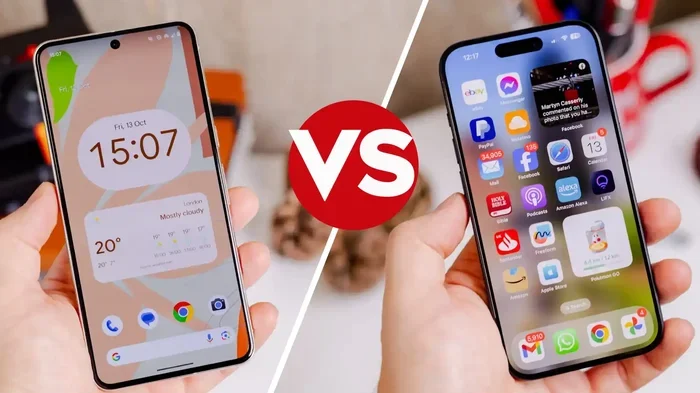
Are Apple Apps Compatible With Android Phones Today
Are Apple Apps Compatible With Android phones? The short answer is no — most Apple apps do not run natively on Android. However, you can access some Apple services through web apps, third-party tools, and workarounds. This guide covers everything you need to know about Apple apps on Android, including what works, what does not, and the best alternatives available today.
Have you ever wondered if your favorite Apple apps would work if you switched to an Android phone? It is a question many people ask, especially those thinking about leaving the Apple ecosystem. The truth is, the answer is more complicated than a simple yes or no.
Apple and Google run very different operating systems. iOS and Android are built on entirely different foundations. This means that most Apple apps are designed specifically for iPhones and iPads. They do not work on Android devices out of the box. But that does not mean you are completely out of luck. There are workarounds, web versions, and some official apps that bridge the gap.
In this guide, we will dive deep into Apple apps on Android. We will look at what works, what does not, and how you can get the most out of your Android phone even if you are coming from an iPhone. Whether you are curious about switching or just want to know your options, this article has you covered.
Key Takeaways
- No native support: Apple apps like iMessage, FaceTime, and most iOS apps do not work on Android devices.
- Workarounds exist: You can use web-based versions, emulators, and third-party tools to access some Apple features.
- Apple Music and Apple TV+ work on Android: Apple has released official apps for these services on the Google Play Store.
- Cross-platform alternatives are plentiful: Apps like WhatsApp, Spotify, and Google services offer similar features across both platforms.
- The gap is closing slowly: Apple has started releasing more apps on Android, but the Apple ecosystem remains largely closed.
- Sideloading is risky: Trying to install iOS apps on Android through unofficial methods can lead to security and performance issues.
- Your best bet is to embrace Android apps: The Google Play Store has millions of apps that cover nearly every need.
📑 Table of Contents
- Why Are Apple Apps Not Available on Android?
- Can You Run Apple Apps on Android?
- Apple Apps That Officially Work on Android
- Popular Apple Services You Can Access on Android
- The Best Alternatives to Apple Apps on Android
- Common Mistakes People Make When Switching from Apple to Android
- What the Future Holds for Apple-Android Compatibility
- Final Thoughts on Apple Apps and Android Compatibility
Why Are Apple Apps Not Available on Android?
Apple builds its own hardware and software. This gives the company tight control over its app ecosystem. Most Apple apps are designed to take full advantage of iOS features. They rely on Apple-specific frameworks and coding languages like Swift and Objective-C.
Android uses a completely different architecture. It runs on Java and Kotlin code. The two platforms do not share the same app runtime environment. This is the main reason why Apple cannot simply port its apps to Android.
Here are some key reasons why iOS apps on Android do not exist natively:
- Different programming languages: iOS apps use Swift and Objective-C. Android apps use Java and Kotlin.
- Separate development tools: Apple uses Xcode for app development. Google uses Android Studio.
- Hardware differences: Apple designs both the chip and the software. Android runs on many different devices from many manufacturers.
- Business strategy: Apple benefits from keeping its ecosystem closed. This encourages users to stay within the Apple world.
- Security and quality control: Apple wants to maintain strict standards for its apps. Allowing them on Android would reduce that control.
Apple also has a strong financial incentive to keep its apps exclusive to its own devices. When you buy an iPhone, you are more likely to stay in the Apple ecosystem. You buy Apple Music, Apple TV+, iCloud storage, and other services. This lock-in strategy is a big part of Apple’s business model.
The Role of Apple’s Ecosystem Lock-In
Apple has built a walled garden around its products. Your iPhone works seamlessly with your Mac, iPad, Apple Watch, and AirPods. This deep integration is a major selling point. It is also a major barrier to switching to Android.
When you use Apple apps on Android, you lose access to many of these integrations. Your iMessages will not sync with your friends on iPhones. AirDrop will not work. Apple Pay will not function the same way. These missing features can make the switch feel like a step backward.
However, Apple has started to loosen its grip in some areas. The company now offers official apps for Android users. This shows that Apple recognizes the value of reaching a wider audience. But the core iOS apps remain exclusive to Apple devices.
Can You Run Apple Apps on Android?
The short answer is no, not directly. You cannot download an iOS app from the App Store and install it on an Android phone. The file formats are different. The code is different. The way apps interact with the operating system is different.
But there are some creative workarounds. These methods are not perfect, but they can help you access certain Apple features on your Android device.
Web-Based Alternatives
Many Apple services have web versions that work in any browser. You do not need an iPhone to use them. Here are some examples:
- iCloud.com: You can access your photos, files, and notes through a web browser.
- Apple Music (web player): Stream your music on any device with a browser.
- Apple TV+: Watch Apple original shows on the web.
- iMessage (web hacks): Some third-party tools allow limited iMessage access on Android, but these are not official.
These web versions are not as full-featured as the native apps. They lack some integrations and notifications. But they are a good starting point if you need basic access to Apple services.
Emulators and Third-Party Tools
Some developers have created tools that let you run iOS apps on other platforms. However, these are not always reliable or safe. Here is what you should know:
- iOS emulators for Android: Some apps claim to emulate iOS on Android. Most of these are scams or contain malware.
- Sideloading: This means installing apps from outside the official store. On Android, this is possible but risky.
- Remote access tools: Some services let you control an iPhone remotely from an Android device. This is not the same as running the app natively.
We strongly advise against using unofficial emulators or sideloading tools. These can expose your phone to viruses and data theft. Stick to official methods whenever possible.
Quick Tip: If you want to try an Apple service on Android, always use the official website or the official app from the Google Play Store. Avoid any app that promises to run iOS apps on your Android phone. These are almost always unsafe.
Apple Apps That Officially Work on Android
While most Apple apps are not available on Android, Apple has released a few official apps for the Google Play Store. These apps are designed specifically for Android users. They work well and receive regular updates.
Apple Music
Apple Music on Android is one of the best examples of Apple embracing cross-platform compatibility. The app is fully featured and works just like the iOS version. You can stream music, download songs, and access curated playlists. It also integrates with Google Assistant and Android’s media controls.
Apple Music offers over 100 million songs. It includes exclusive content and radio stations. The app is free to download and comes with a free trial. After that, you need a subscription.
Apple TV
The Apple TV app on Android lets you watch Apple TV+ shows and movies. You can also access content from other streaming services through the app. The interface is clean and easy to use. It supports Chromecast and Android TV devices.
Apple TV+ has a growing library of original content. Shows like Ted Lasso, Severance, and The Morning Show are popular choices. The app also lets you buy or rent movies and TV shows.
Apple Devices
This app helps you set up and manage your Apple devices. It is useful if you have an iPhone but also use an Android phone or tablet. The app provides setup guides, troubleshooting tips, and device management tools.
Apple Wallet
Apple Wallet has a limited presence on Android. You can add some passes and loyalty cards. But it does not support Apple Pay on Android devices. The functionality is much more limited compared to the iOS version.
Move to iOS
This app helps Android users switch to an iPhone. It is not an Apple app you would use on Android long-term. But it is a useful tool if you are considering making the switch. It transfers your contacts, photos, and accounts to your new iPhone.
| Apple App | Available on Android? | Full Feature Set? |
|---|---|---|
| Apple Music | Yes | Yes |
| Apple TV | Yes | Yes |
| Apple Devices | Yes | Yes |
| Apple Wallet | Limited | No |
| Move to iOS | Yes | Yes (for setup) |
| iMessage | No | N/A |
| FaceTime | No | N/A |
| Pages, Numbers, Keynote | No | N/A |
| Find My | No | N/A |
| Apple Arcade | No | N/A |
As you can see from the table, the list of Apple apps available on Android is short. Most of the core Apple apps remain exclusive to iOS devices. This is unlikely to change anytime soon.
Popular Apple Services You Can Access on Android
Even though most Apple apps do not work on Android, you can still access many Apple services through other means. Here are some of the most popular ones and how you can use them on your Android device.
iCloud on Android
Apple does not have an official iCloud app for Android. But you can access your iCloud account through a web browser. Go to iCloud.com and sign in with your Apple ID. You can view your photos, files, notes, and contacts. You can also manage your iCloud storage.
The web experience is not as smooth as the native app on an iPhone. It lacks some features like real-time syncing and background uploads. But it gets the job done for basic needs.
iMessage and FaceTime Alternatives
iMessage and FaceTime are two of Apple’s most popular apps. They are not available on Android. But there are great cross-platform alternatives:
- WhatsApp: Works on both iOS and Android. Supports text, voice, and video calls.
- Telegram: Fast and feature-rich messaging app available on both platforms.
- Google Meet: A great alternative to FaceTime for video calls.
- Signal: A privacy-focused messaging app that works on both platforms.
- Facebook Messenger: Widely used and easy to set up on any device.
These apps offer similar features to iMessage and FaceTime. They also work across different devices and operating systems. This makes them ideal for people who use both iPhones and Android phones.
AirDrop Alternatives
AirDrop is one of Apple’s most beloved features. It lets you share files instantly between Apple devices. Android does not have a direct equivalent. But there are some great alternatives:
- Google Nearby Share: Lets you share files between Android devices and even some Chromebooks.
- Snapdrop: A web-based tool that works in any browser on any device.
- Send Anywhere: A cross-platform file-sharing app that supports both iOS and Android.
- Xender: A popular file-sharing app that works across platforms.
None of these alternatives are as seamless as AirDrop. But they get the job done and offer similar functionality.
Apple Arcade on Android
Apple Arcade is a gaming subscription service. It is not available on Android. There are no official Apple Arcade games on the Google Play Store. If you want to play Apple Arcade games, you need an Apple device.
However, there are many great mobile games available on Android. The Google Play Store has thousands of high-quality games. Many of them are free or low-cost. You will not miss out on gaming if you switch to Android.
The Best Alternatives to Apple Apps on Android
If you are switching from iPhone to Android, you will need to find replacements for your favorite Apple apps. The good news is that Android has excellent alternatives for nearly every Apple app.
Messaging
Instead of iMessage, use WhatsApp or Google Messages. Both apps support group chats, voice messages, and high-quality media sharing. Google Messages also supports RCS, which offers features similar to iMessage like read receipts and typing indicators.
Video Calling
Instead of FaceTime, use Google Meet, WhatsApp, or Zoom. All three apps work on Android and support video and audio calls. Google Meet integrates well with Google Calendar and Gmail.
Notes
Instead of Apple Notes, use Google Keep or Microsoft OneNote. Both apps are free and work across all platforms. Google Keep is simple and fast. OneNote offers more advanced features like handwriting support and document scanning.
Photos
Instead of the Apple Photos app, use Google Photos. It offers powerful search, automatic backups, and free storage up to a certain limit. Google Photos works on both Android and iOS. It is one of the best photo management apps available.
Maps and Navigation
Instead of Apple Maps, use Google Maps. It is the gold standard for mobile navigation. It offers real-time traffic updates, satellite views, and offline maps. Google Maps also works great on iOS if you ever switch back.
Instead of the Apple Mail app, use Gmail or Outlook. Both apps are excellent and support multiple email accounts. Gmail is the default email app on most Android phones. It offers powerful search and smart categorization.
Common Mistakes People Make When Switching from Apple to Android
If you are thinking about switching from iPhone to Android, there are some common mistakes you should avoid. These mistakes can make the transition harder than it needs to be.
Assuming All Apple Apps Will Work on Android
This is the biggest mistake people make. Not all Apple apps work on Android. You cannot simply download iMessage or FaceTime from the Google Play Store. You need to find alternative apps before you make the switch.
Not Backing Up Your Data Properly
Switching from iPhone to Android requires proper data backup. Use Apple’s Move to iOS app in reverse or use Google’s setup wizard. Make sure your contacts, photos, and messages are backed up before you erase your iPhone.
Ignoring the Learning Curve
Android is different from iOS. The interface, settings, and app layouts are not the same. Give yourself time to learn the new system. Explore the settings and customize your phone to your liking.
Using Unofficial Apps to Access Apple Features
We mentioned this before, but it is worth repeating. Do not use unofficial apps or emulators to access Apple features on Android. These apps often contain malware and can compromise your personal data. Stick to official apps and web services.
Underestimating the Value of the Google Ecosystem
Android is not just a phone. It is part of a larger ecosystem. Google offers apps and services that rival Apple’s. Google Drive, Google Photos, Google Assistant, and Google Calendar are all excellent. Once you explore them, you may find that you prefer the Android experience.
Expert Insight: According to mobile technology analysts, the gap between iOS and Android is shrinking every year. Both platforms are adopting features from each other. Apple has started releasing apps on Android. Google has improved its cross-platform services. The future of cross-platform compatibility looks brighter than ever.
What the Future Holds for Apple-Android Compatibility
The relationship between Apple and Android is complex. The two companies are competitors, but they also cooperate in some areas. For example, Google pays Apple billions of dollars each year to be the default search engine on Safari. This shows that even rivals can work together.
So what does the future hold for Apple apps on Android? Here are some trends to watch:
- More Apple apps on Android: Apple may release more of its apps on Android in the future. Apple Music and Apple TV+ are proof of this trend.
- Better cross-platform tools: Tools like Move to iOS show that both companies are investing in making switching easier.
- Web apps and cloud services: As web technology improves, more Apple services may become accessible through browsers on any device.
- Regulatory pressure: Governments around the world are pushing for more open ecosystems. This could force Apple to make its apps available on more platforms.
- Progressive Web Apps (PWAs): PWAs are web apps that behave like native apps. They could become a bridge between Apple and Android ecosystems.
It is unlikely that Apple will ever make all of its apps available on Android. The company’s business model depends on keeping users in its ecosystem. But we can expect to see more official apps and better cross-platform support in the years ahead.
Final Thoughts on Apple Apps and Android Compatibility
So, are Apple apps compatible with Android phones today? The answer is mostly no. Most Apple apps do not work on Android devices. The two platforms are built differently and serve different ecosystems.
However, this does not mean you cannot use Apple services on an Android phone. Apple Music, Apple TV, and several other apps are available on Android. Web versions of iCloud and other services give you basic access to your Apple data. And there are excellent cross-platform alternatives for the apps that are not available.
If you are considering switching from iPhone to Android, do your research first. Make a list of the Apple apps you use most. Find Android alternatives for each one. Test those alternatives before you make the switch.
The mobile world is more connected than ever. Both Apple and Android offer incredible experiences. The best phone is the one that fits your needs. Whether that is an iPhone or an Android device, you will find great apps and services to support you.
Embrace the platform you choose. Explore its app store, its services, and its community. You will find that Android has everything you need. And if you ever miss an Apple app, there is likely a great alternative waiting for you.
Apple apps on Android are limited, but your options are not. With the right tools and a positive attitude, you can have a fantastic mobile experience on any platform. The future of cross-platform compatibility is bright, and we are excited to see what comes next.
Frequently Asked Questions
Can I download iMessage on my Android phone?
No, iMessage is not available on Android. It is an Apple-exclusive app that only works on iPhones, iPads, and Macs. You will need to use a cross-platform messaging app like WhatsApp or Google Messages instead.
Is Apple Music free on Android?
Apple Music is free to download on Android, but you need a subscription to access the full library. There is a free trial period, and you can also listen to Apple Music Radio for free without a subscription.
Can I use FaceTime on an Android phone?
No, FaceTime is not available on Android. You can use alternatives like Google Meet, WhatsApp, or Zoom for video calls on your Android device. These apps work on both Android and iOS.
Are there any iOS emulators that work on Android?
Most iOS emulators that claim to work on Android are not legitimate. Many contain malware or do not work at all. We recommend avoiding these tools and using official Apple web services or cross-platform apps instead.
Will Apple ever release all its apps on Android?
It is unlikely that Apple will release all its apps on Android. The company benefits from keeping its ecosystem closed. However, Apple has started releasing more apps on Android, like Apple Music and Apple TV, so we may see more in the future.
What is the best way to switch from iPhone to Android?
The best way is to use Google’s setup wizard during the Android phone setup process. Back up your iPhone data first, then use the Move to iOS app in reverse or Google’s transfer tools. Make sure to find Android alternatives for your favorite Apple apps before you switch.
=== CONCLUSION ===
Are Apple Apps Compatible With Android phones? The answer is clear: most Apple apps do not work natively on Android. The two platforms are built on different technologies and serve different ecosystems. However, this does not mean you are stuck without options.
Apple has released some official apps for Android, including Apple Music and Apple TV. Web-based services give you access to iCloud and other Apple features. And the Google Play Store has millions of apps that cover nearly every need.
If you are thinking about switching from iPhone to Android, take your time. Explore the alternatives. Find the apps that work best for you. The mobile world is big, and there is a perfect device and app combination for everyone.
Embrace the platform you choose, and you will find that both Apple and Android offer incredible experiences. The key is to stay informed and make choices that fit your lifestyle.