Can A Compaq Laptop Run Windows 10 And Still Work Well
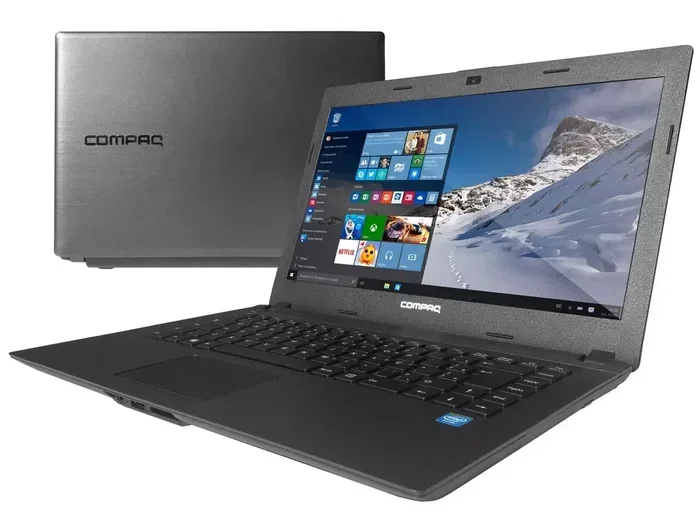
Yes, many Compaq laptops can run Windows 10 and still deliver solid performance. The key is checking your specific model’s hardware against Windows 10 requirements. Older Compaq models may need upgrades like more RAM or a solid-state drive to keep up. This guide walks you through everything you need to know about Compaq laptop Windows 10 compatibility and how to get the best results.
So you have a Compaq laptop sitting around, and you are wondering if it can handle Windows 10. Maybe you want to give it new life, or maybe your current operating system is just too slow. Either way, you are in the right place.
The short answer is yes, many Compaq laptops can run Windows 10. But the real question is, will it run well? That depends on your specific model, its hardware, and what you plan to do with it. In this article, we will break down everything you need to know. From system requirements to real-world performance tips, we have got you covered.
We will look at different Compaq laptop models, compare their specs to Windows 10 needs, and give you practical advice on upgrading. Whether you have a Compaq Presario, an EliteBook, or an older model from the early 2000s, this guide will help you decide if the upgrade is worth it. Let us dive in.
Key Takeaways
- Many Compaq laptops support Windows 10: Models from 2010 onward often meet the minimum requirements.
- Check your hardware first: Processor type, RAM, and storage determine if Windows 10 will run smoothly.
- Upgrades make a big difference: Adding RAM or switching to an SSD can revive an older Compaq laptop.
- Driver support matters: Compaq may not offer official Windows 10 drivers for very old models.
- Performance varies by model: Newer Compaq models like Presario and EliteBook handle Windows 10 much better.
- 64-bit Windows 10 is the way to go: It offers better performance and compatibility than the 32-bit version.
- Backup your data first: Always back up files before upgrading your operating system.
📑 Table of Contents
- Understanding Windows 10 System Requirements
- Which Compaq Laptop Models Support Windows 10
- How to Check If Your Compaq Laptop Can Run Windows 10
- Upgrading Your Compaq Laptop for Better Windows 10 Performance
- Driver Support and Compatibility Issues
- Real-World Performance: What to Expect
- Is It Worth Upgrading an Old Compaq Laptop to Windows 10?
- Final Thoughts
- Frequently Asked Questions
Understanding Windows 10 System Requirements
Before we talk about Compaq laptops specifically, let us cover the basics. Windows 10 system requirements are the minimum specs your computer needs to run the operating system. Microsoft sets these requirements, and they are not super high. But meeting the minimum does not always mean smooth performance.
Minimum Requirements for Windows 10
Here are the official minimum specs for Windows 10:
- Processor: 1 GHz or faster
- RAM: 1 GB for 32-bit or 2 GB for 64-bit
- Storage: 16 GB for 32-bit or 20 GB for 64-bit
- Graphics: DirectX 9 or later with WDDM 1.0 driver
- Display: 800 x 600 resolution
These numbers look low, right? And they are. A Compaq laptop from 2008 or later will likely meet these minimums. But here is the thing. Minimum requirements are just that, minimum. If your laptop only barely meets these specs, you will likely experience slow boot times, laggy performance, and frustration.
Recommended Requirements for a Better Experience
If you want your Compaq laptop to actually work well on Windows 10, aim for these specs:
- Processor: Intel Core 2 Duo or better
- RAM: 4 GB or more
- Storage: 64 GB or more, preferably an SSD
- Graphics: Integrated or dedicated GPU with WDDM 1.3
- Display: 1366 x 768 or higher
Meeting these recommended specs will give you a much smoother experience. Your laptop will feel responsive, and you can run multiple apps at once without slowdowns.
Quick Tip: Always choose the 64-bit version of Windows 10. It uses RAM more efficiently and offers better overall performance compared to the 32-bit version.
Which Compaq Laptop Models Support Windows 10
Not all Compaq laptops are created equal. Some models are perfectly suited for Windows 10, while others will struggle. Let us look at the different Compaq laptop lines and how they stack up.
Compaq Presario Series
The Compaq Presario line was one of the most popular consumer laptop series. Models from the Presario CQ, Presario M, and Presario F series were made from around 2007 to 2013. Many of these laptops can run Windows 10 if they have at least a 2 GHz processor and 2 GB of RAM.
However, older Presario models with single-core processors will likely run very slowly. The Windows 10 experience on these machines will feel sluggish. You may find that simple tasks like opening a web browser take several seconds.
Compaq Evo and EliteBook Series
The Compaq Evo and EliteBook lines were aimed at business users. These laptops tend to have better build quality and slightly more powerful hardware. Models like the Compaq Evo N and Compaq EliteBook 2540p can handle Windows 10 reasonably well, especially after a RAM upgrade.
Business-grade laptops often have better driver support too. HP and Compaq released many Windows 10 drivers for these lines, which makes the upgrade process smoother.
Older Compaq Models (Pre-2008)
If your Compaq laptop is from before 2008, you are in for a tough ride. These models likely have single-core processors, 512 MB of RAM, and slow hard drives. Windows 10 will technically install on some of these machines, but the performance will be barely usable.
For these older laptops, we recommend sticking with a lightweight Linux distribution or upgrading to a newer computer entirely. It is not worth the frustration.
How to Check If Your Compaq Laptop Can Run Windows 10
Not sure if your specific Compaq model can handle Windows 10? You are not alone. Many people buy used laptops without knowing the specs. Here is how to check your laptop and find out for sure.
Step 1: Check Your Current System Specs
You can check your laptop specs right from Windows. If you are still on an older version of Windows, follow these steps:
- Click the Start menu.
- Right-click on “Computer” or “My Computer.”
- Select “Properties.”
- Look for your processor type, RAM amount, and system type (32-bit or 64-bit).
If your laptop does not have enough RAM or has a very old processor, Windows 10 will not be a good fit. But do not give up just yet. There are still things you can do.
Step 2: Use the Windows 10 Upgrade Assistant
Microsoft offers a free tool called the Windows 10 Upgrade Assistant. This tool scans your system and tells you if it meets the requirements. It also checks for driver compatibility.
Here is how to use it:
- Go to the Microsoft website and download the Upgrade Assistant.
- Run the tool and let it scan your system.
- Review the results to see if your Compaq laptop is compatible.
This is the easiest and most reliable way to check compatibility. The tool also provides a detailed report on any issues it finds.
Step 3: Look Up Your Specific Model Online
If you know your Compaq model number, you can search for it online. Type your model number followed by “Windows 10 compatibility.” You will often find forums and articles where other users have shared their experiences.
This is a great way to learn about real-world performance before you commit to an upgrade. You might even find driver download links and installation guides specific to your model.
Upgrading Your Compaq Laptop for Better Windows 10 Performance
So your Compaq laptop meets the minimum requirements, but you want it to run better. The good news is that a few simple upgrades can make a huge difference. Many older laptops feel brand new after a couple of affordable hardware changes.
Add More RAM
RAM is one of the most impactful upgrades you can make. Windows 10 uses about 2 GB of RAM just to run the operating system. If your Compaq laptop only has 1 GB or 2 GB, you will be constantly swapping to disk, which causes slowdowns.
Most Compaq laptops from 2007 onward support RAM upgrades. Check your model to see what type of RAM it takes. Common options include DDR2 and DDR3 SO-DIMM modules. Adding 2 GB or 4 GB of RAM is usually very affordable.
Expert Insight: Upgrading from 2 GB to 4 GB of RAM is the single best thing you can do to improve Windows 10 performance on an older Compaq laptop. The difference is dramatic.
Replace Your Hard Drive with an SSD
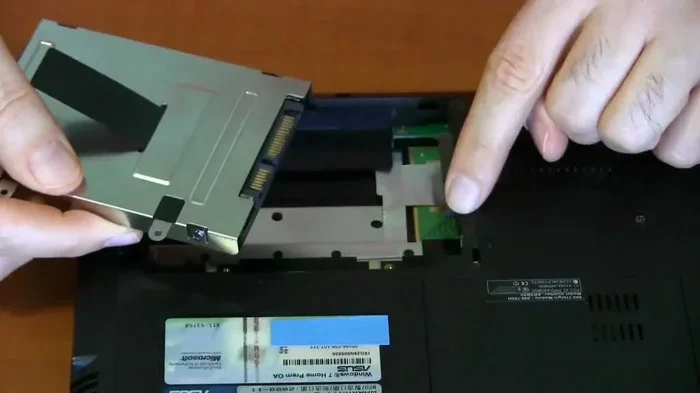
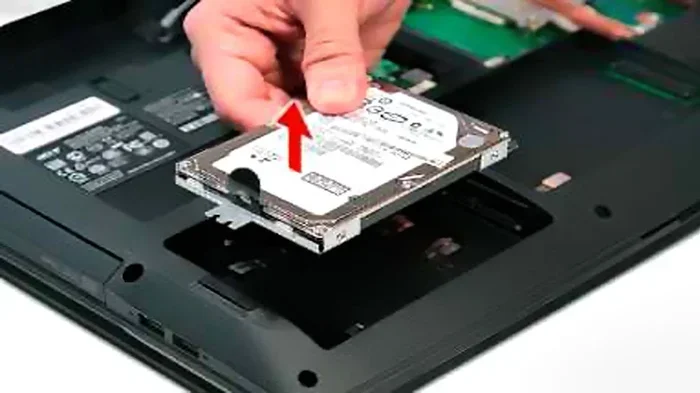
If your Compaq laptop still has a traditional mechanical hard drive, this upgrade will change your life. A solid-state drive, or SSD, makes your laptop boot faster, apps open quicker, and everything feel snappier.
SSDs have no moving parts, so they are also more reliable than old spinning hard drives. You can find a basic 120 GB SSD for around $20 to $30. That is a small price for a huge performance boost.
Here is a quick comparison:
- Traditional Hard Drive: Boot time around 2 to 3 minutes
- SSD: Boot time around 30 to 45 seconds
See the difference? An SSD is a game-changer for older laptops.
Clean Up Your System Before Upgrading
Before you install Windows 10, take some time to clean up your laptop. Uninstall programs you no longer use. Delete old files. Run a disk cleanup. This will free up space and make the upgrade process smoother.
Also, make sure you back up all your important files. Use an external hard drive or a cloud storage service. You never know what can go wrong during an operating system upgrade, and you do not want to lose your photos, documents, or other important data.
Driver Support and Compatibility Issues
One of the biggest challenges with running Windows 10 on an older Compaq laptop is driver support. Drivers are the software that lets your operating system communicate with your hardware. Without the right drivers, your laptop may not work properly.
Where to Find Compaq Drivers for Windows 10
HP acquired Compaq back in 2002, so Compaq drivers are now managed under the HP support umbrella. You can find drivers on the HP support website. Just enter your laptop model number, and the site will show you available drivers.
Here are the key drivers you need to check:
- Chipset driver: This is the foundation for all other drivers.
- Graphics driver: Needed for display and video performance.
- Audio driver: Required for sound to work.
- Network driver: Needed for Wi-Fi and Ethernet connectivity.
- Touchpad driver: Makes your touchpad work properly.
What to Do If Drivers Are Not Available
For very old Compaq models, HP may not offer official Windows 10 drivers. This is a common problem with legacy laptops. When official drivers are not available, you have a few options.
First, try using Windows 10 generic drivers. Windows 10 often includes built-in drivers for common hardware components. Your laptop may work fine with these generic drivers, even if they are not the latest or most optimized.
Second, check third-party driver update tools. These tools scan your system and find compatible drivers from their databases. Just be careful and only use reputable tools. Some free driver updaters include adware or other unwanted software.
Third, visit Compaq or HP forums. Other users who have the same laptop model may have found workarounds or alternative driver sources. The community can be a great resource for troubleshooting.
Common Mistake: Do not install drivers meant for a different laptop model or operating system. Using the wrong drivers can cause crashes, blue screens, and other serious problems. Always double-check that the driver matches your exact model and Windows version.
Real-World Performance: What to Expect
Let us be honest about what you can realistically expect from a Compaq laptop running Windows 10. The experience will vary widely depending on the model and specs.
What Windows 10 Runs Well On
With 4 GB of RAM and an SSD, most Compaq laptops from 2010 or later can handle everyday tasks nicely. These tasks include:
- Web browsing with a few tabs open
- Email and office applications
- Streaming video on sites like YouTube or Netflix
- Light photo editing
- Video calls through apps like Skype or Zoom
For these tasks, a Compaq laptop with Windows 10 will feel perfectly usable. You can get through a full day of light computing without major issues.
What Windows 10 Struggles With
On the other hand, there are things that will push an older Compaq laptop to its limits:
- Running heavy software like video editing tools
- Playing modern 3D games
- Running multiple resource-heavy apps at the same time
- Using virtual machines or development environments
If you need your laptop for these demanding tasks, even a newer laptop might struggle. But for basic computing, a Compaq laptop with Windows 10 can still serve you well.
Tips to Improve Performance
Want to squeeze every bit of performance out of your Compaq laptop? Here are some tips:
- Disable startup programs: Many programs launch automatically and slow down your boot time. Go to Task Manager and disable unnecessary startup items.
- Keep Windows updated: Windows updates often include performance improvements and security patches.
- Uninstall bloatware: Remove programs you do not use to free up system resources.
- Use lightweight apps: Choose lighter alternatives for common tasks. For example, use a lightweight browser instead of a heavy one.
- Defragment your hard drive: If you are still using a traditional hard drive, regular defragmentation can improve speed.
These small changes can add up to a noticeable improvement in day-to-day performance.
Is It Worth Upgrading an Old Compaq Laptop to Windows 10?
This is the big question, and the answer depends on your situation. Let us weigh the pros and cons.
Pros of Upgrading
- Security updates: Windows 10 receives regular security patches. Older operating systems like Windows 7 no longer get security updates, which leaves you vulnerable.
- Software compatibility: Many modern apps and websites are optimized for Windows 10. Running an older OS may mean some apps do not work properly.
- Free or low cost: If you already have a valid Windows 10 license, the upgrade is free. Even if you need to buy a license, it is much cheaper than a new laptop.
- Extended laptop life: Upgrading can add years of useful life to an older Compaq laptop.
Cons of Upgrading
- Potential performance issues: Older hardware may struggle with Windows 10, leading to a frustrating user experience.
- Driver problems: Finding compatible drivers for very old Compaq models can be difficult.
- Limited upgrade path: Even with upgrades, a very old Compaq laptop will never match the performance of a modern budget laptop.
- Time and effort: The upgrade process takes time, and there is always a risk of something going wrong.
For most people, if your Compaq laptop is from 2010 or later and you can add a little RAM and an SSD, the upgrade is absolutely worth it. It gives your laptop a second life at almost no cost.
But if your Compaq is from before 2008, you are better off saving up for a new laptop. The time and effort you spend trying to make an ancient machine run Windows 10 is better invested in a modern computer that will serve you well for years.
Final Thoughts
So, can a Compaq laptop run Windows 10 and still work well? The answer is a qualified yes. Many Compaq laptops can run Windows 10, and with the right upgrades, they can work surprisingly well for everyday tasks. The key is knowing your laptop’s specs, checking compatibility, and making smart upgrades like adding RAM or installing an SSD.
Always check driver support before committing to the upgrade. And be realistic about what you can expect from older hardware. Windows 10 on a well-upgraded Compaq laptop from 2010 or later can handle web browsing, email, office work, and media streaming just fine. But do not expect it to compete with a brand-new laptop.
Ultimately, upgrading an old Compaq laptop to Windows 10 is a great way to get more value out of your existing hardware. It saves money, reduces e-waste, and can give you a perfectly functional computer for basic tasks. Just do your homework first, know your model’s limits, and plan your upgrades accordingly.
Take the time to check your Compaq laptop specs, run the Windows 10 Upgrade Assistant, and read about other users’ experiences with your specific model. With a little effort, you can breathe new life into an old Compaq and keep it working well for years to come.
Frequently Asked Questions
Can I install Windows 10 on any Compaq laptop?
Most Compaq laptops from 2008 onward can technically install Windows 10. However, the experience depends on your hardware specs. Laptops with at least 2 GB of RAM and a dual-core processor will run Windows 10 much better than older models with single-core processors and 1 GB of RAM. Always check your specific model’s compatibility before upgrading.
Do I need a product key to upgrade my Compaq laptop to Windows 10?
If you previously upgraded to Windows 10 on that same Compaq laptop, your product key is linked to your hardware, and the upgrade should remain free. If you are doing a clean install, you may need to purchase a Windows 10 license. You can also use a valid Windows 7 or Windows 8 key to activate Windows 10 in many cases.
Will my Compaq laptop be slow after upgrading to Windows 10?
It depends on your hardware. Older Compaq laptops with 1 GB of RAM and a traditional hard drive will feel slow on Windows 10. But upgrading to 4 GB of RAM and adding an SSD can dramatically improve performance. Many users report that their Compaq laptops feel almost like new after these two upgrades.
Where can I find Windows 10 drivers for my Compaq laptop?
HP manages Compaq driver support since the HP-Compaq merger in 2002. Visit the HP support website and enter your laptop model number to find available Windows 10 drivers. You can also check Compaq and HP user forums for community-shared driver links and installation tips.
Is Windows 10 still supported for older Compaq laptops?
Microsoft provides security updates for Windows 10 until October 14, 2025. After that date, Windows 10 will no longer receive patches. For older Compaq laptops, this means you should plan for either a future upgrade to Windows 11 (if your hardware supports it) or consider switching to a lightweight Linux operating system for continued security support.
Can I dual-boot Windows 10 with another operating system on my Compaq laptop?
Yes, you can set up a dual-boot configuration on most Compaq laptops. This lets you run Windows 10 alongside another operating system like Linux. You will need to partition your hard drive and install both operating systems. Just make sure to back up your data first, as partitioning can sometimes cause data loss if not done carefully.