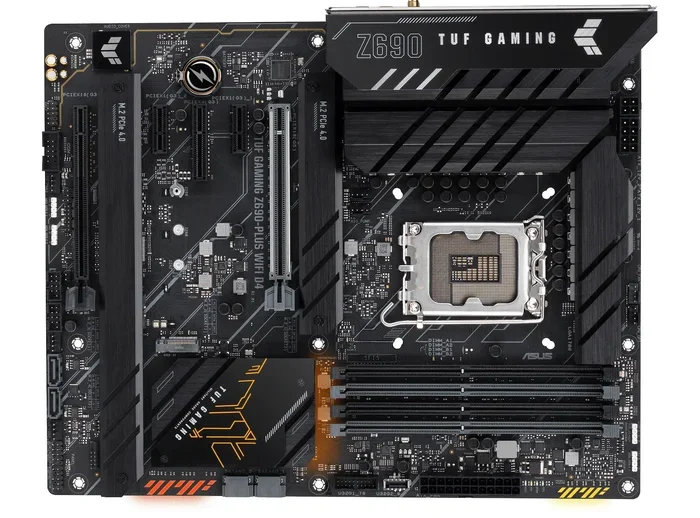
Can Asus Tuf Z690 Motherboard Work With Ddr5 Memory
The Asus Tuf Z690 motherboard can work with Ddr5 memory, but only on specific models. Not all Z690 boards are created equal. Some support Ddr4, while others are built for Ddr5. In this guide, we break down exactly which Tuf Z690 boards accept Ddr5, how to set them up, and what benefits you gain from choosing Ddr5 memory for your Intel 12th or 13th gen build.
So you are building or upgrading a PC, and you have your eye on the Asus Tuf Z690 motherboard. You have heard about Ddr5 memory and how fast it is. But here is the big question: Can Asus Tuf Z690 use Ddr5? The short answer is yes, but with a catch. Not every Tuf Z690 board supports Ddr5. There are Ddr4 versions and Ddr5 versions, and mixing them up can cost you time, money, and frustration.
This guide walks you through everything you need to know. We will cover which models work with Ddr5, how to tell them apart, what benefits Ddr5 brings, and how to set it all up. Whether you are a first-time builder or a seasoned PC enthusiast, you will find practical advice here. Let us dive right in.
Key Takeaways
- Not all Asus Tuf Z690 boards support Ddr5: You must buy the Ddr5 variant of the board.
- The Z690 chipset supports both Ddr4 and Ddr5: It depends on the specific motherboard model you choose.
- Ddr5 offers faster speeds and better bandwidth: This translates to real performance gains in gaming and heavy workloads.
- XMP profiles make Ddr5 setup easy: You can enable boosted memory speeds right from the BIOS.
- Watch out for CPU compatibility: Intel 12th gen and 13th gen processors both work with Ddr5 on the Z690 chipset.
- RAM kit selection matters: Choose Ddr5 kits rated for your motherboard’s supported speeds.
- BIOS updates can improve Ddr5 stability: Always keep your motherboard firmware up to date.
📑 Table of Contents
- What Is the Asus Tuf Z690 and Why Does Ddr5 Matter?
- Which Asus Tuf Z690 Models Support Ddr5?
- Can Asus Tuf Z690 Use Ddr5? The Direct Answer
- Benefits of Using Ddr5 With the Z690 Chipset
- How to Set Up Ddr5 Memory on Your Asus Tuf Z690
- Common Mistakes to Avoid
- Expert Tips for Maximizing Ddr5 Performance
- Final Thoughts
What Is the Asus Tuf Z690 and Why Does Ddr5 Matter?
The Asus Tuf Gaming Z690 is a popular motherboard line built around Intel’s Z690 chipset. It uses the LGA 1700 socket, which supports Intel’s 12th generation and 13th generation processors. The Tuf series is known for durability, solid build quality, and great value. It is a favorite among gamers and budget-conscious builders.
Now, why does Ddr5 matter? Memory technology has evolved. Ddr5 is the fifth generation of double data rate synchronous dynamic random-access memory. It replaced Ddr4 as the latest standard for PC memory. Ddr5 brings several improvements over its predecessor:
- Higher clock speeds: Ddr5 starts at higher base speeds than Ddr4.
- Greater bandwidth: More data moves through the memory bus at once.
- Better power efficiency: Ddr5 runs at a lower voltage than Ddr4.
- Improved capacity: Ddr5 modules can hold more memory per stick.
- On-die error correction: Built-in features help keep data stable.
For gaming, content creation, and multitasking, these upgrades add up. If you are building a new PC or upgrading an existing one, choosing Ddr5 memory can give your system a noticeable boost. But first, you need to confirm that your motherboard supports it.
Which Asus Tuf Z690 Models Support Ddr5?
Here is where things get important. ASUS released multiple versions of the Tuf Z690 board. Some are designed for Ddr4 memory, and some are designed for Ddr5 memory. You cannot simply swap Ddr5 into a Ddr4 board, and vice versa. The memory slots are physically different.
The Ddr4 vs Ddr5 Versions Explained
ASUS makes this distinction clear in the model names. Look at the end of the product name. A board with a “D4” suffix supports Ddr4 memory. A board with a “D5” suffix supports Ddr5 memory. Here are some common examples:
- ASUS TUF Gaming Z690-Plus WiFi D4: This board uses Ddr4 memory slots.
- ASUS TUF Gaming Z690-Plus WiFi D5: This board uses Ddr5 memory slots.
- ASUS TUF Gaming Z690-P WiFi D4: Another Ddr4 variant.
- ASUS TUF Gaming Z690-P WiFi D5: The Ddr5 counterpart to the P model.
- ASUS TUF Gaming Z690-Plus D4: Ddr4 version without WiFi.
- ASUS TUF Gaming Z690-Plus D5: Ddr5 version without WiFi.
As you can see, the naming convention makes it straightforward. Always check the model number before purchasing. If you want Ddr5 support, you must buy the D5 version of the Tuf Z690 board.
How to Identify Your Board Variant
If you already own a Tuf Z690 board, you can check which memory type it supports. Here is how:
- Look at the model number printed on the board itself. It is usually near the CPU socket or RAM slots.
- Check the product box or the ASUS product page for the exact model name.
- Enter the BIOS by pressing the Delete or F2 key during startup. The memory type is displayed in the system information section.
- Use ASUS’s AI Suite or Armoury Crate software on Windows to view motherboard details.
If your board shows Ddr4 slots, you cannot use Ddr5 modules. The physical notch on the memory module and the slot are in different positions. This prevents accidental insertion of the wrong type. Always double-check before buying new RAM.
Can Asus Tuf Z690 Use Ddr5? The Direct Answer
So, can Asus Tuf Z690 use Ddr5? Yes, but only on the D5 variants. The Z690 chipset itself is designed to support both Ddr4 and Ddr5 memory. ASUS chose to create separate board versions for each memory type. This gives builders the flexibility to choose based on their budget and performance needs.
The Ddr5 version of the Tuf Z690 motherboard features Ddr5 DIMM slots. These slots have a different pin layout and keying position compared to Ddr4 slots. The memory controller inside Intel’s 12th and 13th gen processors supports both standards, so the chipset is fully ready for Ddr5.
Here is a quick comparison of what each version offers:
- Ddr4 Tuf Z690 boards: More affordable, widely available, and proven stable. Great for budget builds.
- Ddr5 Tuf Z690 boards: Faster memory speeds, better future-proofing, and improved efficiency. Ideal for performance-focused builds.
If you are asking “can Asus Tuf Z690 use Ddr5,” the answer hinges entirely on which specific model you have or plan to buy. Always verify the model number and its Ddr4 or Ddr5 designation before making a purchase decision.
Benefits of Using Ddr5 With the Z690 Chipset
Choosing Ddr5 memory for your Asus Tuf Z690 Ddr5 motherboard brings real-world advantages. Let us look at the key benefits in detail.
Faster Speeds and Better Bandwidth
Ddr5 memory starts at higher base speeds than Ddr4. While Ddr4 commonly runs at 3200 MHz, Ddr5 starts at 4800 MHz and can go much higher. With XMP profiles and memory overclocking, Ddr5 kits can reach 6000 MHz, 7000 MHz, and even beyond.
Higher speeds mean more data can be read from or written to memory each second. This is called bandwidth. For gaming, faster memory can reduce frame time variability. For workloads like video editing or 3D rendering, increased bandwidth helps your processor access large files more quickly.
Here is a simple example. If you are playing a modern game that streams textures from memory constantly, Ddr5’s higher bandwidth keeps that data flowing smoothly. The result can be fewer stutters and more consistent frame rates, especially at 1080p where the processor and memory matter more.
Improved Power Efficiency
Ddr5 operates at a lower voltage than Ddr4. Ddr4 typically runs at 1.2 volts, while Ddr5 starts at 1.1 volts and can go even lower with XMP profiles. Lower voltage means less heat generated by the memory modules.
Less heat translates to a cooler system overall. This can help your other components, like the CPU and GPU, run at lower temperatures. A cooler system also tends to be quieter because fans do not need to spin as fast. Over time, lower heat can also contribute to better component longevity.
How to Set Up Ddr5 Memory on Your Asus Tuf Z690
Setting up Ddr5 memory on a Tuf Z690 Ddr5 board is straightforward. Follow these steps for a smooth installation.
Choosing the Right Ddr5 RAM Kit
Not all Ddr5 kits are the same. When selecting memory for your Asus Tuf Z690 Ddr5 motherboard, consider these factors:
- Speed rating: Look for kits rated between 4800 MHz and 6000 MHz for a good balance of performance and price. Higher speeds exist but may require more voltage.
- Capacity: 16 GB (2×8 GB) kits are the sweet spot for most users. 32 GB (2×16 GB) kits are great for heavy workloads and future-proofing.
- Dual channel configuration: Always install memory in matched pairs for dual channel mode. This doubles the effective bandwidth compared to single channel.
- XMP support: Choose kits that support Intel XMP profiles. This lets you enable boosted speeds from the BIOS without manual tuning.
- Compatibility: Check ASUS’s QVL (Qualified Vendor List) for your specific board model. This list shows tested and confirmed Ddr5 kits that work properly.
Popular Ddr5 kits from brands like Corsair, G.Skill, Kingston, and Crucial are widely compatible with the Tuf Z690 Ddr5 boards. Always verify compatibility before purchasing.
Xmp Profiles and Bios Setup
Once you have installed your Ddr5 memory, you will want to enable XMP profiles for the best performance. Here is how:
- Boot into your system and restart your computer.
- Press the Delete or F2 key repeatedly during startup to enter the BIOS.
- Navigate to the AI Tweaker section in the ASUS BIOS.
- Find the XMP II or DOCP profile option.
- Select the profile that matches your Ddr5 kit’s rated speed.
- Save the settings and exit the BIOS.
- Your system will reboot with the boosted memory speed active.
You can verify the memory speed in Windows by opening Task Manager, going to the Performance tab, and selecting Memory. The speed displayed should match your Ddr5 kit’s rated speed when XMP is enabled.
Common Mistakes to Avoid
Building or upgrading a PC with Ddr5 memory can come with a few pitfalls. Here are common mistakes to watch out for:
- Buying the wrong board variant: Purchasing a Tuf Z690 Ddr4 board when you need Ddr5 support. Always read the model name carefully.
- Mixing Ddr4 and Ddr5: These are not interchangeable. The physical slots and module designs are different.
- Ignoring the QVL: Using Ddr5 kits that are not on your motherboard’s qualified vendor list can lead to compatibility issues or instability.
- Forgetting to enable XMP: Without enabling XMP in the BIOS, your Ddr5 memory will run at a slower default speed, usually 4800 MHz.
- Overclocking too aggressively: Pushing memory speeds too high without adequate voltage can cause blue screens or data corruption. Increase speed and voltage in small steps.
- Neglecting BIOS updates: ASUS regularly releases BIOS updates that improve memory compatibility and stability. Always check for the latest firmware.
Avoiding these mistakes saves time and prevents frustrating troubleshooting sessions. A little research before you buy goes a long way.
Expert Tips for Maximizing Ddr5 Performance
Want to get the most out of your Ddr5 memory on the Asus Tuf Z690 board? Here are some expert-backed tips:
- Install memory in the correct slots: For dual channel on Z690 boards, use the slots recommended in the motherboard manual. Typically, this means the 2nd and 4th slots from the CPU socket.
- Keep BIOS updated: New BIOS versions often include memory compatibility improvements. Check the ASUS support page for your specific model regularly.
- Use matched pairs: Always buy a kit with two identical sticks. Mixing different sticks, even if they are the same type, can cause issues.
- Monitor temperatures: Ddr5 runs cooler than Ddr4, but extreme overclocking can still generate heat. Ensure good airflow inside your case.
- Test stability after changes: Use tools like MemTest86 or Windows Memory Diagnostic to verify your memory is stable after enabling XMP or making manual adjustments.
- Consider your CPU: Intel 12th gen and 13th gen processors have integrated memory controllers that handle Ddr5 well. Newer CPUs like the 13th gen may offer slightly better memory compatibility and overclocking headroom.
These small steps can make a big difference in system stability and performance. They are especially important if you plan to push your Ddr5 memory beyond its rated speed.
Final Thoughts
The question “can Asus Tuf Z690 use Ddr5” has a clear answer: yes, on the Ddr5 variants of the Tuf Z690 motherboard line. The Z690 chipset fully supports Ddr5 memory, and ASUS has built dedicated board versions to take advantage of it. Whether you are building a gaming PC, a content creation workstation, or a versatile daily driver, choosing the right Tuf Z690 Ddr5 board paired with quality Ddr5 memory sets you up for a strong performance foundation.
Remember to always check the model number before buying. Confirm that your board supports Ddr5, choose a compatible memory kit, enable XMP in the BIOS, and keep your firmware updated. These simple steps ensure a smooth and rewarding experience with Ddr5 memory on your Asus Tuf Z690 build.
Ddr5 is the present and the future of PC memory. Investing in it now means your system is ready for the software and workloads of tomorrow. Take your time, do your research, and enjoy the build process.
Frequently Asked Questions
Is Ddr5 backward compatible with Ddr4 motherboards?
No, Ddr5 is not backward compatible with Ddr4 motherboards. The memory slots are physically different, and the memory controllers are designed for one type or the other. You cannot install Ddr5 RAM into a Ddr4 board or vice versa. Always confirm your motherboard model supports the memory type you plan to use.
Do all Z690 motherboards support Ddr5?
No, not all Z690 motherboards support Ddr5. The Z690 chipset supports both Ddr4 and Ddr5, but each motherboard manufacturer chooses which memory type to support on each model. Some Z690 boards are Ddr4 only, some are Ddr5 only, and a few rare models may have been released in both versions. Always check the specifications of your specific motherboard before purchasing memory.
Can I mix Ddr5 and Ddr4 RAM on a Tuf Z690 board?
Absolutely not. Ddr5 and Ddr4 RAM cannot be mixed on the same board. The physical slots are different, and the memory controller only supports one type. Mixing them will not work and could potentially damage components. Always use the same memory type that your motherboard is designed for.
What Ddr5 speed is best for the Asus Tuf Z690?
For most users, Ddr5-5200 to Ddr5-6000 is the sweet spot for the Asus Tuf Z690. These speeds offer excellent performance without being overly expensive. If you are an enthusiast or overclocker, you can push higher speeds with XMP profiles, but stability testing is recommended at every step. Check the ASUS QVL for tested and confirmed speed ratings.
Does Ddr5 really make a difference in gaming performance?
Yes, Ddr5 can make a noticeable difference in gaming, especially at 1080p where the processor and memory are more critical to frame rates. The higher bandwidth and faster speeds of Ddr5 reduce frame time variability and can lead to smoother gameplay. At higher resolutions like 1440p or 4K, the GPU becomes the bigger bottleneck, but Ddr5 still provides benefits in loading times and overall system responsiveness.
How do I know if my Asus Tuf Z690 is the Ddr4 or Ddr5 version?
Check the model number on the board itself or on the product box. Models ending in “D4” support Ddr4 memory, while models ending in “D5” support Ddr5 memory. You can also check the ASUS product page for your specific model or look at the memory slots. Ddr4 and Ddr5 slots have different physical designs with notches in different positions, making them easy to visually distinguish.
=== CONCLUSION ===
The Asus Tuf Z690 motherboard can indeed work with Ddr5 memory, but only on the specific Ddr5 variants. Understanding the difference between the Ddr4 and Ddr5 versions is the first and most important step. Once you have the right board, pairing it with compatible Ddr5 RAM unlocks faster speeds, better bandwidth, and improved power efficiency.
Setting up Ddr5 on a Tuf Z690 board is straightforward. Choose the right kit, install it in the correct slots, enable XMP in the BIOS, and keep your system updated. Avoid common mistakes like buying the wrong board variant or mixing memory types.
With the right approach, your Asus Tuf Z690 Ddr5 build will deliver strong performance today and stay relevant for years to come. Can Asus Tuf Z690 use Ddr5? Now you know the answer, and you have everything you need to make it work.