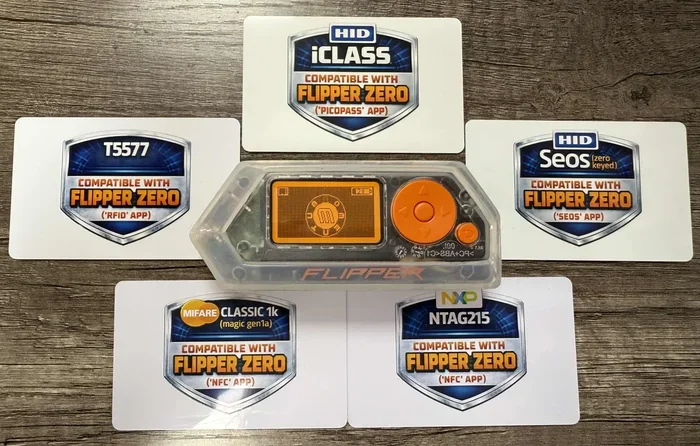
Can Flipper Zero Write Rfid Tags And Clone Them Now
Yes, the Flipper Zero can write RFID tags and clone them with ease. This powerful handheld device supports both 125 kHz and 13.56 MHz RFID frequencies, making it a versatile tool for reading, writing, and emulating RFID cards and tags. Whether you are a hobbyist, a security enthusiast, or a curious tech lover, understanding how the Flipper Zero handles RFID opens up a world of possibilities.
The question on many tech enthusiasts’ minds is simple: can Flipper Zero write RFID? The short answer is yes. But the full story is much more interesting. The Flipper Zero is a multi-tool device that packs a lot of power into a small, portable package. It can interact with RFID tags, NFC cards, infrared signals, and even sub-GHz radio protocols. In this article, we will dive deep into the RFID capabilities of the Flipper Zero. You will learn how it writes tags, how it clones cards, and what you need to know before you start.
RFID technology is everywhere. Your office access badge uses it. Your contactless payment card uses it. Even some hotel key cards rely on RFID. Understanding how devices like the Flipper Zero interact with these tags gives you valuable insight into modern wireless communication. Plus, it helps you think about security in a whole new way. Let us get into the details of Flipper Zero write RFID functionality and everything else you should know.
Key Takeaways
- Full RFID Support: The Flipper Zero can read, write, and clone RFID tags across multiple frequencies.
- Two Frequency Bands: It handles both 125 kHz low-frequency and 13.56 MHz high-frequency RFID tags.
- User-Friendly App: The Flipper Zero app makes writing and cloning RFID tags simple for beginners.
- Security Awareness: Knowing how RFID cloning works helps you protect your cards and access badges.
- More Than Just RFID: The Flipper Zero also works with NFC, infrared, sub-GHz signals, and more.
- Ethical Use Matters: Always use RFID cloning tools responsibly and legally.
📑 Table of Contents
- What Is RFID and How Does the Flipper Zero Handle It
- How to Write RFID Tags Using the Flipper Zero
- Can the Flipper Zero Clone RFID Tags
- RFID Security: What You Need to Know
- Flipper Zero RFID Features Beyond Writing and Cloning
- Getting Started with RFID on the Flipper Zero
- Ethical and Legal Considerations
- Conclusion
What Is RFID and How Does the Flipper Zero Handle It
RFID stands for Radio Frequency Identification. It is a technology that uses radio waves to identify and track objects. A basic RFID system has two parts: a tag and a reader. The tag contains a small chip and an antenna. When the reader sends out a radio signal, the tag responds with its stored data. This happens without any physical contact.
The Flipper Zero supports two main RFID frequency bands. The first is 125 kHz, which is known as low-frequency RFID. This band is common in older access control systems and animal identification tags. The second is 13.56 MHz, known as high-frequency RFID. This band is used in modern smart cards, NFC tags, and many access badges. By supporting both bands, the Flipper Zero covers a wide range of RFID applications.
Types of RFID Tags the Flipper Zero Can Work With
Not all RFID tags are the same. Different tags use different protocols and memory structures. Here are the common types the Flipper Zero can handle:
- EM 4100 Tags: These are classic 125 kHz tags. They are widely used in older access control systems. The Flipper Zero can read and write EM 4100 tags easily.
- HID Tags: HID Prox and HID iCLASS are popular in corporate environments. The Flipper Zero can read and emulate many HID tag formats.
- MIFARE Classic: This is a 13.56 MHz tag commonly found in public transit cards and building access systems. The Flipper Zero supports MIFARE Classic read and write operations.
- MIFARE Ultralight: These are simpler and cheaper NFC tags. The Flipper Zero can read and write them with no problems.
- NTAG Tags: NTAG213, NTAG215, and NTAG216 are popular NFC tags. They work at 13.56 MHz and are fully supported by the Flipper Zero.
Knowing which tag type you are dealing with is the first step. The Flipper Zero app helps you identify the tag automatically. Once identified, you can choose to read, write, or emulate it. This makes the process of Flipper Zero write RFID straightforward even for beginners.
How to Write RFID Tags Using the Flipper Zero
Writing an RFID tag with the Flipper Zero is a simple process. You do not need advanced technical skills. Here is how it works step by step.
- Power on the Flipper Zero and navigate to the RFID or NFC section in the main menu.
- Select the Read option and hold the tag you want to read near the top of the device.
- The Flipper Zero detects the tag and displays its type, UID, and stored data.
- Save the tag data to the device’s internal storage or an SD card.
- Go to the Write section and select the saved tag file.
- Hold a blank writable tag near the device. The Flipper Zero will write the data to the new tag.
- Verify the write by reading the new tag to confirm the data matches.
The entire process takes just a few minutes. For 125 kHz tags, you need a writable blank tag. For 13.56 MHz tags, the same applies. The Flipper Zero comes with a built-in RFID antenna that handles both frequencies. You do not need any extra hardware for basic read and write operations.
Tips for Successful RFID Tag Writing
- Use high-quality blank tags. Cheap tags sometimes have low memory or poor antenna designs, which causes write failures.
- Keep the tag flat against the device. The Flipper Zero antenna is located at the top. Aligning the tag properly ensures a strong signal.
- Check tag compatibility first. Not all tags are writable. Some are read-only or one-time programmable. The Flipper Zero will alert you if a tag cannot be written.
- Back up your tag data. Always save a copy of the read data before writing. This gives you a safety net if something goes wrong.
These small tips save a lot of frustration. They make the Flipper Zero write RFID experience much smoother and more reliable.
Can the Flipper Zero Clone RFID Tags
Yes, cloning is one of the most popular uses of the Flipper Zero. Cloning means copying the data from one tag and writing it onto another blank tag. The cloned tag behaves exactly like the original. This is why people ask, can Flipper Zero write RFID tags and clone them. The answer is a resounding yes.
RFID cloning works by reading the unique identifier and any stored data from the original tag. Then it writes that same information onto a writable blank tag. The result is a tag that the original reader will accept as a valid card or key.
How RFID Cloning Works on the Flipper Zero
The cloning process on the Flipper Zero follows a clear path. First, you read the original tag and save its data. Then you write that saved data onto a blank tag. The Flipper Zero handles the heavy lifting for you. It manages the low-level communication with the tag, so you do not have to worry about protocols or commands.
For 125 kHz tags, cloning is usually straightforward. Most EM 4100 and HID Prox tags store their data in a simple format. The Flipper Zero reads the UID and any additional blocks, then writes them to a blank tag. For 13.56 MHz tags, the process is similar but may involve more complex data structures. MIFARE Classic tags, for example, have multiple memory sectors with access bits that control read and write permissions.
Limitations of RFID Cloning
It is important to understand that not all tags can be cloned. Some systems use advanced security features that prevent cloning. Here are a few limitations to keep in mind:
- Read-only tags: Some tags are factory-set to read-only. You cannot write new data to them, which means cloning is not possible.
- Encrypted tags: High-security systems use encryption on their tags. Without the encryption key, the Flipper Zero cannot clone these tags.
- One-time programmable tags: These tags can only be written once. After the initial write, they become read-only.
- Unique UID restrictions: Some systems check for a unique UID that cannot be duplicated. In these cases, cloning the data alone is not enough.
Despite these limitations, the Flipper Zero handles the vast majority of common RFID tags found in everyday use. For most hobbyists and learners, cloning works without any issues.
RFID Security: What You Need to Know
Understanding how RFID cloning works also means understanding the risks. If someone can clone your access badge or key card, they can gain entry to secure areas. This is why RFID security matters. The same technology that makes life convenient also creates potential vulnerabilities.
Common RFID Security Risks
- Unencrypted data: Many older RFID tags store data in plain text. Anyone with a reader can see and copy it.
- Easy to clone: Simple tags like EM 4100 have no security features at all. Cloning them takes seconds.
- Skimming attacks: A malicious reader can capture your card data from a distance without your knowledge.
- Replay attacks: A cloned tag can be used repeatedly to gain unauthorized access.
The good news is that you can protect yourself. Using RFID blocking wallets is one of the simplest solutions. These wallets have a metal lining that blocks radio signals. When your card is inside the wallet, no reader can communicate with it. This prevents unauthorized scanning and cloning.
How to Protect Your RFID Cards
- Use an RFID-blocking wallet or card sleeve. These products are affordable and widely available.
- Know what cards you carry. Check if your access badges or payment cards use RFID technology.
- Request encrypted cards from your employer. Modern access control systems use encrypted tags that are much harder to clone.
- Monitor your access logs. If your workplace allows it, check for any unauthorized entries that might indicate cloning.
Being aware of RFID risks is the first step toward protection. The Flipper Zero is a great tool for learning about these risks in a safe, controlled environment. You can test your own cards to see how secure they are. This knowledge empowers you to make better decisions about your personal security.
Flipper Zero RFID Features Beyond Writing and Cloning
The Flipper Zero is much more than just an RFID writer and cloner. It is a full-featured multi-tool for wireless signal exploration. Its RFID capabilities are just one part of a larger toolkit. Here are some other features related to RFID and wireless interaction.
RFID Emulation Mode
The Flipper Zero can emulate RFID tags. This means it can act as a tag itself. When held near a reader, the device pretends to be a valid tag and sends the stored data. This is different from cloning because emulation does not require a physical tag. The Flipper Zero becomes the tag.
Emulation is useful for testing access control systems. You can check if a reader accepts a particular tag format without needing the physical card every time. It is also helpful for learning how RFID communication works at a fundamental level.
NFC Compatibility
Near Field Communication, or NFC, is a subset of high-frequency RFID. The Flipper Zero handles NFC tags seamlessly. You can read NFC tags, write data to them, and emulate NFC cards. This makes the Flipper Zero a versatile tool for anyone interested in NFC technology.
Common NFC applications include contactless payment cards, transit cards, and smart posters. The Flipper Zero lets you explore these technologies hands-on. It is an excellent educational tool for students, makers, and security researchers.
Sub-GHz RFID and Other Wireless Protocols
Beyond RFID and NFC, the Flipper Zero also works with sub-GHz radio frequencies. This means it can interact with garage door openers, key fobs, and other remote controls. It can also receive and decode signals from weather stations, temperature sensors, and other IoT devices.
This broad wireless capability makes the Flipper Zero a valuable addition to any tech toolkit. Whether you are interested in RFID, NFC, or sub-GHz signals, this device covers all the bases. The Flipper Zero write RFID feature is just the beginning of what this compact device can do.
Getting Started with RFID on the Flipper Zero
If you are new to the Flipper Zero and want to start exploring RFID, here is what you need to do first.
- Buy a Flipper Zero device. You can purchase it directly from the official website or authorized resellers.
- Download the Flipper Zero app. The app is available for desktop and mobile platforms. It connects to the device via USB or Bluetooth.
- Update the firmware. Always use the latest firmware version for the best performance and security.
- Get some blank RFID tags. Buy a variety of 125 kHz and 13.56 MHz writable tags to practice with.
- Explore the RFID menu. Open the app, connect your Flipper Zero, and navigate to the RFID section. Start by reading tags around your home or office.
The learning curve is gentle. Most people feel comfortable with basic read and write operations within an hour. As you gain confidence, you can explore more advanced features like emulation and tag analysis.
Recommended Accessories for RFID Work
- Blank RFID tags: Get a pack of writable EM 4100 tags for 125 kHz practice and MIFARE Classic or NTAG tags for 13.56 MHz work.
- RFID-blocking wallet: Protect your personal cards while you experiment with cloning.
- USB cable: A reliable USB-C cable ensures stable communication between the Flipper Zero and your computer.
- SD card: A microSD card expands your storage for saving tag data and files.
These accessories make your RFID exploration smoother and more enjoyable. They are affordable and widely available online.
Ethical and Legal Considerations
With great power comes great responsibility. The ability to read, write, and clone RFID tags is a powerful capability. It is important to use this capability ethically and legally. Always respect the privacy and property of others. Do not clone tags that you do not own or have permission to test.
In many places, cloning access badges without authorization is illegal. Even if the technology is fascinating, using it improperly can lead to serious legal consequences. Stick to testing your own cards and tags. Use the Flipper Zero for learning, research, and personal security audits. This keeps you on the right side of the law and helps build a positive reputation in the tech community.
The Flipper Zero community is active and supportive. Many forums and online groups share tips, projects, and best practices. Joining these communities is a great way to learn and grow your skills. You will find plenty of people who share your curiosity about RFID and wireless technology.
Conclusion
The answer to the question can Flipper Zero write RFID is clear and definitive. Yes, it can. The Flipper Zero writes RFID tags, clones them, emulates them, and does much more. It supports both 125 kHz and 13.56 MHz frequencies, covering the most common RFID tag types used today. Whether you want to learn about RFID technology, test your own access cards, or explore wireless communication, the Flipper Zero delivers.
The device is easy to use, even for beginners. Its intuitive app and straightforward workflow make Flipper Zero write RFID accessible to everyone. At the same time, it offers enough depth to satisfy experienced users and researchers. Combined with its other wireless capabilities, the Flipper Zero is one of the most versatile tools in the consumer electronics space today.
Remember to use your Flipper Zero responsibly. Respect the security of others and focus on learning and personal projects. With the right approach, the Flipper Zero becomes not just a tool, but a gateway into the fascinating world of RFID and wireless technology. Start exploring today, and you will be amazed at what this small device can do.
Frequently Asked Questions
Can Flipper Zero write all types of RFID tags?
The Flipper Zero supports most common RFID tag types, including EM 4100, HID Prox, MIFARE Classic, MIFARE Ultralight, and NTAG tags. However, some encrypted or read-only tags cannot be written or cloned. The device will alert you if a tag is not writable.
Is it legal to clone RFID tags with a Flipper Zero?
Cloning tags you own or have permission to test is generally legal. However, cloning someone else’s access badge or card without authorization is illegal in most jurisdictions. Always use the Flipper Zero responsibly and ethically.
Do I need any extra hardware to write RFID tags with the Flipper Zero?
No extra hardware is needed for basic RFID writing. The Flipper Zero has a built-in antenna for both 125 kHz and 13.56 MHz tags. You only need blank writable tags to practice with, which are inexpensive and easy to find online.
How long does it take to clone an RFID tag with the Flipper Zero?
The cloning process takes just a few minutes. Reading the original tag, saving the data, and writing it to a blank tag can all be done in under five minutes for most common tag types.
Can the Flipper Zero clone encrypted RFID tags?
No, the Flipper Zero cannot clone encrypted RFID tags without the encryption key. Advanced security systems use encryption to prevent unauthorized cloning. This is one of the reasons why encrypted tags are considered more secure than basic RFID tags.
What other wireless features does the Flipper Zero have besides RFID?
Beyond RFID, the Flipper Zero supports NFC, infrared signals, sub-GHz radio protocols, and GPIO interactions. It can read garage door remotes, decode weather station data, and interact with a wide range of wireless devices, making it a truly versatile multi-tool.
=== CONCLUSION ===
The Flipper Zero is a remarkable device that handles RFID writing and cloning with ease. From reading your first tag to emulating complex access cards, it offers a rich and rewarding experience. Whether you are a beginner or an experienced maker, the Flipper Zero write RFID feature gives you practical skills and deeper insight into wireless technology. Start your RFID journey today, and discover what this incredible tool can do.