Can HDMI Do 4k 120hz Full Guide To Getting It Right
Yes, HDMI can deliver 4K at 120Hz, but only with the right cable and port. You need an HDMI 2.1 cable and an HDMI 2.1-compatible device to get the best 4K 120Hz experience. This guide breaks down everything from cable types and TV specs to gaming console support, so you can set up your display the right way the first time.
Key Takeaways
- HDMI 2.1 is the standard you need: Only HDMI 2.1 supports 4K at 120Hz reliably. Older versions like HDMI 2.0 cannot handle this bandwidth.
- The right cable matters a lot: You must use an Ultra High Speed HDMI cable rated for 48 Gbps to get 4K 120Hz.
- Both your source and display must support it: Your TV, monitor, console, or PC needs HDMI 2.1 ports on both ends.
- 4K 120Hz is a game-changer for gaming: Next-gen consoles like the PS5 and Xbox Series X support this feature for smoother gameplay.
- Check your TV’s refresh rate carefully: Not all 4K TVs are true 120Hz panels. Some use marketing tricks to mislead buyers.
- VRR and ALLM add real value: Variable Refresh Rate and Auto Low Latency Mode make 4K 120Hz gaming even better.
- You do not need to spend a fortune: Many affordable HDMI 2.1 cables and TVs now support 4K 120Hz without breaking the bank.
📑 Table of Contents
- Can HDMI Do 4k 120hz? The Short Answer Is Yes
- Understanding HDMI Versions and Bandwidth
- Choosing the Right HDMI Cable for 4K 120Hz
- Which Devices Support HDMI 4K 120Hz?
- Setting Up Your 4K 120Hz System
- Advanced Features That Enhance 4K 120Hz
- Is 4K 120Hz Worth It for Non-Gaming Use?
- Common Mistakes People Make with 4K 120Hz HDMI
- Final Thoughts on HDMI 4K 120Hz
Can HDMI Do 4k 120hz? The Short Answer Is Yes
If you have been shopping for a new TV or gaming monitor lately, you have probably seen the term 4K 120Hz thrown around a lot. It sounds amazing. But the real question is whether your HDMI setup can actually handle it. The short answer is yes. But there is a catch. Not every HDMI cable or port can deliver this kind of performance.
To get 4K at 120Hz, you need the right combination of hardware. That means an HDMI 2.1 port, an Ultra High Speed cable, and a device that supports this standard. In this guide, I will walk you through everything you need to know. We will cover cables, TVs, consoles, and PCs. By the end, you will know exactly what to look for and what to avoid.
Let us start with the basics. Why does 4K 120Hz even matter? And why is HDMI 2.1 the version that makes it possible?
Why 4K 120Hz Matters for Your Display
4K resolution gives you four times the pixels of a standard 1080p display. That means sharper images and more detail. Now add 120 frames per second on top of that. The result is incredibly smooth motion. Every movement on screen feels fluid and lifelike.
This is especially important for fast-paced games. Racing games, shooters, and sports titles all benefit from a higher frame rate. But it is not just for gaming. High frame rate content is becoming more common on streaming platforms too.
Before HDMI 2.1 came along, most people were stuck with 4K at 60Hz. That was the limit of HDMI 2.0. The jump from 60Hz to 120Hz is massive. It changes how everything feels on screen. Motion blur drops significantly. Input lag gets lower. And the overall experience feels much more responsive.
Understanding HDMI Versions and Bandwidth
Not all HDMI cables are created equal. The version of HDMI your device supports determines what it can do. Let us break down the different versions and what they can handle.
HDMI 2.0 vs HDMI 2.1
HDMI 2.0 was the standard for many years. It can deliver 4K at 60Hz with a bandwidth of 18 Gbps. That is still perfectly fine for most regular TV watching and casual gaming.
HDMI 2.1 changed the game completely. It supports up to 48 Gbps of bandwidth. That extra bandwidth is what allows 4K at 120Hz. It also opens the door to 8K at 60Hz and 4K at 144Hz in some cases.
Here is a quick comparison to help you understand the difference.
| Feature | HDMI 2.0 | HDMI 2.1 |
|---|---|---|
| Max Bandwidth | 18 Gbps | 48 Gbps |
| Max 4K Refresh Rate | 60Hz | 120Hz |
| Max 8K Support | No | Yes (60Hz) |
| VRR Support | No | Yes |
| Dynamic HDR | No | Yes |
| eARC Support | No | Yes |
As you can see, HDMI 2.1 is the only version that can handle 4K 120Hz. If your TV or monitor only has HDMI 2.0 ports, you will be limited to 60Hz at 4K. This is a hard limitation. No cable can fix it.
What Bandwidth Speed Really Means
Bandwidth is the amount of data that can travel through the cable per second. Think of it like a highway. A wider highway can handle more cars at the same time. Similarly, a higher bandwidth cable can carry more data.
4K at 120Hz requires a lot of data to be transferred every second. That is why HDMI 2.1 was designed with such high bandwidth. Older versions simply do not have enough lane space to handle that much information.
If you try to push 4K 120Hz through an HDMI 2.0 cable, you will run into problems. The image might flicker. You might get a black screen. Or the device might simply downscale the resolution or frame rate. This is why checking your HDMI version before buying anything is so important.
Choosing the Right HDMI Cable for 4K 120Hz
The cable you use is just as important as the device you plug it into. Not all cables can handle 48 Gbps of data. Using the wrong cable will prevent you from getting 4K 120Hz no matter how good your TV or console is.
Ultra High Speed HDMI Cable
The official name for a cable that supports 4K 120Hz is an Ultra High Speed HDMI cable. This is the only cable type certified for HDMI 2.1. It is rated for 48 Gbps bandwidth. It also supports dynamic HDR and enhanced audio formats.
When shopping for a cable, look for the Ultra High Speed HDMI certification logo on the packaging. This logo guarantees the cable has been tested and meets the HDMI 2.1 standard. Do not rely on marketing terms like “high speed” or “premium” alone. Those terms are not always accurate.
Here are some quick tips for picking the right cable.
- Always check for the Ultra High Speed certification. This is the only way to be sure.
- Buy from reputable brands. Companies like Belkin, Cable Matters, and Amazon Basics offer certified options.
- Do not go longer than you need. Longer cables can sometimes cause signal loss. Keep it under 6 feet for best results.
- Avoid cheap no-name cables. They may not actually support 48 Gbps even if they claim to.
Can You Use an HDMI 2.0 Cable for 4K 120Hz?
The honest answer is no. An HDMI 2.0 cable maxes out at 18 Gbps. That is not enough for 4K 120Hz. You might be able to get 4K at 120Hz with heavy compression, but that defeats the purpose. You want the full, uncompressed signal for the best picture quality.
If you already have an HDMI 2.0 cable, it is worth upgrading. Ultra High Speed cables are now very affordable. You can pick one up for under fifteen dollars in most cases. It is one of the easiest upgrades you can make to improve your setup.
Which Devices Support HDMI 4K 120Hz?
Having the right cable is only half the battle. Your source device and your display both need to support HDMI 2.1 and 4K 120Hz. Let us look at what is currently available.
Gaming Consoles
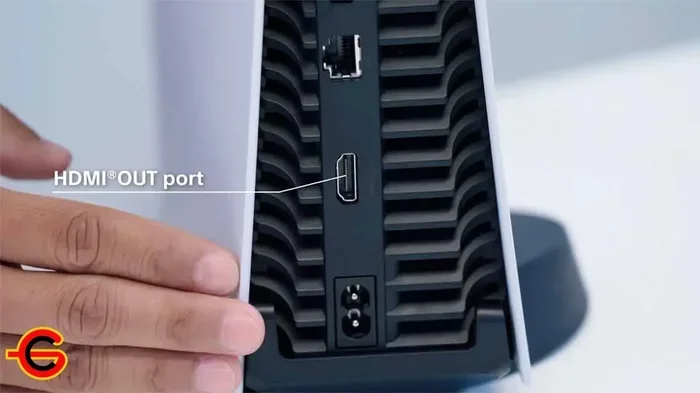
The two main next-gen consoles support 4K 120Hz. The Sony PlayStation 5 and the Microsoft Xbox Series X both have HDMI 2.1 ports. They can output games at 4K resolution with 120 frames per second.
However, not every game on these consoles runs at 120Hz. Many titles still target 60Hz or even 30Hz. The ones that do run at 120Hz offer a noticeably smoother experience. Fast-paced games like racing titles and shooters benefit the most.
If you own a PS5 or Xbox Series X, make sure you are using an Ultra High Speed HDMI cable. This is the easiest way to unlock 120Hz gaming on your TV.
PC Gaming and Graphics Cards
PC gamers also have options for 4K 120Hz. Modern graphics cards from NVIDIA and AMD support HDMI 2.1 output. The NVIDIA RTX 3000 and 4000 series cards include HDMI 2.1 ports. AMD Radeon RX 6000 and 7000 series cards do as well.
Of course, running games at 4K 120Hz requires a very powerful PC. You need a high-end graphics card and a strong processor. Most people will need to use upscaling technologies like NVIDIA DLSS or AMD FSR to hit those frame rates.
Even if your PC cannot always push 4K 120Hz in every game, having the HDMI 2.1 connection means you can still enjoy high frame rates in supported titles. And it future-proofs your setup for more demanding games down the road.
4K TVs and Monitors
Your TV or monitor also needs to support 4K 120Hz. Many modern 4K TVs now come with HDMI 2.1 ports. Brands like LG, Samsung, Sony, and TCL offer models with true 120Hz panels and HDMI 2.1 support.
When shopping for a TV, check the specs carefully. Look for terms like “true 120Hz panel” or “HDMI 2.1 ports.” Some TVs use software tricks to simulate higher refresh rates. These are not the same as a native 120Hz panel.
For monitors, the options are growing but still more limited than TVs. High-end gaming monitors from brands like ASUS, LG, and Samsung now offer 4K 120Hz with HDMI 2.1. These are great for PC gamers who want the best of both worlds.
Setting Up Your 4K 120Hz System
Once you have the right cable and compatible devices, setting up 4K 120Hz is fairly straightforward. But there are a few settings you need to check to make sure everything works correctly.
Configuring Your TV Settings
On most modern TVs, you need to enable the right HDMI input settings. Go to your TV’s settings menu and find the HDMI port you are using. Look for a setting called HDMI Ultra HD Deep Color or HDMI 2.1 mode. Make sure it is turned on.
Some TVs have a game mode that automatically optimizes settings for low latency. Enabling this mode can also help you get the full 4K 120Hz experience. It reduces processing delays and improves response times.
Configuring Your Console or PC
On the PS5, go to Settings, then Screen and Video, and select Resolution. Choose 2160p and enable the 120Hz output option. On the Xbox Series X, go to Settings, General, and then TV and Display Options. Set the refresh rate to 120Hz.
For PC users, right-click on your desktop and open your graphics card control panel. In NVIDIA Control Panel, go to Display and then Change Resolution. Select 3840×2160 and set the refresh rate to 120Hz. For AMD users, the process is similar in the AMD Software application.
Common Setup Mistakes to Avoid
Even with the right hardware, mistakes can happen. Here are some common issues that prevent 4K 120Hz from working.
- Using the wrong HDMI port on your TV. Not all ports on a TV support HDMI 2.1. Check your TV manual to find the right port.
- Having VRR disabled. Variable Refresh Rate needs to be enabled on both your TV and your source device.
- Using a long or cheap cable. Cables over six feet or uncertified cables can cause signal issues.
- Forgetting to enable 120Hz in your console settings. The console may default to 60Hz if you do not change the setting manually.
- Using an older soundbar or receiver without HDMI 2.1. This can limit the signal path and prevent 4K 120Hz from passing through.
Advanced Features That Enhance 4K 120Hz
HDMI 2.1 brings more than just higher refresh rates. It includes several features that make the 4K 120Hz experience even better. Let us look at the most important ones.
Variable Refresh Rate (VRR)
VRR is a feature that syncs your display’s refresh rate with your source device’s frame rate. This eliminates screen tearing and reduces stuttering. It is a must-have for gaming.
When your GPU or console cannot maintain a steady 120 frames per second, VRR adjusts the TV’s refresh rate on the fly. This keeps the picture smooth even when frame rates drop. Both NVIDIA G-Sync and AMD FreeSync support VRR over HDMI 2.1.
Auto Low Latency Mode (ALLM)
ALLM automatically switches your TV to its lowest latency mode when you start gaming. You do not have to go into settings and change it manually. The TV detects when a game is running and optimizes itself instantly.
This feature reduces input lag significantly. Lower input lag means your actions on the controller translate to the screen faster. For competitive gamers, this can make a real difference.
Enhanced Audio Return Channel (eARC)
eARC is another HDMI 2.1 feature that improves audio quality. It allows your TV to send uncompressed audio to your soundbar or receiver. This means you can enjoy formats like Dolby Atmos without any quality loss.
While eARC is not directly related to 4K 120Hz video, it is part of the HDMI 2.1 package. Having a TV with eARC means you get better audio along with better video. It is a nice bonus that comes with the standard.
Is 4K 120Hz Worth It for Non-Gaming Use?
Most people think of 4K 120Hz as a gaming feature. And it is a huge one. But it is not just for games. There are other scenarios where a higher refresh rate makes a noticeable difference.
Watching sports in 4K 120Hz is a fantastic experience. Fast-moving athletes and the ball look incredibly smooth. You can track the action much more easily than with 60Hz content.
Some streaming content is also starting to support higher frame rates. While most shows and movies are still shot at 24 or 30 frames per second, the trend is moving toward higher rates. A 120Hz TV can display 24fps content smoothly using its refresh rate multiplication technology.
For general TV watching, you may not notice a huge difference between 60Hz and 120Hz. But for anything with fast motion, the improvement is clear. It makes the viewing experience feel more natural and immersive.
Common Mistakes People Make with 4K 120Hz HDMI
There are several mistakes that people make when trying to set up 4K 120Hz. Avoiding these can save you a lot of frustration.
One of the biggest mistakes is assuming all HDMI ports on a TV are the same. Many TVs have four HDMI ports, but only one or two of them are HDMI 2.1. The others may be HDMI 2.0. Always check which ports support 4K 120Hz before you plug in your device.
Another common mistake is buying a cable that looks right but is not certified. The Ultra High Speed HDMI certification is the only guarantee that a cable can handle 48 Gbps. Without it, you are taking a gamble.
Some people also forget to update their TV firmware. Manufacturers often release updates that improve HDMI 2.1 compatibility. Keeping your TV up to date can fix issues and add new features.
Finally, do not assume that 4K 120Hz means every game or app will run at 120Hz. Many apps still output at 60Hz. And some games may only support 120Hz in specific modes. Always check the specs of the content you are watching or playing.
Final Thoughts on HDMI 4K 120Hz
So, can HDMI do 4K 120Hz? Absolutely. But it requires the right setup. You need an HDMI 2.1 port on both your source device and your display. You need an Ultra High Speed HDMI cable rated for 48 Gbps. And you need to configure your settings correctly.
The good news is that this technology is becoming more accessible every year. TVs with HDMI 2.1 are now available at various price points. Ultra High Speed cables are affordable and easy to find. Next-gen consoles and PCs make the most of this capability.
If you are building or upgrading your home entertainment or gaming setup, 4K 120Hz is the way to go. It delivers smoother motion, sharper images, and a more immersive experience. Just make sure every piece of your setup supports it. From the cable to the port to the device, every link in the chain matters.
Take the time to check your hardware, get the right cable, and enable the correct settings. Once you experience 4K 120Hz, you will wonder how you ever lived without it. It is one of those upgrades that truly changes how you watch and play.
Frequently Asked Questions
What HDMI version do I need for 4K 120Hz?
You need HDMI 2.1 to get 4K at 120Hz. Older versions like HDMI 2.0 max out at 4K 60Hz. Check your TV, console, or monitor specs to confirm it has HDMI 2.1 ports before you try to use this feature.
Can I use any HDMI cable for 4K 120Hz?
No, you cannot use just any cable. You need an Ultra High Speed HDMI cable certified for 48 Gbps bandwidth. Regular or high-speed cables do not have enough bandwidth to carry the 4K 120Hz signal without issues.
Do all 4K TVs support 120Hz?
No, not all 4K TVs support 120Hz. Many affordable 4K TVs still use 60Hz panels. When shopping, look for TVs that specifically mention a true 120Hz panel and HDMI 2.1 ports. Some brands use software-based motion smoothing that is not the same as a native 120Hz panel.
Does the PS5 support 4K 120Hz?
Yes, the PlayStation 5 supports 4K at 120Hz through its HDMI 2.1 port. You will need a 4K 120Hz TV with HDMI 2.1 and an Ultra High Speed HDMI cable. Not all PS5 games run at 120Hz, but many do, especially fast-paced titles.
What is the difference between 4K 60Hz and 4K 120Hz?
The main difference is the number of frames displayed per second. 4K 60Hz shows 60 frames every second, while 4K 120Hz shows 120 frames per second. This makes motion look twice as smooth. For gaming and fast-action content, the difference is very noticeable and much more enjoyable.
Can I get 4K 120Hz on a PC with an older graphics card?
It depends on your graphics card. Only cards with HDMI 2.1 output can deliver 4K 120Hz. Older cards with HDMI 2.0 ports are limited to 4K 60Hz. Check your GPU specs to confirm HDMI 2.1 support before attempting a 4K 120Hz setup on your PC.
=== CONCLUSION ===
Getting 4K 120Hz through HDMI is entirely possible today. The key is understanding what you need and making sure every part of your setup supports it. From the HDMI 2.1 port to the Ultra High Speed cable to your TV or console, each piece plays a role. You do not need to be a tech expert to get it right. Just follow the guidelines in this guide, check your hardware, and enjoy the incredibly smooth 4K 120Hz experience.