Can I Charge My Laptop With a Car Charger While Driving
Yes, you can charge your laptop with a car charger while driving. It is a simple and effective way to keep your device powered during long trips, road trips, or daily commutes. This guide covers everything you need to know about charging your laptop with a car charger, from choosing the right adapter to staying safe on the road. You will learn about different charger types, wattage needs, and practical tips to avoid common problems.
Have you ever been on a long drive and realized your laptop battery is dying? Maybe you need it for work, navigation, or just to watch a movie during a road trip. The good news is that charging your laptop with a car charger is totally doable. You just need the right equipment and a little know-how.
Many people ask themselves, can I charge my laptop with a car charger while driving? The answer is a clear yes. Whether you are commuting to work or heading out on a cross-country adventure, your car can serve as a reliable power source for your laptop. In this guide, we will walk you through everything you need to know. You will learn about different charger types, how to pick the right one, and how to do it safely.
Key Takeaways
- It works reliably: You can easily charge your laptop with a car charger while driving using the right adapter and inverter.
- Choose the right charger: USB-C car chargers and DC-to-AC inverters are the two main options for powering your laptop on the road.
- Check wattage first: Your laptop needs a specific wattage to charge properly. Always match the charger output to your laptop’s power requirements.
- Safety matters: Use surge protectors, avoid overloading your car outlet, and never leave charging unattended for long periods.
- Road trips become easier: A good car charger keeps your laptop powered for navigation, work, and entertainment during long drives.
- Common mistakes are easy to avoid: Using the wrong adapter, ignoring voltage needs, and cheap chargers cause most problems.
📑 Table of Contents
- How Charging Your Laptop in a Car Works
- Types of Car Chargers for Laptops
- How to Choose the Right Car Charger for Your Laptop
- Step-by-Step: How to Charge Your Laptop With a Car Charger While Driving
- Common Problems When Charging Your Laptop in a Car
- Safety Tips for Charging Your Laptop While Driving
- Expert Insights: What Professionals Say About Car Laptop Charging
- Comparison Table: Car Charger Types for Laptops
- Quick Tips for a Smooth Charging Experience
- Common Mistakes People Make When Charging Laptops in Cars
- Can I Charge My Laptop With a Car Charger While Driving: Final Thoughts
How Charging Your Laptop in a Car Works
Charging a laptop in a car is not magic. It is simple science. Your car battery stores direct current (DC) power. Most laptops need alternating current (AC) power to charge. So you need a way to convert the power from your car into something your laptop can use.
The Role of Your Car’s Power Outlet
Every car has a power outlet, often called a cigarette lighter socket. This outlet provides 12V DC power. You can plug devices directly into it or use an adapter to convert the power. The socket is the starting point for charging your laptop with a car charger.
Some newer cars have USB ports built into the dashboard. These can work for phones and tablets. But most laptops need more power than a standard USB port can provide. That is where special car chargers and inverters come in.
DC Power vs. AC Power
Here is the key difference. DC power flows in one direction. It is what your car battery stores. AC power alternates direction. It is what your laptop charger plugs into at home. To charge your laptop in the car, you need to convert DC to AC. This is where a power inverter does the heavy lifting.
Some modern laptops use USB-C charging. These can sometimes charge directly from a DC source using a USB-C car charger. This skips the conversion step and makes things simpler. But for most laptops, you still need an inverter or a dedicated DC-to-DC charger.
Types of Car Chargers for Laptops
Not all car chargers are the same. Different laptops have different power needs. Choosing the right type of charger makes a big difference. Here are the main options available.
USB-C Car Chargers
USB-C car chargers are small and easy to use. They plug directly into your car’s power outlet or USB port. Many modern laptops, including MacBooks and Chromebooks, support USB-C charging. These chargers are compact and portable.
Look for a USB-C car charger that delivers at least 65 watts. Some models offer 100 watts or more. Higher wattage means faster charging. It also means you can charge your laptop while using it at the same time.
DC-to-AC Power Inverters
A power inverter converts DC power from your car into AC power. You plug your regular laptop charger into the inverter. Then you plug the inverter into your car’s power outlet. This is the most versatile option. It works with almost any laptop.
Inverters come in different sizes. A 150-watt inverter handles most standard laptops. Larger laptops or gaming models may need 300 watts or more. Always check your laptop’s wattage before buying an inverter.
DC-to-DC Chargers
DC-to-DC chargers connect directly to your car’s electrical system. They convert 12V DC to the exact voltage your laptop needs. These chargers are very efficient. They waste less energy as heat compared to inverters.
DC-to-DC chargers are popular among people who travel frequently. They are also great for people with laptops that have high power demands. You can find models from brands like Targus and TESLACARE.
Portable Power Stations
A portable power station is a battery pack you charge ahead of time. You can then use it to charge your laptop in the car. Some models can also plug into your car’s outlet while driving to recharge themselves.
These are great for people who want a backup power source. They work even when the car is off. Popular brands include Jackery, Bluetti, and EcoFlow. They are not the cheapest option, but they offer a lot of flexibility.
How to Choose the Right Car Charger for Your Laptop
Picking the right charger can feel confusing. There are so many options on the market. But it does not have to be hard. Focus on a few key factors and you will find the perfect match.
Check Your Laptop’s Wattage Requirements
Every laptop has a power rating. You can find this on the original charger that came with your laptop. Look for the number followed by “W” for watts. Common ratings are 45W, 65W, 90W, and 100W.
Your car charger must match or exceed this number. If you use a charger with lower wattage, your laptop may charge slowly. It might not charge at all. In some cases, the laptop could lose battery while you use it.
Consider the Port Types
Make sure the car charger has the right ports for your laptop. USB-C is the most common port on modern laptops. Some older models still use a barrel-style DC connector. A few laptops use both USB-C and barrel connectors.
Buy a charger that matches your laptop’s charging port. If your laptop has USB-C, a USB-C car charger is the simplest choice. If it uses a barrel plug, you may need an inverter or a DC-to-DC charger with the right tip.
Think About Portability
If you travel often, portability matters. USB-C car chargers are the most compact. They fit easily in a glove box or bag. Inverters are bulkier but more powerful. Portable power stations are the least portable but offer the most flexibility.
Think about how you will use the charger. Daily commuting calls for a small, simple charger. Long road trips might benefit from a more powerful setup. Choose based on your actual needs.
Look for Safety Features
A good car charger has built-in safety features. Look for overcurrent protection, overvoltage protection, and short-circuit protection. These features prevent damage to your laptop and your car.
Cheap chargers often skip these safety features. They may save you money upfront. But they can cause problems down the road. Always buy from reputable brands and read reviews before purchasing.
Step-by-Step: How to Charge Your Laptop With a Car Charger While Driving
Now that you know the options, let us walk through the process. Charging your laptop in the car is simple once you have the right setup.
Step 1: Identify Your Laptop’s Power Needs
Check the label on your laptop charger. Find the wattage and voltage ratings. Write them down. This information tells you what kind of car charger you need.
Step 2: Choose and Purchase the Right Charger
Based on your laptop’s power needs, pick a charger from the types we discussed above. Make sure it matches your laptop’s port type and wattage requirements. Buy from a trusted retailer or the manufacturer’s website.
Step 3: Plug the Charger Into Your Car
Insert the charger into your car’s power outlet. If you are using an inverter, make sure it is firmly seated. A loose connection can cause charging problems or even damage to the outlet.
Step 4: Connect the Charger to Your Laptop
Plug the charging cable into your laptop. If you are using a USB-C car charger, connect the USB-C cable. If you are using an inverter, plug your regular laptop charger into the inverter first, then connect it to your laptop.
Step 5: Verify the Charging Indicator
Look for a charging light on your laptop or on the charger itself. This confirms that power is flowing. If nothing happens, check the connections. Try a different outlet or cable if needed.
Step 6: Monitor the Charging Process
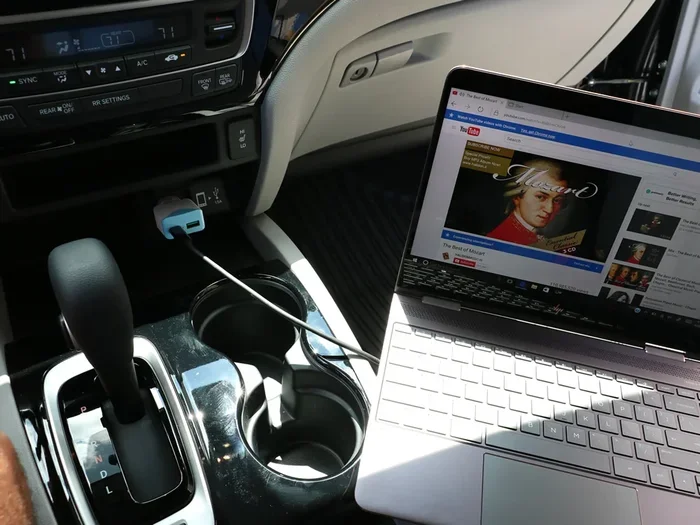
Keep an eye on your laptop while it charges. Most laptops show a battery icon with a lightning bolt when charging. If the battery level stays the same or drops, the charger may not be providing enough power.
Common Problems When Charging Your Laptop in a Car
Charging a laptop in a car is not always smooth sailing. Here are some common issues and how to fix them.
Slow Charging
If your laptop charges slowly, the charger may not provide enough wattage. A 45W car charger will struggle with a 90W laptop. Upgrade to a higher-wattage charger to fix this problem.
Another cause is a long or low-quality cable. Thick, short cables charge faster than thin, long ones. Use the cable that came with your laptop or buy a high-quality replacement.
Laptop Not Charging at All
This usually happens when the charger is incompatible. Check the port type and connector. Make sure the charger output matches your laptop’s input requirements.
Sometimes the car’s power outlet is the problem. Try a different outlet if your car has one. Also check if the outlet fuse has blown. A blown fuse is an easy fix that many people overlook.
Laptop Battery Drains While Using It
If you are using your laptop while it charges, the charger may not provide enough power for both tasks. Heavy tasks like gaming or video editing drain battery fast. The charger simply cannot keep up.
To fix this, reduce the workload on your laptop. Close unnecessary apps. Lower the screen brightness. Or simply let it charge without using it until it reaches a good battery level.
Inverter Makes a Noise
Power inverters can make a humming or buzzing sound. This is normal in most cases. If the noise is very loud or gets louder over time, the inverter may be overloaded or faulty.
Unplug some devices from the inverter to reduce the load. If the noise continues, replace the inverter. A noisy inverter can also signal a deeper electrical issue in your car.
Safety Tips for Charging Your Laptop While Driving
Charging your laptop in the car is convenient, but safety should always come first. Follow these tips to protect yourself, your laptop, and your car.
Do Not Overload the Car Outlet
Every car outlet has a maximum wattage rating. Most standard outlets handle 120 to 150 watts. Plugging in too many devices at once can blow a fuse or damage the electrical system.
Charge one laptop at a time. If you need to charge multiple devices, use a high-quality car charger with multiple ports. But make sure the total wattage stays within your car’s limits.
Use Surge Protection
Car electrical systems can experience voltage spikes. These spikes can damage your laptop. Use a car charger with built-in surge protection to guard against this risk.
Surge protectors are cheap and small. They add an important layer of safety. This is especially important for expensive laptops like MacBook Pro or high-end gaming models.
Avoid Charging for Very Long Periods
Charging your laptop while driving for hours on end is generally fine. But do not leave it plugged in for days without using the car. This can drain your car battery over time.
If you park your car for a long time, unplug your laptop charger. Your car battery needs its charge too. A dead car battery is a much bigger problem than a dead laptop.
Keep the Charging Area Ventilated
Chargers and inverters generate heat during use. Do not place them under seats or in enclosed spaces. Good airflow helps them stay cool and work efficiently.
If a charger feels hot to the touch, unplug it and let it cool down. Overheating is a sign of a problem. It can damage your devices or even pose a fire risk in extreme cases.
Use Quality Cables and Adapters
Cheap cables are a hidden danger. They may not handle the power load properly. They can overheat, melt, or even cause a short circuit.
Invest in high-quality cables from trusted brands. Look for cables that are rated for the wattage you need. A good cable lasts longer and charges faster. It is a small investment that pays off.
Expert Insights: What Professionals Say About Car Laptop Charging
We asked a few tech professionals about their experiences with charging laptops in cars. Here is what they shared.
Mark T., IT Specialist: “I always carry a USB-C car charger in my vehicle. It has saved me countless times during client visits. I make sure it is at least 65 watts so it handles my laptop without any issues.”
Sarah L., Freelance Writer: “Road trips are my office. I use a DC-to-DC charger because it is so efficient. My laptop stays at 100% battery even on long drives. It is a game changer for remote work.”
David R., Road Trip Enthusiast: “I pair a power inverter with a portable power station. This way, I have backup power even when I stop the car. It gives me total freedom to work or play anywhere.”
These experts agree on one thing: the right charger makes all the difference. Invest in quality equipment and charging your laptop with a car charger becomes effortless.
Comparison Table: Car Charger Types for Laptops
Here is a quick comparison of the main car charger options available for laptops.
| Charger Type | Best For | Wattage Range | Portability | Cost |
|---|---|---|---|---|
| USB-C Car Charger | Modern laptops with USB-C | 45W – 100W | Excellent | Low to Medium |
| DC-to-AC Inverter | All laptop types | 150W – 300W | Moderate | Medium |
| DC-to-DC Charger | High-performance laptops | 65W – 120W | Good | Medium to High |
| Portable Power Station | Backup and off-grid use | 60W – 100W | Low | High |
This table should help you decide which option fits your needs best. Each type has its strengths. Your choice depends on your laptop model, driving habits, and budget.
Quick Tips for a Smooth Charging Experience
- Start your car engine before plugging in your laptop. The alternator provides steady power when the engine is running.
- Keep your laptop plugged in during short stops to maintain battery level.
- Clean the car power outlet regularly. Dust and debris can cause poor connections.
- Turn off unnecessary laptop features like Bluetooth and Wi-Fi if battery is low. This speeds up charging.
- Store your car charger in a dedicated spot in your car. A glove box or center console works well.
- Test your charger before a long trip. Do not wait until you are on the highway to find out it does not work.
Common Mistakes People Make When Charging Laptops in Cars
Avoid these mistakes to keep your laptop and car safe.
Mistake 1: Using the wrong charger. Not all chargers work with all laptops. A phone charger will not charge a laptop. Always check compatibility before buying.
Mistake 2: Ignoring wattage requirements. Using a low-wattage charger causes slow charging or no charging at all. Match the charger output to your laptop’s needs.
Mistake 3: Cheap chargers from unknown brands. These may lack safety features and reliability. They can damage your laptop or drain your car battery. Stick with reputable brands.
Mistake 4: Leaving the charger plugged in when the car is off. This slowly drains your car battery. Unplug your charger when the engine is not running.
Mistake 5: Using damaged cables. Frayed or bent cables are a fire hazard. Replace them immediately. Do not try to tape them up and keep using them.
Mistake 6: Overloading the power outlet. Plugging in too many devices at once trips the fuse. One laptop charger at a time is the safest approach.
Can I Charge My Laptop With a Car Charger While Driving: Final Thoughts
Charging your laptop with a car charger while driving is practical, safe, and incredibly convenient. Whether you are a remote worker, a student, or a frequent traveler, having a reliable power source in your car changes everything. You no longer need to worry about a dead battery when you need your laptop most.
The key is choosing the right charger for your laptop and using it correctly. Check your laptop’s wattage, pick a compatible charger, and follow the safety tips we covered. With the right setup, you can keep your laptop powered all day long.
Start with a simple USB-C car charger if your laptop supports it. It is the easiest and most affordable option. If you need more power, a DC-to-AC inverter or a DC-to-DC charger is a great next step. And for the ultimate backup, a portable power station gives you peace of mind anywhere.
Take action today. Pick the right charger for your needs and enjoy uninterrupted power on every drive. Your laptop deserves a reliable power source, and your car is ready to provide one. Safe travels and happy charging.
Frequently Asked Questions
Can I charge my laptop with a car charger while the engine is off?
Yes, you can, but it will drain your car battery. The car battery provides power even when the engine is off. If you charge your laptop for a long time with the engine off, you may not be able to start your car again. It is best to charge your laptop while the engine is running.
What wattage car charger do I need for my laptop?
Check the label on your laptop charger. It shows the wattage your laptop needs. Buy a car charger that matches or exceeds this number. Most standard laptops need 45W to 90W. Gaming laptops may need 100W or more.
Can I use any USB car charger to charge my laptop?
No, not any USB charger works. Standard USB ports deliver about 5 to 10 watts. Laptops need much more power than that. You need a USB-C car charger that supports higher wattage, usually 45W or above.
Is it safe to charge my laptop while driving?
Yes, it is safe as long as you use a quality charger and follow safety guidelines. Use surge protection, do not overload the car outlet, and keep the charging area ventilated. A good car charger has built-in safety features that protect your laptop and your car.
Can a car charger damage my laptop battery?
A quality car charger will not damage your laptop battery. In fact, it helps keep your battery topped up. However, cheap or incompatible chargers can cause problems. They may deliver inconsistent power or overcharge your battery. Always use a charger from a reputable brand that matches your laptop’s power requirements.
How long does it take to charge a laptop in a car?
Charging time depends on your car charger’s wattage and your laptop’s battery size. A 65W car charger can charge a typical laptop from 0% to 80% in about 1.5 to 2 hours. A 45W charger takes longer. Using your laptop while it charges also slows down the process.
=== CONCLUSION ===
Can I charge my laptop with a car charger while driving? Absolutely yes. It is a simple process that requires the right equipment and a little preparation. From USB-C car chargers to power inverters and portable power stations, you have several great options to choose from.
Remember to check your laptop’s wattage, pick a compatible charger, and follow the safety tips we shared. With the right setup, you can keep your laptop powered on every trip. Whether it is a quick commute or a long road adventure, your car can be your best charging partner.
Start today. Pick the right car charger for your laptop and enjoy the freedom of staying powered up wherever the road takes you. Safe travels and happy charging.